WhatsApp marketing for Shopify means sending opted-in customers useful messages on WhatsApp (order updates, COD confirmations, cart reminders, launches, offers) and handling their replies in one inbox. To do it properly you need the official WhatsApp Business API, Meta-approved templates for anything you send first, customer opt-in, and a sending rhythm people don't block. This guide covers all of it.
I run WhatFlow, a WhatsApp app for Shopify, and I talk to store owners about this every week. Most of them don't need a 40-tool "omnichannel" stack. They need five or six messages that fire at the right moment, a clean opt-in, and a way for the team to answer replies without passing one phone around. That's what this guide builds.
What is WhatsApp marketing for Shopify, exactly?
WhatsApp marketing for Shopify is the use of WhatsApp messages, triggered by store events or sent as campaigns, to sell more and support customers better. It splits into two kinds of message:
Business-initiated messages: things you send first, like an order confirmation, a shipping update, a cart reminder or a sale announcement. Outside an open customer service window these must use a Meta-approved template.
Conversations: customers message you (from a chat button, an ad, a QR code on packaging) and you reply. Inside the 24-hour window you can reply freely.
Good WhatsApp marketing uses both. The automated messages bring people back into a chat. The chat is where the sale, the reassurance or the save actually happens.
If you already have an opted-in Shopify audience, start a WhatFlow broadcast from selected customers or a Shopify segment in Admin. For a scheduled campaign built from CSV, Excel or existing conversations, use Team Inbox. Map the template fields, send a test, and make sure someone owns the replies. The campaign walkthrough shows both routes.
Why does WhatsApp work so well for Shopify stores?
Because it's where a lot of your customers already talk. In India, Pakistan, the Gulf, Brazil, Indonesia and much of Europe and Latin America, WhatsApp isn't "a new channel". It's the default way people message anyone, including shops. A customer who ignores your fourth email will often answer a WhatsApp message in minutes, because it sits next to messages from their family.
That cuts both ways. A WhatsApp message is personal space. Send something useful and it feels like service. Send three discount blasts in a week and you get blocked, and blocks hurt your number's standing with Meta. Everything in this guide follows from that.
One clarification because people mix them up: WhatFlow has two apps. WhatFlow WhatsApp Business API uses Meta's official Cloud API and connects through Meta Embedded Signup. WhatFlow Chat Automation is our older app that connects as a linked device, with no Meta Business account needed, and suits very small stores. This guide is about the API route. Here's how the two compare. If you remember WhatFlow as "the small-shop app", that was the older product. The Business API app runs on Meta's official Cloud API and is built for teams of 2 or 50: shared inbox, Shopify Flow automation at scale, official templates and a number that can apply for Meta's verified badge.
The rules, on one page
WhatsApp has more rules than email, and they're enforced by software, not by a reviewer who might let something slide. Learn these five and you'll avoid most problems.
Opt-in first. WhatsApp's Business Messaging Policy says you may only contact people who gave you their number and agreed to receive messages from you. Opt-outs, on or off WhatsApp, must be honoured.
The 24-hour customer service window. When a customer messages you, a 24-hour window opens in which you can reply with any message. Outside it, you can only send approved templates. The 24-hour window, explained.
Templates need approval. A message template is a pre-written message, with variables like {{1}} for the name, that Meta reviews before you can send it. Review can take up to 24 hours. If Meta says no, here's why templates get rejected and how to fix them.
Every template has a category. Marketing, utility or authentication. Meta checks the category against the content and will move a "utility" template to marketing if it contains a promo. Marketing vs utility vs authentication templates.
Quality and limits. Meta watches how recipients react (blocks, reports, reads) and caps how many unique people you can message outside service windows each 24 hours. Good quality is how the cap rises. Quality rating and messaging limits.
How much does WhatsApp marketing cost?
There are two separate bills: Meta's charges and your app's subscription.
As of November 2026, Meta charges per delivered template message, with the rate depending on the template category and the recipient's country. Marketing templates are the most expensive category. Customer replies cost you nothing to receive. Your free-form replies inside the 24-hour window are "service messages": each business phone number gets 1,000 free per month, and Meta charges for service messages beyond that since October 1, 2026. Utility templates sent inside an open window are also charged again from that date.
Your app's fee sits on top. WhatFlow has a Free plan, and paid plans start at $4.99/month. Every feature is on every plan, and there are no per-seat fees for the team inbox. Plans differ by messaging allowance and rates, so check WhatFlow pricing for current numbers.
How to set up WhatsApp marketing on Shopify, step by step
This is the order I'd do it in for a new store. Most stores get through steps 1 to 5 in an afternoon, then wait on template approvals.
Pick the number. Use a number you'll keep for years. Ideally a dedicated business number that isn't already on the consumer WhatsApp app, so you don't have to delete an account to move it.
Install a Shopify WhatsApp app. With WhatFlow, install WhatFlow WhatsApp Business API and start Meta Embedded Signup from your Shopify admin.
Complete Embedded Signup. You'll choose or create a Meta business portfolio, create a WhatsApp account, verify the phone number and set a display name. Use your store's real brand name.
Start Meta business verification. It's not required to send your first message, but it's one of the paths to a higher messaging limit and a prerequisite for the blue checkmark. See how verification and the badge work.
Add a chat button. Put a WhatsApp button on product pages and your contact page so customers can start conversations. WhatFlow's theme-matched buttons are free forever. How to add a WhatsApp chat button to Shopify.
Start collecting opt-ins. Checkout, a signup form, post-purchase pages, packaging inserts. Record when and where each customer agreed.
Submit your first templates. Order confirmation, shipping update, COD confirmation if you run cash on delivery, and one abandoned checkout reminder.
Turn on automations one at a time. Check each message on a test order before moving to the next.
How do you collect WhatsApp opt-ins on Shopify?
Opt-in is the foundation, and it's where most stores cut corners. An opt-in is a clear, recorded "yes" from the customer to receive WhatsApp messages from your store, ideally saying what kind of messages.
The best opt-ins are tied to something the customer wants: "Get your order updates on WhatsApp" at checkout, "Tell me when it's back in stock" on a sold-out product, "Join the launch list" on a pre-order page. Shopify customer profiles now hold a WhatsApp marketing setting alongside email and SMS, which makes it easier to keep consent in one place (Shopify Help Center).
Which WhatsApp automations should a Shopify store build first?
Build the messages customers already expect before the ones you want them to read. Transactional messages get read, rarely get blocked, and train customers to trust your number. Here's the sequence I recommend:
Automation
Trigger
Likely template category
Why it's worth it
Order confirmation
Order created
Utility
Reassures the buyer and opens a chat if they have a question
COD confirmation
COD order created
Utility
Catches fake or impulse orders before you ship
Shipping update
Fulfillment created
Utility
Cuts "where is my order?" messages
Abandoned checkout reminder
Checkout abandoned
Usually marketing
Recovers buyers who got distracted
Review request
Some days after delivery
Utility or marketing depending on wording
Builds social proof
Back-in-stock alert
Product restocked, customer subscribed
Utility or marketing depending on wording
High intent, customer asked for it
The category column is a guide, not a promise. Meta decides the category from your wording, and a template that mixes an update with a promo is treated as marketing.
COD confirmation
If you sell cash on delivery, this is the highest-value message you'll set up. A COD confirmation is a WhatsApp message sent right after a COD order asking the customer to confirm or cancel with one tap.
Hi {{1}}, thanks for your order {{2}} from Leafy Home. Total to pay on delivery: {{3}}. Please confirm so we can pack it today.
[Confirm order] [Cancel order]
Keep the first reminder helpful, not pushy. Say what they left, offer help, and give the link. Save any discount for a second message, if at all.
Hi {{1}}, you left {{2}} in your checkout at Leafy Home. If you had a question about sizing or delivery, just reply here and we'll help. Your checkout: {{3}}
These are boring, and that's the point. A shipping update with the tracking link and a realistic delivery estimate saves you a support conversation per order. When things go wrong, handle shipping delays on WhatsApp before the customer has to ask.
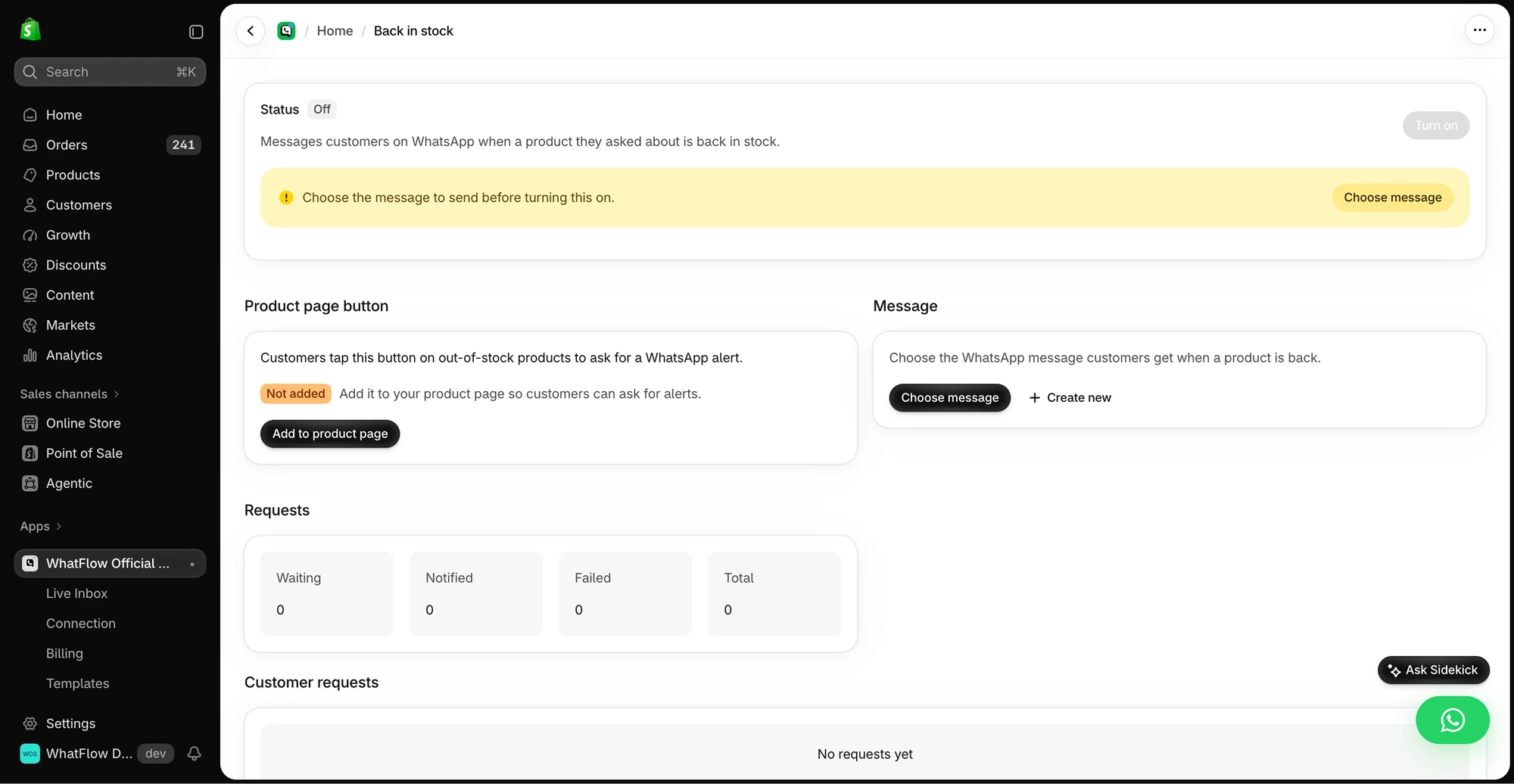
The demo setup shows the product-page button, message selection and request queue before the workflow is enabled.
If you'd rather build these in Shopify Flow, WhatFlow adds native triggers (incoming message, order reply) and actions (send template, text, media or video). Start with the WhatFlow and Shopify Flow automation guide.
How do you run WhatsApp campaigns that don't get you blocked?
Campaigns (broadcasts) are where stores get into trouble. The template is approved, the list is big, someone hits send to everyone, and a week later the number's quality has dropped.
Hi {{1}}, the linen bedding you asked about in March is back in sage and oat. We restocked 80 sets and they went fast last time. Shop here: {{2}}
[Stop promotions]
Compare that with "🔥 MEGA SALE 🔥 50% OFF EVERYTHING". The first one is a message from a shop. The second is spam that happens to be on WhatsApp.
Business hours and away messages so customers know when to expect an answer. Away message examples.
Remember the cost angle: as of November 2026, free-form replies are free up to 1,000 service messages per number per month, then charged. Most small stores won't hit that, but a busy store during a sale might.
How do you measure WhatsApp marketing?
Don't drown in dashboards. For each automation or campaign, track:
Delivered and read: did it arrive, did they open it
Replies: did it start a conversation
Opt-outs and blocks: is this message costing you trust
Orders attributed: with a clear window and an honest note that some of those buyers would have bought anyway
Cost: Meta charges plus app fees, divided by the outcome you care about
What are the most common WhatsApp marketing mistakes?
The ones I see most often, roughly in order:
Messaging people who never opted in. Uploading an old customer list and blasting it. This is the fastest way to tank your quality rating.
Disguising promos as utility. Adding "use code SAVE10" to an order update. Meta will recategorise it as marketing anyway, and repeated misuse can get your utility templates restricted.
One giant broadcast instead of segments. Same message, whole list, no reason.
No owner for replies. Customers reply to a campaign and nobody answers for a day.
Ignoring the cost model. Sending marketing templates to countries where they're expensive without checking Meta's rate card.
Starting with five automations at once. Then nobody knows which one is broken.
Templates, COD confirmation, Shopify Flow automations and a shared team inbox with no seat fees. Every feature is included on every plan, including Free.
If you do nothing else: install the API app, connect your number through Embedded Signup, submit an order confirmation template and a shipping template, and add a chat button. That alone gives customers a reason to save your number and a way to reach you. Add COD confirmation or cart recovery next, then your first segmented campaign. WhatFlow's Free plan includes every feature, so you can build all of this before you pay us anything.
Frequently asked questions
Can I do WhatsApp marketing on Shopify for free?
You can start without an app subscription on WhatFlow's Free plan, but Meta still charges per delivered template message, so marketing messages always carry a Meta cost. Replies inside the 24-hour customer service window are covered by Meta's monthly free service tier up to 1,000 per number, as of November 2026.
Do I need the WhatsApp Business API for marketing?
For automated order messages, opted-in broadcasts beyond a small list and a shared team inbox, yes. The free WhatsApp Business app works for one person replying by hand, but it doesn't plug into Shopify events or Shopify Flow.
What should a Shopify store send first on WhatsApp?
Start with order and shipping updates or COD confirmation, because customers expect them and they rarely get blocked. Add abandoned checkout reminders and occasional campaigns once those are running cleanly.
How often can I send WhatsApp marketing messages?
There's no fixed number from Meta, but recipients block businesses that message too often, and blocks drag down your quality rating. Most small stores do well with a campaign every week or two to an engaged segment, plus the transactional messages customers expect.
Is WhatsApp marketing allowed without opt-in?
No. WhatsApp's Business Messaging Policy requires opt-in permission before you message someone, and you must honour opt-out requests made on or off WhatsApp.