WhatsApp has three template categories. Marketing templates promote or persuade: sales, launches, cart reminders. Utility templates are non-promotional updates about something the customer did or needs: order confirmations, shipping updates, COD confirmation. Authentication templates send one-time passcodes. Meta checks every template against these definitions, can move it to a different category, and charges a different rate for each.
Getting the category right matters for three reasons: price, approval, and the trust customers place in messages that look like service. Here's how each category works, with examples from a Shopify store.
What are WhatsApp template categories?
A WhatsApp template category is the label Meta attaches to every message template, describing its purpose. You pick one when you create the template; Meta validates it against the content. The category decides the per-message price and, if you misuse it, can get your account restricted.
Non-promotional updates triggered by a customer action or essential to them
Order confirmation, COD confirmation, shipping update, delivery issue, return status
Lower; volume tiers apply
Authentication
Verifying identity with a one-time code
Login codes for a customer account or app
Lower; volume tiers apply
Exact rates depend on the recipient's country. Check Meta's pricing page for your markets.
What is a marketing template?
Meta calls marketing "the most flexible" category: it covers goals from awareness to driving sales. If a message is trying to get someone to buy, come back, browse or take up an offer, it's marketing.
Store examples:
Hi {{1}}, our winter linen collection lands Friday at 10am. Opted-in customers get first access for 24 hours: {{2}}
Hi {{1}}, you left {{2}} in your cart. Still deciding? Reply with any question about sizing or delivery. {{3}}
Hi {{1}}, it's been a while since your last order. Your favourite {{2}} is back in a new scent. Take a look: {{3}}
That cart reminder has no discount and is polite, but it's still persuasive, so it's marketing. Plan for that in your budget rather than fighting it.
What is a utility template?
Meta says utility templates are "typically triggered by a user action or request". To qualify, the template must have no promotional or persuasive intent, and it must be either specific to something the user did or requested, or essential to them.
Store examples:
Hi {{1}}, your order {{2}} is confirmed. We'll message you here when it ships.
Hi {{1}}, your order {{2}} for {{3}} is cash on delivery. Please confirm so we can dispatch it.
[Confirm] [Cancel]
Hi {{1}}, order {{2}} has shipped with {{3}}. Track it here: {{4}}
Hi {{1}}, your return for order {{2}} has been received. Your refund will be processed by {{3}}.
Meta's guidance is blunt about what breaks utility: order and account messages shouldn't promote, recommend, upsell or cross-sell products, or include offers. And a generic survey or request for feedback won't be approved as utility.
What is an authentication template?
Authentication templates verify identity, usually with a one-time code. Meta says marketing and utility templates can't be used for this. If your store sends login codes (for a custom customer account system or a companion app), they belong here. Most Shopify stores using standard customer accounts won't need them, because Shopify sends its own codes by email.
{{1}} is your verification code. For your security, don't share this code.
Authentication templates use a fixed format with limited customisation, so there's not much copywriting to do.
What happens when a template mixes marketing and utility?
It's marketing. Meta's categorisation guidelines say templates with mixed content, like an order update that also contains a promo, are categorised as marketing.
This is the mistake I see most:
Hi {{1}}, your order {{2}} has shipped! Track it here: {{3}}. Use code THANKS10 for 10% off your next order.
One extra sentence and every shipping update you send is now billed at the marketing rate. Worse, customers who opted out of marketing are now getting marketing. Split it: keep the shipping update pure, and send the thank-you offer as a separate marketing message to people who opted in to promotions.
How does Meta recategorise WhatsApp templates?
There are two checkpoints.
At creation. WhatsApp validates the category you chose against the content. Since April 9, 2025, if you submit a template as utility and Meta decides it's marketing, it's approved as marketing instead of rejected. You'll see the new category in your template list. If you build templates via the API, you can also let Meta assign the category automatically.
After approval. Meta keeps checking. When it moves an approved template from utility to marketing, it normally gives a day's notice. Businesses that have been warned for misuse lose that notice: changes are instant.
Appeals. You can request a review within 60 days of the template's creation or of the category change, in WhatsApp Manager and then Business Support Home. If you genuinely think a pure order update was miscategorised, appeal it, but read it once more as a customer would first.
What happens if you keep misusing utility templates?
Meta has an escalation path for businesses that repeatedly dress marketing up as utility, per its categorisation docs:
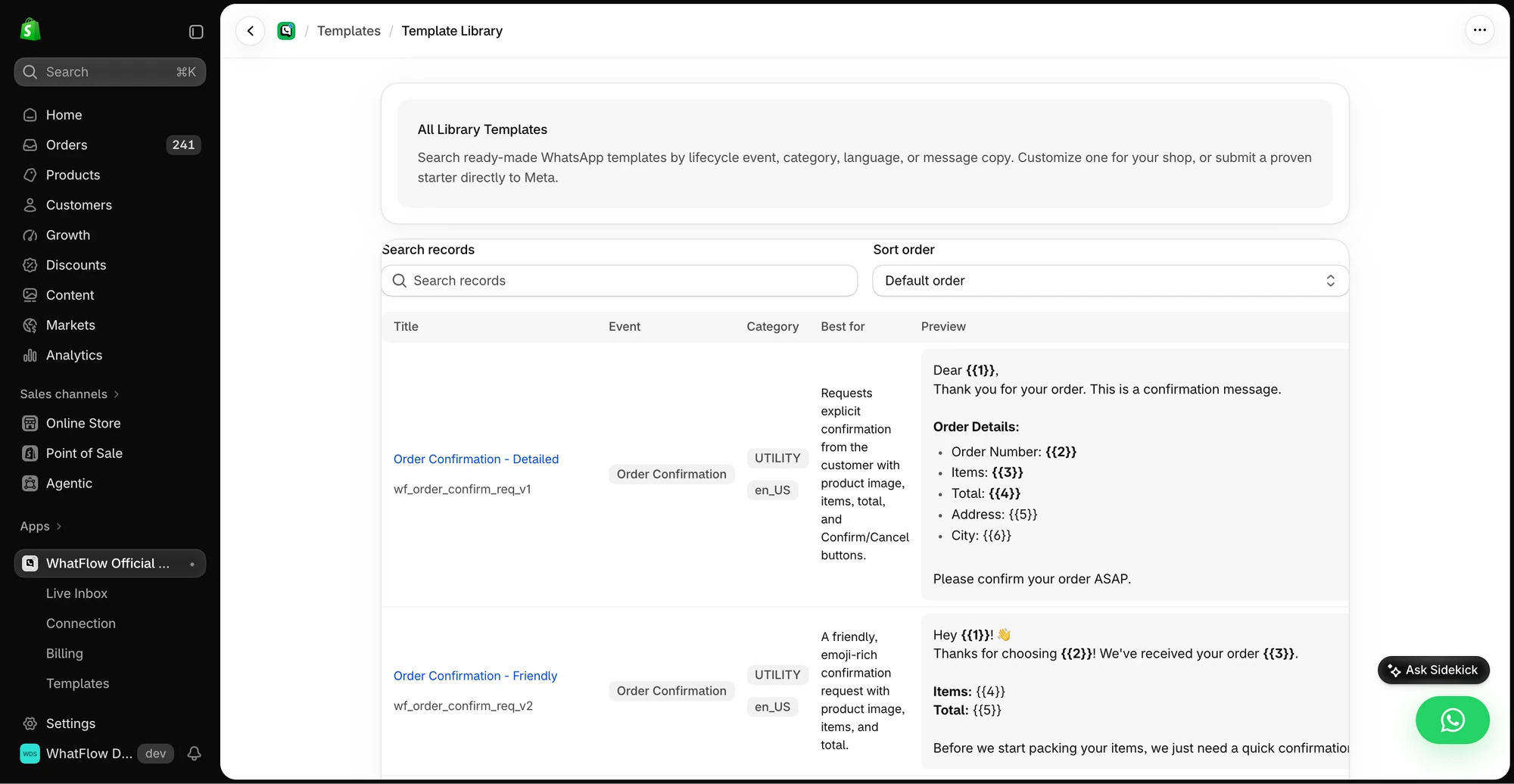
The library shows example messages and the corresponding Shopify event and WhatsApp template category.
A written warning to your WhatsApp account admins.
Rate limiting on utility messages for at least 7 days, with messages over the cap rejected.
All your approved utility templates switched to marketing, with new utility templates blocked for 7 days, or 30 days for repeat violations.
The same measures across every WhatsApp account in your business portfolio if misuse spans several accounts.
For a Shopify store, step 3 is painful: suddenly every order confirmation and COD message costs marketing rates. Not worth saving a few cents on one campaign.
How do categories affect what you pay?
As of November 2026, Meta charges per delivered template, and the category sets the rate:
Marketing is generally the most expensive and has no volume discounts.
Utility and authentication are cheaper and get volume tiers as monthly volume grows.
Utility inside an open customer service window has been charged at the regular utility rate since October 1, 2026. Between July 2025 and September 2026 it was free, so older guides that tell you to "send utility inside the window for free" are out of date.
Free-form replies (not templates) inside the window are service messages: 1,000 free per number per month, then charged.
How should you set up categories for a Shopify store?
Here's how I'd map a typical store's messages:
Message
Category
Note
Opt-in confirmation
Utility
Confirms what they signed up for, no offer
Order confirmation
Utility
No cross-sell
COD confirmation
Utility
Buttons to confirm or cancel
Shipping and delivery updates
Utility
Tracking link only
Delivery problem or address check
Utility
Specific to their order
Review request
Marketing or utility
Generic feedback asks won't pass as utility; a specific "how was order #1042?" may. Expect marketing.
Back-in-stock alert
Marketing
Usually treated as promotional
Abandoned checkout
Marketing
Persuasive by nature
Campaigns, launches, win-backs
Marketing
Obviously
Two practical habits that keep this clean:
Separate opt-in by type where you can. WhatsApp's policy lists separate opt-in by message category as best practice. Plenty of customers want order updates but not promotions. How to collect WhatsApp opt-ins on Shopify.
Name templates by category. "util_order_shipped", "mkt_winter_launch". Your team will thank you when the list hits fifty templates.
In WhatFlow's template editor you choose the category, write the body with {{1}}-style variables, add buttons and submit to Meta from Shopify admin, then trigger the approved template from an automation or Shopify Flow.
Templates, COD confirmation, Shopify Flow automations and a shared team inbox with no seat fees. Every feature is included on every plan, including Free.
If a message is trying to sell, it's marketing. If it's telling the customer something they need to know about their order or account, with nothing else attached, it's utility. Keep those two apart and you'll pay less, get approved faster, and stay on the right side of Meta. WhatFlow runs on Meta's official Cloud API, so the categories, approvals and rates you see in our editor are Meta's own.
Frequently asked questions
What are the three WhatsApp template categories?
Marketing, utility and authentication. Marketing covers promotional and persuasive messages, utility covers non-promotional updates tied to something the customer did or needs, and authentication covers one-time passcodes.
Is an abandoned cart message marketing or utility?
Treat it as marketing. A cart reminder is trying to persuade someone to complete a purchase, and Meta categorises templates with promotional or persuasive intent as marketing.
Why did Meta change my utility template to marketing?
Meta checks the content against its category guidelines when you create the template and can recategorise it later. Any promotion, upsell, discount or cross-sell in an otherwise utility message makes the whole template marketing.
Can I appeal a WhatsApp template category change?
Yes. Meta lets you request a review in WhatsApp Manager and Business Support Home within 60 days of the template's creation or of the category change.