The WhatsApp 24-hour window (Meta calls it the customer service window) is the 24 hours after a customer messages or calls your business. Inside it, you can reply with any message: text, images, product cards, voice notes. Outside it, the WhatsApp Business API only lets you send a pre-approved template. Every new customer message restarts the 24-hour clock.
That one rule shapes almost everything about how a store uses WhatsApp: when your team answers, which messages need templates, and how much you pay. Here's how it works in practice.
What is the WhatsApp 24-hour customer service window?
Meta's pricing documentation puts it simply: when a WhatsApp user messages you or calls you, a 24-hour timer called a customer service window starts. While it's open, you can send free-form messages, which Meta calls service messages. When it closes, you're back to templates only.
Two details people miss:
It's per customer. Each customer has their own window, opened by their own last message.
It refreshes, it doesn't stack. If a customer messages at 9am and again at 4pm, the window now runs until 4pm tomorrow, not 9am tomorrow plus another day.
What opens (and refreshes) the 24-hour window?
Only the customer can open it. Anything they send counts:
A typed message ("Is this available in XL?")
A tap on a quick-reply button in your template ("Confirm order")
A photo, voice note, location or sticker
A call to your business number
A message that starts from a chat button on your store, a QR code or a wa.me link
What does not open it: you sending a template, the customer reading your message, or the customer opening your profile. Reading isn't replying.
This is why I like templates with quick-reply buttons. A button tap is a reply. One tap on "Track my order" opens a 24-hour window in which your team can answer anything else the customer wants, free-form. Designing quick replies that make the next step clearer goes into button wording.
What can you send inside the 24-hour window?
Inside an open window you can send any message type the API supports, without a template:
Templates too, if you want, though those are charged at their category rate
This is where actual customer service happens. Say a customer messages at 8:15pm asking whether your vitamin C serum is safe to use with retinol. Your team can reply with a proper answer, a photo of the label and a link to the product page, no template needed.
Hi Sara, good question. Our Vitamin C serum is fine to use in the same routine as retinol, but we'd suggest vitamin C in the morning and retinol at night so your skin isn't overloaded. Here's the full ingredient list: [link]. Want me to suggest a simple AM/PM routine?
What can you send outside the 24-hour window?
Only approved templates. WhatsApp's Business Messaging Policy says it directly: outside the 24-hour customer service window, you may only send messages via approved message templates.
A message template is a pre-written message, with variables like {{1}} for a name or order number, that Meta reviews before you can use it. Every template has a category (marketing, utility or authentication) that sets its price. Typical templates outside the window:
Order confirmations and shipping updates (utility)
COD confirmation (utility)
Abandoned checkout reminders (usually marketing)
Campaigns and launches (marketing)
A "we're getting back to you" follow-up when your team missed the window (utility, if written purely as a service follow-up)
If you need copy, I've written 40 WhatsApp templates for Shopify stores, grouped by journey.
How does the 24-hour window affect WhatsApp pricing?
As of November 2026:
Message
Inside the window
Outside the window
Free-form reply (service message)
Allowed. Free up to 1,000 per number per month, then charged
Not allowed
Utility template
Allowed, charged at the utility rate since October 1, 2026
Allowed, charged at the utility rate
Marketing template
Allowed, charged at the marketing rate
Allowed, charged at the marketing rate
Customer's messages to you
Free
Free
Before October 2026, utility templates sent inside an open window were free and all service messages were free. Meta changed both on October 1, 2026, so older guides are out of date. The full picture is in WhatsApp Business API pricing explained.
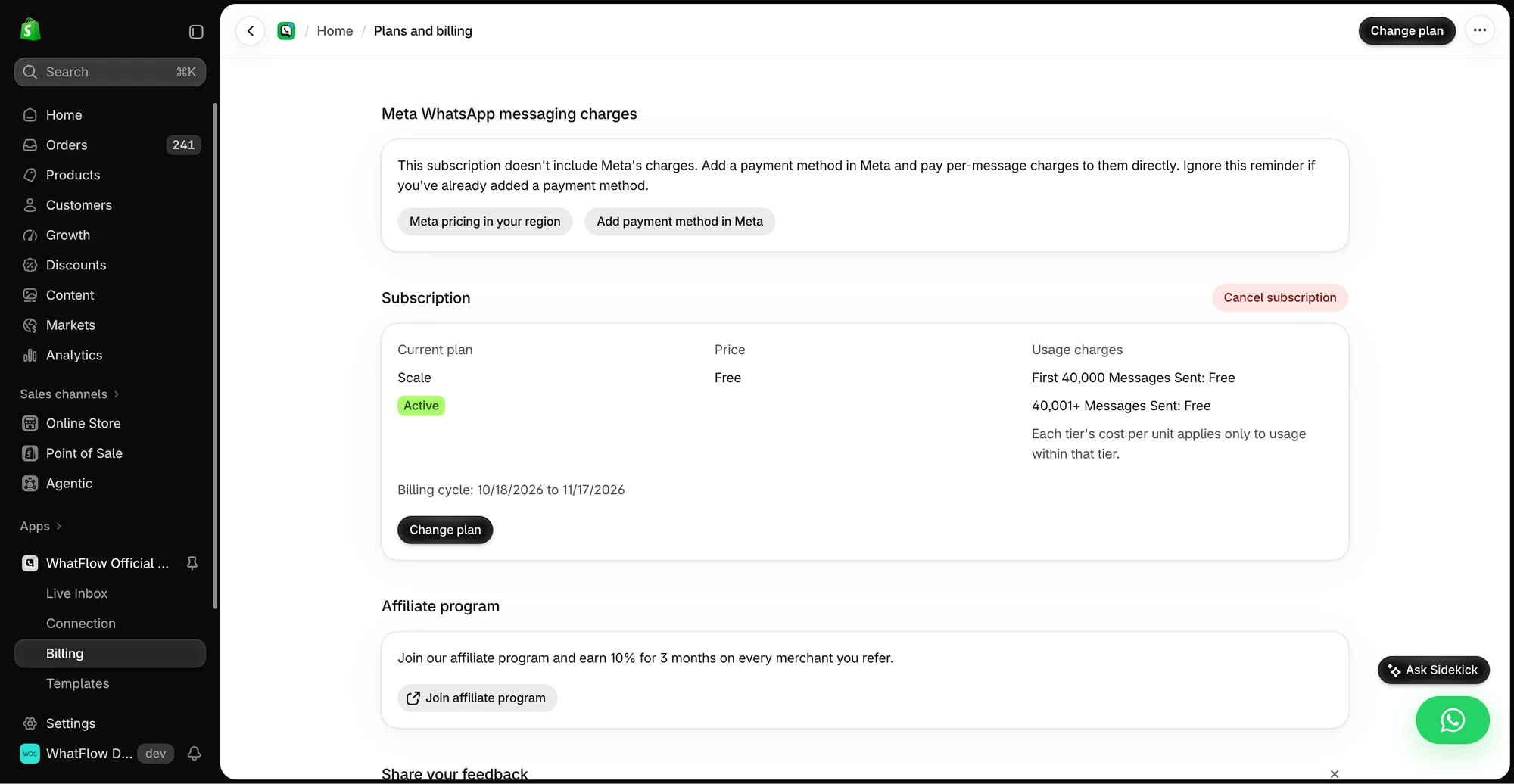
The demo Billing screen separates WhatFlow’s app subscription from Meta messaging charges. Check the pricing page for current public rates.
One exception worth knowing: if a customer starts a chat from a Click-to-WhatsApp ad on their phone and you reply in time, Meta opens a free entry point window in which your messages aren't charged. Meta's pricing page says it can stay open for up to 7 days. More on Click-to-WhatsApp ads for Shopify.
What are the most common 24-hour window mistakes?
Answering a day late
The single most expensive habit. A customer asks a question at 6pm Friday, your team gets to it Monday, and the window's long gone. Now you need a template just to say "sorry for the wait", and the customer has probably bought elsewhere.
Fix: set business hours, an away message that sets expectations, and a rule that every chat gets a first answer within the window. How fast to reply on WhatsApp and away message examples cover the setup.
Thinking a template opens the window
You send a shipping update template. The customer reads it but doesn't reply. Two days later you try to send a free-form "Your parcel is at the local depot" and it fails. The window was never opened, because only the customer can open it. Use another template, or add a button to the first one so a tap opens the window.
Using marketing templates to "re-open" support chats
If you missed the window on a support question, a short utility follow-up is fine:
Hi {{1}}, sorry we missed your message about order {{2}}. Reply here and we'll pick it up straight away.
Turning that into "Sorry we missed you! Here's 15% off your next order" makes it a marketing template, at the marketing rate, and it reads like you're dodging the question.
Not tracking which chats are about to close
In a busy inbox, a chat that came in 22 hours ago looks the same as one from 20 minutes ago. Sort by oldest unanswered first, and assign chats so someone owns each one. A shared team inbox with assignment and filters makes this visible.
Mixing up the Business app and the API
The 24-hour rule belongs to the WhatsApp Business Platform. If your number is on the API through coexistence and you reply from the WhatsApp Business app, Meta's documentation says those app messages aren't subject to the window. But messages from your Shopify app go through the API and are. Pick one place your team answers from so nobody gets confused.
How should a small team work with the 24-hour window?
A routine I'd suggest for a two-to-five person store:
First reply within business hours, always inside 24 hours. Even if it's "Checking with the warehouse, back to you by 2pm."
Buttons on every utility template, so customers can reopen the window with one tap.
One utility follow-up template for missed windows, approved and ready.
Weekend cover or a clear away message. Saturday questions shouldn't expire on Sunday night.
In WhatFlow, the team inbox shows every chat with assignment and filters, and you can send templates or free-form replies from the same screen, so your team doesn't need to think about which mode they're in. It runs on Meta's official Cloud API and has no seat fees, so it works the same for a two-person team or a large support floor. If the window has closed, you pick a template; if it's open, you just type.
Free plan available
Run WhatsApp for your Shopify store with WhatFlow
Templates, COD confirmation, Shopify Flow automations and a shared team inbox with no seat fees. Every feature is included on every plan, including Free.
The customer opens the window; you can't. Inside 24 hours, reply however you like. Outside, use an approved template. Since October 2026, replies beyond 1,000 a month and utility templates inside the window are charged, so fast answers matter for cost as well as service. Get the window right and everything else about WhatsApp gets easier.
Frequently asked questions
What happens after the WhatsApp 24-hour window closes?
You can no longer send free-form messages to that customer. To reach them you must send a Meta-approved template, and once they reply, a new 24-hour window opens.
Does sending a template open the 24-hour window?
No. Only a message or call from the customer opens or refreshes the customer service window. A template lets you start the conversation; the customer's reply is what opens the window.
Do I pay for messages inside the 24-hour window?
As of November 2026, free-form replies inside the window are service messages: free up to 1,000 per business phone number per month, then charged. Templates sent inside the window, including utility templates since October 1, 2026, are charged at their category rate.
Does the 24-hour window apply to the WhatsApp Business app?
No. The customer service window is a rule of the WhatsApp Business Platform (the API). Meta's coexistence documentation states that messages sent from the WhatsApp Business app aren't subject to it.