A good WhatsApp away message tells the customer exactly when a person will reply and gives them one useful thing to do in the meantime. "We're closed, back at 10am Saturday. Track your order here: [link]" beats any amount of "your message is important to us". Below are 14 examples you can copy, and how to set them up on the WhatsApp Business app or the API.
What is a WhatsApp away message?
A WhatsApp away message is an automatic reply sent when a customer messages your business while you're unavailable, usually outside your business hours. In the WhatsApp Business app it's a built-in setting. On the WhatsApp Business API (which is what most growing Shopify stores move to) there's no single toggle; you configure an automatic reply yourself.
Its job is expectation-setting. A customer who knows you're back at 10am will wait. A customer who sees nothing will message twice, then try Instagram, then leave a cross review.
What makes a good away message?
Four things, in this order:
Acknowledge in a few words. "Thanks for your message."
Say when you'll reply in concrete terms. "By 11am tomorrow (Saturday)" beats "during business hours".
Give one self-serve option for the most common question, usually order tracking.
Say what to send now so your morning reply can be useful straight away. "Send your order number and we'll start there."
Keep it under about 60 words. Skip the emoji parade. One is fine.
14 WhatsApp away message examples
Swap in your own times, links and tone. Times should be in the customer's language ("tomorrow at 10am"), not a time-zone puzzle.
Everyday after-hours
1. The standard
Thanks for messaging Luma Skincare. We're offline now and back at 10am tomorrow. Send your question and order number (if you have one) and we'll reply first thing.
2. With order tracking
Hi, thanks for your message. Our team replies 10am to 7pm, Monday to Saturday. If you're checking on an order, you can track it any time here: [tracking page link]. For anything else, leave a message and we'll be back to you by 11am.
3. Short and warm
Hey, we've logged off for the night 🌙 Back at 9am. Leave your message and we'll pick it up first thing.
4. For COD stores
Thanks for reaching out. We're closed right now and open again at 10am. If you're confirming a cash-on-delivery order, reply to the confirmation message we sent you and it'll be recorded. Anything else, we'll answer in the morning.
Thanks for your message! We're closed on Sundays and back Monday at 9am. Orders placed today still ship Monday. Leave your question here and you'll hear from us first thing.
6. Reduced weekend hours
Hi! On weekends we reply between 11am and 3pm, so it might take a little longer. If it's about an existing order, please include your order number so we can jump straight in.
Holidays and closures
7. Public holiday
Thanks for messaging. We're closed for the holiday on [date] and back on [date] at 10am. Orders placed now will ship on [date]. We'll reply to every message in the order it arrived.
8. Eid closure
Eid Mubarak from all of us! The team is off from [date] to [date]. We'll be back on [date] and reply to every message in order. Orders placed now ship on [date].
9. Ramadan hours
Ramadan Kareem. During Ramadan our hours are 11am to 4pm and 9pm to 12am. We'll reply in our next open slot. Thanks for your patience.
10. Diwali or year-end shutdown
Happy Diwali! Our team is taking a short break and will be back on [date]. You can still place orders, and they'll ship from [date]. Leave your message and we'll reply when we're back.
Thanks for messaging during our sale! We're getting a lot of chats, so replies may take up to 3 hours today. For delivery times and returns, everything's here: [FAQ link]. We'll get to you as fast as we can.
That one isn't strictly an "away" message, but it's the same idea: set expectations honestly when you're swamped. Our Black Friday WhatsApp playbook covers the rest of a sale-week setup.
12. Holiday shipping cut-off
Hi! We're closed now and back at 9am. Quick heads-up: the last day to order for delivery before [holiday] is [date]. Leave your message and we'll reply in the morning.
Hi, it's Maya. I run this shop on my own, so I reply between 10am and 6pm while I'm packing orders. I'll get to your message today or first thing tomorrow. Thank you for your patience!
14. Lunch or short break
We're on a short break and back at 2pm. Leave your message and we'll pick it up then.
How to set up away messages in the WhatsApp Business app
In the WhatsApp Business app, away messages are a built-in tool. According to the WhatsApp Help Center, the steps are:
Open Tools and tap Away message.
Turn on Send away message and edit the text.
Under Schedule, choose Always send, Custom schedule, or Outside of business hours.
Under Recipients, choose everyone, everyone not in your address book, everyone except selected contacts, or only selected contacts.
Tap Save.
The "Outside of business hours" option only appears once you've set hours in your business profile. The phone needs an internet connection for the away message to send, which catches people out when the shop phone goes flat overnight. You set hours in your business profile as selected hours, always open, or by appointment.
How to set up an away message on the WhatsApp Business API
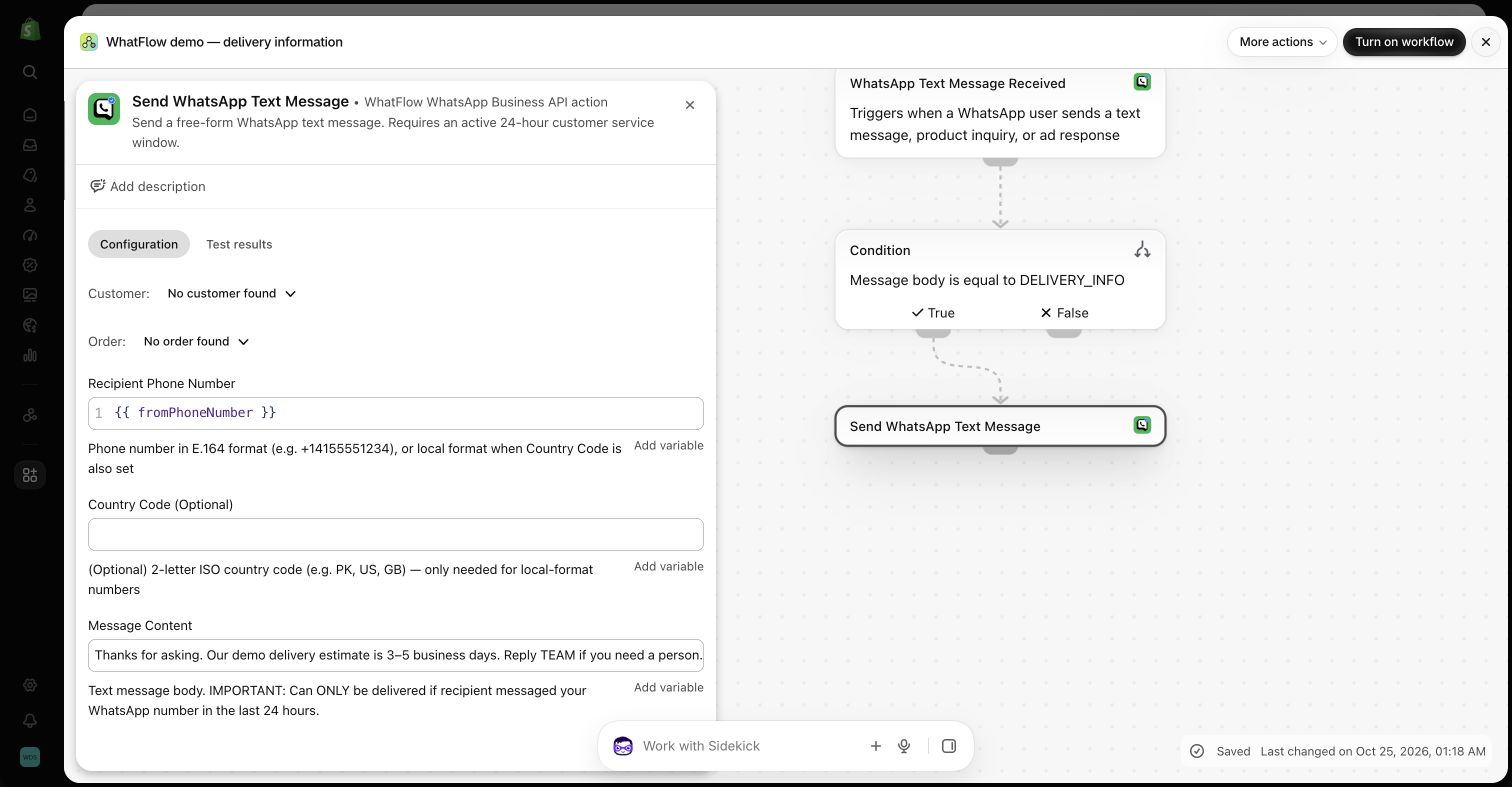
On the WhatsApp Business API there isn't a built-in "away message" switch like the app has. You build an automatic reply. With WhatFlow, the natural place to do that is Shopify Flow:
In Shopify Flow, start a workflow with WhatFlow's WhatsApp Text Message Received trigger.
Add the condition logic you want (see the options below).
Add WhatFlow's Send WhatsApp Text Message action, mapping the recipient to the incoming sender's number.
Write your away text, test it with your own phone, then turn the workflow on.
Inactive demo workflow: a WhatFlow text-message action with the recipient mapped from the incoming sender
The fiddly part: checking the time
Shopify Flow doesn't have a ready-made "outside business hours" condition, and its Run code step can't read the clock (the Run code docs say dates must be passed in as input). So you have two honest options:
Simple: an always-on acknowledgement. Send the same short reply to incoming messages at any hour, with your hours in it. "Thanks for messaging! We reply 10am to 7pm, Monday to Saturday. Leave your question and order number and we'll get to it." It's useful during the day too, and there's no time logic to break.
Advanced: a real time check. Pass a date value into a Run code step that decides if the shop is closed, and branch on the result. Inspect the trigger's fields first to see which date or time values you actually get. Test it in your store's time zone, including the weekend, before you rely on it.
Whichever you pick, test what happens when a customer sends four messages in a row. Five identical away messages in a thread look broken. If you can't add a condition that stops repeats in your setup, keep the text so short that a repeat is harmless, or narrow the trigger (for example, only reply to messages that look like a new question rather than "ok" or "thanks").
Does an API away message cost anything?
Your away message is a free-form reply inside the customer service window the customer just opened, so you don't need a template for it. It does count as a service message, though. Since October 1, 2026, Meta gives each business phone number its first 1,000 delivered service messages a month free and charges after that, so an away message that fires on every incoming chat uses up that allowance faster. Check Meta's pricing page for current rates as of November 2026. WhatFlow's own plan pricing is separate, on our pricing page.
Mistakes to avoid
Vague timing. "We'll reply soon" means nothing at 11pm on a Friday.
Over-promising. "Reply within 1 hour" on an away message is a contradiction.
Forgetting to update holiday messages. An Eid closure message still running in the second week of the month is a bad look. Put a calendar reminder on the end date.
Asking for sensitive data. Never ask for card details or passwords in an automatic reply. Order number and a description of the issue are enough.
Hiding the self-serve link. If half your night-time messages are "where's my order", put tracking in the away message.
Free plan available
Run WhatsApp for your Shopify store with WhatFlow
Templates, COD confirmation, Shopify Flow automations and a shared team inbox with no seat fees. Every feature is included on every plan, including Free.
An away message only works if the morning reply actually comes when you said it would. Start the day by clearing overnight chats, oldest first, before you look at anything else. If you're working out what promise you can realistically make, our guide to WhatsApp response times for small teams helps you set a target you'll keep, and WhatsApp customer service etiquette covers the tone for that first reply.
Save the repeatable part of a reply in WhatFlow, then check the facts before you send it. Agents can personalize a canned response, keep a draft in the thread, and put the internal context in a private note. Search inside the conversation if you need to verify what another agent promised. The Inbox walkthrough shows when to use each tool.
Frequently asked questions
How do I set an away message on WhatsApp Business?
In the WhatsApp Business app, open Tools, tap Away message, turn on Send away message, edit the text and choose a schedule such as Outside business hours. That option appears once you've set business hours in your business profile.
Does the WhatsApp Business API have away messages?
Not as a built-in app toggle. On the API you set up the equivalent as an automatic reply, for example a Shopify Flow workflow that sends a text message when a customer writes in.
What should a WhatsApp away message say?
When you'll reply, in the customer's terms ("by 10am tomorrow"), plus one useful thing they can do now, like tracking an order. Keep it to three or four short lines.
Should my away message promise a reply time?
Yes, but only one you'll actually meet. A specific, kept promise is far better than "we'll get back to you soon".