
Publisher disclosure: this comparison is written by WhatFlow. Competitor capabilities are based on the linked public documentation; the WhatFlow screenshots come from our demo store. Examples are illustrative, and results depend on your store and configuration.
WhatsApp with WhatFlow and SMS at a glance
| Consideration | WhatsApp with WhatFlow | SMS |
|---|---|---|
| Best-fit experience | A real conversation: images, video, reply buttons, catalog products and free-text replies in one thread, with your business name and logo. | Short text alerts. Works on any phone with signal, no app or data needed, which makes it a good fallback. |
| Costs to include | WhatFlow plan (Free, then from $4.99/month) plus Meta's per-message charges by category and country. No seat fees. | Per-segment pricing by provider and country. 160 GSM-7 or 70 Unicode characters per single segment, so long or non-Latin messages cost more. |
| Shopify workflow | Templates mapped to Shopify order fields, Shopify Flow triggers and actions, COD buttons that tag orders, replies in a shared inbox. | Depends on the SMS app; replies often land in a separate tool or aren't monitored. |
| Starting point | Free plan with every feature and a free-forever theme-matched WhatsApp button. | Keep SMS for customers without WhatsApp and for short critical alerts. |
| Two-way replies | Built for it: customers reply, tap buttons or send photos, and your team answers in the WhatFlow inbox. | Possible, but plain text only and often routed to a short code or no-reply number. |
For most Shopify stores selling where customers already use WhatsApp, WhatsApp should be your main messaging channel and SMS the backup. WhatsApp gives you two-way chat, product images, reply buttons and your catalog in one thread per customer, under your business name. SMS gives you plain text that reaches any phone with signal. Run WhatsApp through WhatFlow on Shopify, and keep SMS for customers who aren't on WhatsApp.
One practical check: Can your team run a test and handle the replies after the send? In WhatFlow, test a Shopify customer or segment send, then try scheduling a separate Inbox broadcast from a spreadsheet or existing conversations. The campaign walkthrough shows the test send, reply handoff and recipient report.
WhatsApp vs SMS at a glance
WhatsApp (via WhatFlow) | SMS | |
|---|---|---|
Format | Text, images, video, documents, reply buttons, catalog products | Plain text (MMS for images, where supported) |
Sender identity | Business name, logo and profile | A number or short code |
Replies | Natural two-way thread | Possible, often unmonitored |
Reach | Customers with WhatsApp and data | Any phone with signal |
Pricing unit | Per delivered message, by category and country | Per segment, by country and provider |
Shopify link | Flow triggers and actions, COD tagging, shared inbox | Depends on the SMS app |
Why should WhatsApp lead for Shopify stores?
Because customers answer it. That's the whole argument. An SMS is a notice; a WhatsApp message is the start of a conversation that stays in one place.
Say you sell skincare and send a shipping update. On SMS, the customer gets a tracking link from a number they don't recognise. On WhatsApp, they get this from your named business profile:
Hi Sara, your Vitamin C serum (order #5521) has shipped. Track it here: {{tracking_link}} [Track order] [Talk to us]
She taps Talk to us and asks whether she can use it with retinol. Your team answers in the same thread, sends a photo of the routine card and shares the night cream straight from your catalog. With SMS, that question either goes to email or doesn't get asked.
The mechanics that make WhatsApp the better primary channel:
- One thread per customer. Order updates, questions and photos all sit together, so whoever replies sees the history.
- Rich media. Product photos, how-to videos and PDFs go inline.
- Buttons. Quick-reply and call-to-action buttons turn "reply YES" into one tap.
- Catalog. Share live products from your Meta catalog while you chat (here's how).
- Business identity. Your name and logo, plus a verified badge if you qualify. That matters when scammers impersonate stores.
Where does SMS still win?
Reach. An SMS lands on any phone with signal, no app and no mobile data needed. If some of your buyers don't use WhatsApp, or you ship to areas with patchy data, SMS is the right fallback for critical alerts like delivery-day notices. It's a complement, not a rival. Our guide to coordinating email, SMS and WhatsApp shows how to stop customers getting the same message three times.
Is WhatsApp cheaper than SMS?
Compare real numbers for your countries, not headline rates.
SMS is billed per segment. A single segment holds 160 GSM-7 characters, or just 70 if the text needs Unicode (Arabic, Urdu, Hindi, emoji). Longer messages split into 153- or 67-character chunks, each billed (Twilio explains the limits). A friendly order update in Urdu with a link can easily run to three or four segments.
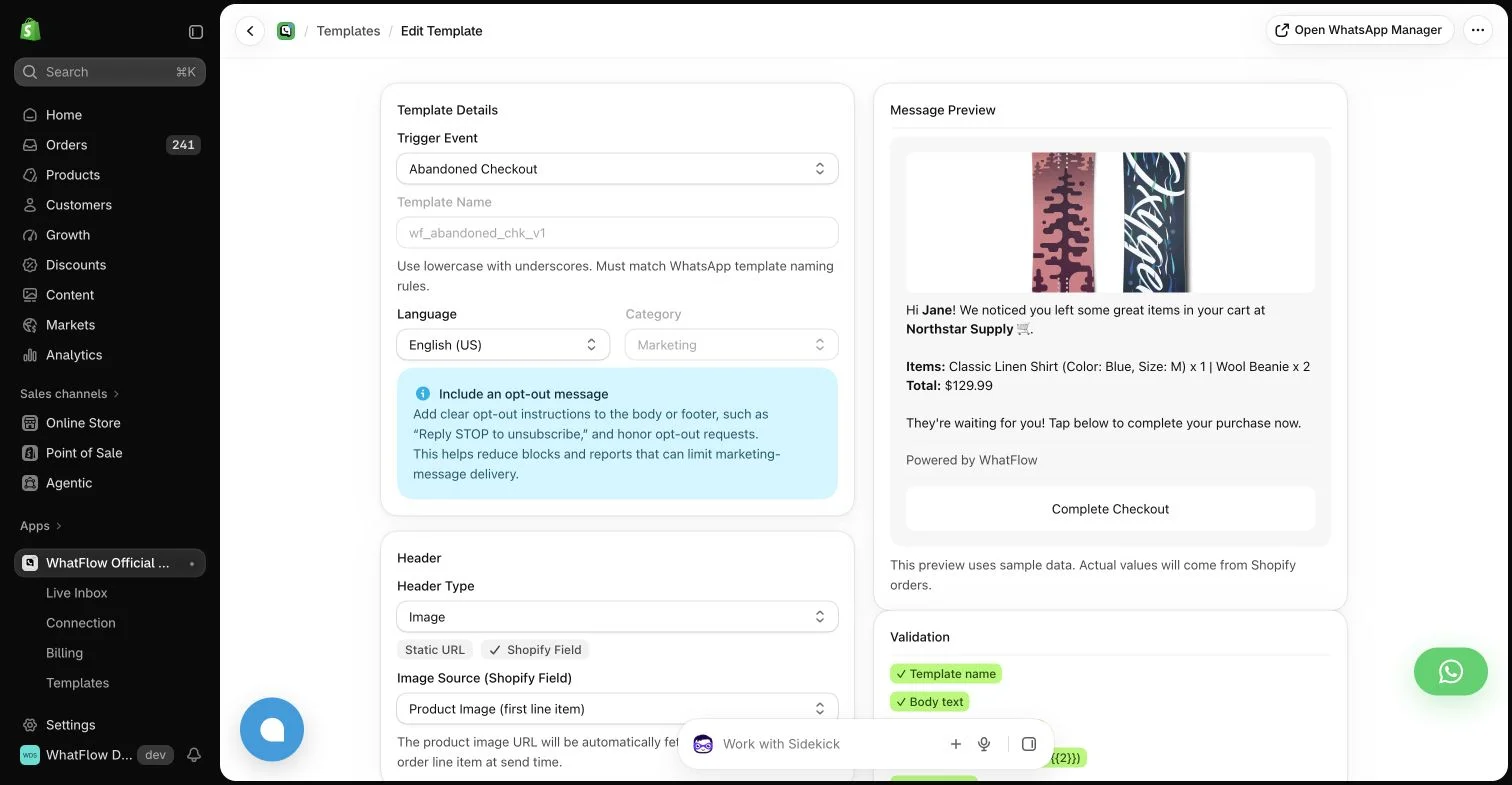
WhatsApp is billed by Meta per delivered message, based on template category (marketing, utility, authentication) and the customer's country. A long message with an image is still one message. Meta updated what it charges for on October 1, 2026, so check Meta's pricing docs and our WhatsApp API pricing explainer.
WhatFlow is the app fee on top, and it's simple. As of November 2026: Free ($0, 100 messages a month), Starter ($4.99, 2,000), Plus ($9.99, 5,000), Growth ($29, 20,000), Scale ($49.99, 40,000), Ultimate ($99, 75,000). Every plan has every feature. Say you send 10,000 WhatsApp messages a month: that's Growth at $29, with your whole team in the inbox and no seat fees. Current amounts are on the pricing page.
What can WhatsApp do on Shopify that SMS can't?
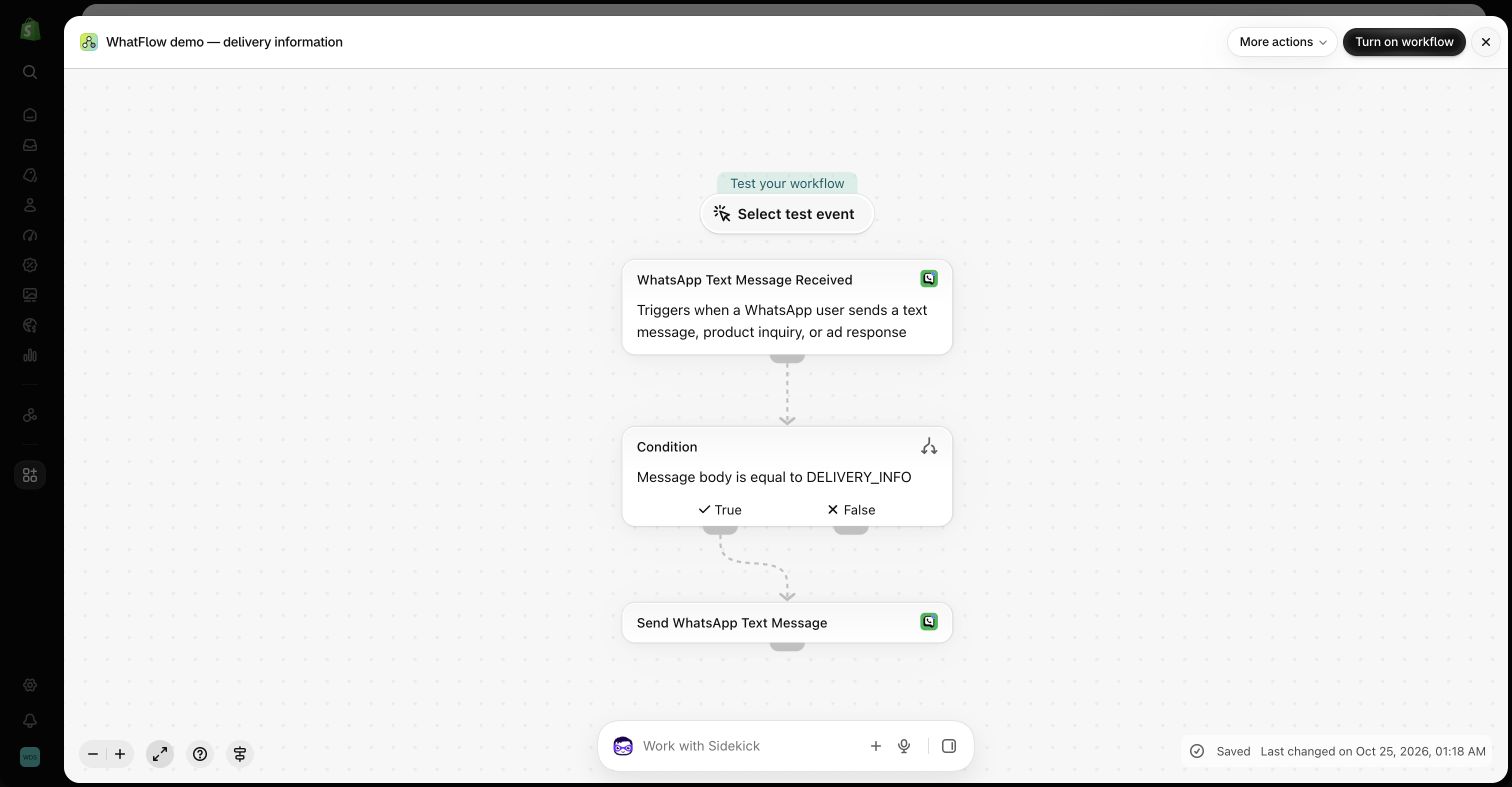
With WhatFlow, WhatsApp plugs into Shopify Flow, so a reply can change an order. The best example is COD confirmation:
Hi Usman, please confirm order #8820 (Rs 3,750, cash on delivery) so we can dispatch today. [Confirm] [Cancel]
Confirm tags the order in Shopify. Cancel can cancel it. No calls, no spreadsheets. The same goes for abandoned checkout reminders, shipping updates and review requests, all sent from templates mapped to Shopify fields. See WhatsApp vs SMS for COD confirmation for the side-by-side.
How to roll out WhatsApp with SMS as backup
- Install WhatFlow and connect your number through Meta Embedded Signup.
- Add the free theme-matched WhatsApp button and collect opt-ins at checkout (how to collect opt-ins).
- Move order confirmations, COD confirmations and shipping updates to WhatsApp first.
- Keep SMS for customers without a WhatsApp opt-in and for delivery-day alerts.
- After a month, compare replies, button taps and cost per resolved question.
Business-initiated WhatsApp messages need opt-in and an approved template outside the 24-hour customer service window (WhatsApp Business policy).
The bottom line
SMS reaches everyone; WhatsApp gets answered. For a Shopify store selling where customers use WhatsApp, lead with WhatsApp on WhatFlow (Free plan, every feature, no seat fees, rated 5.0/5 from 55 ratings on the Shopify App Store as of November 5, 2026) and keep SMS as the safety net.
Questions worth asking
Is WhatsApp better than SMS for a Shopify store?
For most Shopify stores whose customers already use WhatsApp, yes. WhatsApp supports images, reply buttons, catalog products and two-way chat in one thread, and WhatFlow connects it to Shopify orders. SMS is better as a fallback for customers who don't use WhatsApp or are offline.
How do I test WhatsApp against SMS for my store?
Send the same order update to opted-in customers on each channel for a month. Compare how many reply or tap a button, what each message actually cost, and how quickly your team could match each reply to the right order.
Does the free WhatFlow plan restrict features?
No. WhatFlow includes every feature on every plan, including Free. Plans differ only by message allowance and rates, the team inbox has no seat fees, and the theme-matched WhatsApp button is free forever.
Is WhatsApp cheaper than SMS?
It depends on the country and message type, so compare real quotes. Meta charges per delivered WhatsApp message by category and country, while SMS is charged per segment, and long or non-Latin texts use several segments. WhatFlow's app fee is separate from Meta's charges.
Sources and methodology
We checked these primary sources on November 5, 2026. Vendor pages describe advertised capabilities, rather than independent performance tests. Confirm current pricing, plan limits and availability with each provider.
- WhatFlow WhatsApp Business API on the Shopify App Store
WhatFlow's listing, plans and Shopify integrations; rated 5.0/5 from 55 ratings as of November 5, 2026.
- WhatsApp Business Platform pricing
Meta's per-message WhatsApp charges by category and recipient country.
- SMS length and segmentation
Twilio's explanation of GSM-7 (160 characters) and UCS-2 (70 characters) segment limits.
- WhatsApp Business Platform pricing (developer docs)
How Meta bills per delivered message and how the 24-hour customer service window works, including changes effective October 1, 2026.
- WhatsApp Business Messaging Policy
Opt-in, opt-out and template rules for business-initiated WhatsApp messages.