A WhatsApp catalog lets your support team send a real Shopify product (photo, name, price, variant) straight into a customer's chat instead of pasting a link. With WhatFlow WhatsApp Business API you sync your Shopify products into a catalog, then share one product, a short list or the whole range from the inbox. It works best when you answer the question first and send the product second.
That order matters. A product card is a nice-looking way to send the wrong strap.
What is WhatsApp catalog sharing?
A WhatsApp catalog is a set of products attached to your WhatsApp business number, stored in Meta's commerce tools. Customers can open a product inside the chat, see the image and price, and add items to a cart they send back to you. WhatFlow adds live catalog sharing to the team inbox, so an agent can pick a product while they're talking to the customer.
For a shopper asking which size or variant fits, use WhatFlow's product picker to share the relevant catalog item from the conversation. With catalog cart follow-up configured, WhatFlow can send back a Shopify checkout link. Check Shopify before treating the WhatsApp cart as a paid order. The catalog-to-checkout walkthrough shows the test sequence.
The point isn't to turn chat into a shop window. It's to stop the "which one do you mean?" back-and-forth. Say a customer asks which blender jar fits their model. One correct product card answers that faster than three paragraphs and a link to a collection page.
Which catalog are you using: WhatFlow-managed or already connected?
Check this before you sync anything, because it decides where you edit products.
Whatever already manages it, such as Shopify's Facebook & Instagram channel
How it updates
When you press Sync catalog
In the system that owns it
Does WhatFlow change products?
Yes: adds items, removes deleted ones
No, WhatFlow only reads it
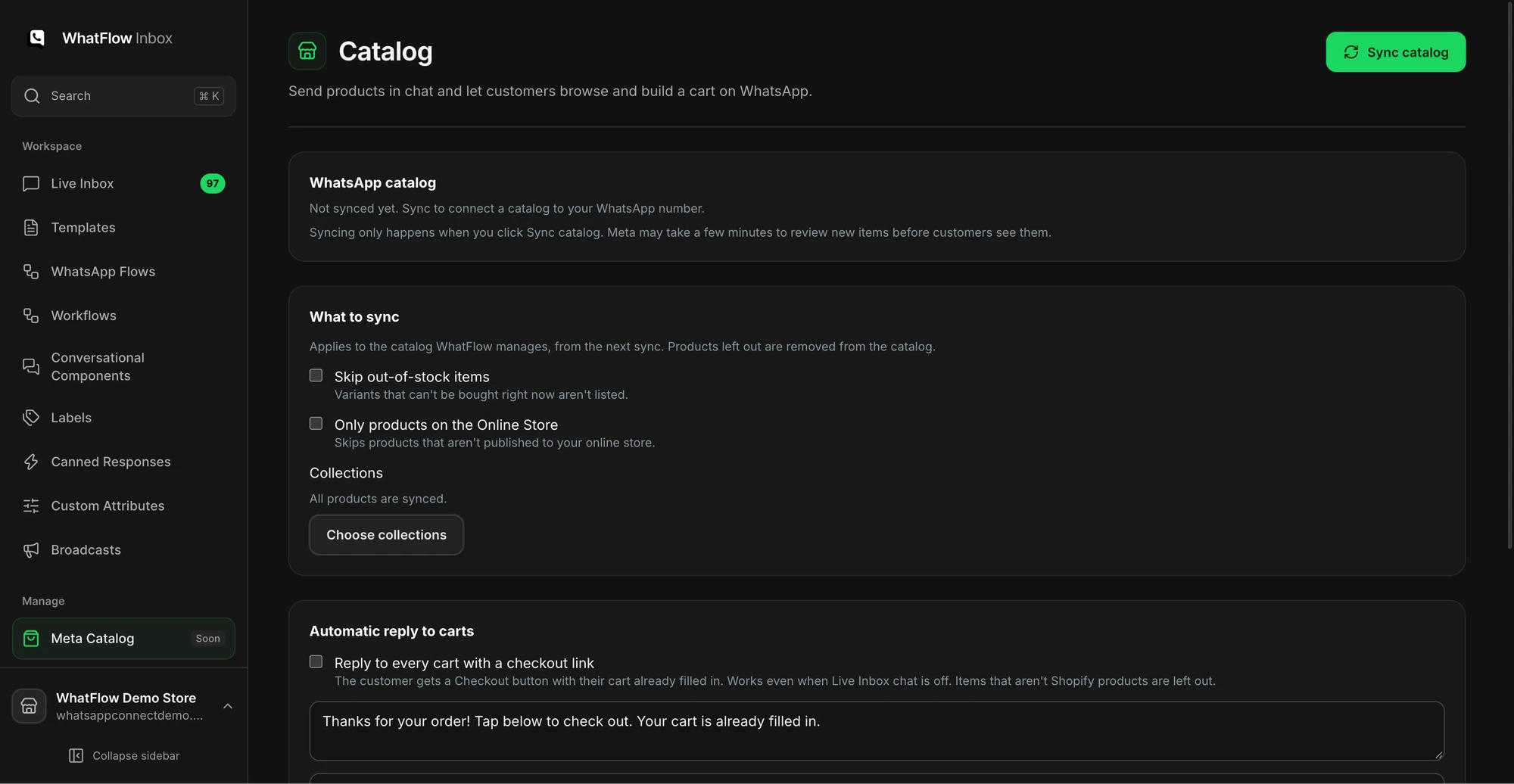
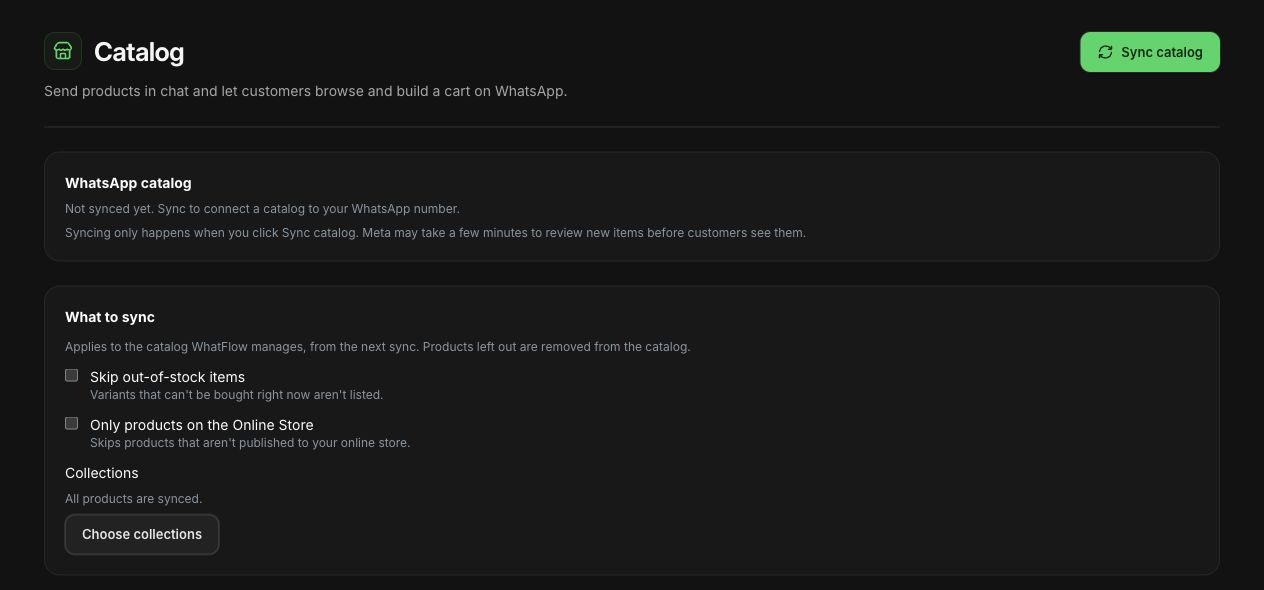
For a WhatFlow-managed catalog, Sync catalog copies active Shopify products with one catalog item per variant and removes products you've deleted. Sync settings let you exclude products, and excluded items are removed on the next sync, so review the scope before you press the button.
The catalog screen shows sync options and the collection picker before products are synced.
WhatFlow catalog settings in a demo store. The catalog hadn't been synced; this shows the controls only.
Sync is manual. That's deliberate (you decide when a half-edited product goes live in chat), but it means the catalog is only as current as your last sync. After a price change, a sell-out or a new variant, sync again before agents send that product. New items can also need Meta's review before they show up properly.
Test five products before your team uses it
Don't roll it out across 400 SKUs on day one. Pick the products your team talks about most, say two variants of a best-seller and one accessory, and send them to a colleague's phone. Ask them to tell you what they think they're buying without your help.
Check
What goes wrong
How to test it
Variant name
Customer picks the wrong size or colour
Can your colleague name the variant from the card alone?
Image
Two similar products look identical
Does the photo match the actual variant?
Price
An old price becomes a promise
Compare it with the live Shopify price
Availability
The card implies stock is held for them
Check stock and say nothing is reserved
Fit or compatibility
A card gets read as "this will fit"
Confirm the customer's model or size first
If an item is missing or wrong, send the storefront product link while you fix the catalog. Don't send a similar-looking variant just to keep the chat moving.
Answer the question, then send the product
The most useful thing an agent does is ask the one question that changes the recommendation. For a replacement part, that's the model. For clothing, a measurement from your size guide. You don't need their life story. Our guide to handling pre-purchase questions on WhatsApp covers how to spot those questions and fix the product page so fewer people need to ask.
Here's a made-up exchange for a bag store:
Customer: Will this strap fit the bag I bought last year?
Agent: Which bag do you have? The new strap fits the Compact 2. I'd need to check the original Compact separately before I say yes.
Customer: Compact 2, black.
Agent: Perfect, here's the black strap that's listed for the Compact 2. Have a look at the details, and tell me if you want to see the tan one too.
Then the agent sends that one product. If compatibility is still unclear, say so. A polished product card doesn't make an item fit.
One product, a list, a carousel or the whole catalog?
WhatFlow's Send products panel gives you four formats: One product, Product list, Carousel and Whole catalog. My rule: send the smallest thing that answers the question.
One product when you know exactly what they need. Replacement parts, a specific size.
Product list when they're choosing between a few suitable options. Use section headings that explain the choice, like "Fits Compact 2" and "Matching accessories".
Carousel when the photos do the selling, such as three colourways of the same dress.
Whole catalog only when they ask to browse.
Dumping the whole catalog on someone who asked a specific question just hands the work back to them. If you want to suggest an add-on, our guide to cross-sell recommendations that actually help is worth a read first.
Timing rule: product messages from the inbox are free-form, so they need an open 24-hour customer service window. That's rarely an issue in a live support chat, but it matters if you're picking up a conversation the next afternoon. The 24-hour window explained covers the edge cases.
What to do when a customer sends a cart
Where it's enabled, customers can build a cart from your catalog and send it in the chat: items and quantities. Treat that as a request, not an order. It hasn't been paid for, nothing is reserved, and it isn't in Shopify yet.
Reply with something that makes that clear:
Got your cart: two black straps. I'll double-check stock and send you the checkout link in a few minutes. Just so you know, nothing's reserved or paid yet.
Then send them through your normal checkout so shipping, tax and payment are handled where they should be. WhatsApp isn't a payment tool, and you shouldn't ask for card details in chat.
Make the recommendation easy to hand over
Write a one-line internal note with the reason for the recommendation, not just the product: "Compact 2 owner, wants black strap, sent the Compact 2 strap, no stock held." If a colleague picks the chat up tomorrow, they know what was promised.
That's where a shared inbox earns its keep. With WhatFlow's team inbox, your product expert can jump into a tricky chat without you paying for another seat, because there are no seat fees on any plan. The shared inbox guide covers how to assign chats so two people don't answer at once.
Free plan available
Run WhatsApp for your Shopify store with WhatFlow
Templates, COD confirmation, Shopify Flow automations and a shared team inbox with no seat fees. Every feature is included on every plan, including Free.
Keep the catalog honest after every product change
Add one line to your product-update routine: change it in Shopify, sync the catalog, check the card. Do the same with any saved replies that mention that product. Catalog sharing is only as good as the product data behind it, and a stale price in chat is worse than no card at all.
Frequently asked questions
How do I add my Shopify products to a WhatsApp catalog?
With WhatFlow WhatsApp Business API you can let WhatFlow manage a catalog and press Sync catalog to copy your active Shopify products, one item per variant. If your WhatsApp number already has a catalog connected, for example through Shopify's Facebook & Instagram channel, WhatFlow reads that one instead and you keep managing it there.
Does the WhatsApp catalog update automatically when I change prices in Shopify?
Not in WhatFlow's managed catalog. Syncing happens when you press Sync catalog, so after a price, stock or variant change you should sync again before agents send that product.
Can customers pay inside WhatsApp from a catalog cart?
No. A cart sent from a WhatsApp catalog is a list of items and quantities, not a payment or a Shopify order. Confirm the items and send the customer to your normal checkout.
Can I send a product from the catalog outside the 24-hour window?
Product messages sent from the inbox are free-form messages, so they need an open 24-hour customer service window. Outside it, WhatsApp only allows approved templates.