To coordinate email, SMS and WhatsApp on Shopify, give each channel one clear job, put every automated message from every app on a single timeline per customer event, and make sure one purchase or one opt-out stops the right messages everywhere. Count contact per customer, not per app. Three tools that each look reasonable on their own can still add up to six messages about one abandoned cart.
Here's the scenario I see constantly. A customer leaves checkout at 10am. Shopify sends a recovery email at 11. The SMS app fires at 2pm. WhatsApp sends a reminder at 6pm. Meanwhile the customer bought at 3pm, so the WhatsApp message arrives after the order confirmation. Every app did what it was told. The customer just thinks you're disorganised.
If you already have an opted-in Shopify audience, start a WhatFlow broadcast from selected customers or a Shopify segment in Admin. For a scheduled campaign built from CSV, Excel or existing conversations, use Team Inbox. Map the template fields, send a test, and make sure someone owns the replies. The campaign walkthrough shows both routes.
Give each channel a job
Don't ask "which channel is best?" Ask "what's this message for?" Then pick the channel that fits.
Job
Best fit
Why
Newsletters, lookbooks, long guides
Email
Room for images, links and browsing; read when convenient
Your market changes the mix. In Pakistan, India, Brazil or the Gulf, WhatsApp is often where customers actually read and reply, and email is a receipt archive. In parts of Europe, email still does most of the marketing work. Our comparisons of WhatsApp vs email and WhatsApp vs SMS go into the trade-offs.
Map every message on one timeline
Open a spreadsheet. One tab per customer event: checkout abandoned, order placed, order shipped, order delivered, review request, win-back. In each tab, list every message any system sends, with timing and conditions.
Here's what an honest "order placed" map might look like for a COD store:
Time
Channel
Sent by
Message
Stops if
0 min
Email
Shopify
Order confirmation
n/a
0 min
WhatsApp
WhatFlow
COD confirmation with Confirm / Cancel buttons
n/a
+2 hrs
WhatsApp
WhatFlow
Reminder if no reply
Customer replied
+1 day
SMS
SMS app
"Thanks for your order" promo
???
On ship
Email + WhatsApp
Shopify + WhatFlow
Tracking link
n/a
Look at the SMS row. It's a marketing message landing a day after purchase, alongside two other messages, with no clear stop condition. That's the kind of thing the map exposes. Include Shopify's own notifications. People forget those are messages too.
For every reminder sequence, decide which single system owns it and what stops it. Abandoned checkout is the classic. Shopify's built-in recovery email won't send if the customer buys before it goes out (Shopify Help Center). Third-party email, SMS and WhatsApp apps each have their own logic, and you need to check each one.
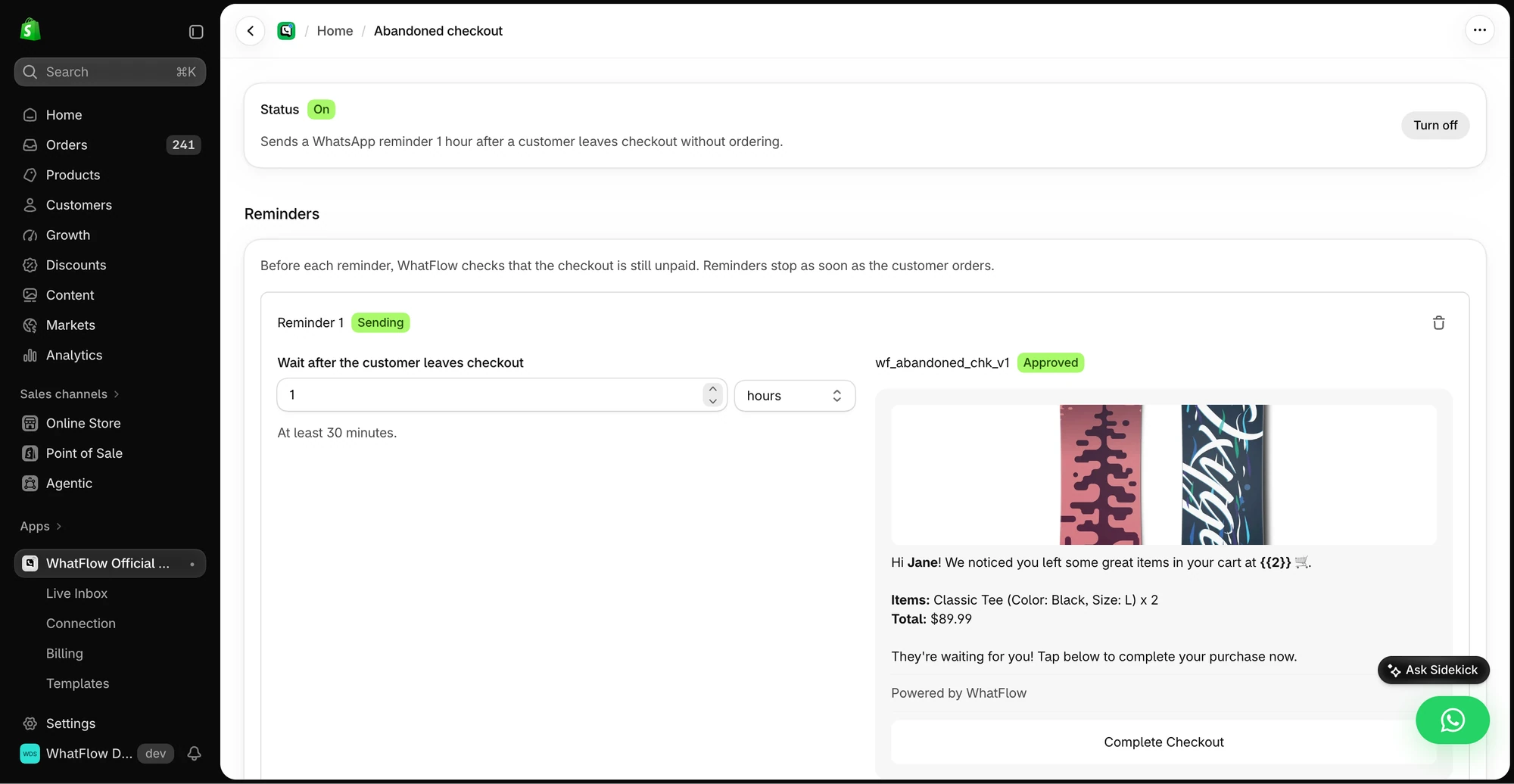
The demo checkout reminder shows the delay, selected template and example message preview.
My recommendation for a small store: pick one primary recovery channel and make the others quieter or remove them. For example:
Email at 1 hour (Shopify's built-in recovery).
WhatsApp at 4 hours, only for customers who opted in to WhatsApp and haven't bought. Phrase it as a question, not a reminder.
No SMS for cart recovery.
Then test it. Create a real checkout with your own number, abandon it, buy 90 minutes later, and see what arrives. If anything shows up after the purchase, find the tool and fix the exit rule. If a tool can't check purchase status at send time, simplify the sequence rather than hoping. Our guide to abandoned checkout conversations on WhatsApp has the message examples.
If you use Shopify Flow, you can add a condition before a WhatsApp send that checks the order or checkout state at that moment. WhatFlow's template actions run inside Flow, so the check and the send live in one workflow. Here's how to send WhatsApp templates from Shopify Flow.
Respect preferences across channels
Opt-ins are per channel. An email subscriber hasn't agreed to WhatsApp marketing, and WhatsApp requires opt-in before you send business-initiated messages (WhatsApp Business Messaging Policy). Outside the 24-hour customer service window (the day after a customer's last message), WhatsApp also requires a Meta-approved template.
Opt-outs deserve more care than the rules strictly require. If someone replies "stop sending me this" on WhatsApp, the legal minimum might only cover WhatsApp. But moving the same campaign to SMS will feel like you didn't listen. My rule: a clear "stop" in any channel pauses marketing in all of them until you check. Document how this works in your WhatsApp opt-out process.
Count contact per customer, not per app
Every app's dashboard shows its own sends. None shows what the customer experienced. Once a month, pick five real customers who ordered recently and reconstruct everything they received from you across channels. It's eye-opening.
During a sale week, a single customer might get: sale announcement email, SMS teaser, WhatsApp broadcast, email reminder, abandoned-cart WhatsApp, order confirmation by email and WhatsApp, shipping by email, SMS and WhatsApp. That's ten messages. If you're not sure where the line is, our guide to WhatsApp message frequency has practical limits.
Make sure replies reach someone
Marketing messages generate replies. "Does the code work on sale items?" in response to a WhatsApp broadcast is a support question, and someone needs to answer it with the actual offer terms in front of them. Brief your support team on every campaign before it sends.
That's one reason I like WhatsApp as the "conversation" channel: replies land in WhatFlow's shared team inbox, where anyone on the team can pick them up. There are no seat fees, so your marketer can sit in the inbox during a campaign without adding to the bill, whether your team is three people or thirty. It's built on Meta's official WhatsApp Cloud API, with native Shopify Flow triggers and actions, so it scales with your sequences rather than becoming another silo.
Compare channels fairly
Open rates aren't comparable across channels. Email opens are unreliable, and WhatsApp read receipts depend on the customer's settings. Compare what matters: replies, orders, opt-outs and complaints, against what each message actually cost. Meta charges per delivered WhatsApp template message, by category and country (Meta pricing), and those charges sit on top of any app fees.
Often the best improvement isn't adding a channel. It's deleting a duplicate reminder.
Free plan available
Run WhatsApp for your Shopify store with WhatFlow
Templates, COD confirmation, Shopify Flow automations and a shared team inbox with no seat fees. Every feature is included on every plan, including Free.
Map one event this week: abandoned checkout. List every message from every tool, run a test purchase, and fix anything that arrives after the order. That single afternoon removes the most common and most embarrassing overlap.
Frequently asked questions
Should I use email, SMS or WhatsApp for my Shopify store?
Usually more than one, each for a different job. Email suits longer content and browsing, SMS suits short alerts, and WhatsApp suits anything where the customer may want to reply, like order confirmations, questions and cart recovery.
How do I stop sending cart reminders after a customer buys?
Make sure every tool that sends reminders checks order status before each send. Shopify's own abandoned checkout email isn't sent if the customer buys first, but third-party apps each need their own exit rule, so test the whole sequence with a real order.
How many messages per week is too many?
There's no universal number, but count across all channels, not per app. A customer who gets one email, one SMS and one WhatsApp about the same sale has received three messages, not one.
If a customer unsubscribes from email, can I still message them on WhatsApp?
Only if they separately opted in to WhatsApp, and even then, use judgement. If someone says 'stop messaging me', treat that as a stop on every marketing channel rather than moving the same campaign elsewhere.