The best abandoned checkout message on WhatsApp doesn't just remind the buyer about their cart. It asks what stopped them. Send one Meta-approved template within a few hours, only to customers who opted in, with a question they can answer in one tap. Then handle the reply like a sales conversation, and stop all follow-ups the moment they buy or opt out.
Here's my problem with most cart recovery: it assumes the buyer forgot. Some did. But plenty left because the shipping cost surprised them, or they weren't sure about the size, or the payment failed. A reminder with a countdown timer doesn't fix any of those. A conversation does.
Why do customers abandon checkout?
Baymard Institute's running average of 50 studies puts documented cart abandonment at about 70% (Baymard). In their survey of US shoppers, once you exclude people who were just browsing, the top reason was extra costs like shipping, tax and fees (40%), followed by slow delivery (20%) and not trusting the site with card details (19%).
Your store's reasons will differ, especially if you sell COD in Pakistan or ship within the Gulf. But notice the pattern: most reasons are information problems, not price problems. That's why I'd rather ask than discount.
On Shopify, a checkout counts as abandoned when the customer has entered their email address, didn't pay, and the checkout has sat incomplete for more than ten minutes (Shopify Help Center). That's the event your WhatsApp recovery should trigger on, not a product-page view.
What WhatsApp requires before you send
Two rules shape everything:
Opt-in. You can only send business-initiated WhatsApp messages to people who agreed to hear from you there (WhatsApp Business Messaging Policy). A checkbox at checkout or a clear opt-in on your WhatsApp button counts. A phone number typed into the shipping field doesn't. Here's how to collect WhatsApp opt-ins on Shopify.
Templates. The customer hasn't messaged you, so there's no open customer service window (the 24 hours after a customer's last message). Outside that window, WhatsApp only lets a business send a Meta-approved template. Cart recovery templates are usually approved as marketing, which affects both the price and how they're delivered. Our post on marketing vs utility templates explains the categories.
Meta charges per delivered template, with rates set by category and country (Meta pricing). Those charges are separate from your WhatsApp app's own plan.
A first message that invites a reply
Compare these two.
The reminder:
Hi Jane! You left some great items in your cart. They're waiting for you! Tap below to complete your purchase.
The question:
Hi Jane, you were checking out the Classic Linen Shirt (Blue, M) earlier. Did something stop you? If it's sizing, delivery or payment, reply here and we'll sort it out.
[Complete checkout] [I have a question]
The first is fine. The second gives the buyer a reason to reply and a one-tap way to do it. Quick reply buttons (tappable options inside the message) make that reply nearly effortless. More on that in designing WhatsApp quick replies.
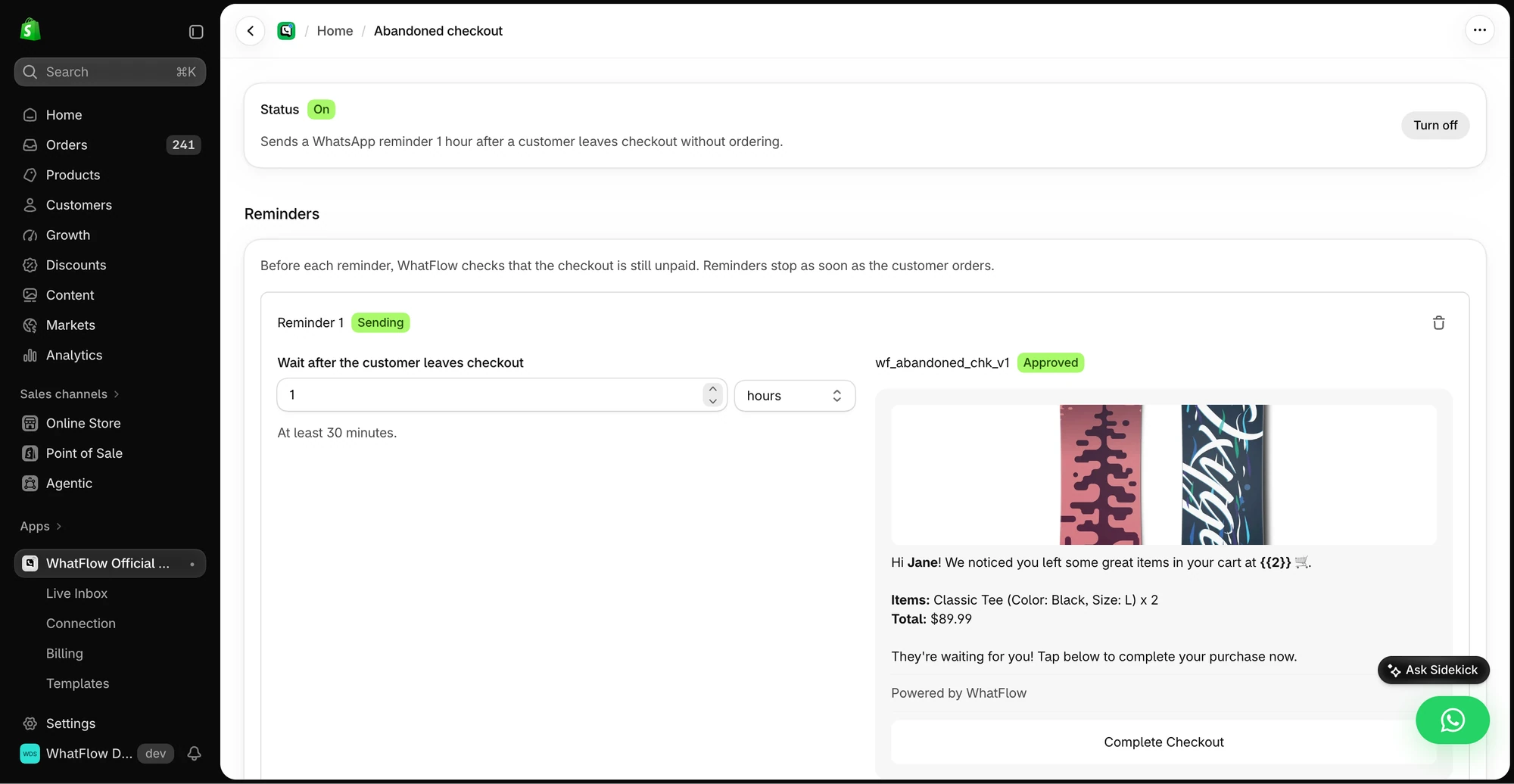
WhatFlow's Business API app sends these through Meta's official WhatsApp Cloud API, so templates go through Meta's normal approval process. You build this as a template with the Abandoned Checkout trigger, pull in the product image and line items from Shopify, and preview it with sample data before submitting to Meta for approval.
The demo checkout reminder shows the delay, selected template and example message preview.
The editor even nudges you to add an opt-out line ("Reply STOP to unsubscribe"). Do it. It costs you a few words and protects your number's quality rating.
When to send, and when to stop
My default sequence:
Step
Timing
Content
Message 1
1 to 3 hours after abandonment
The question above, with checkout link and a "question" button
Message 2 (optional)
About 24 hours later, only if no reply and no purchase
A short, specific answer to the most common objection (e.g. delivery time to their city)
Stop
Immediately on purchase, opt-out or reply
Hand the chat to a human
Two messages is plenty. A third starts to feel like being chased. And the stop rules matter more than the send rules. A buyer who completes checkout and then gets "you forgot something!" two hours later now trusts you a little less.
If you also send recovery emails or SMS, check that a purchase stops all of them. Each app's schedule can look sensible on its own and still add up to five messages. I cover this in coordinating email, SMS and WhatsApp, and there's a direct comparison of WhatsApp vs email cart recovery.
Answer the reply, not the cart
Once a buyer replies, you're inside the 24-hour window, and you can write freely. This is where recovery is actually won. Match the answer to the obstacle:
Delivery:
We ship to Riyadh in 2 to 4 working days with Aramex. If you order before 3pm, it goes out today. Want me to send the checkout link again?
Sizing:
The shirt runs slightly big. If you're usually between M and L, most people go with M. Happy to share the chest measurement if that helps.
Payment failed:
Sorry about that. Sometimes the bank blocks the first attempt. You can try again here, or choose cash on delivery at checkout if you prefer.
Never ask for card details in chat. Point the buyer back to checkout.
With WhatFlow, these replies land in the same shared team inbox as every other chat, with no seat fees, so whoever knows sizing can pick up the sizing question.
When does a discount make sense?
Discounts in the first message train customers to abandon carts on purpose. I'd only offer one when:
The buyer has told you price is the problem, and
Your margin can take it, and
The code isn't something they'd find on a coupon site anyway.
Never invent a deadline ("expires in 1 hour!") that isn't real. If you do offer a code, say exactly what it applies to.
How to judge whether it's working
Track replies, recovered orders, refunds on those orders and message spend together. A recovered order isn't automatically extra revenue; some of those buyers would have come back anyway. And read the replies. If ten buyers a week ask about delivery to the same city, put that on the product page. Our guide to reducing cart abandonment with clearer information is about fixing those gaps before checkout.
Free plan available
Run WhatsApp for your Shopify store with WhatFlow
Templates, COD confirmation, Shopify Flow automations and a shared team inbox with no seat fees. Every feature is included on every plan, including Free.
Ask, don't nag. One well-timed template that invites a reply, a human who answers the actual question, and a hard stop when the buyer purchases. Check WhatFlow's plans if you want to set it up on the Free plan first.
Frequently asked questions
When should I send an abandoned checkout message on WhatsApp?
Send the first message within a few hours while the buyer still remembers the cart, and at most one follow-up about a day later. Stop the sequence immediately if they buy or opt out.
Do I need a template for abandoned checkout messages on WhatsApp?
Yes, in almost every case. The buyer hasn't messaged you, so there's no open customer service window, and WhatsApp only allows Meta-approved templates for business-initiated messages. Cart recovery templates are usually categorised as marketing.
Should I offer a discount in an abandoned cart message?
Not in the first message. Ask what stopped them first. Many buyers leave because of shipping cost, delivery time or a question, and a discount doesn't fix those.
Can I message every abandoned checkout on WhatsApp?
Only customers who have opted in to WhatsApp messages from your store. A phone number typed into checkout isn't the same as consent to marketing messages.