
Publisher disclosure: this comparison is written by WhatFlow. Competitor capabilities are based on the linked public documentation; the WhatFlow screenshots come from our demo store. Examples are illustrative, and results depend on your store and configuration.
WhatFlow and Email cart reminders at a glance
| Consideration | WhatFlow | Email cart reminders |
|---|---|---|
| What the shopper can do | Tap the cart link or reply with a question ('does it come in blue?') and get an answer from your team. | Click back to the cart. Replies usually go to a no-reply address or a separate mailbox. |
| Cost | WhatFlow from $0 (Free) or $4.99/month for 2,000 messages, plus Meta's per-template charge. No seat fees. | Usually cheap per send, often bundled into an email platform priced by contacts. |
| Shopify workflow | Built-in abandoned checkout recovery messages, plus Shopify Flow triggers and actions for custom timing and conditions. | Shopify's built-in abandoned checkout email, or an email marketing app's flow. |
| Where it shines | Mobile shoppers with a question or doubt that a quick reply can resolve. | A low-cost reminder for everyone who left an email address. |
| Consent | Needs WhatsApp opt-in, collected at checkout or on-site. | Needs email marketing consent, depending on your region's rules. |
Run WhatsApp cart recovery alongside email, and let WhatsApp lead for shoppers who've opted in. An email reminder says "you left something behind". A WhatsApp reminder lets the shopper reply "does this come in a size 10?" and get an answer from a person. WhatFlow sends the abandoned-checkout message with a cart link and catches those replies in a team inbox with no seat fees.
At a glance
WhatsApp with WhatFlow | ||
|---|---|---|
Shopper can reply and get help | Yes, in your team inbox | Rarely |
Where it shows up | Phone notification, next to their chats | Inbox, often a promotions tab |
Cart link | Yes | Yes |
Shopify automation | Built-in recovery + Shopify Flow | Shopify email or an email app |
Cost | Free plan or from $4.99/month + Meta fee | Low per send |
Why does a reply matter so much?
Plenty of carts aren't abandoned because of price. They're abandoned because of a question. Will it fit? Does it ship to my city by Friday? Is COD available? Can I pay in two parts?
An email can't answer those. A WhatsApp conversation can. Say someone leaves a 3-seater sofa in their cart at 10pm. The next morning they get:
Hi Priya, you left the Oslo 3-seater in your cart. Here it is: {cart_link}. Any questions about size, fabric or delivery? Just reply here.
They reply: "Will it fit through a 75cm door?" Your teammate checks the spec sheet and answers in two minutes. That's a sale an email reminder would likely have lost. Recovering an abandoned checkout with a useful conversation has more message examples, and reducing cart uncertainty covers fixing the page so fewer people need to ask.
What does WhatsApp cart recovery cost?
A worked example with hypothetical numbers. Say you get 400 abandoned checkouts a month and 250 of those shoppers opted in to WhatsApp. One reminder each is 250 messages. Add order updates you already send, say 1,200 a month, and you're at 1,450: inside WhatFlow's Starter plan, $4.99/month for 2,000 messages (as of November 2026).
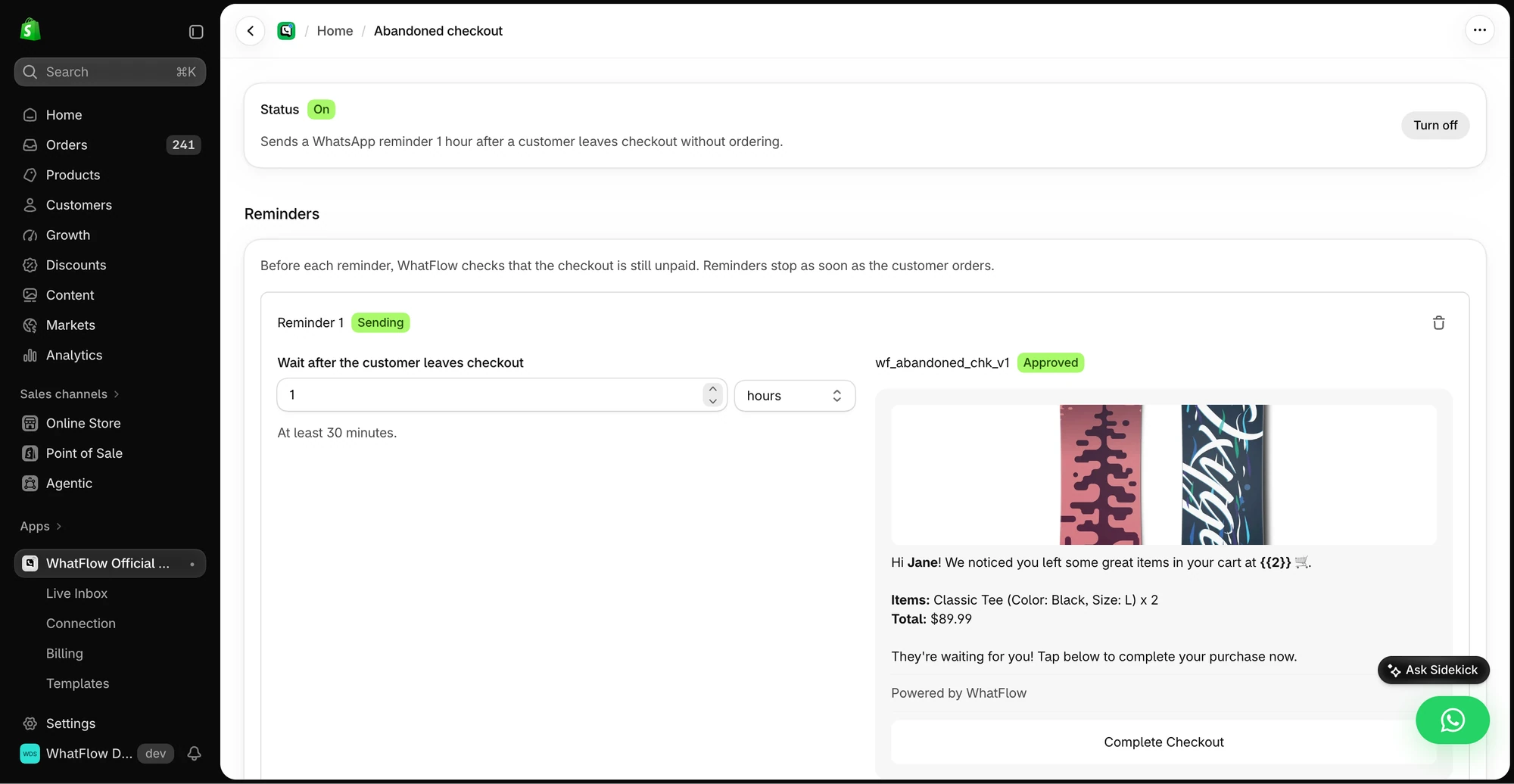
Meta charges per delivered template on top. Cart reminders are typically marketing templates, which carry a higher Meta rate than utility ones, so don't send a second and third reminder by default. One well-timed message plus a helpful reply beats a sequence. See WhatsApp Business API pricing explained and our pricing page.
Every WhatFlow feature, cart recovery included, is on every plan. You never upgrade just to get it.
How should WhatsApp and email work together?
Don't fire both at the same moment. A sensible order:
- WhatsApp first (for opted-in shoppers), about an hour after abandonment, with the cart link and an invitation to ask questions.
- Email later for anyone who didn't buy and isn't on WhatsApp, or as a gentle second touch the next day.
- Stop everything the moment they purchase.
Shopify Flow helps here. WhatFlow adds WhatsApp actions to Flow, so you can add conditions like "only if cart value is over $50" or "skip if the customer already has an open order". Coordinating email, SMS and WhatsApp covers spacing.
Do I need permission to send WhatsApp cart reminders?
Yes. Meta's WhatsApp Business Messaging Policy requires opt-in before you message someone first, and you must honour opt-outs. Collect opt-in at checkout, where the phone number is entered anyway. Collecting WhatsApp opt-ins on Shopify shows how.
Is WhatsApp cart recovery ready for a large store?
WhatFlow WhatsApp Business API sends through the official Meta WhatsApp Cloud API, and it's built for teams of any size: a shared inbox with assignment and filters, no seat fees, Shopify Flow automation, COD confirmation, live catalog sharing and Shopify admin extensions. Small stores start on the Free plan with every feature.
When might email-only recovery still make sense?
Stick with email only if your customers genuinely don't use WhatsApp or you can't staff replies at all. Email is cheap and reaches everyone who left an address, so keep it as your backstop regardless. If SMS is also on the table, see WhatsApp vs SMS cart recovery.
The bottom line
Email reminds. WhatsApp converses. With WhatFlow, the reminder, the cart link and the follow-up chat live in Shopify, with every feature on the Free plan and no seat fees. WhatFlow WhatsApp Business API is rated 5.0/5 from 55 ratings on the Shopify App Store (as of November 5, 2026).
Questions worth asking
Is WhatsApp better than email for abandoned cart recovery?
For opted-in shoppers, WhatsApp is the stronger first message because they can reply with the question that stopped them and get an answer. Keep email as the backstop for everyone else.
How do I test WhatsApp cart recovery against email?
Split comparable shoppers into groups, make sure reminders stop once someone buys, and avoid sending WhatsApp and email at the same minute. Read the replies too: they tell you what's blocking checkout.
Is abandoned cart recovery on WhatFlow's free plan?
Yes. Abandoned checkout recovery, like every WhatFlow feature, is on every plan including Free. Plans differ only by message allowance.
How much does a WhatsApp cart reminder cost?
You pay WhatFlow's plan (Free or from $4.99/month) plus Meta's per-message charge for the template, which depends on category and country. Cart reminders are typically marketing templates.
Sources and methodology
We checked these primary sources on November 5, 2026. Vendor pages describe advertised capabilities, rather than independent performance tests. Confirm current pricing, plan limits and availability with each provider.
- WhatFlow plans and Shopify integrations
WhatFlow listing: timed cart reminders with cart links and plan pricing, checked November 5, 2026.
- WhatsApp Business Platform pricing
Meta's overview of WhatsApp Business Platform pricing by category and country.
- Google: New Gmail protections for a safer, less spammy inbox (October 3, 2023)
Google's October 2023 announcement of Gmail bulk-sender requirements; background on email deliverability.
- WhatsApp Business Platform pricing (Meta developer docs)
Meta charges per delivered template message by category and recipient country. Since October 1, 2026, service replies are free only for the first 1,000 per business number each month, and utility templates inside the customer service window are charged.
- WhatsApp Business Messaging Policy
Opt-in, opt-out and template rules for business-initiated WhatsApp messages.