WhatFlow doesn't have a dedicated back-in-stock feature, and I'd rather say that up front. You can still send back-in-stock alerts from Shopify over WhatsApp in two ways: Shopify Flow's "Product variant back in stock" trigger plus WhatFlow's template action, or a back-in-stock app's own Flow trigger feeding the same action. Both need opted-in subscribers and an approved template.
Two ways to send back in stock alerts from Shopify
Route A: Flow + customer tags
Route B: back-in-stock app + Flow
Who collects sign-ups
You (WhatsApp chat or a form)
Your back-in-stock app
What fires the alert
Shopify Flow's "Product variant back in stock" trigger
You manage tags; Flow returns up to 100 customers per lookup
Only works if the app's trigger passes a phone number
I'd start with Route A if most of your "is this coming back?" questions already arrive on WhatsApp. Go to Route B if you already have a back-in-stock app with a sign-up form on your product pages.
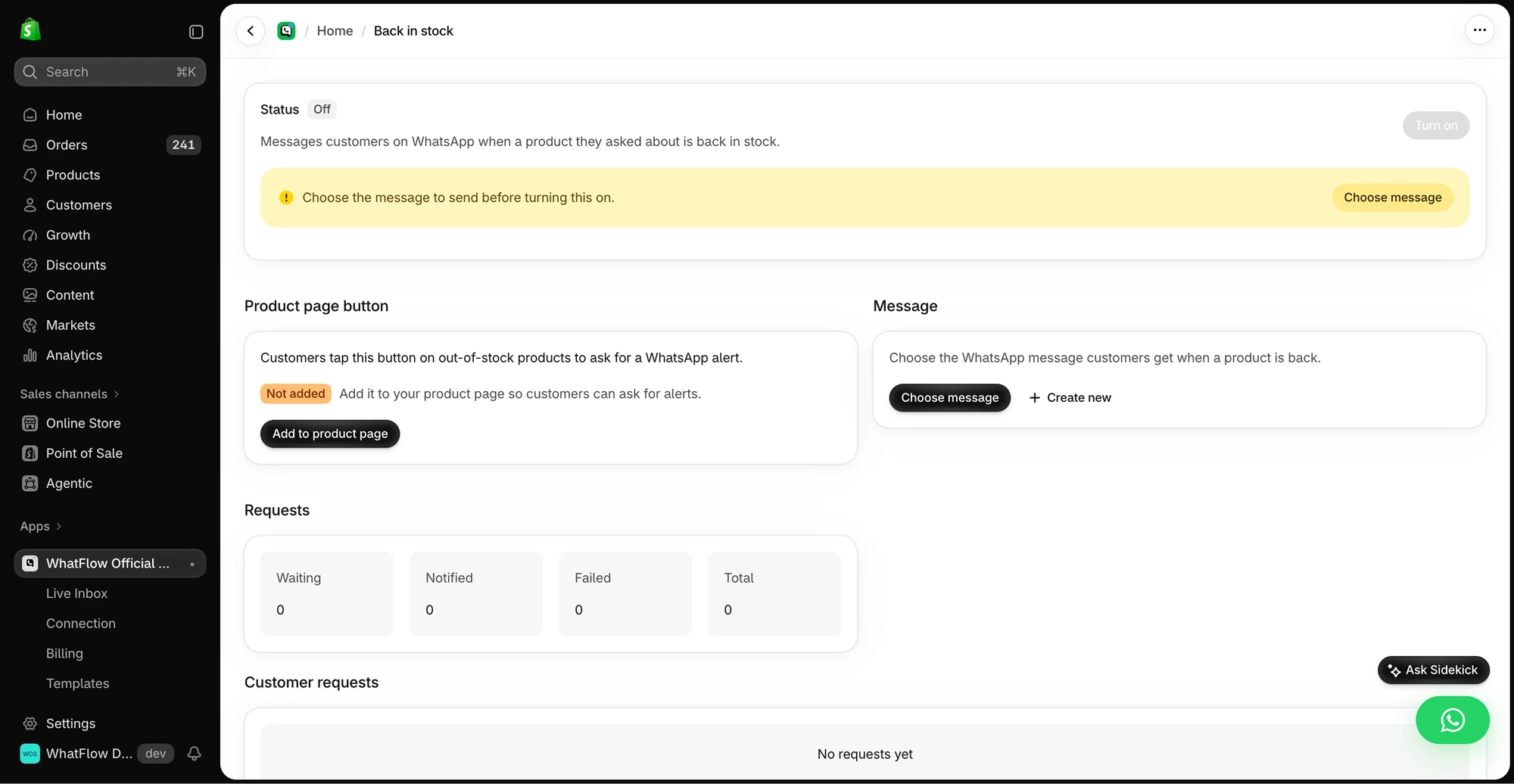
The demo setup shows the product-page button, message selection and request queue before the workflow is enabled.
Route A: Shopify Flow, customer tags and WhatFlow
Step 1: capture the request with consent
Say a customer messages: "Is the oat linen shirt coming back in M?" Reply inside the chat:
It's sold out in M right now, sorry. We're expecting more in about two weeks. Want a WhatsApp message the moment it's back? Reply YES and we'll send one alert, nothing else.
When they say yes, tag the customer in Shopify with something that identifies the variant, for example bis-oat-linen-m. You can do that by hand from the customer record. If you'd like to automate tagging from incoming messages, routing incoming WhatsApp messages with Shopify Flow shows what's possible.
Write a back-in-stock template in WhatFlow's template editor with variables for the customer's first name, product name and link. Meta decides the template's category. A restock alert promotes a product, so expect it to be treated as marketing in many cases; our marketing vs utility templates explainer has the detail. It can't send until it's approved.
Step 3: build the Flow workflow
Trigger: Product variant back in stock. Per Shopify's docs, this fires when a variant's inventory increases from 0 or less to 1 or more, whether the change comes from an order, a manual edit or an app.
Condition: check it's the variant you care about (or use the variant's SKU to build the tag you search for).
Action: Get customer data. Query customers with the matching tag. Flow returns up to 100 customers per run.
For each customer returned:
Condition: confirm the customer really has the tag. Shopify's docs warn that a failed query can return all results instead of none, and you do not want to alert your whole customer list about one shirt.
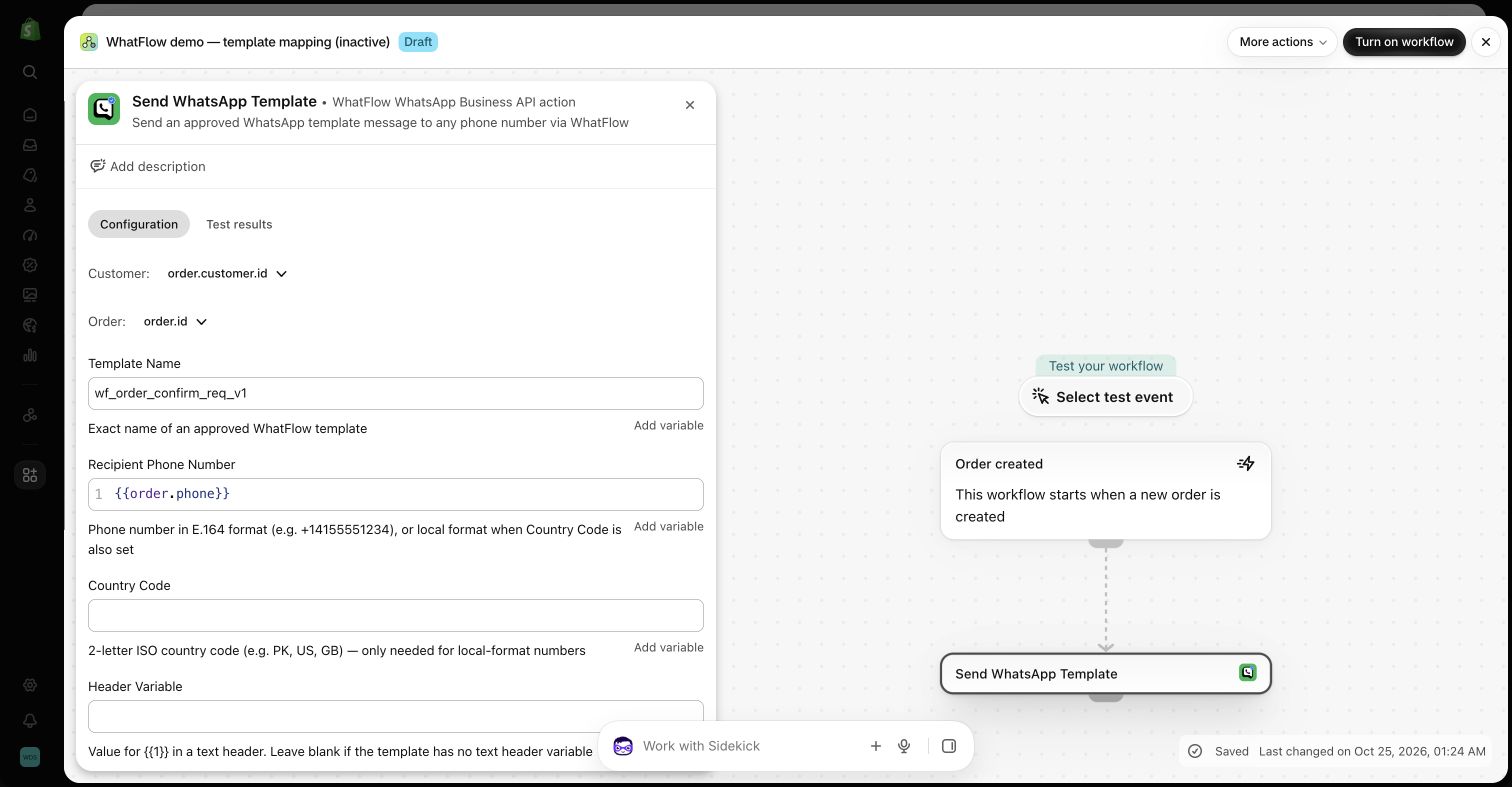
Action: WhatFlow's send-template action, mapping first name, product title and product URL into the template variables.
Action: remove the bis- tag so they're not alerted again next time.
WhatFlow's send-template action in a demo Shopify Flow workflow. Nothing was sent.
The back-in-stock trigger doesn't care about locations; it's about in stock versus out of stock. If you only want to alert people when a specific warehouse or shop has stock, or only when you have, say, more than five units, use Flow's "Inventory quantity changed" trigger, which gives you the prior quantity and per-location levels to build conditions on.
Route B: a back-in-stock app's Flow trigger
Many back-in-stock apps on the Shopify App Store add their own Shopify Flow triggers. If yours does, the setup is shorter: the app collects sign-ups on your product page, fires a trigger when it's time to notify someone, and you add WhatFlow's send-template action to that workflow.
Before you build anything, check three things in your app's Flow trigger:
Does it pass a phone number? If the trigger only includes an email address, you can't send a WhatsApp message from it.
Does it fire per subscriber or per product? Per subscriber is easiest: one trigger, one WhatsApp. Per product means you'll need to look up the subscribers yourself.
Does the sign-up form collect WhatsApp consent? An email sign-up isn't WhatsApp consent. Add a WhatsApp checkbox or a separate phone field with clear wording.
Notify me on WhatsApp when this is back in stock. We'll send one message for this item. Reply STOP any time.
Short, specific, and it tells people exactly what they're signing up for. That one line does more for your quality rating than anything else in this guide.
Back-in-stock message examples
Standard alert:
Hi Rhea, good news: the Oat Linen Shirt is back in size M. Here's the link: shoplinen.co/oat-shirt
You asked us to let you know, so this is the only message you'll get about it.
Small restock (be honest about quantity):
Hi Rhea, the Oat Linen Shirt is back in M, but only a small batch came in. If you still want one, here it is: shoplinen.co/oat-shirt
Back, but different:
Hi Rhea, the Oat Linen Shirt is back in M. Heads-up: the new batch has a slightly longer sleeve (2cm). Happy to send a photo if you'd like to compare. Link: shoplinen.co/oat-shirt
If someone replies with a question, that opens the 24-hour customer service window and you can answer normally.
How many alerts, and when?
One alert per request. No "still thinking about it?" follow-up. They asked for one message, so send one.
Timing is the awkward part. Flow fires the moment inventory changes, which might be 2am when your supplier's stock sync runs. If that's a problem, change how you restock (receive inventory during working hours) or move the send to a scheduled workflow.
And if 300 people are waiting for a variant and 20 units arrive, think before you alert everyone at once. A small-restock message like the one above keeps expectations honest.
Test before you switch it on
A back-in-stock workflow that misfires can message the wrong people, so test it properly:
Create a test product (or a hidden variant) with zero inventory.
Tag your own customer record with the matching bis- tag, using your own phone number, opted in.
Tag a colleague's test record with a different tag, to make sure they're not messaged.
Change the test variant's inventory from 0 to 1.
Check: did you get exactly one message, with the right product name and link? Did your colleague get nothing? Was your tag removed afterwards?
Look at the workflow's run history in Shopify Flow for errors.
Only then activate it for real products. And when you change the template later, run the test again.
Free plan available
Run WhatsApp for your Shopify store with WhatFlow
Templates, COD confirmation, Shopify Flow automations and a shared team inbox with no seat fees. Every feature is included on every plan, including Free.
Both work. WhatsApp gets seen fast and invites a reply; email is cheaper per message and fine for low-urgency items. If you're choosing between them, our WhatsApp vs email comparison for back-in-stock alerts lays out the trade-offs. Many stores offer both on the sign-up form and let the customer pick.
Frequently asked questions
Does WhatFlow have a built-in back-in-stock feature?
No. WhatFlow doesn't have a dedicated back-in-stock feature. You can send back-in-stock alerts by connecting Shopify Flow's inventory triggers, or a back-in-stock app's Flow trigger, to WhatFlow's send-template action.
Which Shopify Flow trigger fires when a product comes back in stock?
The Product variant back in stock trigger starts a workflow when a variant's inventory goes from 0 or less to 1 or more. For location-specific logic, Shopify points to the Inventory quantity changed trigger instead.
Do back-in-stock WhatsApp alerts need opt-in?
Yes. The customer has to agree to receive the alert on WhatsApp, and the alert must use a Meta-approved template because it's sent outside an open chat window.
Should I send a follow-up if the customer doesn't buy after a restock alert?
Usually no. One alert is what they asked for. If stock is running low and they replied to the first message, a short answer in that chat is fine.