
Publisher disclosure: this comparison is written by WhatFlow. Competitor capabilities are based on the linked public documentation; the WhatFlow screenshots come from our demo store. Examples are illustrative, and results depend on your store and configuration.
WhatFlow and Email stock alerts at a glance
| Consideration | WhatFlow | Email stock alerts |
|---|---|---|
| Speed and visibility | A phone notification in minutes, from your business name, next to the shopper's chats. | An email that may be read hours later, after a small restock has sold out. |
| Cost | WhatFlow from $0 (Free) or $4.99/month for 2,000 messages, plus Meta's per-template charge. You only message people who asked. | Low per send; often part of an email platform priced by contacts. |
| Shopify setup | Shopify Flow plus WhatFlow's Send WhatsApp Template action, triggered by your back-in-stock app's Flow trigger or an inventory change. | Built into most back-in-stock apps and email platforms. |
| Shopper questions | Replies like 'is the M true to size?' land in WhatFlow's team inbox; staff can share the product from the live catalog. | Replies go to a mailbox, if the sender address accepts them. |
| Consent | Needs WhatsApp opt-in at the waitlist sign-up. | Needs email consent at the waitlist sign-up. |
For shoppers who asked to hear about a restock on WhatsApp, send the alert there, not by email. Restocks of popular sizes can sell out fast, and a WhatsApp notification gets seen in minutes while an email may wait for hours. With Shopify Flow and WhatFlow's template action, the alert goes out from Shopify, and shoppers can reply with a question before they buy. Keep email for sign-ups without WhatsApp consent.
At a glance
- WhatsApp (Shopify Flow + WhatFlow): fast, from your business name, two-way. Shoppers can ask "is it true to size?" and get an answer.
- Email: fine for large waitlists and people who only gave an email address.
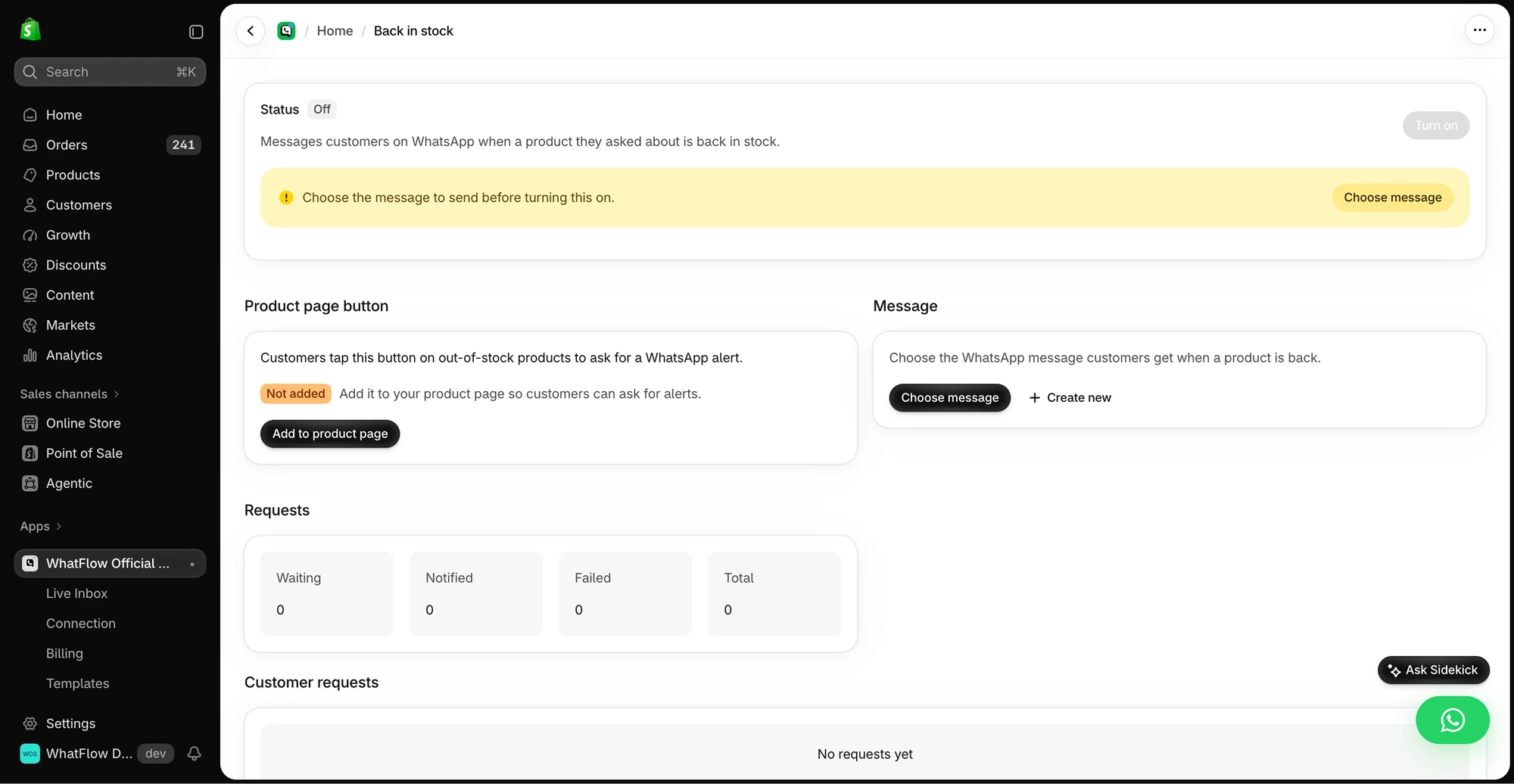
- Setup: WhatFlow doesn't have a dedicated back-in-stock feature. You build it in Shopify Flow, using your back-in-stock app's Flow trigger or an inventory trigger, plus WhatFlow's Send WhatsApp Template action.
How do I send back-in-stock alerts on WhatsApp?
There are two common setups.
Option 1: your back-in-stock app plus Flow. Many back-in-stock apps keep the waitlist and fire a Shopify Flow trigger for each subscriber when stock returns. Add WhatFlow's action to that workflow:
- Trigger: your back-in-stock app's "product back in stock" trigger.
- Condition: subscriber chose WhatsApp and has a phone number.
- Action: WhatFlow, Send WhatsApp Template, mapping first name, product, variant and product link.
Option 2: Shopify's inventory trigger. If you keep a small waitlist yourself (for example, tagging customers who asked in chat), use a Flow inventory-change trigger, find the tagged customers and send the template. This suits small, hand-curated lists.
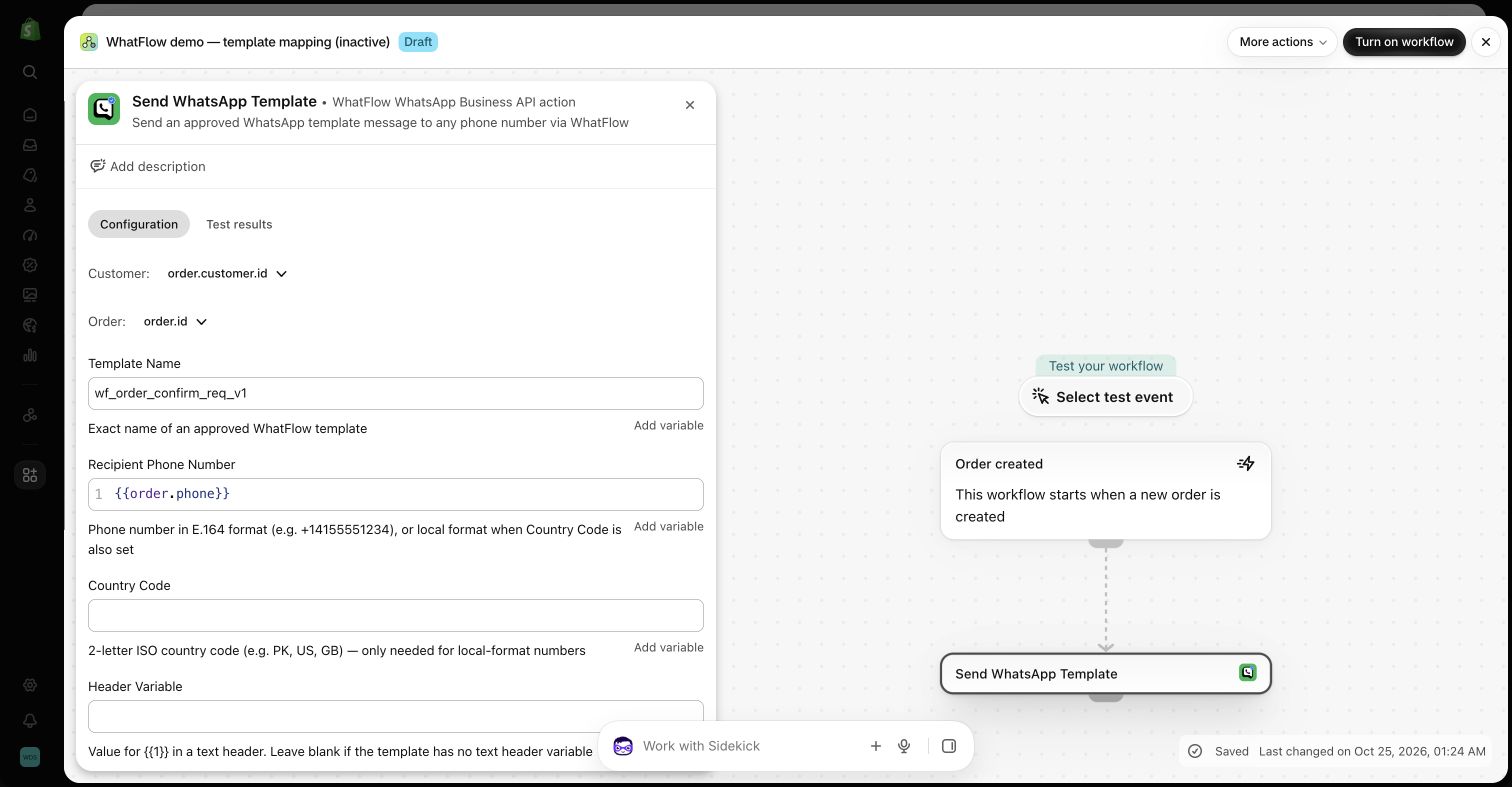
The full walkthrough is in back-in-stock alerts on WhatsApp, and connecting WhatsApp to your Shopify app workflows covers other app triggers.
What does a good restock alert say?
Hi Zainab, the Silk Midi Dress in Emerald, size M, is back in stock: {product_link}. We only got a few in. Questions about fit? Reply here.
Name the exact variant, link straight to it, and be honest about quantity. If Zainab replies "is the M true to size? I'm usually between M and L", your teammate can answer from WhatFlow's inbox and share the product from your live catalog. That reply is often what turns an alert into an order.
Why does speed matter for restocks?
Because a restock is usually small. If you get 20 units of a bestselling size and 150 people are waiting, the first ones to see the alert buy them. A message that shows up on the phone gets acted on sooner than one sitting in an email tab.
That also makes honesty important. An alert isn't a reservation. If the variant sells out before someone clicks, the product page should say so clearly, and your team should have a saved reply ready:
Sorry, that batch sold out faster than we expected. Want me to put you on the list for the next one?
How much do WhatsApp restock alerts cost?
A worked example with hypothetical numbers. Say you restock 10 popular variants a month and 60 WhatsApp subscribers are waiting on each: 600 alerts. Add your order updates, say 1,000 a month, and you're at 1,600, inside WhatFlow's Starter plan at $4.99/month for 2,000 messages (as of November 2026). Every feature, Flow actions included, is on every plan.
Meta charges per delivered template on top, by category and country. Restock alerts may be categorised as marketing by Meta, so budget at that rate unless your approved template says otherwise. See WhatsApp Business API pricing explained and our pricing page.
Do customers need to opt in?
Yes. Meta's WhatsApp Business Messaging Policy requires opt-in before you message someone first. Give the waitlist form a clear WhatsApp option ("Notify me on WhatsApp") rather than assuming an email sign-up covers it. Collecting WhatsApp opt-ins on Shopify shows the wording.
Is WhatFlow built for big drops?
Yes. WhatFlow WhatsApp Business API runs on the official Meta WhatsApp Cloud API, and it's enterprise-ready: inbox assignment and filters for launch-day rushes, no seat fees at any team size, Shopify Flow automation at scale, COD confirmation, live catalog sharing and Shopify admin extensions. For launch planning, see launching a product on WhatsApp.
When does email still make sense?
Use email for waitlist sign-ups that didn't opt in to WhatsApp, and for very large waitlists where you'd rather not pay a per-message fee for every subscriber. Email is cheap and broad; it just isn't fast or conversational.
The bottom line
Restocks reward speed and a quick answer to "will it fit?". WhatsApp gives you both. With Shopify Flow and WhatFlow, the alert goes out from Shopify and replies land in a team inbox with no seat fees. WhatFlow WhatsApp Business API is rated 5.0/5 from 55 ratings on the Shopify App Store (as of November 5, 2026).
Questions worth asking
Can WhatFlow send back-in-stock alerts on WhatsApp?
Yes, through Shopify Flow. WhatFlow doesn't have a dedicated back-in-stock feature, but its Send WhatsApp Template action works with a back-in-stock app's Flow trigger or an inventory-change trigger to message waiting shoppers.
What should I test before sending WhatsApp restock alerts?
Restock a test variant, check the alert names the exact variant and links to it, and confirm each subscriber gets only one message. Then sell the variant out again and make sure no late alerts go out.
Do I need a paid WhatFlow plan for back-in-stock messages?
No. The Shopify Flow actions and every other WhatFlow feature are on every plan, including Free. Plans differ only by message allowance.
How much does a WhatsApp back-in-stock alert cost?
WhatFlow's plan (Free or from $4.99/month) plus Meta's per-message charge for the template, which depends on category and recipient country. Meta decides the template category.
Sources and methodology
We checked these primary sources on November 5, 2026. Vendor pages describe advertised capabilities, rather than independent performance tests. Confirm current pricing, plan limits and availability with each provider.
- WhatFlow plans and Shopify integrations
WhatFlow listing: plans from Free to Ultimate and Shopify integrations, checked November 5, 2026.
- WhatsApp Business Platform pricing
Meta's overview of WhatsApp Business Platform pricing by category and country.
- Google: New Gmail protections for a safer, less spammy inbox (October 3, 2023)
Google's October 2023 announcement of Gmail bulk-sender requirements; background on email deliverability.
- WhatsApp Business Platform pricing (Meta developer docs)
Meta charges per delivered template message by category and recipient country. Since October 1, 2026, service replies are free only for the first 1,000 per business number each month, and utility templates inside the customer service window are charged.
- Shopify Flow (Shopify Help Center)
Shopify Flow is free and available on Basic, Grow, Advanced and Plus plans, as of November 2026.
- WhatsApp Business Messaging Policy
Opt-in, opt-out and template rules for business-initiated WhatsApp messages.