
Publisher disclosure: this comparison is written by WhatFlow. Competitor capabilities are based on the linked public documentation; the WhatFlow screenshots come from our demo store. Examples are illustrative, and results depend on your store and configuration.
WhatFlow and WhatFlow Chat Automation at a glance
| Consideration | WhatFlow | WhatFlow Chat Automation |
|---|---|---|
| App and listing | WhatFlow WhatsApp Business API at apps.shopify.com/whatflow-official-api | WhatFlow Chat Automation (listed as WhatFlow: Whatsapp Automation) at apps.shopify.com/whatflow |
| Connection method | Official Meta WhatsApp Cloud API, connected from Shopify admin through Meta Embedded Signup. | Unofficial linked-device integration to your existing WhatsApp account; no Meta Business setup. |
| Best for | Any Shopify store that wants templates, broadcasts, Shopify Flow automation and a shared team inbox. Our default recommendation. | Small and startup stores with modest order volume that want the fastest possible setup. |
| Shopify App Store rating (checked November 8, 2026) | 5.0 out of 5 from 58 ratings | 4.0 out of 5 from 331 ratings |
| Shopify listing launched | May 8, 2026 | October 21, 2024 |
| Starter plan (app fee) | $4.99 per 30-day cycle with 2,000 sends, then $0.005 per send. Meta fees separate. | $4.99 per 30-day cycle with 1,000 sends, then $0.01 per send. |
| App fee at 5,000 sends | $9.99 on Plus, before Meta fees and tax. | $24.99 (Professional with overage, or Enterprise), before tax. |
| Features and team access | Every feature on every plan including Free, team inbox with no seat fees, free-forever theme-matched WhatsApp buttons. | Order and fulfillment automation from a linked number; see its own listing for the current feature set. |
I recommend WhatFlow Business API for most Shopify stores. It uses Meta’s official WhatsApp Cloud API and includes Shopify Flow, catalog sharing and a team inbox with no seat fees on every plan. WhatFlow Chat Automation is our older app: it uses an unofficial linked-device connection. I’d only recommend it for small or startup stores testing modest transactional sends.
I'm Safwan, co-founder of WhatFlow. We built both, so this isn't a "pick the winner" page. It's about matching the app to the stage your store is at.
WhatFlow Chat Automation vs Business API at a glance
WhatFlow Business API | WhatFlow Chat Automation | |
|---|---|---|
Connection | Official Meta WhatsApp Cloud API | Linked device (your existing number) |
Setup | Meta Embedded Signup from Shopify admin | Link your phone, no Meta Business account |
Rating (Nov 8, 2026) | 5.0/5 from 58 ratings | 4.0/5 from 331 ratings |
Launched | May 8, 2026 | October 21, 2024 |
Templates and broadcasts | Yes, Meta-approved templates with an editor | Order and fulfillment messages from your number |
Shopify Flow, team inbox, COD confirmation | Included on every plan, no seat fees | Built around order automation from one number |
Best for | Most stores, and any store planning to grow | Small and startup stores wanting the fastest start |
The Chat Automation listing showed 4.0/5 from 331 ratings on November 8, 2026. The Business API listing showed 5.0/5 from 58 ratings on the same date. Each rating belongs to its own listing. The older app has a longer review history; its rating doesn’t describe the official API app.
One practical check: Can you run a launch and handle replies without swapping tools? Use the campaign, team inbox and catalog checkout walkthroughs to evaluate the broader WhatFlow Business API workflow alongside recovery and notifications.
What's the difference between linked-device and the official API?
Chat Automation connects to your WhatsApp account as a linked device. It’s an unofficial integration, outside the Meta Cloud API, and has a lower setup barrier for a small shop. I’d keep it to modest transactional work, like a candle shop testing order updates from its existing number. If those messages are critical to shipping, I’d start on the official API.
The official Meta Cloud API is Meta's supported platform for business messaging. Messages sent outside the 24-hour customer service window use Meta-approved templates, and you get the tooling built for business volume: broadcasts, template categories, quality ratings and messaging limits. Our guide to what the WhatsApp Business API is explains it in plain English.
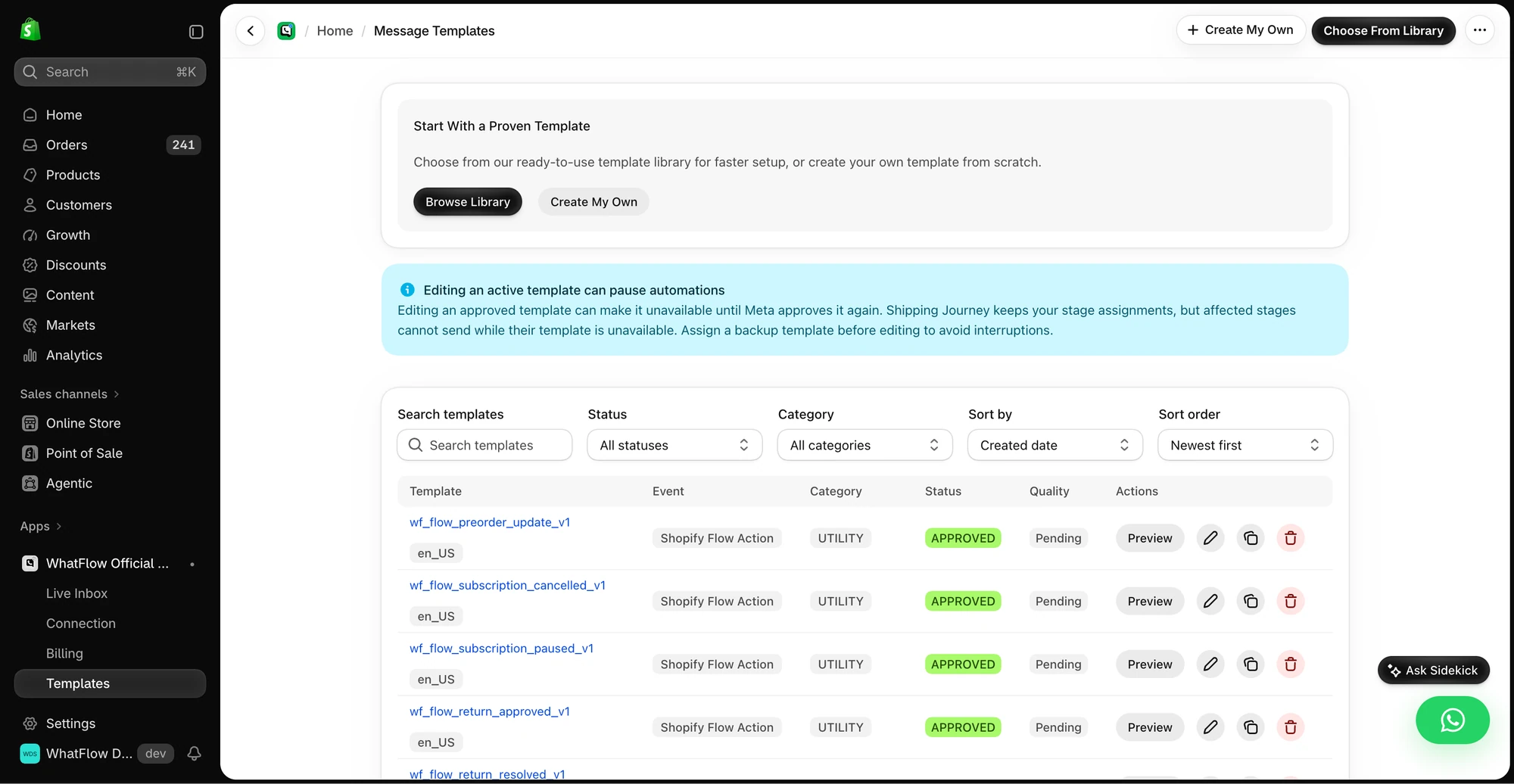
Some merchants told us their linked sessions disconnected or their accounts faced restrictions as sending grew. That feedback helped shape Business API. It doesn’t explain every older review, and the official API isn’t a guarantee of delivery or account status. The advantage is using Meta’s supported business messaging platform and tools for templates, quality and limits.
How much does each WhatFlow app cost?
App fees as of November 2026, per 30-day cycle (current amounts are always on our pricing page):
Plan | Business API | Chat Automation |
|---|---|---|
Free | 100 sends, then $0.01 | 50 sends, then $0.01 |
Starter $4.99 | 2,000 sends, then $0.005 | 1,000 sends, then $0.01 |
$9.99 | Plus: 5,000 sends, then $0.004 | Growth: 2,000 sends |
Higher tiers | Growth $29 (20,000), Scale $49.99 (40,000), Ultimate $99 (75,000) | Professional $14.99 (4,000), Enterprise $24.99 (7,500), Ultimate $49.99 |
Business API includes more sends at the same price points. At 5,000 sends a month, Business API Plus costs $9.99 in app fees. On Chat Automation, the same volume is $24.99 (Professional plus 1,000 overage sends, or Enterprise).
The $15 difference in the 5,000-send example is only the gap in app fees. Business API can also incur Meta charges based on message type, destination and current rules. Chat Automation doesn’t use the Cloud API billing model. At low transactional volume, its total may be lower; compare the complete bill and the operational cost of losing a linked session. Use Meta’s pricing page for current delivery charges.
What does Business API add for a growing store?
If you still think of WhatFlow as "the unofficial WhatsApp app for small shops", that picture is out of date. WhatFlow WhatsApp Business API runs on the official Meta Cloud API and is ready for enterprise-sized teams, while staying the easiest start for a new store:
- Every feature on every plan, including Free. Plans differ only by message allowance and rate.
- A shared team inbox with no seat fees at any team size, with assignment, filters and saved replies. A 50-person team pays the same in seats as a two-person shop.
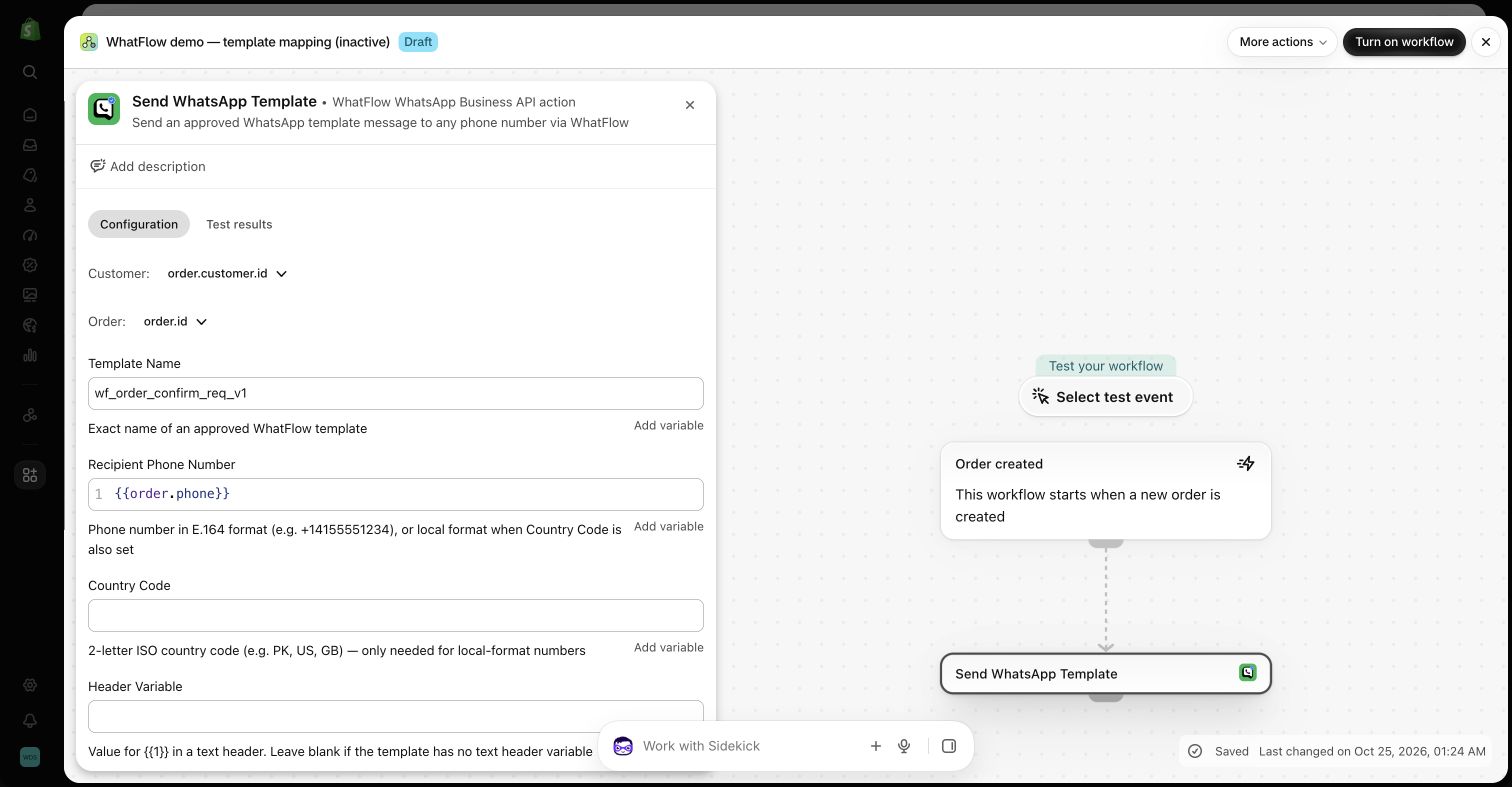
- Native Shopify Flow triggers and actions: incoming-message and order-reply triggers, plus template, text and media actions.
- COD confirmation with reply buttons that can tag or cancel orders through Flow.
- Abandoned checkout, order and shipping templates, broadcasts and review-request workflows.
- Live catalog sharing from the inbox.
- Free-forever theme-matched WhatsApp buttons for your storefront.
A COD confirmation on Business API looks like this:
Hi Fatima, thanks for your order #2481 (PKR 4,500, cash on delivery). Please confirm so we can dispatch it today. [Confirm order] [Cancel]
When she taps Confirm, Shopify Flow tags the order and your packer sees it ready to ship. The WhatFlow and Shopify Flow guide shows how to build it.
Which WhatFlow app should you choose?
Pick Chat Automation if you're a small or startup store, you want order confirmations and fulfillment updates going out from your current number today, and you don't need templates, broadcasts or a team inbox yet. Keep the use simple and transactional.
Pick Business API if any of these are true:
- More than one person answers customer messages.
- You run COD and want confirmations to tag or cancel orders automatically.
- You plan broadcasts, abandoned checkout recovery or back-in-stock alerts.
- You want your WhatsApp automation inside Shopify Flow.
- Your store is growing and you'd rather set up once on the official platform.
Official API access doesn't exempt you from WhatsApp's rules. Opt-in, template approval and message quality still apply, which is exactly why we put the template editor and Flow tooling in the app.
Moving from Chat Automation to Business API
If you're on Chat Automation and ready to move up, plan it like any other change to a live workflow:
- Check your number's eligibility for the WhatsApp Business Platform. Our app-to-API migration guide covers what changes.
- Connect through Meta Embedded Signup from Shopify admin.
- Recreate your order messages as templates and submit them for approval.
- Test one full journey, say a COD order through to the confirm reply, before switching your automations over.
Before switching, confirm number eligibility, what history is available and whether the number can keep using the WhatsApp Business app. Don’t assume your templates or workflows transfer. Run one internal test order and disable the equivalent old automation before enabling the new one, so customers don’t get duplicate messages.
The bottom line
Both apps come from the same team that's been building WhatsApp for Shopify since 2024. Chat Automation is the established quick-start app with 331 ratings behind it. Business API is where we're putting our energy: official Meta Cloud API, Shopify Flow, a no-seat-fee inbox and every feature on every plan, rated 5.0/5 by its first 58 reviewers. If you're unsure, install Business API on the Free plan and see how far it takes you.
Questions worth asking
Why do the two WhatFlow apps have different ratings?
They're separate Shopify apps with separate review histories. As of November 8, 2026, WhatFlow Chat Automation is rated 4.0/5 from 331 ratings since its October 2024 launch, and WhatFlow WhatsApp Business API is rated 5.0/5 from 58 ratings since its May 2026 launch.
Are WhatFlow Chat Automation and WhatFlow Business API the same app?
They are separate Shopify apps by the same team. Chat Automation uses an unofficial linked-device integration. WhatFlow Business API uses Meta’s official WhatsApp Cloud API. Pricing, Shopify features and reviews belong to each app separately.
Which WhatFlow app is best for a small or startup store?
For modest transactional sending with minimal setup, Chat Automation can be a starting point. I recommend the official Business API if orders depend on those messages, or if your team needs Shopify Flow and a shared inbox. Business API has a Free plan.
Which WhatFlow app should a growing Shopify store use?
WhatFlow WhatsApp Business API. It uses the official Meta Cloud API and adds approved templates, broadcasts, native Shopify Flow triggers and actions, COD confirmation and a shared team inbox with no seat fees.
Why did WhatFlow build a second app on the official API?
We built Business API after merchants outgrew linked-device sending and some reported disconnections or account restrictions. The official API is our recommendation for important Shopify workflows. Its rules on opt-in, templates and message quality still apply.
Is WhatFlow Business API ban-proof?
No WhatsApp tool is. The official Meta Cloud API is the supported route for business messaging, but every business still has to follow WhatsApp's policies on opt-in, templates and message quality.
Is Chat Automation cheaper than Business API?
Not always. At 5,000 sends a month, Business API's Plus plan is $9.99 in app fees versus $24.99 on Chat Automation. Business API adds Meta's per-template delivery fees on top, so for small transactional volumes Chat Automation's total can be lower.
Does WhatFlow Business API charge per inbox seat or limit features on Free?
No to both. Every WhatFlow Business API plan, including Free, has every feature and a team inbox with no seat fees. Plans differ only by message allowance and rate, and Meta's delivery fees are separate.
How long has WhatFlow been on the Shopify App Store?
Since October 21, 2024, when WhatFlow Chat Automation launched. That's over two years as of November 2026. WhatFlow WhatsApp Business API launched on May 8, 2026.
What's WhatFlow's goal for 2027?
Our ambition is to make WhatFlow the leading WhatsApp app for Shopify stores by the end of 2027. That's a goal we intend to earn through the product, not a ranking we claim today.
Is WhatFlow Chat Automation an unofficial WhatsApp API app?
Yes. Chat Automation connects as a linked device and does not use Meta’s official WhatsApp Cloud API. We recommend it only for small, low-volume transactional use. For important Shopify automations, use WhatFlow Business API.
Sources and methodology
We checked these primary sources on November 8, 2026. Vendor pages describe advertised capabilities, rather than independent performance tests. Confirm current pricing, plan limits and availability with each provider.
- WhatFlow Chat Automation (WhatFlow: Whatsapp Automation) on the Shopify App Store
Linked-device connection, launch date, pricing and the 4.0/5 rating from 331 ratings, checked November 8, 2026.
- WhatFlow WhatsApp Business API on the Shopify App Store
Official API integration, launch date, plan pricing and the 5.0/5 rating from 58 ratings, checked November 8, 2026.
- WhatsApp Business Messaging Policy
Meta's rules on opt-in, templates and message quality, which apply to every business sender.
- WhatsApp Business Platform pricing
Meta's per-message delivery pricing by category and country, separate from WhatFlow's app fees.