The WhatsApp Business API (officially the WhatsApp Business Platform) is Meta's way for software to send and receive WhatsApp messages on a business number. Instead of one person typing on a phone, a Shopify app can send order updates automatically, run opted-in campaigns and let a whole team reply from one inbox. Most Shopify stores use it through an app, not by writing code.
That's the short version. The rest of this guide explains the pieces in plain English: what "API" actually means here, how it differs from the free WhatsApp Business app, who the "providers" are, what it costs, and what happens when you click "Connect WhatsApp" inside a Shopify app like WhatFlow.
What does "WhatsApp Business API" actually mean?
An API (application programming interface) is a door that lets one piece of software talk to another. The WhatsApp Business API is the door Meta opens so your software can use WhatsApp on your behalf.
You'll see several names for the same thing:
WhatsApp Business Platform: Meta's official umbrella name.
WhatsApp Cloud API: the version Meta hosts itself. This is what new businesses use. Meta retired the older self-hosted On-Premises API in October 2025, so in 2026 "the API" means the Cloud API.
WhatsApp Business API: the name everyone still searches for. Same thing.
What the API gives you is not an app with buttons. It's raw capability: send this template to this number, receive this reply, upload this image. A Shopify app wraps that capability in screens you can use: a template editor, an inbox, automation settings, a chat button.
WhatsApp Business app vs WhatsApp Business API: what's the difference?
The WhatsApp Business app is a free phone app for one business to chat by hand. The WhatsApp Business API is a platform that lets software run your WhatsApp: automations, campaigns, integrations and a multi-person inbox. Here's how they compare for a Shopify store:
Required for anything you send outside the 24-hour window
Cost from Meta
Free
Per delivered template message; service replies free up to a monthly tier
Verified badge route
Meta Verified subscription
Official Business Account request
Setup
Download and go
Meta business portfolio, number verification, display name
The app is the right tool when you're doing a few dozen chats a day yourself. The API is the right tool the moment you want WhatsApp to run while you sleep, or want more than one person answering. If you're comparing directly, see WhatFlow vs the WhatsApp Business app.
Who are WhatsApp API providers (BSPs) and do you need one?
Meta doesn't sell you a dashboard. It provides the Cloud API, and other companies build products on top. You'll hear several labels:
Business Solution Providers (BSPs) or Solution Partners: companies Meta has approved to onboard businesses and often to handle billing.
Tech Providers: software companies (including Shopify apps) that connect businesses to the Cloud API through Embedded Signup.
Direct integration: a developer builds on the Cloud API with no middle layer.
For a Shopify store, the question isn't really "which BSP?". It's "which tool will my team actually use every day?" That tool should know about your Shopify orders, customers and products without a Zapier chain in the middle. I've laid out the trade-offs of building your own in Shopify WhatsApp app vs building on Meta's Cloud API, and why Shopify-native matters in Shopify-native WhatsApp vs an external dashboard.
How does a Shopify app connect to the WhatsApp Business API?
Shopify apps like WhatFlow connect your number to the Cloud API using Meta Embedded Signup: a Meta-hosted sign-up flow that opens inside the app, collects your business details, creates the WhatsApp assets you need and grants the app permission to use them.
I'd evaluate WhatFlow Business API across a whole sales journey: run a Shopify WhatsApp campaign, work the replies in the shared inbox, then share the right product and link to checkout. Those jobs sit alongside recovery and order notifications. If you only test the first order message, you miss much of what the app replaces.
Here's what you'll see when you connect WhatFlow WhatsApp Business API from Shopify admin:
Log in with Facebook. You use your own Meta login. WhatFlow never sees your password.
Choose or create a business portfolio. This is the Meta business account (formerly Business Manager) that will own your WhatsApp assets. If your store already runs Meta ads, you likely have one.
Choose or create a WhatsApp account. Meta's older docs call this a WhatsApp Business Account (WABA); newer docs call it a WhatsApp or Messaging account. It holds your numbers and templates.
Add and verify your phone number. Meta sends a code to the number. It must be able to receive that code.
Set your display name. The name customers see instead of your number once it's approved. Use your real store brand.
Grant permissions. You confirm that the app can manage messages and templates for that account.
When you're done, the app can send templates, receive replies, and show conversations in its inbox. Meta's own Embedded Signup documentation describes the same flow from the developer side.
What if my number is already on WhatsApp?
This trips up a lot of merchants. Meta's phone number docs say a number already in use on WhatsApp can't be registered on the API until it's deleted from the app. Deleting a WhatsApp account erases its message history on that phone.
There's now a second option: coexistence, where Meta lets a WhatsApp Business app number stay in the app while also connected to the Cloud API through a partner that supports it. It has limits (some app features are switched off, only recent history syncs). I've covered both routes in moving from the WhatsApp Business app to the API. If you can, start the API on a fresh number and keep it forever.
What can you do with the WhatsApp Business API on Shopify?
Once connected, here's what a Shopify store typically uses it for:
Order confirmations and shipping updates, triggered by Shopify events.
COD order confirmation with reply buttons. In WhatFlow, a "Confirm" or "Cancel" tap can tag or cancel the order through Shopify Flow. Here's that workflow.
Abandoned checkout reminders to customers who opted in.
Campaigns to segments: launches, restocks, seasonal offers.
Team support in a shared inbox, with saved replies, assignment and filters.
Catalog sharing, sending product cards from your Meta catalog inside the chat.
Shopify Flow automations, like routing incoming messages by keyword or sending a template when an order is tagged. Start with the WhatFlow and Shopify Flow guide.
What happens to one order on the WhatsApp Business API?
Abstract explanations only go so far, so let's follow one order. Say you sell handmade ceramic mugs from Lahore, a customer in Karachi orders two mugs at 10:40pm and picks cash on delivery.
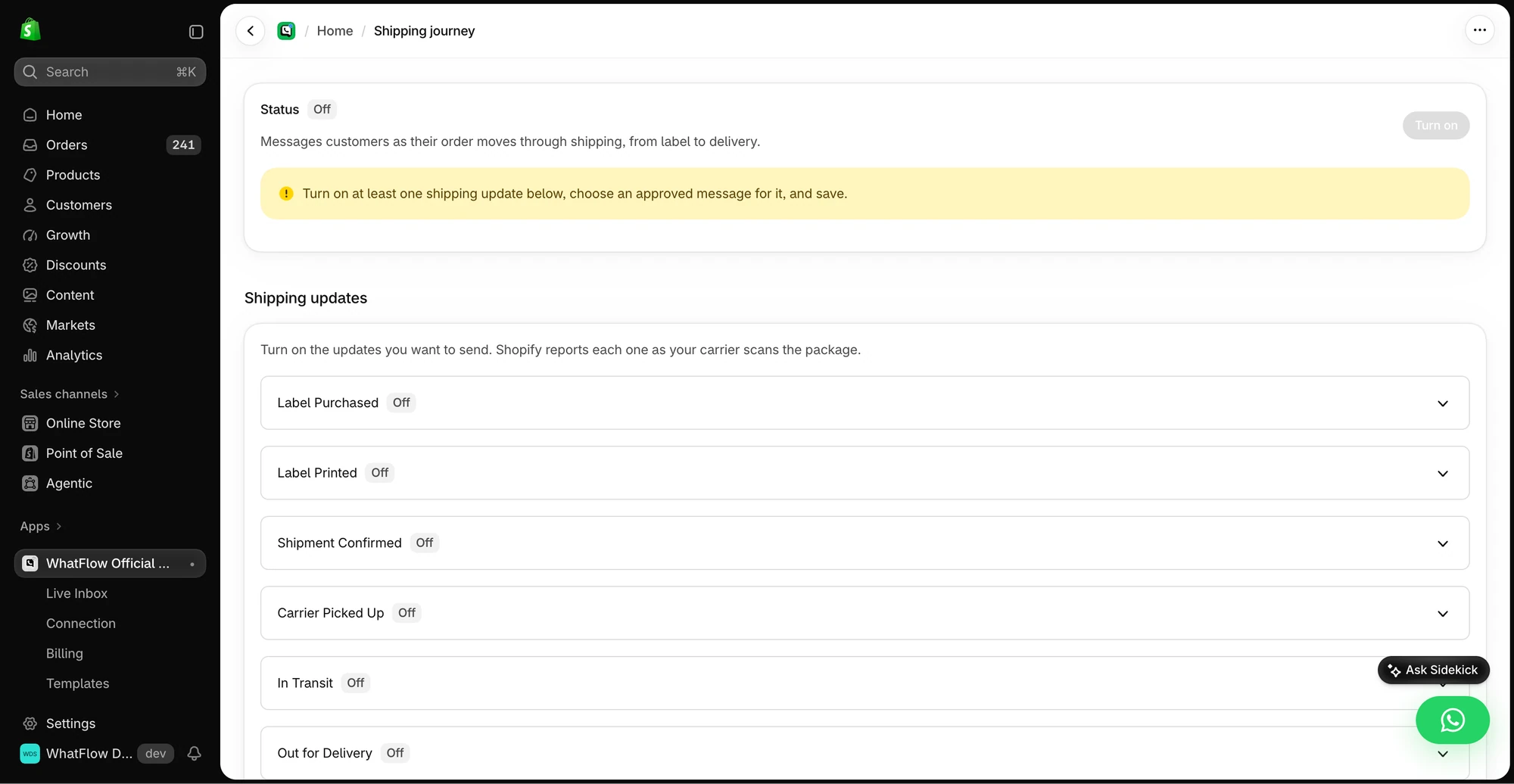
The demo Shipping Journey screen shows the available fulfillment stages. Individual stages need a message before they can be enabled.
10:40pm. Shopify creates the order. Your WhatsApp app sees the new COD order and sends an approved utility template through the Cloud API:
Hi Ayesha, thanks for your order #1042 from Clay & Co. Total to pay on delivery: Rs 4,800. Please confirm so we can pack it tomorrow morning.
[Confirm order] [Cancel order]
10:41pm. Meta delivers it. Because it's a template, Meta charges for it at the utility rate for a Pakistani number.
10:52pm. Ayesha taps "Confirm order". Her tap is a message to you, so it opens a 24-hour customer service window.
10:52pm. The app receives the reply. In WhatFlow, a Shopify Flow workflow tags the order "COD confirmed" so your packer knows it's safe to ship.
10:55pm. Ayesha types "Can you gift wrap one of them?" It lands in your shared inbox as an unassigned chat.
9:10am next day. Your support person picks it up and replies with a free-form message. No template needed, because the window opened at 10:52pm is still open. That reply is a service message, covered by your monthly free tier.
Two days later. The order ships. Shopify creates a fulfillment and the app sends a shipping update template with the tracking link. The window from step 3 has closed, so this has to be a template.
That's the whole model in miniature: templates to start or restart a conversation, free-form replies while the window is open, and Shopify events driving the timing. Everything else is variations on this.
A short glossary of WhatsApp API terms
You'll bump into these in Meta's screens and in app settings. One line each:
Business portfolio: the Meta business account (previously Business Manager) that owns your WhatsApp account, pages and ad accounts.
WhatsApp account (WABA): the container for your business phone numbers and message templates.
Display name: the business name shown to customers once Meta approves it.
Message template: a pre-approved message format, with variables, that you can send at any time to opted-in customers.
Customer service window: the 24 hours after a customer messages you, during which you can reply freely.
Service message: a free-form, non-template reply sent inside the customer service window.
Quality rating: Meta's read on how recipients react to your messages, based on signals like blocks and reports.
Messaging limit: the cap on how many unique customers your business portfolio can message outside service windows in a rolling 24 hours.
Official Business Account: a number Meta has marked with a blue checkmark after verification.
Coexistence: using one number in the WhatsApp Business app and on the Cloud API at the same time.
What doesn't the WhatsApp Business API do?
Worth saying plainly, because some sales pages blur it:
It doesn't let you message anyone you like. Opt-in still applies, and messaging limits cap volume for new accounts.
It doesn't make WhatsApp free. Template messages cost money on every send.
It doesn't give you a badge automatically. The blue checkmark is a separate request with its own criteria.
It doesn't carry over your old chats by default. Moving a number from the app usually means starting with an empty history, unless you use coexistence.
If you want broadcast-style updates to followers who haven't given you their number, that's what WhatsApp Channels are for, and they're a separate product. See WhatsApp Channels for Shopify brands.
What rules come with the WhatsApp Business API?
The API is more powerful than the app, and Meta polices it more closely. The core rules:
Opt-in. You can only message people who gave you their number and agreed to hear from you, per WhatsApp's Business Messaging Policy.
The 24-hour customer service window. A customer message opens a 24-hour window for free-form replies. Outside it, only approved templates. Full explanation.
Templates. A message template is a pre-approved message with variables like {{1}}. Each has a category: marketing, utility or authentication. How categories work.
Quality and messaging limits. Meta tracks how recipients react and caps how many unique people your business portfolio can message outside service windows in 24 hours. New portfolios start low and scale up. Quality rating and messaging limits.
None of this is hard once you know it. It just means you can't treat WhatsApp like a bulk SMS gateway.
How much does the WhatsApp Business API cost?
As of November 2026, there are two layers of cost.
Meta's charges. Since July 1, 2025 Meta charges per delivered template message. The rate depends on the template category (marketing costs the most) and the recipient's country. Free-form replies inside the 24-hour window are service messages: each business phone number gets 1,000 free per month, and Meta has charged for service messages beyond that since October 1, 2026. Meta publishes current rates on its pricing page.
The app's fee. What you pay the Shopify app or provider. This varies hugely: some charge per seat, some per contact, some lock features behind higher tiers. WhatFlow has a Free plan, paid plans from $4.99/month, every feature on every plan and no seat fees. Plans differ by messaging allowance and rates; current pricing is here.
How do you choose a WhatsApp Business API app for Shopify?
My honest checklist, in the order I'd weigh things:
Is it Shopify-native? Does it read orders, customers and products without extra connectors, and does it work with Shopify Flow?
Does it use the official Cloud API? Unofficial tools that automate the consumer app put your number at risk.
What's the full cost? App fee plus Meta charges plus seats. A cheap base plan plus a per-agent fee adds up fast once you hire. No-seat-fee vs per-seat inboxes.
Are features gated? If COD confirmation or Flow actions sit on the top tier, factor that in.
Can your team actually use it? Template editor, inbox, saved replies. Try it on the free plan.
Obviously I'm biased: WhatFlow WhatsApp Business API was built to tick all five, on Meta's official Cloud API, for stores from a one-person shop to a support team of fifty. No seat fees means a 50-person team pays the same in seats as a 2-person team, and Shopify Flow handles the automation at volume. It also comes with everything included on the Free plan and a 5.0 rating from 55 reviews on the Shopify App Store as of November 5, 2026. You can see how we compare with others on the comparisons page.
Free plan available
Run WhatsApp for your Shopify store with WhatFlow
Templates, COD confirmation, Shopify Flow automations and a shared team inbox with no seat fees. Every feature is included on every plan, including Free.
The WhatsApp Business API is how your Shopify store runs WhatsApp properly: automated order messages, opted-in campaigns and a shared team inbox, all on one official number. You don't need a developer. You need a Shopify app that connects through Meta Embedded Signup, a number you'll keep, opt-in from customers, and a handful of approved templates. Everything else is detail you can learn as you go.
Frequently asked questions
Is the WhatsApp Business API free?
Access to Meta's Cloud API has no setup fee, but Meta charges per delivered template message, and service replies are free only up to 1,000 per business phone number per month as of November 2026. Shopify apps and providers that connect you to the API usually charge their own subscription on top.
What is the difference between the WhatsApp Business app and the WhatsApp Business API?
The WhatsApp Business app is a free phone app for one business user replying by hand. The WhatsApp Business API (the WhatsApp Business Platform) is Meta's interface for software, which lets a store automate messages, run opted-in campaigns and share one number across a team inbox.
Do I need a developer to use the WhatsApp Business API?
Not if you use a Shopify app. Apps like WhatFlow connect your number through Meta Embedded Signup inside Shopify admin, so you click through Meta's screens instead of writing code.
Can I keep using my number on the WhatsApp Business app after moving to the API?
Meta offers coexistence, which lets some businesses use the same number in the Business app and on the Cloud API through a partner that supports it. Without coexistence, a number already on WhatsApp has to be deleted from the app before it can be registered on the API.