WhatsApp Channels for business are one-way broadcast feeds that people choose to follow in WhatsApp's Updates tab. Followers can react and vote in polls but can't reply. For a Shopify brand, a Channel suits regular, public content like drops and behind-the-scenes posts. It doesn't replace WhatsApp Business API broadcasts, which go into each customer's private chat, can be personalised, and invite a reply that can turn into an order.
People mix these up constantly, partly because "broadcast" gets used for three different things on WhatsApp. Let's sort them out, then talk about when a Channel is worth your time.
What are WhatsApp Channels for business?
WhatsApp describes Channels in its Help Center as a way to follow people and organisations and get their updates (text, links, photos, videos) in the Updates tab, separate from chats and calls. A few properties matter for a store:
One-way. WhatsApp calls channel updates "a one-way broadcast rather than a conversation." Followers can react with emoji and vote in polls. They can't reply to an update or message the admins through it.
Opt-in by following. Nobody gets added automatically. People follow, and they can unfollow anytime.
Muted by default. Followers get notifications only if they turn them on.
Private followers. According to WhatsApp's Channels page, a follower's phone number is hidden from other followers, and admins only see it if they already have that person saved as a contact.
Discoverable. Channels can show up in WhatsApp's channel directory, and admins can share a link or QR code.
So a Channel is closer to an Instagram account inside WhatsApp than to a customer messaging tool.
Channels vs API broadcasts vs Communities
Here's the comparison I'd want if I were deciding:
Group members can usually see each other's numbers
Consent
Following the channel
Opt-in required before sending
Joining
Requires a template?
No
Yes, outside the 24-hour window
No
Meta messaging charges
Not part of Business Platform pricing
Per delivered template message
Not part of Business Platform pricing
Best for
Public updates, drops, content
Offers, reminders, cart recovery, order updates
Superfans, clubs, local groups
A Business API broadcast is a Meta-approved template message sent through the WhatsApp Business Platform to a list of customers who opted in. Each one lands in a private chat. Meta charges per delivered template message, with rates by category and country (see Meta's pricing page for current rates). The broadcast best practices guide covers how to send them without getting blocked.
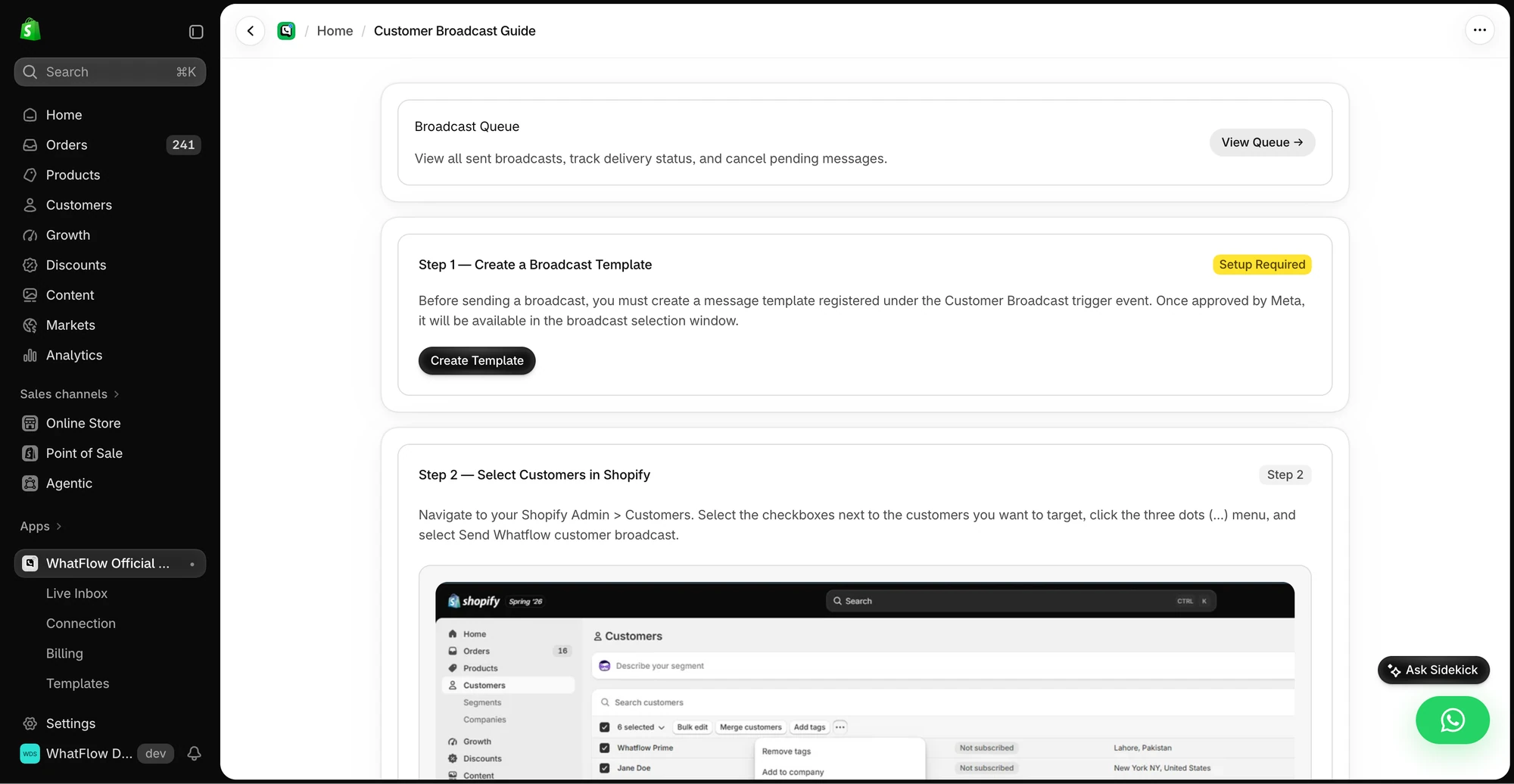
The broadcast guide shows how Shopify customer selection and a WhatsApp template fit together.
Communities bring related group chats together under one umbrella with an announcement group, per WhatsApp's Communities page. They're built for people talking to each other. For most brands that's a moderation job, and in ordinary groups members can usually see each other's phone numbers, which is a real privacy concern for customers.
When a WhatsApp Channel makes sense for a Shopify brand
A Channel is worth running if you can answer yes to most of these:
You post regularly (at least weekly) and have things to say beyond "sale!"
Your content is interesting on its own: new drops, recipes, styling ideas, studio updates, restock schedules.
You already have an audience that would follow, from Instagram, your email list or your customers.
You want reach without per-message costs and you're fine with no personalisation or replies.
Brands where this tends to fit: fashion with frequent drops, food and coffee brands with recipes and seasonal menus, beauty brands with routines and tutorials, and creator-led brands where the founder is the draw.
Here's a hypothetical Channel post for a coffee roaster:
New on Thursday: Ethiopia Guji, natural process. Think blueberry and dark chocolate. We roasted 60 bags. Link goes live 10am. ☕
[Poll] Which brew method should we write a guide for next? V60 / AeroPress / Moka pot
Notice it doesn't ask anyone to reply. It can't.
When a Channel is the wrong tool
Order updates, delivery messages, COD confirmations. These are personal. Use the Business API.
Abandoned cart or back-in-stock alerts. They're for one person about one product.
Customer support. A Channel can't receive a question.
Targeted offers. You can't segment a Channel. Everyone sees the same post.
A small store with nothing regular to say. A dead Channel with three posts looks worse than no Channel.
What to post: a month of Channel content
If you're not sure you have enough to say, sketch a month before you start. Here's a hypothetical plan for a skincare brand:
Week 1: A 30-second video of the founder explaining the new night cream, plus a poll: "What's your biggest skin concern this winter?"
Week 2: A routine post: "Morning routine for dry skin in 3 steps," with links to each product.
Week 3: Restock schedule for the two products that sold out, with the date and time.
Week 4: Poll results and what you're doing about them, plus a behind-the-scenes photo from the lab or warehouse.
Four posts, none of them a pure discount. If you can't fill a month like this, a Channel will feel empty fast.
How to measure a WhatsApp Channel
Channels don't give you the per-customer data a Business API broadcast does, so keep the scorecard simple:
Followers over time, and where they came from (add the link in one place at a time so you can see what moved it).
Reactions and poll votes per post, as a rough engagement signal.
Clicks on links, using UTM parameters so Shopify analytics can see the visits.
Chats started from your "message us" link in posts, using a prefilled message unique to the Channel.
If follower growth stalls and posts get few reactions after a couple of months, it's fine to stop. Put that energy into the private-chat side, where conversations turn into orders.
How to use a Channel and the Business API together
The two work well side by side because they do different jobs:
Channel for discovery and content. Post drops, behind-the-scenes and polls. Put the channel link in your Instagram bio and on your site.
A path from Channel to chat. Since followers can't reply, include a link to your WhatsApp chat in posts where people might have questions: "Questions about sizing? Message us here." A wa.me link with prefilled text works well.
Business API for the conversation and the transaction. When they message, your team answers in a shared inbox, and if they want offers in their private chat, you ask for opt-in.
The Channel is the shop window. The private chat is the counter.
Where WhatFlow fits
WhatFlow is built for the private-chat side: it runs on Meta's official WhatsApp Cloud API and gives you templates, opt-in broadcasts, a shared team inbox with no seat fees, COD confirmation, catalog sharing and Shopify Flow automation, all on every plan, including Free. Channels are run separately from WhatFlow. Many brands will want both, and that's fine. If you're still building your overall plan, the WhatsApp marketing guide for Shopify puts Channels, broadcasts and automation in context.
Free plan available
Run WhatsApp for your Shopify store with WhatFlow
Templates, COD confirmation, Shopify Flow automations and a shared team inbox with no seat fees. Every feature is included on every plan, including Free.
If you have weekly content people would follow anyway, start a Channel and treat it like a social account. If you don't, skip it for now. Either way, your customer messaging (orders, support, targeted offers) belongs in the WhatsApp Business API, where people can actually talk back.
Frequently asked questions
What is a WhatsApp Channel for business?
A WhatsApp Channel is a one-way broadcast feed that people choose to follow in the Updates tab. Followers can react with emoji and vote in polls, but they can't reply to updates or message the admins through the channel.
Are WhatsApp Channels the same as WhatsApp broadcasts?
No. A Channel is a public feed people follow, separate from chats. An API broadcast is a template message delivered into each customer's private chat, requires opt-in, can be personalised, and the customer can reply.
Can I see who follows my WhatsApp Channel?
Not their phone numbers. WhatsApp says followers' numbers are hidden from other followers, and admins only see a follower's number if they already have them saved as a contact.
Should a Shopify store use WhatsApp Channels or the WhatsApp Business API?
Use the Business API for anything personal or transactional: order updates, cart recovery, support and targeted offers. Add a Channel only if you have regular content people would follow for its own sake, like drops, recipes or behind-the-scenes.