WhatsApp broadcasts that customers don't block follow a simple pattern: send only to people who opted in, segment by what they actually care about, keep a predictable frequency, write one short message with one clear action, make opting out easy, and check blocks and quality after every send. The rest is detail, and the 12 rules below are that detail.
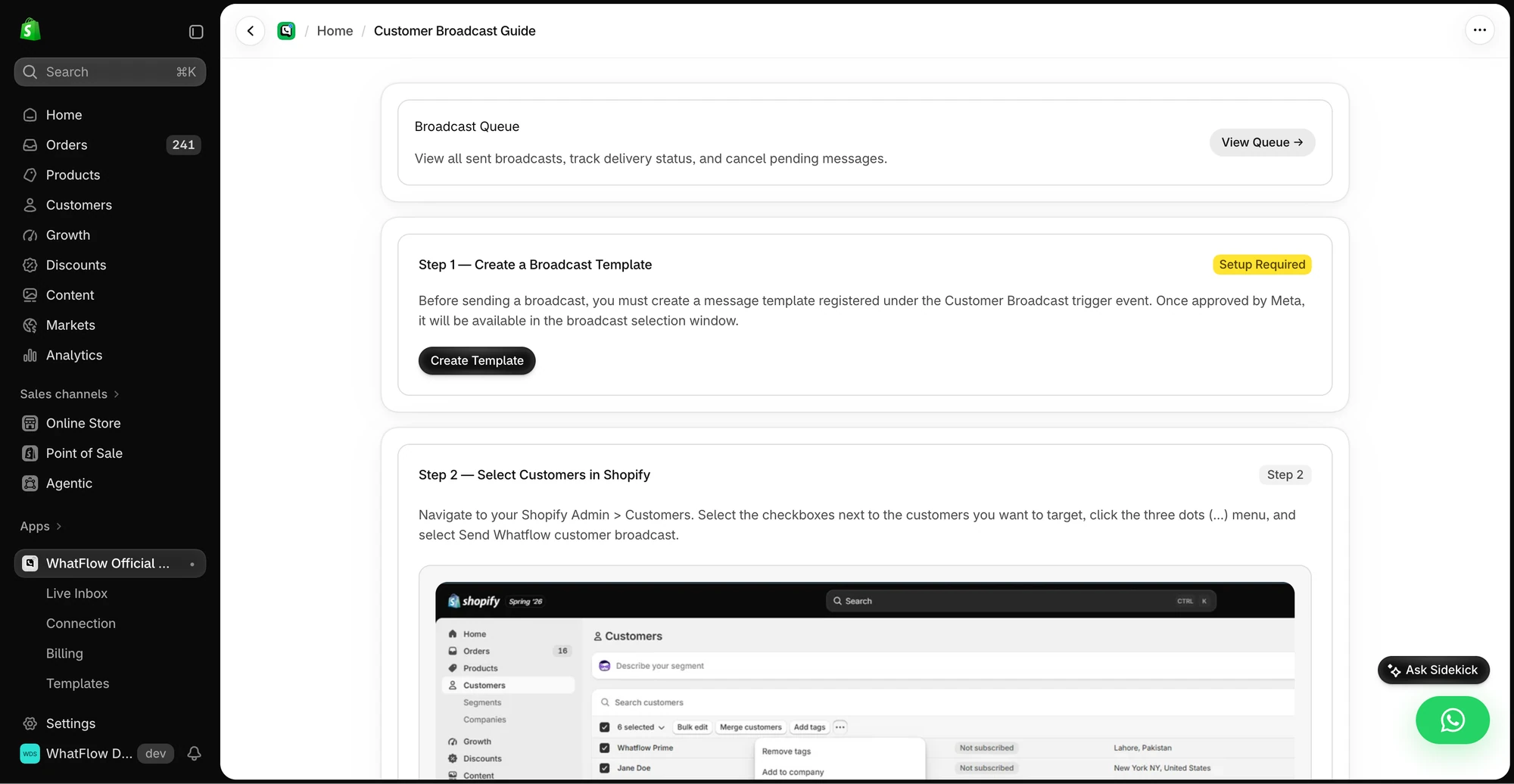
The broadcast guide shows how Shopify customer selection and a WhatsApp template fit together.
A broadcast here means a business-initiated template message sent to a list of customers through the WhatsApp Business API. It's different from a WhatsApp Channel, which people follow and can't reply to (I cover those in WhatsApp Channels for brands). Broadcasts land in the same chat list as your customer's family group. That's why they work, and it's why a bad one gets blocked so fast.
Why WhatsApp punishes bad broadcasts faster than email
Email has a spam folder. WhatsApp has a block button right under your message. The WhatsApp Business Messaging Policy says users can block or report businesses, and that WhatsApp may limit how many messages you can send based on that feedback.
There are three mechanisms worth knowing:
Template quality. Meta rates each template using usage, customer feedback and engagement, including read rates, according to its template quality docs. Low-quality templates can be paused or disabled.
Messaging limits. Your business can only start conversations with a capped number of unique customers per rolling 24 hours, and moving up requires high-quality sending. The quality rating and messaging limits guide explains the tiers.
Per-user marketing limits. Meta may limit how many marketing templates one person receives from businesses, based on their recent read rate and how busy their inbox is. If you hit that cap, the message fails with error 131049, per Meta's .
So a broadcast that annoys people doesn't just lose that campaign. It can make the next one harder to deliver.
The 12 rules
1. Only send to people who said yes to WhatsApp
Not people who gave you a number for delivery. Not last year's COD customers. People who agreed to hear from your store on WhatsApp. If your list is thin, fix that first: collecting WhatsApp opt-ins on Shopify walks through six places to ask.
2. Tell them what's coming when they opt in, then keep the promise
If your popup said "2 messages a month" and you send six, you've broken a promise. Customers notice. Blocks follow.
3. Segment by intent, not just by "everyone"
A customer who bought baby clothes six months ago doesn't need your new menswear drop. Basic segments that work for most stores:
Bought from a category in the last 90 days
Asked about a product in chat but didn't buy
Bought a consumable that's about due for a refill
Never bought, opted in from a popup
You can launch a WhatFlow broadcast from selected Shopify customers or a Shopify segment using the Admin action. In Team Inbox, the audience builder instead uses a spreadsheet or existing conversation contacts. Launching from a Shopify segment does not keep that segment continuously synced into Inbox. See the two campaign routes.
4. One message, one action
A broadcast with four products, two discount codes and a survey link gets no action at all. Pick the one thing.
Hi Sara, the Sage Linen Throw you asked about is back in stock. We've got 40, and last time they went in under a week.
[View the throw] [Not interested]
5. Lead with the reason they'll care
The first line shows in the notification preview. "Big news from Kaya Home!!" wastes it. "Your size in the Aria dress is back" earns the open.
6. Give them a way to reply
WhatsApp is a conversation app. A broadcast with a quick reply button ("Show me", "Ask a question") invites the customer to answer, and a reply opens a 24-hour customer service window where your team can help freely. That's often where the sale actually happens.
7. Make stopping easy and honour it immediately
Add a "Stop promotions" style button or a plain line:
Don't want offers from us on WhatsApp? Reply STOP and we'll take you off.
Then actually remove them, everywhere. Anyone who writes "please stop messaging me" in their own words counts too. The opt-out process guide shows how to make that stick across tools.
8. Pick a frequency and stay predictable
For most small stores, one to four marketing broadcasts a month per customer is plenty, and the right number depends on how often your customers buy. A tea shop can justify more than a mattress shop. The full framework is in how often to message customers on WhatsApp.
9. Send at a time that suits the customer, in their time zone
Morning commute and early evening work for many audiences. 11pm doesn't. If you sell across the Gulf and South Asia, split the send by country. During Ramadan, the best times shift completely (think after iftar).
10. Personalise with real data, not fake intimacy
"Hi Sara" plus the product she viewed is useful. "Hey bestie, we missed you sooo much 💕" from a brand she bought from once is not. Template variables in WhatFlow's template editor let you insert names, products and order details from Shopify.
11. Run a preflight before every send
Check the link opens on a phone, the discount code works, the template variables fill properly, the segment is the one you meant, and someone is on the inbox when replies start. The campaign preflight checklist is the one I'd print.
12. Look at blocks and opt-outs after every send, not just revenue
Revenue tells you what worked. Opt-outs, blocks and template quality tell you what it cost. If a broadcast made money but doubled your opt-outs, it borrowed from next month.
A broadcast that breaks the rules
For contrast, here's the kind of message that gets a store blocked. Imagine it going to every number the store has ever collected, at 10:40pm on a Tuesday:
🔥🔥 MEGA SALE 🔥🔥 Up to 70% off EVERYTHING at Kaya Home!!! Cushions, throws, candles, lamps, rugs and more. Use code MEGA70 or MEGA50 on selected items. Plus refer a friend and win a voucher! Shop now 👉 [link]
Count the problems. It went to people who never opted in to WhatsApp marketing. It's late at night. It has no personal reason to exist for this customer. It has two codes, a referral pitch and a link to "everything", so there's no single action. There's no way to stop. And the first line in the notification preview is emoji and capitals, which reads like spam before anyone opens it.
Each of those breaks one of the rules above. Together they're a fast way to a yellow quality rating.
A broadcast that follows the rules
Here's a hypothetical example for a skincare store, sent to customers who bought the vitamin C serum 5 to 7 weeks ago:
Hi Aisha, your Noor Vitamin C Serum usually runs out around now. Want us to hold one for you? Refills ship next day in Dubai.
[Reorder now] [Remind me in 2 weeks] [Stop reminders]
It's tied to her purchase, timed to her likely need, has one action, offers a softer option, and gives her a clean exit. That's the whole playbook in three lines.
A note on cost and country
As of November 2026, Meta charges per delivered template message, with rates that vary by category and the recipient's country; check Meta's pricing page for current rates. Sending to people who don't want your message isn't only bad manners, it's money spent on a block. Also, Meta's docs say WhatsApp doesn't currently deliver marketing templates to US phone numbers, so exclude them from promotional broadcasts.
What WhatFlow does here
WhatFlow's Business API app runs on Meta's official WhatsApp Cloud API and is built to handle a store's full broadcast program, from a first campaign to a team sending every week. It gives you templates with an editor, broadcasts, quick reply buttons, a shared inbox for the replies, and Shopify Flow actions to trigger sends from store events. Everything is on every plan, including Free, and there are no seat fees, so the whole team can answer when a broadcast lands. Meta's message charges are separate from WhatFlow's app pricing.
Free plan available
Run WhatsApp for your Shopify store with WhatFlow
Templates, COD confirmation, Shopify Flow automations and a shared team inbox with no seat fees. Every feature is included on every plan, including Free.
Pick the segment, write one message with one action and an exit, run the preflight, and look at opt-outs the next morning. Do that every time and the list stays healthy enough to use when it matters, like Black Friday week.
Frequently asked questions
What are WhatsApp broadcast best practices for online stores?
Send only to people who opted in, segment by what they bought or asked about, keep frequency predictable, write one clear message with one action, make opting out easy, and watch blocks and quality after every send.
Why do customers block WhatsApp broadcasts?
Usually because the message surprised them, had nothing to do with what they buy, or came too often. WhatsApp lets users block and report businesses, and that feedback can limit how many messages a business can send.
Do I need a template to send a WhatsApp broadcast?
Yes, for anyone outside an open 24-hour customer service window. Business-initiated messages on the WhatsApp Business API must use a Meta-approved template, and promotional broadcasts are usually in the marketing category.
Can I send WhatsApp marketing broadcasts to US customers?
Not as of November 2026. Meta's documentation says WhatsApp doesn't currently deliver marketing template messages to users with US phone numbers.