
Publisher disclosure: this comparison is written by WhatFlow. Competitor capabilities are based on the linked public documentation; the WhatFlow screenshots come from our demo store. Examples are illustrative, and results depend on your store and configuration.
WhatFlow and External dashboard at a glance
| Consideration | WhatFlow | External dashboard |
|---|---|---|
| Where your team works | Inside Shopify admin. Admin extensions, Flow triggers and the inbox sit next to the order, so nobody copies details between tabs. | A separate web app. Staff switch between the dashboard and Shopify to check orders, addresses and fulfilment. |
| Monthly cost | App plan from $0 (Free) or $4.99, plus Meta's per-message charges. No seat fees, no connector fees. | Dashboard subscription, often per user, plus any connector or integration add-on, plus Meta's charges. |
| Shopify automation | Native Shopify Flow triggers (incoming message, order reply) and actions (template, text, media). A Confirm reply can tag the order. | Depends on the connector. Order data usually syncs into the dashboard rather than actions flowing back into Shopify. |
| Getting started | Free plan with every feature, Meta Embedded Signup from Shopify admin, free theme-matched WhatsApp button. | Account setup outside Shopify, then a Shopify connector and field mapping. |
| Shopify App Store rating | WhatFlow WhatsApp Business API: 5.0/5 from 55 ratings (as of November 5, 2026). | Varies by product; check the listing of the tool you're considering. |
If you sell on Shopify, run WhatsApp from a Shopify-native app, not an external dashboard. WhatFlow puts the inbox, templates and automations inside Shopify admin, wires them into Shopify Flow, and charges no seat fees. Your team answers "where's my order?" with the actual order in view. An external dashboard makes sense only when one central team runs messaging for several businesses that aren't all on Shopify.
At a glance
WhatFlow (Shopify-native) | External dashboard | |
|---|---|---|
Where staff work | Shopify admin | A separate web app |
Order data | Live from Shopify | Synced copy via connector |
Automation | Native Shopify Flow triggers and actions | Dashboard rules plus a connector |
Team cost | No seat fees | Often priced per user |
Entry price | Free plan, every feature | Varies, often a paid tier for integrations |
WhatFlow WhatsApp Business API is rated 5.0/5 from 55 ratings on the Shopify App Store (as of November 5, 2026).
Why does "native" matter so much for a Shopify store?
Because almost every WhatsApp conversation a store has is about an order. Say a customer messages at 9pm: "I moved flats yesterday, can you change my address?" The person answering needs three facts fast: which order, whether it has shipped, and whether the address can still change.
In WhatFlow, that's one screen away from the order in Shopify admin. In an external dashboard, your agent sees whatever the connector last synced, then opens Shopify in another tab to check, then comes back to reply. Multiply that by 60 conversations a day and you've built a copy-paste job into your support process.
One practical check: Can you run a launch and handle replies without swapping tools? Use the campaign, team inbox and catalog checkout walkthroughs to evaluate the broader WhatFlow Business API workflow alongside recovery and notifications.
The other half is action. A reply should change something in Shopify. With WhatFlow, a customer tapping Confirm on a COD message fires a WhatFlow order-reply trigger in Shopify Flow, and Flow tags the order. No export, no webhook glue.
What does each option really cost?
Here's a worked example with clearly hypothetical numbers. A store with four people on WhatsApp (two support, one warehouse lead, the owner) sends about 5,000 template messages a month.
WhatFlow: the Plus plan is $9.99/month and includes 5,000 messages (as of November 2026). Four people, zero seat fees. App cost: $9.99.
Hypothetical external dashboard at $25 per user: 4 × $25 = $100/month before any Shopify connector add-on. Hire a fifth person for sale season and it's $125.
Both options pay Meta the same per-message charges for templates, because that's Meta's fee, not the app's. See WhatsApp Business API pricing explained for how those work. The difference is everything on top. Current WhatFlow plan amounts live on the pricing page.
How does the Shopify workflow compare?
WhatFlow plugs into Shopify Flow, Shopify's free automation app. That gives you:
- Triggers when a WhatsApp message or order reply arrives.
- Actions to send a template, a text, or media (including video) from any Flow workflow.
- Variable mapping from order and customer fields straight into template placeholders.
So "order created and payment is COD → send confirmation template → if reply is Confirm, tag order cod-confirmed" is a workflow you build in Flow in a few minutes. You can even ask Shopify Sidekick to draft it, as covered in using Sidekick to draft WhatsApp workflows.
An external dashboard typically runs its own automation engine. That's fine until you need a Shopify-side action, and then you're back to connectors. The Flow vs Zapier comparison goes deeper on that trade.
What about the team inbox?
WhatFlow's shared inbox has assignment, filters and saved replies, and adding a colleague costs nothing. That changes behaviour. You'll actually give the warehouse lead access so they can answer "has my parcel left?" themselves, instead of rationing logins. Here's a saved reply that warehouse lead might use:
Hi Aisha, your order #1042 left our warehouse this morning. Tracking: {link}. Reply here if anything looks off and I'll check with the courier.
For how to split ownership, read setting up a shared team inbox. If staff currently retype order details by hand, automation vs manual order copying shows what you get back.
Is a Shopify-native app enough for a large team?
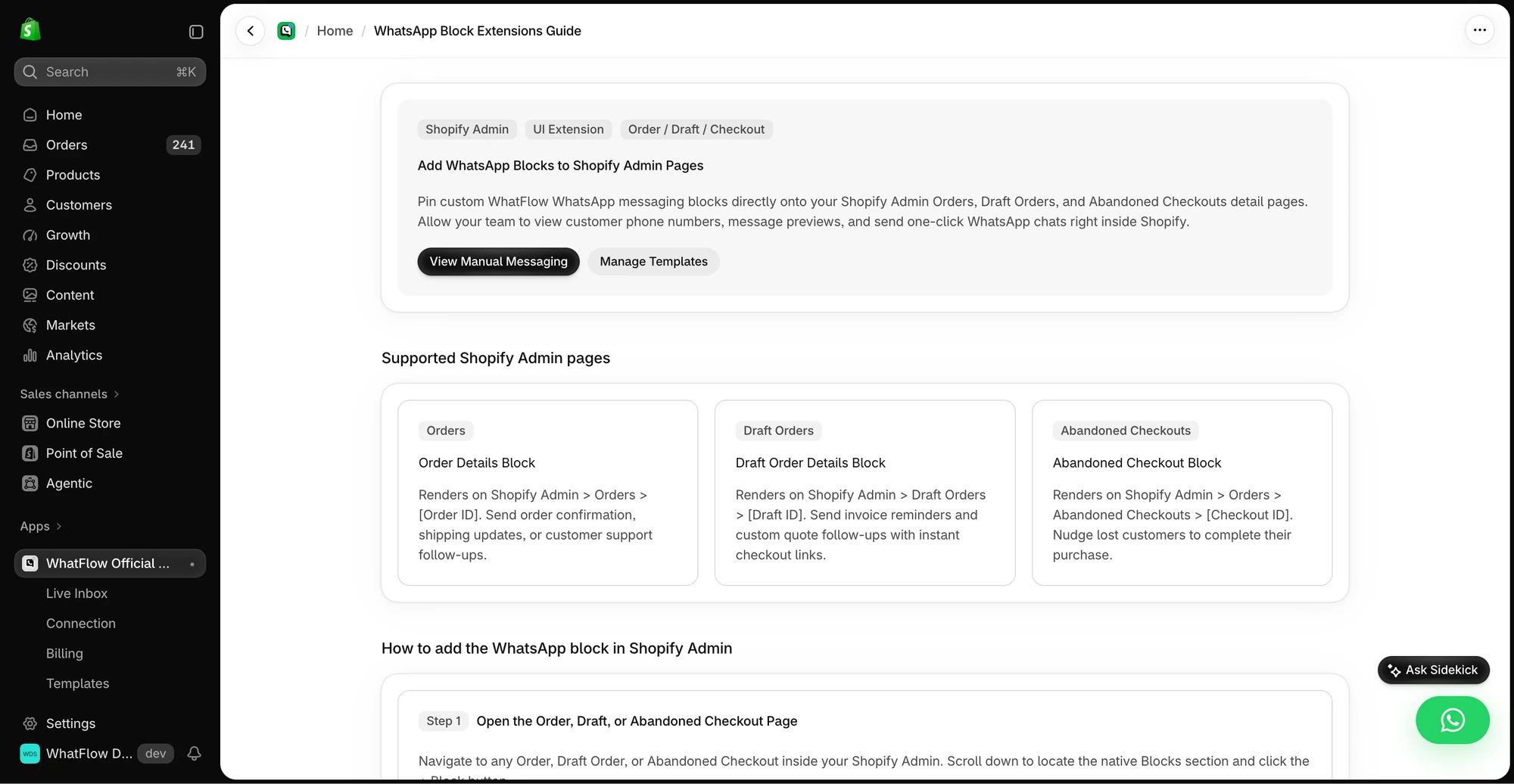
Yes. WhatFlow WhatsApp Business API runs on the official Meta WhatsApp Cloud API, not an unofficial workaround, and it's built to scale: a team inbox with assignment and filters, no seat fees at any team size, Shopify Flow automation for high order volumes, COD confirmation, live catalog sharing and Shopify admin extensions. The same app is still the easiest start for a two-person store, because every feature is on the Free plan.
When might an external dashboard still make sense?
Pick an external dashboard only if you specifically need one team to run messaging for several brands on different platforms (say, a Shopify store plus a WooCommerce site plus a service business) and you want them all in one queue. If everything you sell runs through Shopify, that central view mostly adds a sync layer.
The bottom line
A Shopify store's WhatsApp traffic is order traffic, so the tool should live where orders live. WhatFlow gives you that, plus native Flow automation, no seat fees and every feature on the Free plan. Install it, connect your number through Meta Embedded Signup, and send your first order update the same afternoon.
Questions worth asking
Is a Shopify-native WhatsApp app better than an external dashboard?
For a Shopify store, usually yes. A native app like WhatFlow keeps the conversation next to the order and runs automations through Shopify Flow, so staff act on live order data instead of a synced copy.
How do I test a WhatsApp app before committing?
Run one real job end to end: open an order, send a template, read the customer's reply and tag or update the order. Then repeat it with a changed address and a cancelled order to see whether the tool shows current Shopify data.
Does WhatFlow's free plan limit features?
No. Every WhatFlow feature is on every plan, including Free. Plans differ only in message allowance and overage rate, and the team inbox has no seat fees.
Are Meta's WhatsApp fees included in WhatFlow's price?
No. Meta charges separately per delivered template message, by category and country. WhatFlow's plan covers the app. Since October 1, 2026, Meta also charges for service replies beyond the first 1,000 per business number each month.
Sources and methodology
We checked these primary sources on November 5, 2026. Vendor pages describe advertised capabilities, rather than independent performance tests. Confirm current pricing, plan limits and availability with each provider.
- WhatFlow plans and Shopify integrations
WhatFlow WhatsApp Business API listing: plans (Free with 100 messages, Starter $4.99, Plus $9.99, Growth $29, Scale $49.99, Ultimate $99) and rating, as of November 5, 2026.
- WhatsApp Business Platform pricing
Meta's overview of WhatsApp Business Platform pricing; rates depend on message category and recipient country.
- Shopify Flow
Shopify Flow is free on Basic, Grow, Advanced and Plus plans, as of November 2026, and is where WhatFlow's triggers and actions run.
- WhatsApp Business Platform pricing (Meta developer docs)
Meta charges per delivered template message by category and recipient country. Since October 1, 2026, service replies are free only for the first 1,000 per business number each month, and utility templates inside the customer service window are charged.
- WhatFlow pricing
Current WhatFlow plan amounts, allowances and rates.