
Publisher disclosure: this comparison is written by WhatFlow. Competitor capabilities are based on the linked public documentation; the WhatFlow screenshots come from our demo store. Examples are illustrative, and results depend on your store and configuration.
WhatFlow and Manual copy-and-paste messaging at a glance
| Consideration | WhatFlow | Manual copy-and-paste messaging |
|---|---|---|
| Best-fit experience | Shopify events send the message with mapped order fields. Your team only steps in when a customer replies. | Someone opens the order, copies the number, name and tracking link, and types the message. Every time. |
| Costs to include | Your message plan plus Meta's WhatsApp fees. No seat fees for the people answering replies. | No software cost, but real staff time for every order, plus the cost of typos in addresses and tracking numbers. |
| Shopify workflow | Templates map Shopify fields automatically. Shopify Flow triggers and actions handle replies, tags and follow-ups. | Nothing is connected. Changes to the order in Shopify only reach the customer if someone remembers. |
| Starting point | Free plan with every feature, plus theme-matched WhatsApp buttons that are free forever. | Free, until order volume makes it someone's full-time job. |
If you're copying Shopify order details into WhatsApp by hand, automate it. WhatFlow sends order confirmations, shipping updates, abandoned checkout reminders and COD confirmations straight from Shopify events, filling in the customer's name, order number and links every time. Your team stops pasting and starts answering the questions that actually need a person, in a shared inbox with no seat fees.
Manual messages still have a place: the odd exception that needs judgment. Routine updates aren't that.
At a glance
WhatFlow automation | Manual copying | |
|---|---|---|
Who sends order updates | Shopify events, automatically | A person, from admin |
Data accuracy | Pulled from the order | Copied, so typos happen |
After hours | Still sends | Waits until morning |
Replies | Shared inbox, no seat fees | Whoever holds the phone |
Cost | Free plan, paid from $4.99/month | Staff time per order |
What manual copying really looks like
Say you run a fashion store doing 40 orders a day. For each one, someone opens the order in Shopify, copies the order number, the customer's first name, maybe the tracking link once it ships, opens WhatsApp, finds or saves the contact, and types a message. Two messages per order is 80 copy-paste jobs a day.
It works at 5 orders. At 40, it's a part-time job. And the mistakes are the expensive kind: the wrong tracking number to the wrong customer, or no message at all on the busy day.
How WhatFlow automates it
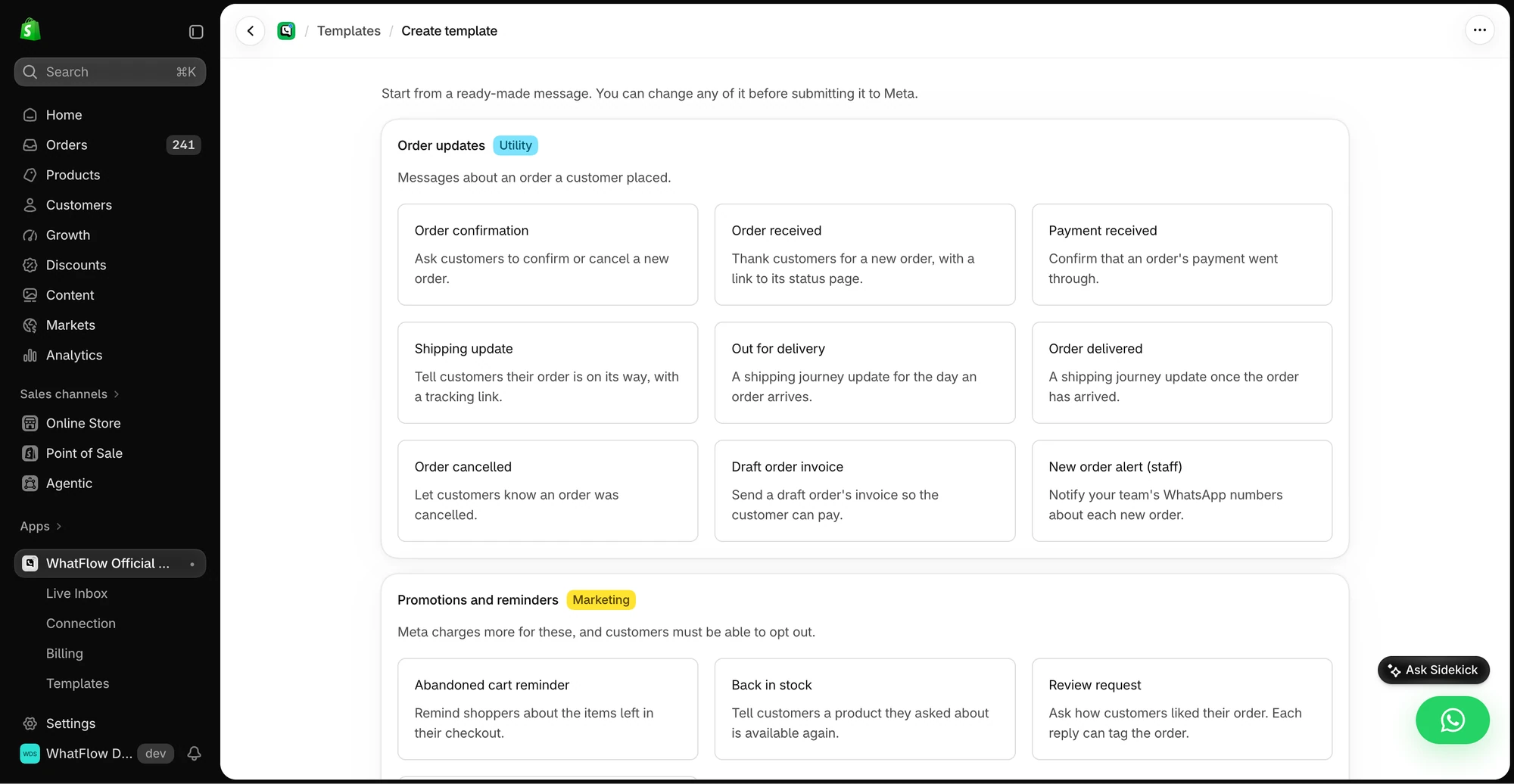
WhatFlow connects to the official WhatsApp Business API from your Shopify admin. You pick an event (order created, order fulfilled, checkout abandoned), choose an approved template, and map Shopify fields into it.
Hi {{first_name}}, your order {{order_number}} has shipped! Track it here: {{tracking_url}}. Reply to this message if anything looks wrong.
From then on, the message goes out when the event happens. The preview shows exactly which field fills each variable, so you can check before you switch it on.
Need something more custom? WhatFlow adds native actions to Shopify Flow (send a template, text, image or video) and triggers for incoming messages and order replies. So "when an order over $200 ships, send the VIP care template" is a Flow workflow, not a developer project. See send WhatsApp templates from Shopify Flow for a walkthrough, or get Shopify Sidekick to draft the workflow for you.
Keep people for the exceptions
Automation handles the predictable part. When a customer replies "I moved, can you change the address?", that lands in the WhatFlow team inbox where anyone on the team can pick it up. No seat fees, so the person who can actually edit the order can answer. Our guide to address changes and order edits on WhatsApp has reply examples.
One rule I'd set from day one: if an order is edited after the first message, whoever edits it sends a quick manual note. Automation sends what Shopify knows at that moment.
What does it cost?
As of November 2026 (Shopify App Store listing), WhatFlow's Free plan includes every feature and 100 sends. A store sending 1,000 messages a month fits Starter at $4.99, which includes 2,000 sends. Every plan has the same features and no seat fees. Meta's WhatsApp fees are separate (Meta pricing). See our pricing page for current amounts.
Compare that with an hour or two of someone's day, every day. If you want a broader view of where to start, read choose the first Shopify automation your team can maintain.
WhatFlow's WhatsApp Business API app runs on the official Meta WhatsApp Cloud API and is rated 5.0 out of 5 from 55 ratings on the Shopify App Store (checked November 5, 2026).
When manual messaging still makes sense
Keep manual messages for one-off situations: a personal thank-you to a big customer, an apology after a mistake, a delivery problem that needs a real explanation. Those are better written by a person. Everything predictable should be automated.
The bottom line
Copying order details into WhatsApp doesn't scale and doesn't survive a busy week. WhatFlow sends the routine messages from Shopify events, keeps your team free for the conversations that matter, and starts free with every feature. If you're still on the WhatsApp Business app, read WhatFlow vs the WhatsApp Business app next.
Questions worth asking
How do I send automatic WhatsApp order updates from Shopify?
Install a Shopify WhatsApp app on the official WhatsApp Business API, such as WhatFlow, connect your number, and turn on templates for order confirmation, shipping and abandoned checkout. Each message fills in the customer name, order number and links from Shopify automatically.
How do I test an automated WhatsApp order message before going live?
Place a test order to your own number and check the name, order number, product and link in the preview. Then change one field, such as the address, and confirm the next message uses the new value.
Does the free WhatFlow plan restrict features?
No. Every WhatFlow feature, including order automation, COD confirmation and Shopify Flow, is on every plan, including Free. Plans differ only by message allowance and rate.
Are Meta's WhatsApp charges included in WhatFlow's price?
No. Meta charges separately for delivered template messages by category and country. Since October 1, 2026, Meta's free customer service replies are capped at the first 1,000 per number per month.
Sources and methodology
We checked these primary sources on November 5, 2026. Vendor pages describe advertised capabilities, rather than independent performance tests. Confirm current pricing, plan limits and availability with each provider.
- WhatFlow plans and Shopify integrations
WhatFlow WhatsApp Business API listing: order and fulfillment alerts, cart recovery, plan prices and a 5.0 rating from 55 reviews, checked November 5, 2026.
- WhatsApp Business Platform pricing
Meta's per-message pricing, which varies by template category and recipient country and is charged separately from app fees.