
Publisher disclosure: this comparison is written by WhatFlow. Competitor capabilities are based on the linked public documentation; the WhatFlow screenshots come from our demo store. Examples are illustrative, and results depend on your store and configuration.
WhatFlow and WhatsApp Business app at a glance
| Consideration | WhatFlow | WhatsApp Business app |
|---|---|---|
| What the product is built around | Shopify: order events, mapped templates, COD confirmation, native Shopify Flow, admin extensions and a team inbox. | A free phone app for small businesses to chat with customers, with a profile, catalog and greeting and away messages. Meta also promotes an AI business agent in the app. |
| Pricing and billing units | Free plan; paid plans from $4.99/month (as of November 2026). Meta's per-message fees are separate. | Free to download. The hidden cost is staff time copying order details into chats by hand. |
| Feature access | All features on every plan, including Free: templates, broadcasts, abandoned checkout, COD, catalog sharing, Flow. | Everyday chat tools, catalog and greeting and away messages. No Shopify event automation. |
| Team access | Shared team inbox with assignment and filters. No seat fees. | Built around one phone and its linked devices, not a Shopify team inbox with seat-free assignment and filters. |
| Storefront entry point | Free-forever WhatsApp buttons that match your Shopify theme. | A wa.me link or a separate widget app you add yourself. |
The WhatsApp Business app is a good start for a solo founder. WhatFlow is the better choice once your Shopify store needs order messages sent automatically or more than one person answering. WhatFlow runs on the official Meta WhatsApp Cloud API, sends order, shipping, COD and abandoned checkout messages straight from Shopify events, and gives your team a shared inbox with no seat fees. Every feature is on the Free plan.
In short: the Business app is a phone. WhatFlow is a WhatsApp system for your store.
At a glance
WhatFlow | WhatsApp Business app | |
|---|---|---|
Built for | Shopify stores and teams | One business, one phone |
Order messages | Automatic, from Shopify events | Typed or pasted by hand |
COD confirmation | Buttons that tag or cancel orders via Flow | Manual |
Team inbox | Assignment, filters, no seat fees | One phone plus linked devices |
Shopify Flow | Native triggers and actions | None |
Price | Free plan; paid from $4.99/month | Free app |
Connection | Official Meta Cloud API | WhatsApp Business app |
Where the WhatsApp Business app runs out
Say you sell sneakers and do 30 orders a day. Every evening you open Shopify, copy each order number and tracking link, and paste them into WhatsApp. Your colleague answers sizing questions from her own phone. A customer who asked about a return on Monday gets asked for their order number again on Wednesday because nobody can see Monday's chat.
That's not a WhatsApp problem. It's a tooling problem. The Business app was designed for one person having conversations, and it's good at that. It doesn't know what happens in your Shopify store.
What WhatFlow adds
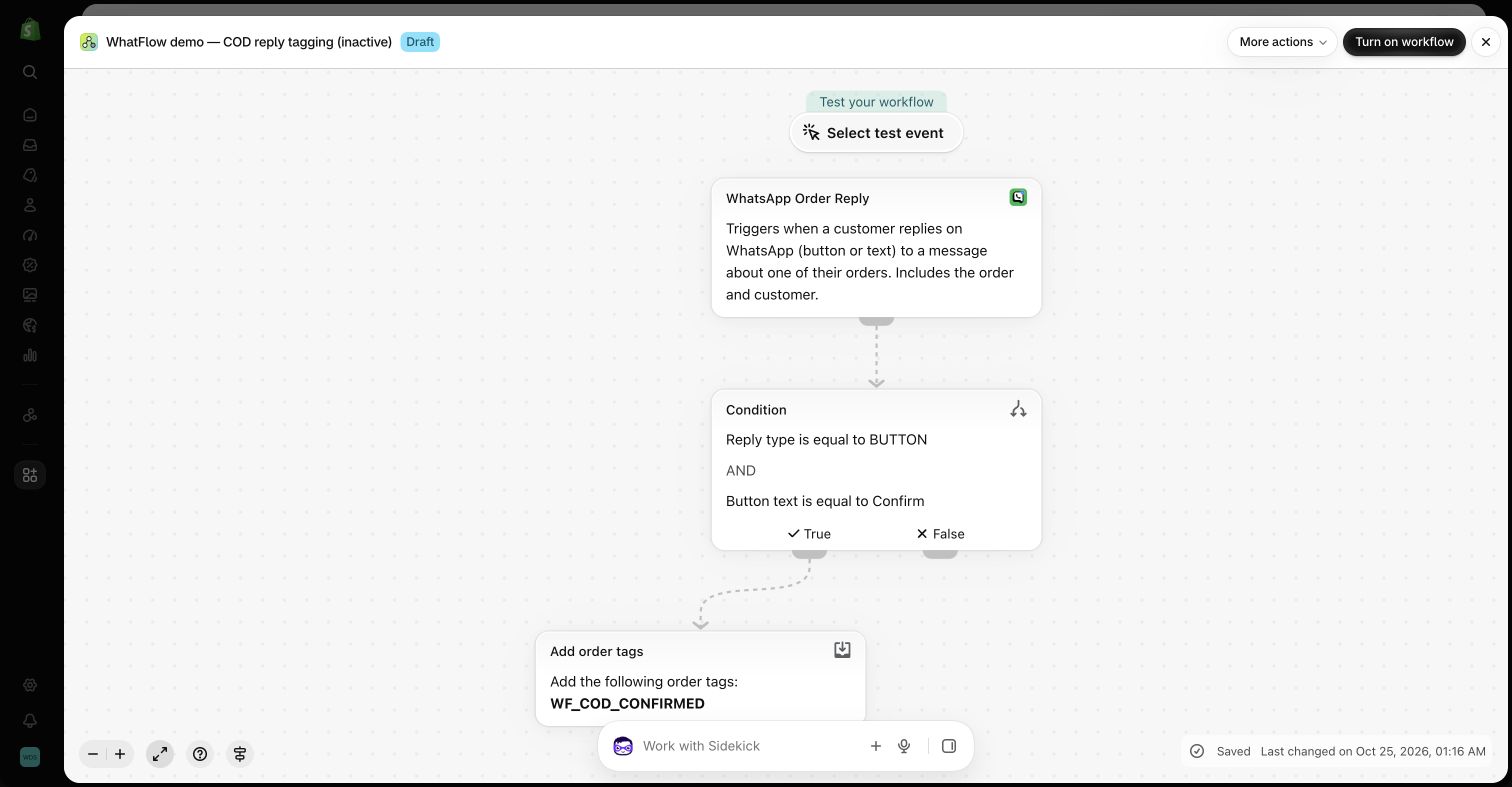
Order messages that send themselves. Pick a Shopify event (order created, fulfilled, checkout abandoned), choose an approved template, and map the fields.
Hi {{first_name}}, your sneakers are on the way! Order {{order_number}} can be tracked here: {{tracking_url}}. Need to swap sizes? Just reply.
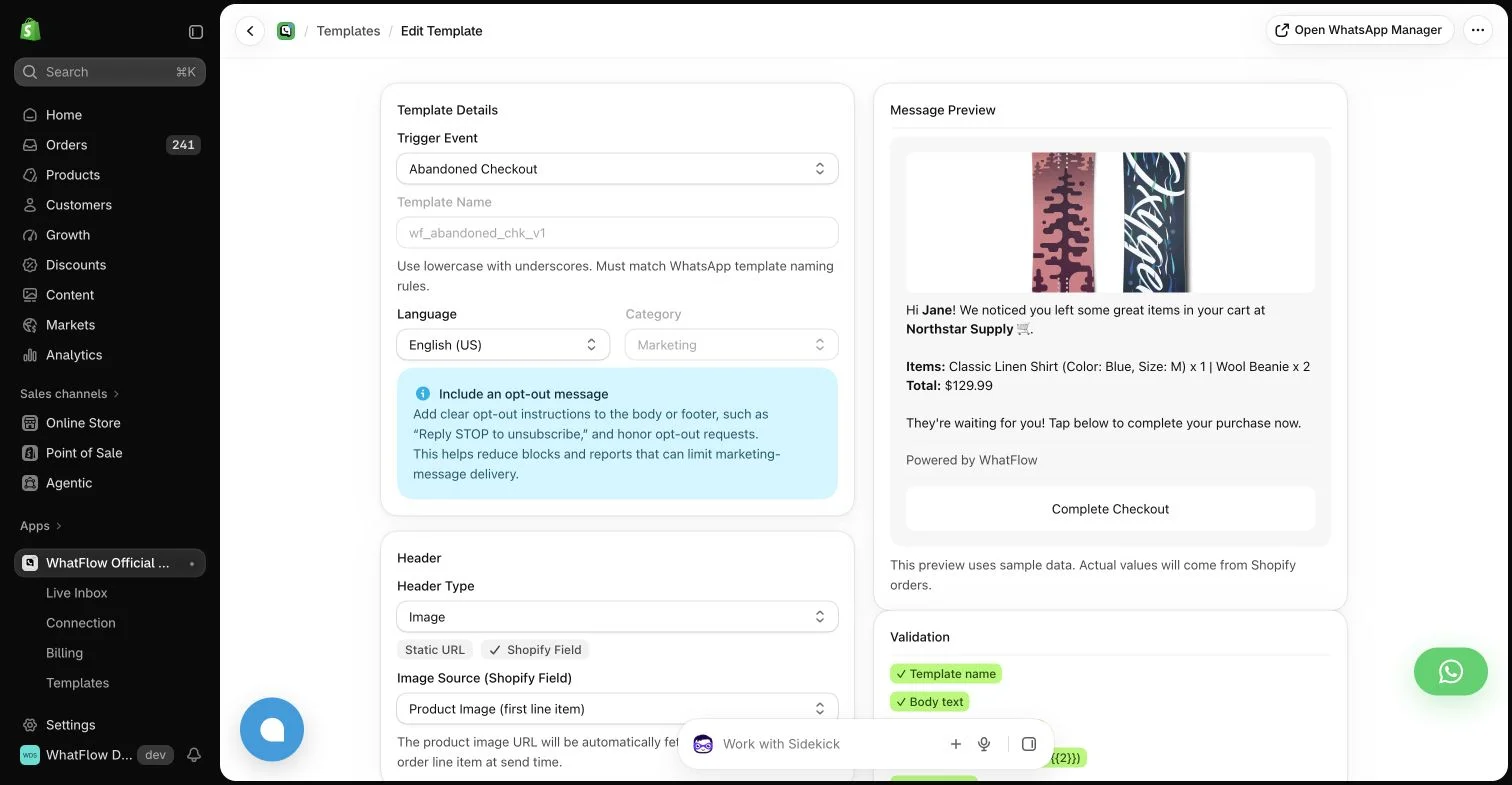
COD confirmation that updates the order. The customer taps Confirm or Cancel, and WhatFlow's order reply trigger in Shopify Flow tags or cancels the order. No one has to read and act on each reply.
When testing WhatFlow and WhatsApp Business app, ask: Can one team manage messages, order context, and catalog sales? Use the campaign, team inbox and catalog checkout walkthroughs to evaluate the broader WhatFlow Business API workflow alongside recovery and notifications.
A team inbox. Everyone who helps customers works from one inbox with assignment, filters and saved replies. No seat fees, so the warehouse colleague who knows if it shipped can answer too.
Everything else on every plan. Broadcasts to opted-in customers, live catalog sharing from the inbox, free-forever theme-matched chat buttons, Shopify admin extensions, and Shopify Sidekick support for drafting Flow workflows.
If you're new to Flow, our WhatFlow and Shopify Flow automation guide is the place to start.
How much does WhatFlow cost compared with a free app?
The Business app costs nothing to download. WhatFlow also has a Free plan with every feature. As of November 2026 (Shopify App Store listing), paid plans start at $4.99/month for 2,000 sends, and a store sending 20,000 messages a month pays $29 on Growth. No seat fees at any team size. Meta's per-message charges are separate and depend on the template category and country (Meta pricing); our WhatsApp Business API pricing guide breaks them down. See WhatFlow pricing for current amounts.
The real comparison is time. If someone spends an hour a day copying order details, that's the cost of "free".
Official API, ready for a growing team
Some merchants assume a Shopify WhatsApp app must be an unofficial workaround. WhatFlow's WhatsApp Business API app isn't. It connects through Meta's Embedded Signup to the official WhatsApp Cloud API, and it's built to scale: team inbox with no seat fees, Shopify Flow automation, COD, catalog and admin extensions. It's rated 5.0 out of 5 from 55 ratings on the Shopify App Store (checked November 5, 2026).
We also make an older, separate app, WhatFlow Chat Automation, which uses a linked-device connection and doesn't need a Meta Business account. It's rated 4.0 out of 5 from 329 ratings (checked November 5, 2026) and suits very small stores that want quick setup. For the official API features on this page, use WhatFlow WhatsApp Business API.
Moving over from the Business app
Moving a number from the Business app to the API changes how it works, so plan it. Check whether your number can migrate or use Meta's coexistence option, tell your team, and set up your templates before the switch. Our step-by-step guide: moving from the WhatsApp Business app to the API. If your staff currently reply from their own phones, read shared inbox vs personal phones too.
When the WhatsApp Business app might still make sense
Stay on the Business app only if you're a one-person store, you handle a handful of orders a day, and you're happy typing every message yourself. Plan the move before your first hire.
The bottom line
The WhatsApp Business app is a great first step. WhatFlow is the next one: automatic Shopify order messages, COD confirmation that updates orders, a shared inbox with no seat fees, and every feature on the Free plan, all on the official Meta Cloud API. If copying order details is part of your day, see automation vs manual order copying and then install WhatFlow.
Questions worth asking
Is WhatFlow a good WhatsApp Business app alternative for Shopify?
Yes. WhatFlow adds what the WhatsApp Business app doesn't have: messages sent automatically from Shopify events, COD confirmation that updates orders through Shopify Flow, and a shared team inbox with no seat fees. It runs on the official Meta Cloud API and has a free plan with every feature.
Is WhatFlow more expensive than the free WhatsApp Business app?
WhatFlow has a free plan with every feature, and paid plans start at $4.99/month as of November 2026. Meta charges separately per delivered template message. The Business app is free, but every order update costs staff time.
Does WhatFlow charge per inbox seat?
No. WhatFlow's team inbox has no seat fees at any team size. You pay only for your message plan and Meta's fees.
Are WhatFlow features restricted on the free plan?
No. All plans have the same features. Message allowances and rates differ, Meta's delivery charges are separate, and theme-matched WhatsApp buttons are free forever.
Can I keep my WhatsApp number when moving from the Business app to WhatFlow?
Often, yes, but it depends on your number and Meta's current migration and coexistence options. Check before you switch a live number, and see our guide to moving from the Business app to the API.
Sources and methodology
We checked these primary sources on November 5, 2026. Vendor pages describe advertised capabilities, rather than independent performance tests. Confirm current pricing, plan limits and availability with each provider.
- WhatsApp Business app: official product and commercial information
Meta's product page for the WhatsApp Business app: business profile, catalog, greeting and away messages, and the Meta Business Agent.
- WhatFlow plans and Shopify integrations
WhatFlow WhatsApp Business API listing: plan prices, included sends, features and a 5.0 rating from 55 reviews, checked November 5, 2026.
- WhatsApp Business Platform pricing
Meta's per-message pricing, which varies by template category and recipient country and is charged separately from app fees.