
Publisher disclosure: this comparison is written by WhatFlow. Competitor capabilities are based on the linked public documentation; the WhatFlow screenshots come from our demo store. Examples are illustrative, and results depend on your store and configuration.
WhatFlow and Braze at a glance
| Consideration | WhatFlow | Braze |
|---|---|---|
| What the product is built around | A Shopify WhatsApp app: admin extensions, native Shopify Flow triggers and actions, COD confirmation and a team inbox. | Customer engagement infrastructure for data-driven journeys across channels including WhatsApp, aimed at teams with lifecycle and technical staff. |
| Pricing and billing units | Published: Free plan, paid plans from $4.99/month by message allowance. Meta fees separate. | No published prices as of November 2026. Go, Select, Pro and Enterprise editions; contracts include Monthly Active Users, Profiles and Action Credits. |
| Feature access | Every feature on every plan, including Free. | Features step up by edition (for example, predictive AI from Pro); add-on products are sold separately. |
| Team access | No seat fees for the team inbox. | User terms are set in the contract rather than published. |
| Storefront entry point | Free-forever WhatsApp chat buttons matched to your Shopify theme. | Not part of Braze's public pricing; ask whether a storefront button is in scope. |
| How you buy | Install from the Shopify App Store and start free. | "Get pricing" or "Talk to an expert" on the pricing page. |
| WhatsApp connection and scale | Official Meta Cloud API via Embedded Signup; team inbox with assignment and filters, no seat fees at any team size. | WhatsApp is one channel inside a wider engagement platform. |
WhatFlow is the better WhatsApp choice for a Shopify store. It's a Shopify app on the official Meta Cloud API with native Shopify Flow, COD confirmation, cart recovery and a shared inbox with no seat fees, and every feature is on every plan from $0. Braze is excellent enterprise engagement infrastructure, sold by contract. Pick it to orchestrate app, web and email journeys at scale, not to run WhatsApp for your store.
When testing WhatFlow and Braze, ask: Which Shopify audience do you already use? In WhatFlow, test a Shopify customer or segment send, then try scheduling a separate Inbox broadcast from a spreadsheet or existing conversations. The campaign walkthrough shows the test send, reply handoff and recipient report.
WhatFlow vs Braze at a glance
WhatFlow | Braze | |
|---|---|---|
Built for | Shopify stores running WhatsApp | Lifecycle teams across apps, web and many channels |
How you buy | Install from Shopify App Store | "Get pricing" / talk to an expert |
Public pricing | $0 to $99/month | None (as of November 2026) |
Pricing unit | Messages per month | Edition plus Monthly Active Users, Profiles and Action Credits |
Seat fees | None | Contract-based |
Shopify Flow | Native triggers and actions | Not advertised |
How much does Braze cost compared with WhatFlow?
The Braze pricing page lists four editions (Go, Select, Pro and Enterprise) and explains that each contract includes Monthly Active Users and Profiles, an allotment of Action Credits and CX Services, with add-on products on top. There are no dollar amounts. You click "Get pricing".
WhatFlow, as of November 2026: Free ($0, 100 messages a month), Starter ($4.99, 2,000), Plus ($9.99, 5,000), Growth ($29, 20,000), Scale ($49.99, 40,000), Ultimate ($99, 75,000). Same features on all of them.
Say you send 10,000 WhatsApp messages a month. That's WhatFlow Growth at $29 on the app side, with your whole support team in the inbox. Meta's per-message charges apply with any WhatsApp app and depend on country and template category; see WhatsApp Business API pricing explained. For a store doing that volume, a sales cycle and an edition-plus-credits contract is a lot of process for a WhatsApp order update.
Which one fits Shopify order work better?
WhatFlow. The jobs Shopify merchants ask us about most are built in:
- COD confirmation: reply buttons that tag or cancel the order through Shopify Flow.
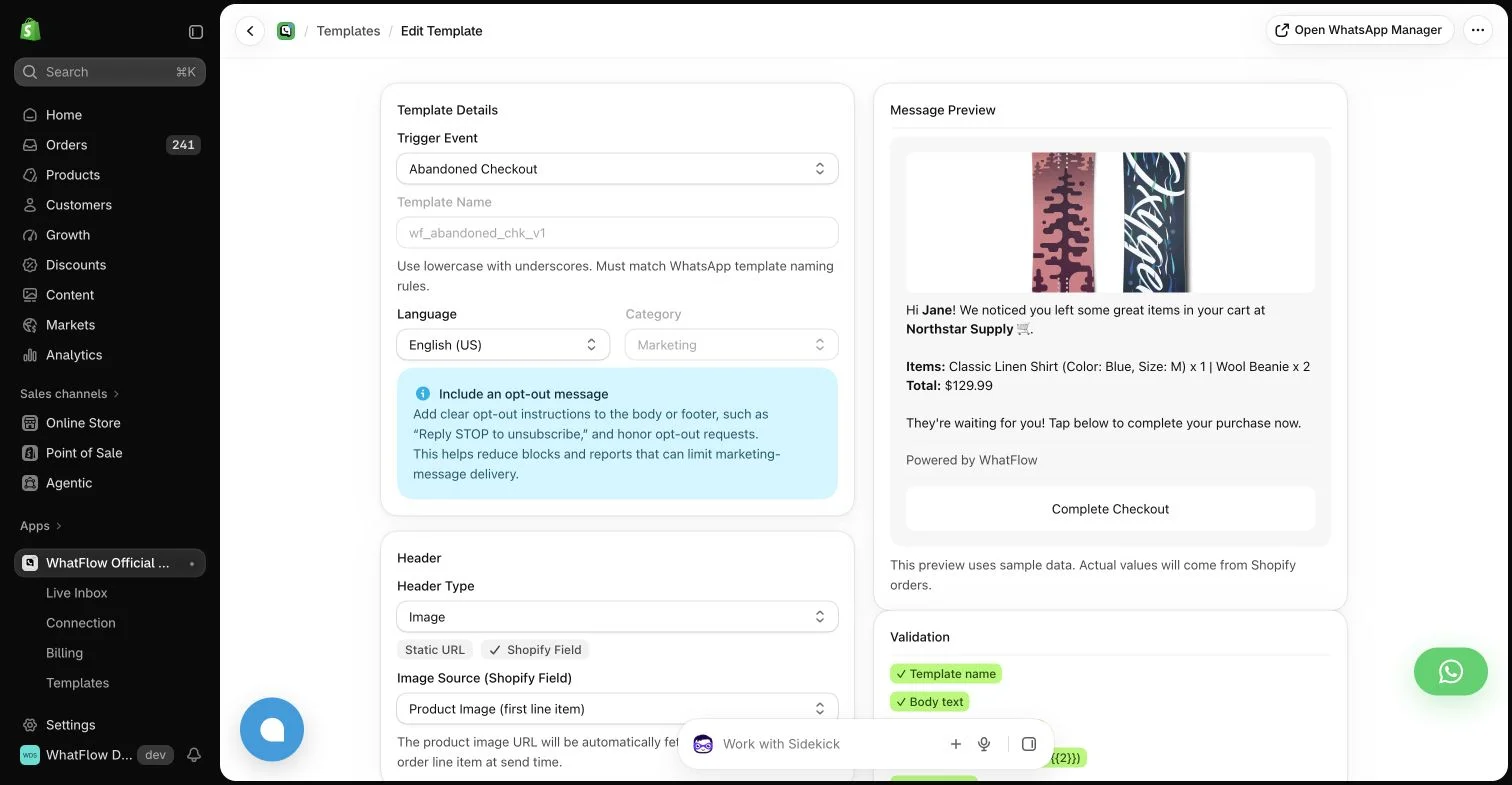
- Abandoned checkout recovery with the checkout link and product details.
- Order and shipping updates from templates mapped to Shopify fields.
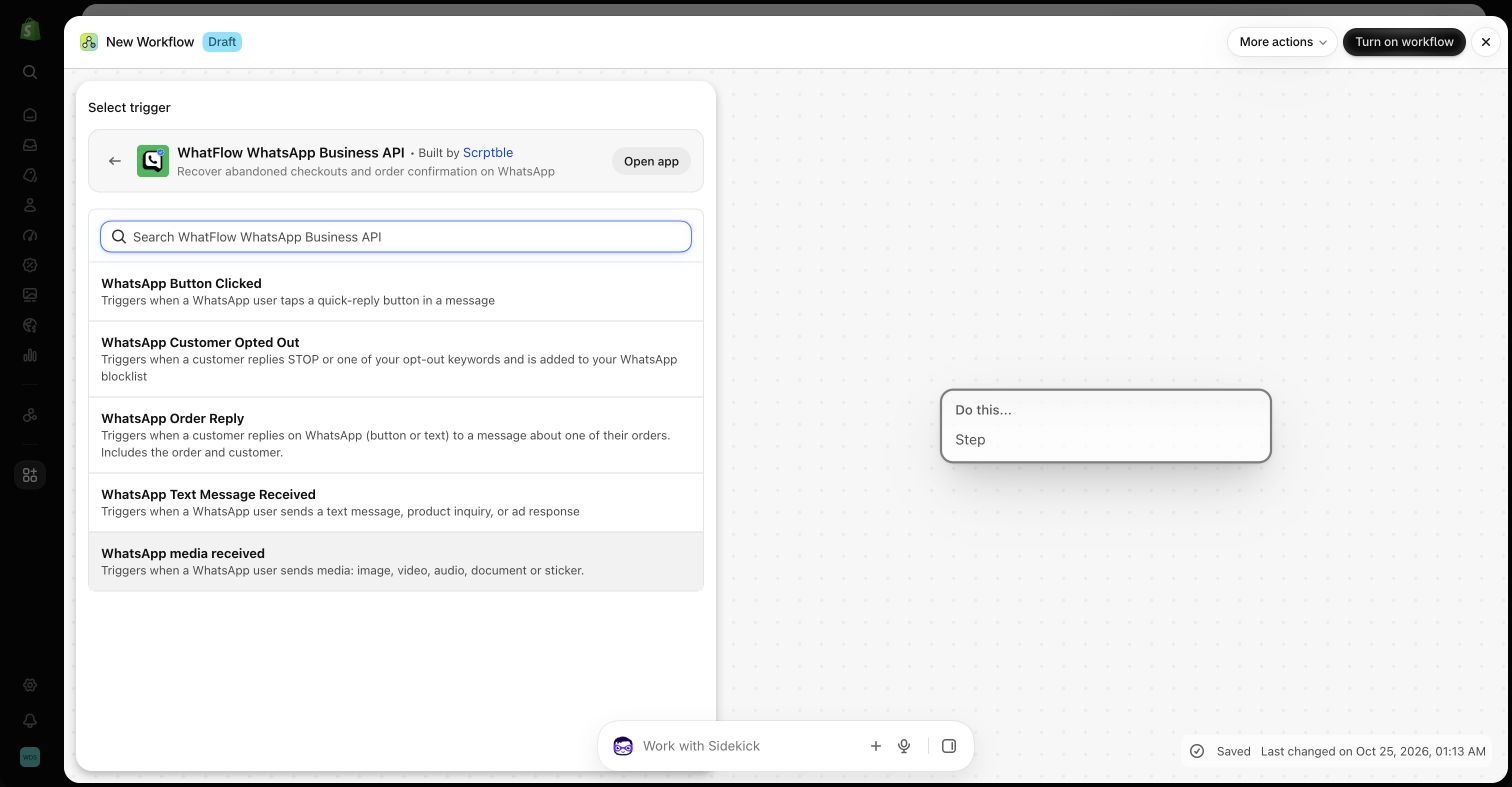
- Flow triggers for incoming messages and order replies, plus actions for template, text and media messages.
- Live catalog sharing from the inbox.
Here's a delay message your team might send from a saved reply:
Hi Omar, sorry, the courier has pushed your parcel (#7781) to Thursday. Nothing you need to do. If Thursday doesn't work, reply here and we'll rebook.
Braze can trigger WhatsApp from data events, and it does that very well for brands with engineers to maintain the identity and event pipelines. WhatFlow does it with Shopify events directly, no pipeline needed. See how to send WhatsApp templates from Shopify Flow.
Who handles the replies?
A WhatsApp message isn't a push notification. Customers answer it. WhatFlow's shared inbox handles those replies with assignment, filters, saved replies and catalog sharing, and it carries no seat fees, so your warehouse lead can join for the shipping questions without adding cost. With a journey platform, you'll want to confirm where replies land and who answers them. Our inbox vs helpdesk comparison covers that decision.
Is WhatFlow enterprise-ready?
Yes, and this is worth saying plainly because people still assume a Shopify WhatsApp app must be an unofficial, small-shop tool. WhatFlow WhatsApp Business API connects to the official Meta Cloud API through Meta Embedded Signup. The team inbox has assignment and filters so a 20-person support team can split work by agent or status, and there are no seat fees at any team size. Shopify Flow runs the automation, so COD confirmation, order updates and reply routing scale with your order volume, not with headcount. Add live catalog sharing, Shopify admin extensions and a 5.0/5 rating from 55 ratings on the Shopify App Store (as of November 5, 2026). The Free plan makes it the easiest start for a small store, and nothing about it caps a large one.
When Braze might still make sense
Choose Braze if you run a mobile app plus several web properties, have a lifecycle team and engineers, and need cross-channel orchestration, experimentation and predictive features from one platform. In that setup, many brands still give the Shopify store its own WhatsApp app for orders and replies.
The bottom line
For WhatsApp on Shopify, WhatFlow wins on cost, setup time and fit: published plans from $0, every feature on every plan, no seat fees, native Shopify Flow and a 5.0/5 rating from 55 ratings on the Shopify App Store (as of November 5, 2026). Install it, connect your number through Meta Embedded Signup and send your first template this week. Comparing other suites? The WhatFlow vs MoEngage page works the same way.
Questions worth asking
Is WhatFlow a good Braze alternative for Shopify?
Yes, when WhatsApp on Shopify is what you need. WhatFlow gives you templates, cart recovery, COD confirmation, Shopify Flow and a no-seat-fee team inbox on every plan from $0. Braze is the stronger fit only for brands orchestrating journeys across apps, websites and many channels with a dedicated lifecycle team.
How much does Braze cost compared with WhatFlow?
As of November 2026 Braze doesn't publish prices; its editions (Go, Select, Pro, Enterprise) are quoted with Monthly Active Users, Profiles and Action Credits. WhatFlow is free to start, with paid plans from $4.99 to $99 a month plus Meta's WhatsApp charges.
Does WhatFlow charge per inbox seat?
No. WhatFlow's team inbox has no seat fees. You pay for a message plan, not for people.
Are WhatFlow features restricted on the free plan?
No. All WhatFlow features are on the Free plan, including Shopify Flow, COD confirmation, broadcasts and the team inbox. Paid plans only add message allowance, and the theme-matched WhatsApp button is free forever.
Is WhatFlow only for small Shopify stores?
No. WhatFlow WhatsApp Business API runs on the official Meta Cloud API and is built for teams of any size: a shared inbox with assignment and filters, no seat fees however many agents you add, Shopify Flow automation, COD confirmation, catalog sharing and Shopify admin extensions. Small stores can start on the Free plan, and larger teams get the same features without a Braze-style enterprise contract.
Sources and methodology
We checked these primary sources on November 5, 2026. Vendor pages describe advertised capabilities, rather than independent performance tests. Confirm current pricing, plan limits and availability with each provider.
- Braze: official product information
Braze's description of its customer engagement platform and channels.
- WhatFlow WhatsApp Business API on the Shopify App Store
WhatFlow's listing, plans and Shopify integrations; rated 5.0/5 from 55 ratings as of November 5, 2026.
- WhatsApp Business Platform pricing
Meta's per-message charges, which apply on top of any app's subscription.
- Braze pricing
Lists the Go, Select, Pro and Enterprise editions and contract components, with pricing on request (checked November 2026).
- WhatFlow pricing
Current WhatFlow plan prices, message allowances and overage rates.