
Publisher disclosure: this comparison is written by WhatFlow. Competitor capabilities are based on the linked public documentation; the WhatFlow screenshots come from our demo store. Examples are illustrative, and results depend on your store and configuration.
WhatFlow and Ticket-first helpdesk at a glance
| Consideration | WhatFlow | Ticket-first helpdesk |
|---|---|---|
| Best-fit experience | A WhatsApp inbox built for Shopify: quick back-and-forth chats, assignment, filters and saved replies, with no per-seat charges. | Ticketing suits formal SLAs and cross-channel reporting. It can feel heavy for the quick, chatty questions that make up most WhatsApp support. |
| Costs to include | Your message plan plus Meta's WhatsApp fees. No seat fees, however many people reply. | Usually billed per agent, sometimes with add-ons for automation or AI. Check the price for everyone who needs access, not just full-time agents. |
| Shopify workflow | Order templates, COD confirmation, native Shopify Flow triggers and actions, and admin extensions in the same app as the inbox. | Shopify data usually arrives through an integration sidebar. WhatsApp often needs a separate connector or BSP. |
| Starting point | Free plan with every feature, plus theme-matched WhatsApp buttons that are free forever. | Typically a time-limited trial, then a paid plan per agent. |
For most Shopify stores, a WhatsApp team inbox is the better support tool than a ticket-first helpdesk. WhatsApp support is a conversation: a quick question, a photo, a two-line answer. A shared WhatsApp inbox like WhatFlow handles that with assignment, filters and saved replies, keeps Shopify order messaging in the same app, and charges no seat fees.
A helpdesk earns its place when you need formal SLAs and reporting across email, phone and chat. Most stores with a team of 1 to 20 don't.
At a glance
WhatFlow WhatsApp inbox | Ticket-first helpdesk | |
|---|---|---|
Built for | Fast chat conversations | Formal cases with status and SLA |
Pricing model | Message plans, no seat fees | Usually per agent |
Shopify order messages | Built in (templates, COD, Flow) | Usually a separate app |
WhatsApp connection | Official Meta Cloud API, from Shopify admin | Often a connector or BSP |
Free option | Free plan with every feature | Usually a trial |
Is WhatsApp support a ticket or a conversation?
Look at your last 50 WhatsApp messages. I'd bet most look like this:
Hi, does the linen shirt run small? I'm usually an M.
Has my order shipped yet? #2231
Can I change the delivery address? I just moved.
None of those needs a ticket number, a priority field or an SLA timer. They need someone who can see the order and answer within the hour. Wrapping each one in a ticket adds clicks without helping the customer. That's why we built WhatFlow's inbox around the chat itself, with assignment and filters for ownership, instead of a case workflow.
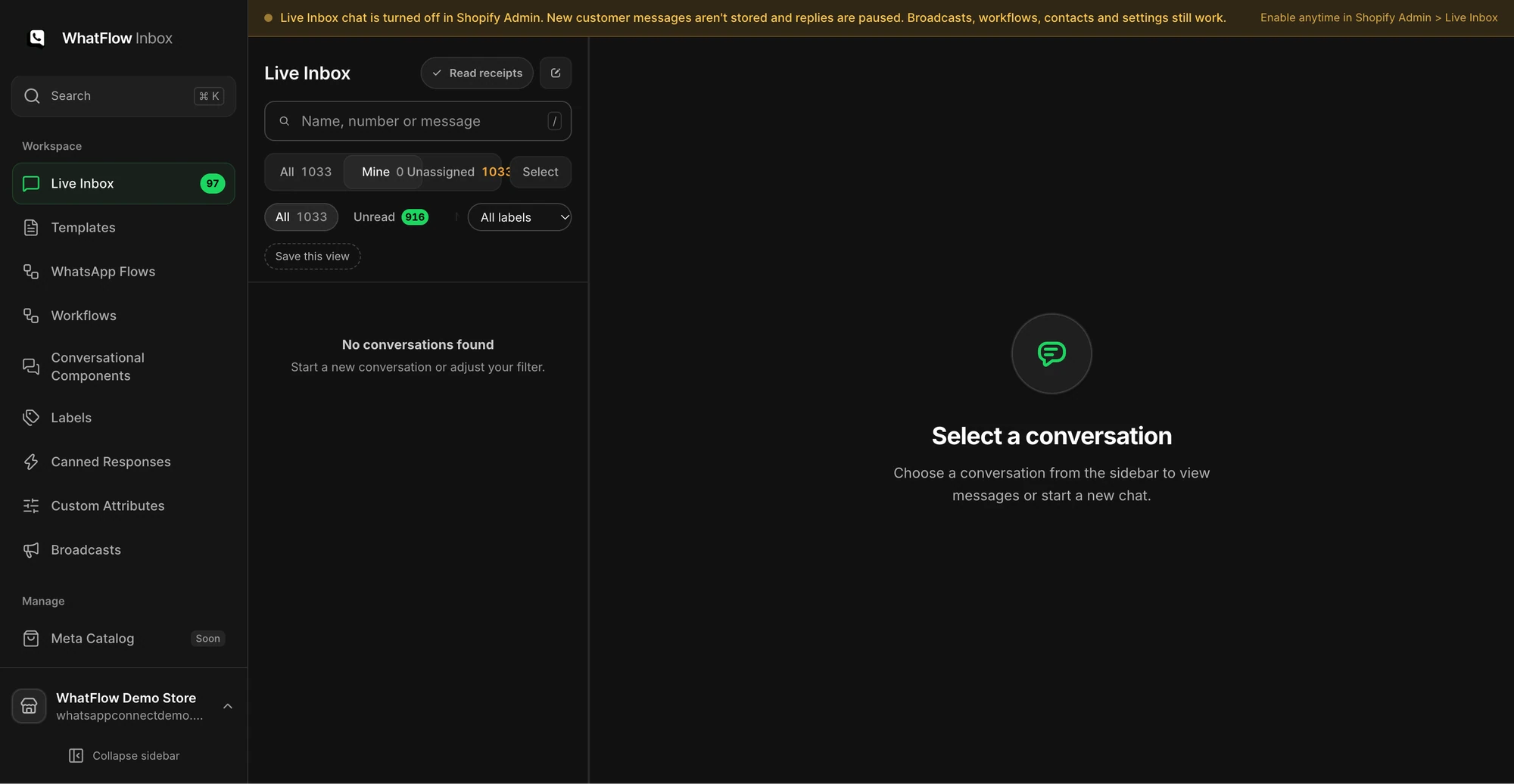
One practical check: Can an agent open a matching Shopify order while they reply? In WhatFlow, use Needs reply and Closing soon, claim a conversation, then check Shopify order context and leave a private note. The team inbox walkthrough gives you a repeatable test for two agents, with no per-seat fee.
The occasional multi-day problem (a lost parcel, a damaged item, a replacement) still fits. Assign it to one person, keep the conversation going in the same thread, and use a saved reply for the update.
What does each option cost a small team?
Helpdesks are usually priced per agent. That sounds fine until you realise who actually needs to answer: the founder, the support lead, the warehouse person who knows whether it shipped, and a part-timer at Black Friday. Paying a seat for each, every month, adds up fast.
WhatFlow has no seat fees. You pay for messaging only. As of November 2026, plans start at $4.99/month on the Shopify App Store, and a store sending 20,000 messages a month pays $29 on Growth whether two or ten people reply. Meta's WhatsApp fees are separate, and since October 1, 2026 only the first 1,000 customer service replies per number per month are free from Meta (Meta pricing). Full details are on our pricing page.
For a side-by-side with two helpdesks we're often compared against, read WhatFlow vs Zendesk and WhatFlow vs Gorgias.
What the WhatsApp inbox does that a helpdesk usually doesn't
Because WhatFlow is a Shopify app on the official WhatsApp Business API, the inbox sits next to the automation that creates most support questions in the first place:
- Proactive order messages. Shipping and delivery updates go out from Shopify events, so "where's my order?" chats drop before they start.
- COD confirmation. Customers tap Confirm or Cancel, and Shopify Flow tags or cancels the order.
- Native Shopify Flow triggers. An incoming WhatsApp message or order reply can start a Flow workflow, for example routing every message containing "refund" to your returns person.
- Live catalog sharing. Send a product from your Meta catalog straight from the chat.
- Saved replies. One click for the answers you type ten times a day.
The routing example is covered step by step in route incoming WhatsApp messages with Shopify Flow. For a good starter set of canned answers, see saved replies that still answer the question.
One honest note: WhatFlow has no built-in AI bot. Answers come from your team, your saved replies and the rules you set, which for most stores is the point. If you want AI help, WhatFlow's MCP connector lets Claude, ChatGPT or Cursor draft replies from Live Inbox chats, and a person approves each one before it is sent.
WhatFlow's WhatsApp Business API app runs on the official Meta WhatsApp Cloud API and is rated 5.0 out of 5 from 55 ratings on the Shopify App Store (checked November 5, 2026).
When a helpdesk might still make sense
Pick a ticket-first helpdesk only if you specifically need formal SLA tracking, a single case record across email, phone and several chat channels, or reporting your operations team already depends on. If that's you, you can still run WhatsApp order messaging in WhatFlow and keep the helpdesk for escalations.
The bottom line
WhatsApp customers expect a chat, not a case number. For a Shopify store, WhatFlow's WhatsApp inbox gives your whole team a shared place to answer, with order automation and Shopify Flow built in, no seat fees and every feature on the Free plan. Start there. Add tickets later only if a real requirement shows up. If your team still answers from personal phones, read shared inbox vs personal phones first.
Questions worth asking
Do I need a helpdesk for WhatsApp customer support on Shopify?
Most small and mid-sized Shopify stores don't. A WhatsApp team inbox like WhatFlow handles order questions, delivery problems and returns with assignment and saved replies, and it charges no seat fees, so everyone who knows the order can help.
How can I test whether a WhatsApp inbox is enough for my store?
Run three real cases through it for a week: a quick sizing question, a delivery problem that lasts several days, and a handover between two people. If all three close cleanly with a clear owner, you don't need tickets.
Does the free WhatFlow plan restrict features?
No. Every WhatFlow feature, including the team inbox, is on every plan, including Free. Plans differ only by message allowance and rate.
Are Meta's WhatsApp charges included in WhatFlow's price?
No. Meta charges separately for delivered template messages by category and country. Since October 1, 2026, Meta's free customer service replies are capped at the first 1,000 per number per month.
Sources and methodology
We checked these primary sources on November 5, 2026. Vendor pages describe advertised capabilities, rather than independent performance tests. Confirm current pricing, plan limits and availability with each provider.
- WhatFlow plans and Shopify integrations
WhatFlow WhatsApp Business API listing: plan prices, included sends and a 5.0 rating from 55 reviews, checked November 5, 2026.
- WhatsApp Business Platform pricing
Meta's per-message pricing, which varies by template category and recipient country and is charged separately from app fees.