
Publisher disclosure: this comparison is written by WhatFlow. Competitor capabilities are based on the linked public documentation; the WhatFlow screenshots come from our demo store. Examples are illustrative, and results depend on your store and configuration.
WhatFlow and Personal staff phones at a glance
| Consideration | WhatFlow | Personal staff phones |
|---|---|---|
| Best-fit experience | One shared WhatsApp inbox for the whole Shopify team, with assignment, filters and saved replies on every plan. | Works for a solo founder. Once a second person helps, chats split across devices and nobody can see the full history. |
| Costs to include | Your message plan plus Meta's WhatsApp fees. No seat fees, so adding a colleague costs nothing extra. | No software bill, but you pay in staff time: forwarded screenshots, repeated questions and orders looked up twice. |
| Shopify workflow | Order templates, COD confirmation, Shopify Flow triggers and actions, and admin extensions in the same app as the inbox. | Order details are copied by hand from Shopify admin into each chat. Nothing is triggered by a store event. |
| Starting point | Free plan with every feature, plus theme-matched WhatsApp buttons that are free forever. | Free to start, but the customer history leaves with whoever holds the phone. |
| When someone leaves | Remove their access. The conversations stay in the store's inbox. | Customer chats stay on that person's device unless someone exports them first. |
If more than one person answers your store's WhatsApp, use a shared inbox, not personal phones. A shared WhatsApp inbox keeps every customer conversation, order reference and owner in one place, so a handover doesn't depend on someone forwarding screenshots. WhatFlow gives Shopify teams that inbox with no seat fees and every feature on every plan, including Free.
Personal phones are fine for a founder working alone. The trouble starts the day a second person helps.
At a glance
WhatFlow shared inbox | Personal staff phones | |
|---|---|---|
Who can see a chat | Anyone you give access to | Only the phone's owner |
Handover at shift end | Assign the chat; history stays | Screenshots and voice notes |
When someone leaves | Remove access; chats stay with the store | Chats leave with the device |
Order messages | Triggered by Shopify events | Copied by hand |
Cost per extra person | $0 (no seat fees) | $0, plus a lot of lost time |
What goes wrong with personal phones?
Say a customer messages at 9pm on Friday: "My parcel says delivered but it isn't here." Your colleague Aisha replies from her phone, checks the courier, promises an update by Saturday noon, and then her shift ends. On Saturday, Bilal is on. He can't see the chat. The customer messages again and gets asked for the order number a second time.
Nobody did anything wrong. The setup did. When conversations live on personal devices, the store doesn't own its own customer history. That gets worse when a staff member leaves, and it's a mess for privacy, too: customer phone numbers and addresses sit on phones the business doesn't control.
How a shared WhatsApp inbox fixes the handover
A shared inbox is one WhatsApp number answered by the whole team from one place. In WhatFlow, that inbox sits inside your Shopify setup, so the person replying has the order context and the next action right there.
One practical check: Can a second agent tell who owns the conversation without asking? In WhatFlow, use Needs reply and Closing soon, claim a conversation, then check Shopify order context and leave a private note. The team inbox walkthrough gives you a repeatable test for two agents, with no per-seat fee.
Here's how Saturday looks instead:
- Aisha assigns the chat to Bilal before logging off.
- Bilal filters the inbox to his assigned chats and reads the full conversation, including her promise.
- He sends the update with a saved reply instead of typing it from scratch.
Hi Sara, Bilal here from the team. I've picked up your delivery question from Aisha. The courier has opened a trace on order #1042 and we'll update you by 12pm today. Sorry for the worry.

For a deeper walkthrough of ownership rules, see how to set up a shared team inbox for a small Shopify business. If you're writing the replies themselves, these tips on saved replies that don't sound robotic help.
What does a shared WhatsApp inbox cost?
With WhatFlow, adding people costs nothing. There are no seat fees, so the founder, two support staff and a warehouse colleague who helps during sales all share the inbox for the same price as one person.
What you pay for is messaging. As of November 2026, WhatFlow's paid plans start at $4.99/month on the Shopify App Store listing, and Growth is $29/month with 20,000 sends included. A store sending 10,000 messages a month pays $29 on Growth, whether one person or eight people answer the replies. Meta's WhatsApp fees are separate and depend on the template category and country. Current amounts are always on our pricing page.
Compare that with seat-priced tools, where every new helper means another monthly licence. We wrote up the maths in no-seat-fee inbox vs per-seat pricing.
What else you get beyond the inbox
Moving to a shared inbox on the official WhatsApp Business API also lets you stop copying order details by hand:
- Order confirmation, shipping and abandoned checkout messages sent from Shopify events, using approved templates.
- COD confirmation with reply buttons that can tag or cancel the order through Shopify Flow.
- Native Shopify Flow triggers for incoming messages and order replies, so a reply can route itself.
- Live catalog sharing from the inbox and free-forever, theme-matched WhatsApp buttons for your storefront.
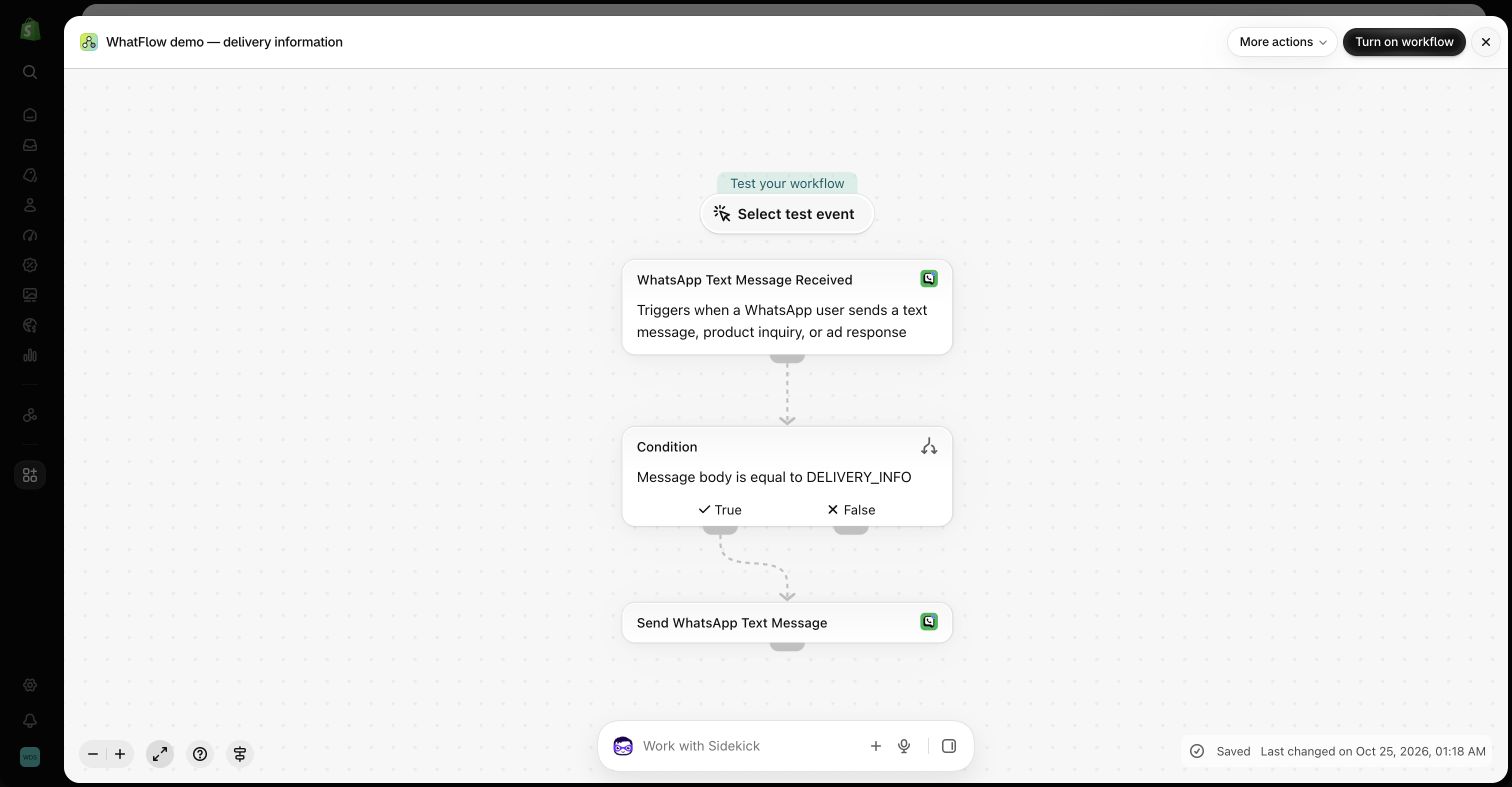
If you want to route incoming chats automatically, here's how to route WhatsApp messages with Shopify Flow.
WhatFlow's WhatsApp Business API app runs on the official Meta WhatsApp Cloud API and is rated 5.0 out of 5 from 55 ratings on the Shopify App Store (checked November 5, 2026).
When personal phones still make sense
If you're a one-person store and you answer every message yourself, the WhatsApp Business app on your own phone is fine for now. Plan the switch before your first hire, not after the first lost conversation. Our guide to moving from the WhatsApp Business app to the API explains what changes.
The bottom line
Personal phones hide your customer history in places the business can't reach. A shared WhatsApp inbox keeps it with the store. WhatFlow does that for Shopify teams with no seat fees, every feature on the Free plan, and order messaging built in. If two or more people touch customer chats, install it and run your next handover through it.
Questions worth asking
Should my Shopify staff use their own phones for customer WhatsApp chats?
Only while one person handles everything. As soon as two people reply, a shared inbox like WhatFlow keeps every conversation, order reference and owner in one place, and WhatFlow charges no seat fees for adding them.
How do I test whether my WhatsApp handover works?
Take an open delivery problem, have the first person go offline, and ask a colleague to pick it up. If they can see what was promised and what happens next without a phone call or screenshot, your handover works.
Does the free WhatFlow plan restrict features?
No. Every WhatFlow feature, including the team inbox, is on every plan, including Free. Plans differ only by message allowance and rate, and the theme-matched WhatsApp buttons are free forever.
Are Meta's WhatsApp charges included in WhatFlow's price?
No. Meta charges separately for delivered template messages, depending on the category and the recipient's country. Since October 1, 2026, Meta's free customer service replies are capped at the first 1,000 per number per month.
Sources and methodology
We checked these primary sources on November 5, 2026. Vendor pages describe advertised capabilities, rather than independent performance tests. Confirm current pricing, plan limits and availability with each provider.
- WhatFlow plans and Shopify integrations
WhatFlow WhatsApp Business API listing: plan prices, included sends and a 5.0 rating from 55 reviews, checked November 5, 2026.
- WhatsApp Business Platform pricing
Meta's per-message pricing, which varies by template category and recipient country and is charged separately from app fees.