
Publisher disclosure: this comparison is written by WhatFlow. Competitor capabilities are based on the linked public documentation; the WhatFlow screenshots come from our demo store. Examples are illustrative, and results depend on your store and configuration.
WhatFlow and Zapier integration chain at a glance
| Consideration | WhatFlow | Zapier integration chain |
|---|---|---|
| Where the automation runs | Inside Shopify Flow, next to the order. WhatFlow adds WhatsApp triggers and actions directly to Flow. | On Zapier, outside Shopify. Each step passes data between separate apps. |
| Automation cost | Shopify Flow is free. WhatFlow plans start at $0, paid from $4.99/month. No per-task billing. | Billed by tasks. Free covers 100 tasks/month; Pro starts at $19.99/month billed annually for 750 tasks (as of November 2026). WhatsApp provider is extra. |
| Acting on a customer's reply | WhatFlow's order-reply trigger fires in Flow, so a Confirm tap can tag or cancel the order in the same workflow. | Needs a trigger from the WhatsApp provider plus a Shopify action step, each consuming tasks. |
| Setup | Install WhatFlow, connect WhatsApp via Meta Embedded Signup, pick a WhatFlow action in Flow. Sidekick can draft workflows. | Connect Shopify, a WhatsApp provider and any other apps, then map fields between them. Multi-step Zaps need a paid plan. |
| Team inbox for replies | Included, with no seat fees. | Not part of Zapier; you need a separate inbox tool. |
For WhatsApp automation on a Shopify store, use Shopify Flow with WhatFlow instead of a Zapier chain. Flow is free, WhatFlow plugs WhatsApp triggers and actions straight into it, and a customer's reply can tag or cancel the order in the same workflow. Zapier bills per task and sits outside Shopify. Keep it for the rare job that needs a non-Shopify app.
At a glance
- Cost: Shopify Flow is free. Zapier bills by tasks: the Free plan gives 100 tasks a month with two-step Zaps only, and Pro starts at $19.99/month billed annually for 750 tasks (as of November 2026).
- Data: Flow reads the live Shopify order. Zapier passes copies of fields between apps.
- Replies: WhatFlow's order-reply trigger lives in Flow, so acting on "Confirm" or "Cancel" is native.
- Inbox: WhatFlow includes a team inbox with no seat fees. Zapier has no inbox.
- Maintenance: One app inside Shopify vs a chain of connected accounts.
What does a WhatsApp automation cost in Flow vs Zapier?
Take a common job: COD confirmation. A hypothetical store gets 600 COD orders a month. Each order should get a WhatsApp template, and a Confirm reply should tag the order.
Shopify Flow + WhatFlow. Flow costs nothing. WhatFlow's Starter plan is $4.99/month with 2,000 messages included (as of November 2026), comfortably covering 600 confirmations plus reminders. No per-step fees.
One practical check: Can a catalog cart event start a workflow separately from an order-paid event? WhatFlow has separate Shopify Flow blocks, API-triggered Inbox Workflows and in-chat WhatsApp forms. Try the catalog cart workflow if you need to connect a buyer reply with a Shopify action.
Zapier chain. You need at least two Zaps: one to send the template when an order arrives, one to tag the order when the reply comes back. That's 1,200 or more action tasks a month, beyond Pro's 750-task entry tier, plus a WhatsApp provider subscription, plus an inbox for the replies that aren't a simple button tap.
Meta's per-message charge is the same either way, because it's Meta's fee. WhatsApp Business API pricing explained covers how those charges work. WhatFlow's current plans are on the pricing page.
How does a WhatsApp workflow look in Shopify Flow?
Here's the COD confirmation as a Flow workflow:
- Trigger: Order created.
- Condition: Payment gateway is Cash on Delivery.
- Action: WhatFlow, Send WhatsApp Template, mapping order number, total and first name.
- Separate workflow trigger: WhatFlow order reply received.
- Condition: Reply is "Confirm" → add tag
cod-confirmed. Reply is "Cancel" → add tagcod-cancel-requestfor a human to review.
The customer sees something like:
Hi Ravi, thanks for your order #2231 (₹1,850, Cash on Delivery). Please confirm so we can ship it today. [Confirm] [Cancel]
The step-by-step version is in sending WhatsApp templates from Shopify Flow, and the reply side is in turning WhatsApp order replies into Shopify actions.
Why fewer moving parts matters
Every Zapier hop is a place for a field to go missing. Rename a template variable, change a Shopify field, let one connected account's login expire, and the Zap quietly stops. You find out when a customer asks why nobody confirmed their order.
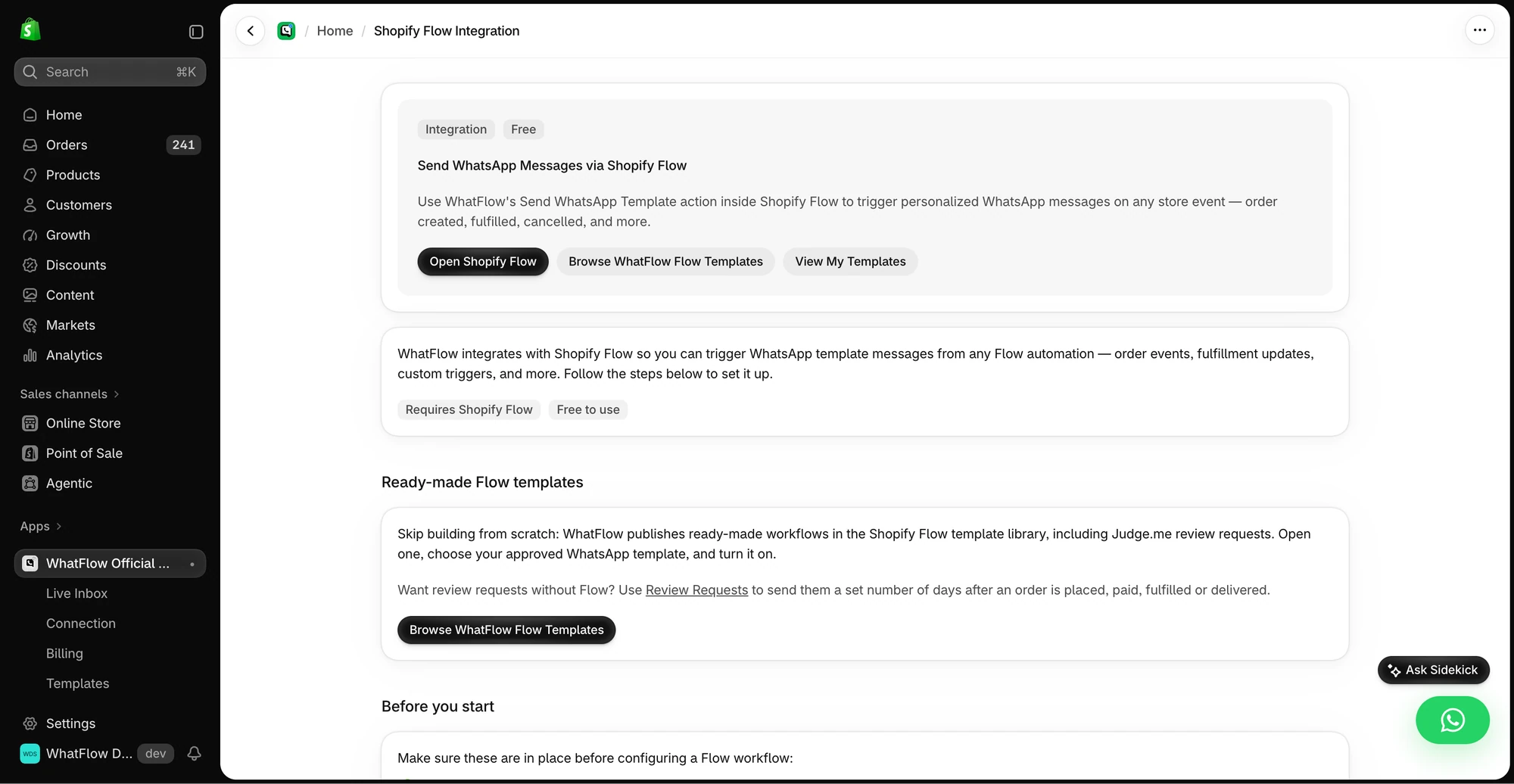
In Flow, the trigger, the WhatsApp action and the order action sit in one workflow inside Shopify. Flow's run history shows exactly which step did what. And because Flow also connects many other Shopify apps (review apps, loyalty apps, back-in-stock apps), you can often join them to WhatsApp without leaving Shopify. See connecting WhatsApp to your Shopify app workflows.
Do I need to know APIs to build this?
No. You pick triggers and actions from menus. If you'd rather describe it in words, Shopify Sidekick can draft a Flow workflow that uses WhatFlow actions, and you review it before turning it on. The WhatFlow + Shopify Flow guide walks through the first few.
Who handles the replies?
Automation sends the message; people handle the "actually, can you deliver Thursday instead?" replies. WhatFlow's shared inbox catches those, with assignment, filters and saved replies, and adding colleagues costs nothing. A Zapier chain gives you the send but leaves the conversation somewhere else.
Does this hold up at high order volume?
Yes. WhatFlow WhatsApp Business API sends through the official Meta WhatsApp Cloud API, and Shopify Flow is Shopify's own automation engine, so you aren't stacking unofficial workarounds. Large teams get a shared inbox with assignment and filters and no seat fees at any team size, plus COD confirmation, live catalog sharing and Shopify admin extensions. Small stores get the same toolset on the Free plan.
When might Zapier still make sense?
Pick Zapier only if a step needs an app that has no Shopify Flow connector, for example pushing a WhatsApp lead into a niche CRM your sales team uses. Even then, keep the WhatsApp send and the order action in Flow and let Zapier handle that one extra hop. Before you add any connector, run through these connector checks.
The bottom line
Shopify Flow is free, already lives in your store, and with WhatFlow it speaks WhatsApp natively. That beats paying per task to shuttle order data between three accounts. WhatFlow WhatsApp Business API is rated 5.0/5 from 55 ratings on the Shopify App Store (as of November 5, 2026), and every feature, Flow actions included, is on the Free plan.
Questions worth asking
Is Shopify Flow better than Zapier for WhatsApp messages?
For Shopify order messages, yes. Shopify Flow is free, runs on live order data, and with WhatFlow installed it can send WhatsApp templates and react to replies without per-task charges.
How do I test a WhatsApp automation before going live?
Place a test order, check the template arrives with the right order number, reply with each button option and confirm the order is tagged correctly. Then cancel an order mid-flow to make sure no stale message goes out.
Do I need a paid WhatFlow plan to use Shopify Flow actions?
No. Every WhatFlow feature, including the Flow triggers and actions, is on the Free plan. Paid plans only add message allowance.
Are Meta's WhatsApp charges included in WhatFlow or Zapier pricing?
No. Meta bills per delivered template message by category and country, whichever tool sends it. Since October 1, 2026, free-form service replies are free only for the first 1,000 per business number each month.
Can Zapier send WhatsApp messages from Shopify?
Yes, by connecting Shopify to a WhatsApp provider in a Zap. You pay Zapier tasks for each step plus the provider, and multi-step Zaps need a paid Zapier plan as of November 2026.
Sources and methodology
We checked these primary sources on November 5, 2026. Vendor pages describe advertised capabilities, rather than independent performance tests. Confirm current pricing, plan limits and availability with each provider.
- WhatFlow plans and Shopify integrations
WhatFlow listing: Free plan (100 messages) and paid plans from $4.99/month; all features on every plan. Checked November 5, 2026.
- WhatsApp Business Platform pricing
Meta's overview of WhatsApp Business Platform pricing by category and country.
- Shopify Flow
Shopify Flow is free on Basic, Grow, Advanced and Plus plans; Send HTTP Request is limited to Grow and above, as of November 2026.
- Zapier pricing
Zapier bills by tasks; the Free plan has 100 tasks a month and two-step Zaps only, as of November 2026.
- WhatsApp Business Platform pricing (Meta developer docs)
Meta charges per delivered template message by category and recipient country. Since October 1, 2026, service replies are free only for the first 1,000 per business number each month, and utility templates inside the customer service window are charged.