A good review request message names your store and the exact product, asks for an honest review in one sentence, gives one link, and tells the customer how to get help if something went wrong. On WhatsApp that's three or four short lines. Below are 12 review request message examples (eight for WhatsApp, four for email) that you can copy and adapt, plus the wording to avoid.
What every good review request has
Before the examples, the checklist. If a message misses one of these, fix it before you send:
Store name in the first line. Customers buy from lots of shops. "Hi, it's Sana from Loom & Pack" beats "Hi there!"
The product, by name. "The Commuter Lunch Bag", not "your recent purchase".
An honest ask. "Tell us what you think, good or bad." Never "leave us 5 stars".
One link. To your review app's form for that product. No "shop our new arrivals" button competing with it.
A help route. "Reply here if anything's wrong." Then make sure someone actually reads the replies.
And timing: ask after the customer has had time to use the thing. For most products that's days after delivery, not the day of dispatch. Our guide on when to ask for a review after delivery breaks it down by product type.
WhatsApp review request examples
A quick rule first. Outside a 24-hour window after the customer last messaged you, WhatsApp only lets a business send a Meta-approved template. So every first-contact example below is written as a template, with placeholders like {{1}} for the customer's name.
Meta also decides the template's category. Its template categorization rules say a feedback request about a specific previous order can count as utility, a generic "tell us what you think of us" won't, and anything promotional pushes the template into marketing. Keep review requests about one order and free of discount codes. More on utility vs marketing templates if you want the detail.
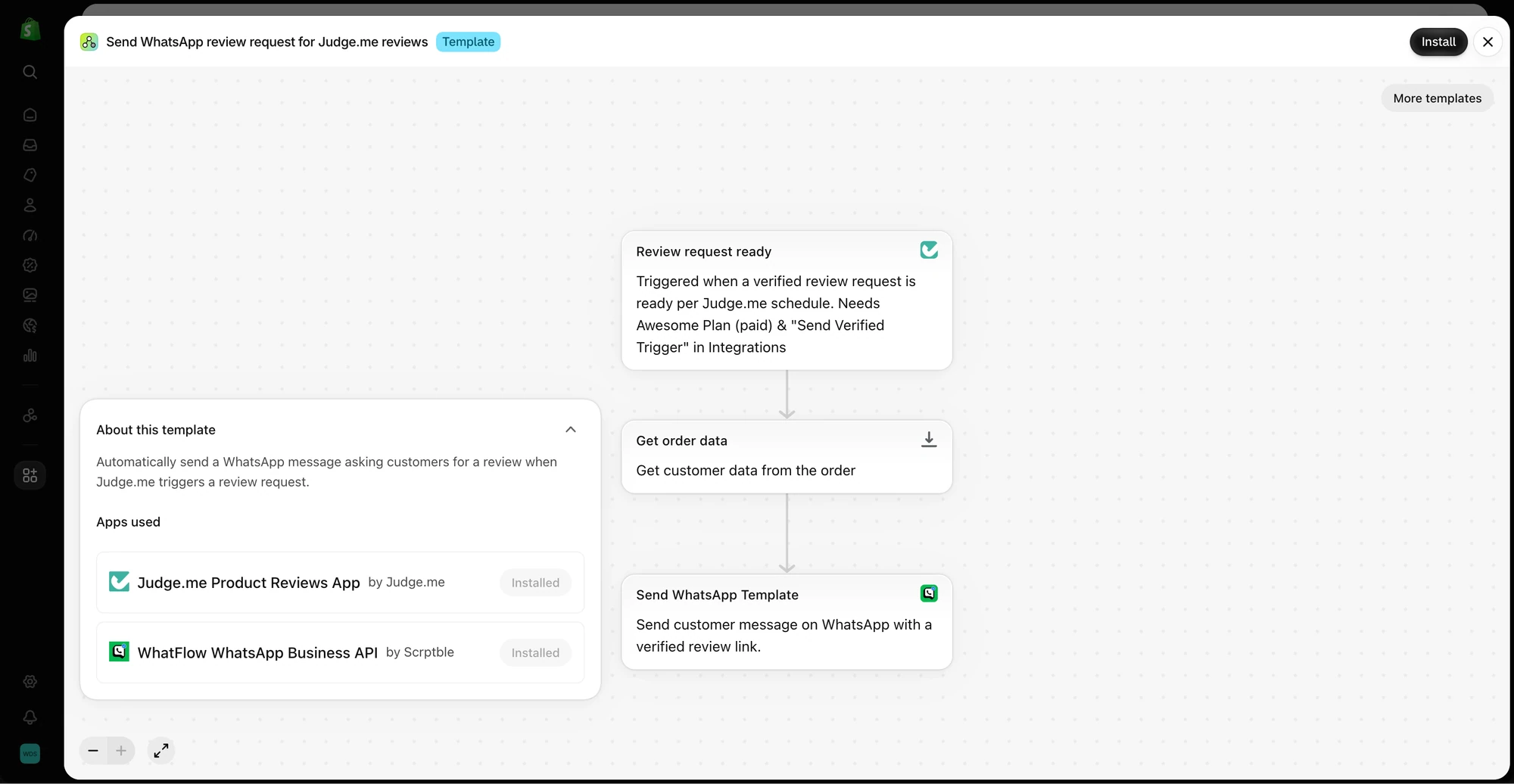
The template uses a Judge.me review request trigger, loads order data, and sends a WhatsApp template through WhatFlow. This is a preview, not an enabled workflow.
1. The standard first ask
Hi {{1}}, it's Sana from Loom & Pack. Your {{2}} was delivered last week, so I hope you've had a chance to use it. Would you share an honest review? It helps other shoppers decide. {{3}}
If anything's not right with your order, just reply here.
2. The short version
Hi {{1}}, how's the {{2}} working out? We'd love an honest review: {{3}}
Loom & Pack
Short works on WhatsApp. If your product names are long, this is the safer choice.
3. With a help button
Hi {{1}}, Loom & Pack here. Got a minute to review your {{2}}? Tap below to leave an honest review, or tap "I need help" if something's wrong.
[Write a review] [I need help]
Both buttons go to everyone. Don't build a version where happy customers get the review link and unhappy ones only get support. That's review gating, and it skews your reviews toward the positive. If you're new to buttons, see designing WhatsApp quick replies.
4. Asking for a photo
Hi {{1}}, thanks again for ordering the {{2}}. If you're up for it, a photo of it in everyday use is really helpful for other shoppers. Totally optional, a few words of honest feedback is great too: {{3}}
5. The one reminder
Hi {{1}}, a quick follow-up about your {{2}} from Loom & Pack. If you'd like to share a review, here's the link: {{3}}. If you've already done it, thank you, and please ignore this.
Send it once, about a week after the first ask, and only to people who haven't reviewed yet if your setup can check that. If it can't, skip the reminder rather than nag people who already helped.
6. After you fixed a problem
This one goes inside an open conversation, so it's a normal reply, not a template:
Glad the replacement arrived safely, Ravi, and sorry again for the hassle with the first one. Whenever you've used it for a bit, we'd value an honest review, including the part where things went wrong: [link]
Note the wording. You're not asking him to forget the problem. You're asking for the whole story.
7. Orders with several products
Hi {{1}}, it's Loom & Pack. You ordered a few things from us recently. If you have a minute, you can review any of them here, whichever you've used most: {{2}}
If your review app can give you one link covering the whole order, use it. If not, link the main item rather than cramming four product names into one message.
8. Consumables, after the second order
Hi {{1}}, now that you're on your second bag of {{2}}, you know it better than most. Would you share an honest review for people trying it for the first time? {{3}}
Repeat buyers write the most useful reviews for consumables. They've used it for weeks.
WhatFlow WhatsApp Business API runs on Meta's official WhatsApp Cloud API, so these go out as real Meta-approved templates. You write them in the template editor inside Shopify admin, submit them to Meta for approval, then send them automatically from Shopify Flow, for example a few days after an order is marked delivered. The message links to your review app's form (Judge.me, or whichever app you use). WhatFlow sends the request; your review app collects, verifies and displays the review. Template editor, Flow actions and the shared inbox are on every WhatFlow plan, including Free, and the setup stays the same as your order volume and support team grow.
Email review request examples
9. The standard email
Subject: How's your Commuter Lunch Bag?
Hi Aisha,
Your Commuter Lunch Bag arrived last week. We'd really like to know how it's working for you, what you like and what could be better.
[Write a review]
If something's wrong with your order, reply to this email and we'll sort it out.
Sana, Loom & Pack
10. The email reminder
Subject: Quick follow-up on your lunch bag
Hi Aisha, just one reminder in case last week's email got buried. If you'd like to review your Commuter Lunch Bag, the link's below. If you already have, thank you.
[Write a review]
11. Store review instead of product review
Subject: How did we do with your order?
Hi Aisha, this one's about us rather than the bag: how was ordering from Loom & Pack, from checkout to delivery? An honest review helps us fix what's not working.
[Review Loom & Pack]
Keep store reviews and product reviews separate. "Fast delivery" belongs on the store, not on a product page.
12. The plain founder note
Subject: A favour from Loom & Pack
Hi Aisha,
I'm Sana, I run Loom & Pack with my brother. We're small, so every review genuinely shapes what we make next. If you've used your lunch bag for a while, would you tell us honestly how it's going?
[link]
Thanks,
Sana
Plain-text founder notes often feel more personal than a designed email. Only send one if it's true.
"Leave us a 5-star review!" Asking for a rating, not a review, makes every review look bought.
"Review us and get 10% off your next order... if you loved it." The FTC's consumer reviews rule bans incentives that expressly or implicitly require a positive review (the FTC's Q&A gives examples). Read the rules on review incentives before offering anything.
"Support our small business journey!" It makes the ask about you. Make it about the product.
Three buttons and a discount code. The review link should be the only obvious thing to do. Promotional extras also turn a WhatsApp template into marketing.
"Your reply here will be posted as a review." Unless your setup really does that, it won't be. The review is whatever the customer submits in your review app.
Free plan available
Run WhatsApp for your Shopify store with WhatFlow
Templates, COD confirmation, Shopify Flow automations and a shared team inbox with no seat fees. Every feature is included on every plan, including Free.
Test with your own phone number and a real test order. Check: a customer with no first name on file, a product with a very long title, an order with three items, and the link on both Android and iPhone. Then decide who reads replies. A request that says "reply if something's wrong" and lands in an inbox nobody checks is worse than no request. If your team shares WhatsApp, a shared team inbox with clear ownership keeps those replies from slipping.
Frequently asked questions
What should a review request message say?
Who you are, which product the customer bought, a one-line ask for an honest review, and the link. Add a way to get help if something went wrong.
Is a WhatsApp review request a marketing or utility template?
Meta decides the category. Its guidelines say feedback requests tied to a specific previous order can be utility, but a generic request for feedback won't be approved as utility, and any promotional content makes a template marketing.
Can I ask customers for a 5-star review?
No. Ask for an honest review. Under the FTC's consumer reviews rule, incentives that expressly or implicitly require a positive review are prohibited, and asking for stars makes your reviews less believable anyway.
How many review reminders should I send?
One reminder is plenty for most stores, sent about a week after the first request, and only to customers who haven't already reviewed.