
Publisher disclosure: this comparison is written by WhatFlow. Competitor capabilities are based on the linked public documentation; the WhatFlow screenshots come from our demo store. Examples are illustrative, and results depend on your store and configuration.
WhatFlow and Email review requests at a glance
| Consideration | WhatFlow | Email review requests |
|---|---|---|
| Customer experience | A short, personal message after delivery with a link to your review form. The customer can also reply with a question or problem. | A longer branded email with product images, read whenever the customer gets to it. |
| Cost | WhatFlow from $0 (Free) or $4.99/month for 2,000 messages, plus Meta's per-template charge. One well-timed request per order. | Usually included with your review app or email platform. |
| Shopify workflow | Shopify Flow sends WhatFlow's review-request template after fulfilment or delivery, linking to your review app's form. | Your review app's built-in email schedule. |
| Review verification | Handled by your review app; WhatFlow delivers the invitation and link. | Handled by your review app. |
| When the customer is unhappy | They reply in WhatsApp and your team resolves it in the inbox before it becomes a one-star review. | They often skip the email or leave the review without contacting you. |
Send review requests on WhatsApp to customers who've opted in, and keep email as the backup. A WhatsApp request after delivery gets seen, and when a customer has a problem they reply to you instead of quietly leaving one star. WhatFlow sends the request from Shopify Flow with a link to your review app's form, and replies land in a team inbox with no seat fees.
At a glance
WhatsApp with WhatFlow | ||
|---|---|---|
Visibility | Phone notification in their chats | One email among many |
Format | Short personal note + review link | Rich layout, product images |
If something went wrong | Customer replies; you fix it | Customer often just leaves a low review |
Setup | Shopify Flow + WhatFlow template | Review app's email schedule |
Verification | Your review app | Your review app |
Why does WhatsApp work better for review requests?
It's the reply. Say a customer bought a ceramic planter and it arrived with a chip. An email review request lands, and they click through and write "arrived broken, disappointed". With WhatsApp, the request reads:
Hi Lucía, hope the Terra planter is settling in. If you have a minute, we'd love your honest review: {review_link}. And if anything wasn't right, just reply here and we'll sort it.
She replies with a photo of the chip. Your teammate sends a replacement from the inbox. Maybe she reviews later, maybe she doesn't, but you've fixed a real problem instead of reading about it. That's a better outcome for everyone. For reply examples to tougher messages, see handling an angry customer on WhatsApp.
Keep the ask neutral. Invite an honest review; never hint that only positive ones are welcome, and don't offer rewards for positive reviews. The rules on incentivised reviews cover what's allowed.
How do I set up WhatsApp review requests in Shopify?
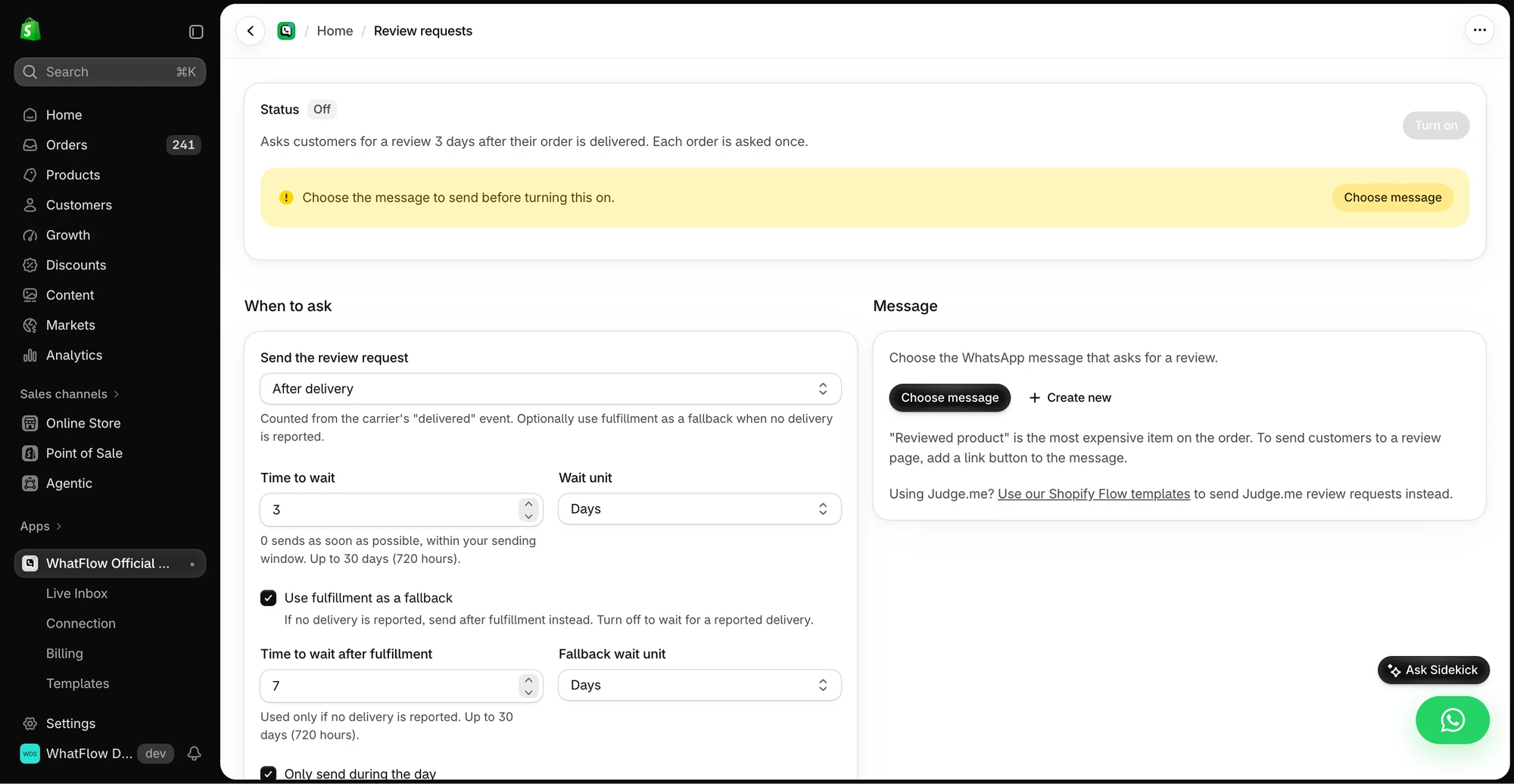
WhatFlow supports review-request workflows: send a link to your review app's form. In Shopify Flow:
- Trigger: Order fulfilled (or a delivered event, if your setup provides one).
- Wait: long enough for the customer to use the product, for example 7 days for skincare, 3 days for a phone case.
- Condition: customer opted in to WhatsApp; order not cancelled or refunded.
- Action: WhatFlow, Send WhatsApp Template, with the first name, product name and your review app's link.
The review itself is collected and verified by your review app. Some review apps mark a review verified when it's tied to a real order, including reviews submitted through review links, so check how yours handles link-based submissions. Timing advice is in when to ask for a review after delivery, and message examples are in review request messages for WhatsApp and email.
How much do WhatsApp review requests cost?
A worked example with hypothetical numbers. You deliver 800 orders a month and send one review request each to the 500 customers who opted in. Add 1,200 order updates and you're at 1,700 messages, inside WhatFlow's Starter plan at $4.99/month for 2,000 messages (as of November 2026).
Meta charges per delivered template on top. Meta decides the category; review requests are often treated as marketing, so budget for that rate. One request per order is plenty, both for cost and for goodwill. See WhatsApp Business API pricing explained and our pricing page.
Is WhatFlow suitable for a large review program?
Yes. WhatFlow WhatsApp Business API runs on the official Meta WhatsApp Cloud API, and it's built for large teams: inbox assignment and filters to route complaints, no seat fees at any team size, Shopify Flow automation at scale, COD confirmation, live catalog sharing and Shopify admin extensions. If you're just starting, collecting your first product reviews is the place to begin, on the Free plan.
When does email still make sense?
Use email for customers who haven't opted in to WhatsApp, and when you want a richer request showing several products from a multi-item order. Your review app's email schedule handles that well. Just make sure the same customer doesn't get the ask on both channels in the same week.
The bottom line
A review request should be easy to answer and easy to reply to. WhatsApp is both. WhatFlow sends it from Shopify Flow, links to your review app, and gives your whole team a no-seat-fee inbox for the replies. WhatFlow WhatsApp Business API is rated 5.0/5 from 55 ratings on the Shopify App Store (as of November 5, 2026).
Questions worth asking
Are WhatsApp review requests better than email?
For opted-in customers, WhatsApp is the better first ask: it's seen quickly and the customer can reply if something went wrong. WhatFlow sends it from Shopify Flow with a link to your review app's form.
When should I send a review request on WhatsApp?
After the customer has had time to use the product, usually a few days to two weeks after delivery depending on what you sell. Send one request, not a sequence.
Can I send review requests on WhatFlow's free plan?
Yes. Review-request workflows and every other WhatFlow feature are on every plan, including Free. Plans differ only by message allowance.
Does Meta charge for WhatsApp review requests?
Yes. Meta bills each delivered template message by category and recipient country, separately from WhatFlow. Meta decides the category, so budget at the marketing rate unless your template is approved as utility.
Sources and methodology
We checked these primary sources on November 5, 2026. Vendor pages describe advertised capabilities, rather than independent performance tests. Confirm current pricing, plan limits and availability with each provider.
- WhatFlow plans and Shopify integrations
WhatFlow listing: feedback requests, post-purchase messages and plan pricing, checked November 5, 2026.
- WhatsApp Business Platform pricing
Meta's overview of WhatsApp Business Platform pricing by category and country.
- Google: New Gmail protections for a safer, less spammy inbox (October 3, 2023)
Google's October 2023 announcement of Gmail bulk-sender requirements; background on email deliverability.
- Judge.me verified-review requirements
Judge.me help: a review is marked verified when it's tied to an actual order; review links and other channels count when the customer confirms.
- WhatsApp Business Platform pricing (Meta developer docs)
Meta charges per delivered template message by category and recipient country. Since October 1, 2026, service replies are free only for the first 1,000 per business number each month, and utility templates inside the customer service window are charged.
- Shopify Flow (Shopify Help Center)
Shopify Flow is free and available on Basic, Grow, Advanced and Plus plans, as of November 2026.
- WhatsApp Business Messaging Policy
Opt-in, opt-out and template rules for business-initiated WhatsApp messages.