Illustrated cover by WhatFlow. App screenshots and examples appear in the guide.
Send a review request once the customer has had the product long enough to judge it: around 3–5 days after delivery for things used immediately, 1–2 weeks for products that need setup, and 2–4 weeks for anything that works over time, like skincare. Time it from a real delivery event, not the order date. Then treat "it hasn't arrived" or "haven't used it yet" replies as timing feedback.
Why "three days after the order" doesn't work
Because your products aren't all the same, and neither are your delivery times.
A tote bag can be judged the moment it comes out of the box. A self-assembly shelf needs a weekend. A serum needs a few weeks before anyone can tell you if it did anything. Send all three a request on the same day and you'll get premature reviews for two of them ("looks nice, haven't tried it yet, 4 stars"), or no reviews at all.
Delivery time varies too. If you ship domestically in two days and internationally in twelve, "seven days after the order" means "five days after delivery" for one customer and "before it arrived" for another.
Order date, fulfillment and delivery aren't the same
Three timestamps, three different meanings:
Order date: when they paid. Tells you nothing about the product.
Fulfillment date: when it left your warehouse. Better, but transit times vary.
Delivery date: when they (probably) have it. This is what you want.
Check which one your review request uses today. If the workflow fires on fulfillment but the message says "now that your order has arrived", that's the first thing to fix, before you test any new delay.
If you can't get a reliable delivery event, use fulfillment plus your typical transit time for that shipping zone, and write the message so it doesn't claim delivery:
Hi {{1}}, your {{2}} should be with you by now. If it hasn't arrived, just reply and we'll check the tracking.
A review timing table by product type
Group your catalog into a few buckets rather than setting a delay for every product.
These are starting points I'd test, not rules. Your customers' replies will tell you if a bucket is wrong.
Here's how one bucket plays out. Say you sell a face serum and currently ask for a review five days after delivery. Most replies you get are some version of "too early to tell", and the reviews that do come in say "nice texture, smells good". That's a review of the bottle, not the serum. Move the request to three weeks and you'll get fewer, later reviews that actually say whether it worked, which is what the next shopper wants to know.
Cash on delivery changes things too. A COD order isn't really complete until the customer has paid the courier, and some get refused at the door. Time COD review requests from a confirmed delivery, not from dispatch, or you'll be asking people to review parcels they turned away.
Gifts are their own problem. The buyer may not be the user, and the occasion may be weeks away. A softer request works better:
Hi {{1}}, if the {{2}} was a gift, no rush. Whenever you or they have had a chance to try it, we'd love an honest review: {{3}}
Exceptions that should pause the request
Don't send the standard review request to:
Orders with an open return, exchange or damaged-item chat.
Orders where tracking shows a delivery problem.
Split shipments where only part has arrived.
Here's the line not to cross: pausing a request because there's an open support case is fine. Deliberately only asking happy customers for reviews is review gating, and it skews what shoppers see. Once the issue is resolved, the customer should get the same invitation as everyone else. If you want the detail on what's allowed around review incentives and selection, read our guide to incentivized review rules.
Test one timing change at a time
Say your current request goes out 5 days after delivery for everything, and you suspect skincare needs longer. Move only the skincare group to 21 days. Leave everything else alone. After a month or two, compare:
Eligible orders.
Requests actually delivered.
Reviews submitted.
Replies saying "too early", "not arrived" or "haven't used it".
The fourth number is often more useful than the third. It tells you directly whether the timing fits the real customer experience. Don't call a winner from a dozen orders, and don't compare groups with very different products or prices. Our guide to measuring review collection rate explains how to keep these numbers honest.
Keep email and WhatsApp on one schedule
If your review app sends an email request on day 5 and your WhatsApp workflow also sends one on day 5, the customer gets two requests on the same day. If you then add a reminder on each channel, that's four. A timing test quietly becomes a frequency test.
Pick one sequence across channels. A common split: WhatsApp for the first request (it gets read), email for the single reminder a week later. Or the reverse. Just make it one plan. Our comparison of WhatsApp and email review requests covers when each works better.
How to schedule review requests with WhatFlow
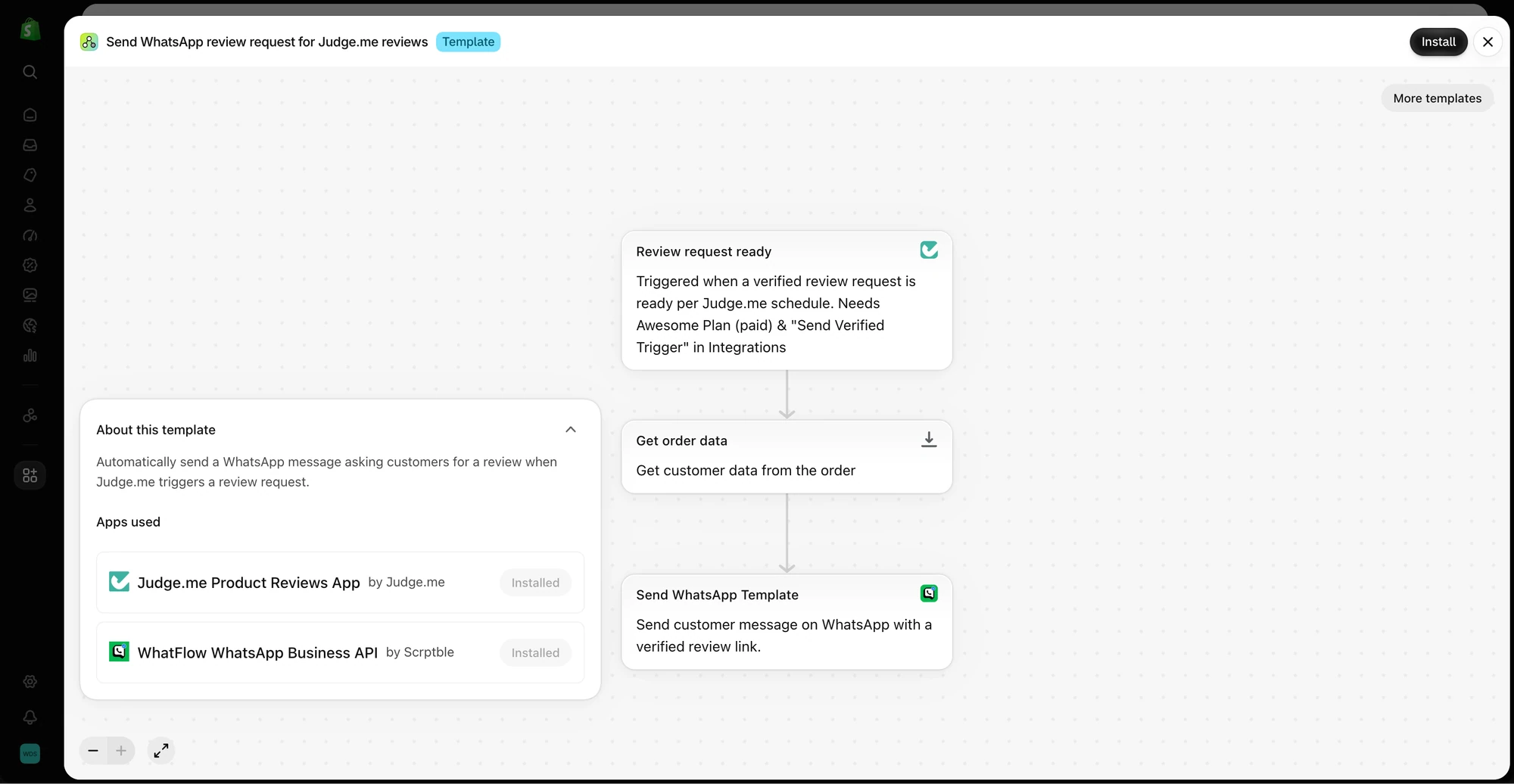
WhatFlow sends the WhatsApp message; your review app (for example Judge.me) owns the form, publishing and verified badges. In Shopify Flow, the workflow looks like:
The template uses a Judge.me review request trigger, loads order data, and sends a WhatsApp template through WhatFlow. This is a preview, not an enabled workflow.
Trigger: a delivered status from Flow's fulfillment event trigger, if your carrier reports it reliably. Otherwise, fulfillment created plus a wait for typical transit time.
Condition: product type or tag, to pick the right timing bucket.
Wait: the delay for that bucket.
Condition: order not refunded, no open-issue tag, customer has opted in.
Action: send your approved review-request template with a link to the product's review form.
Outside the 24-hour customer service window, WhatsApp only lets a business send a pre-approved template, and review requests are usually categorized as marketing. For copy, see our review request message examples.
Run WhatsApp for your Shopify store with WhatFlow
Free plan available. Templates, COD confirmation, Shopify Flow automations and a shared team inbox with no seat fees. Every feature is included on every plan, including Free.
A schedule that worked for locally stocked products breaks the day you add pre-orders or a slow international route. Leave a one-line note in the workflow explaining the event and delay you chose and why. When things change, you'll know what to adjust. And if you're just getting started, our guide to collecting your first product reviews puts timing in the context of the whole process.
Frequently asked questions
How many days after delivery should I ask for a review?
It depends on how long the product takes to judge. Something used immediately, like a bag or a phone case, can be asked about 3 to 5 days after delivery; something that needs setup or weeks of use, like skincare, needs 2 to 4 weeks.
Should review requests be timed from the order date or delivery date?
From delivery whenever you have a reliable delivery event. Order date and fulfillment date don't tell you when the customer actually had the product in hand.
Should I send a review reminder?
One reminder is reasonable if the first request got no response. Keep email and WhatsApp on the same schedule so a reminder doesn't turn into three messages from three apps.
Can WhatFlow send review requests after delivery?
Yes. WhatFlow can send a WhatsApp review-request template from a Shopify Flow workflow, linking to your review app's form. The review app, such as Judge.me, collects and publishes the review.