The right way to budget WhatsApp messaging is per outcome, not per month. Count every message a flow actually sends, price each one by Meta's category and the customer's country, add your app plan and staff time, then divide by the result you care about: a confirmed COD order, a recovered checkout, a resolved question. That number tells you which flows deserve more budget.
Most stores I talk to do the opposite. They look at the app's monthly price, guess a round number for "WhatsApp costs", and then get surprised by the first invoice. Here's how to avoid that.
How does WhatsApp Business API pricing work in 2026?
Since July 1, 2025, Meta has charged per delivered message instead of per 24-hour conversation. Each message falls into a category, and the price depends on that category plus the recipient's country calling code. As of November 2026, Meta's pricing documentation describes four categories:
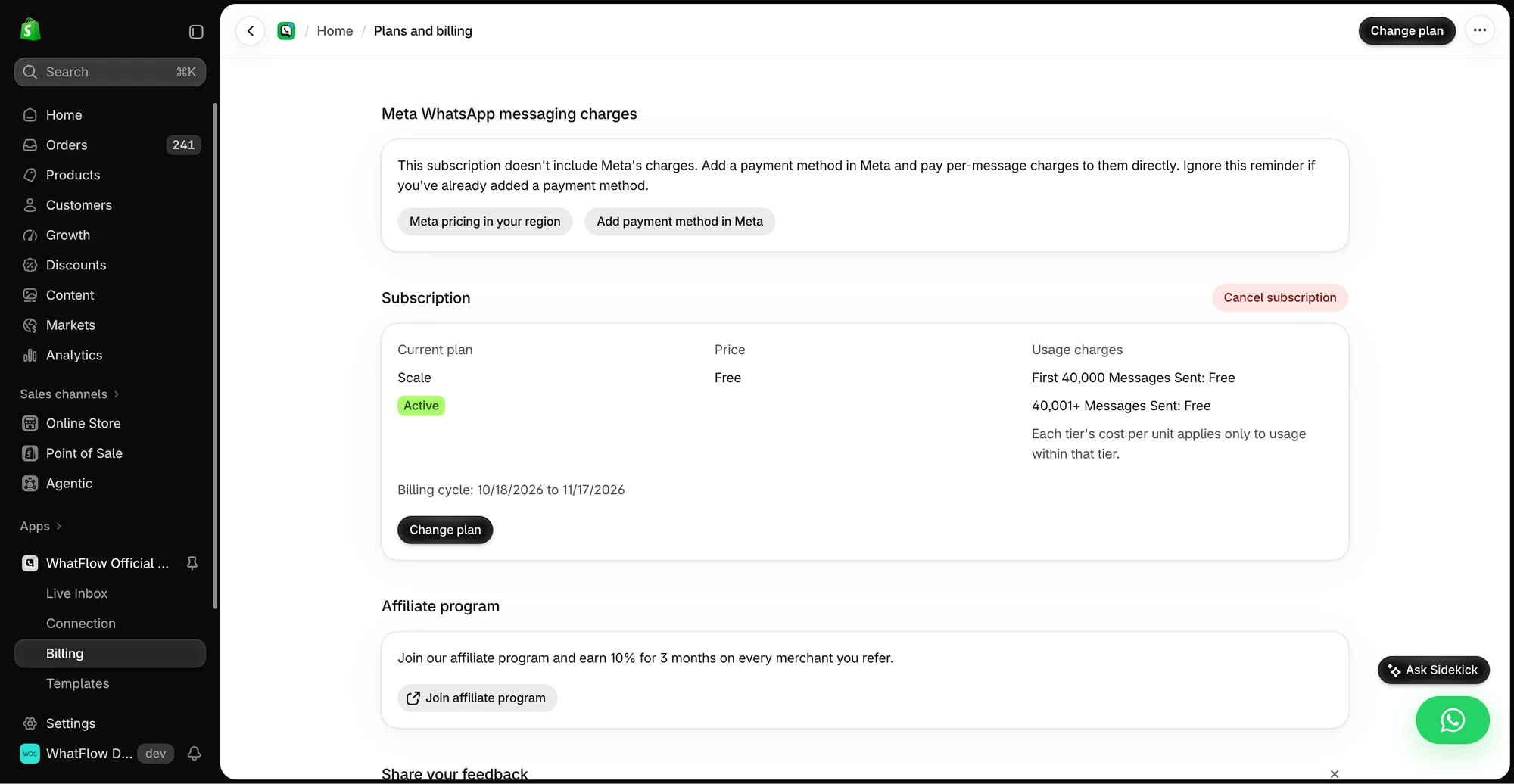
The demo Billing screen separates WhatFlow’s app subscription from Meta messaging charges. Check the pricing page for current public rates.
Marketing templates: promotions, launches, win-back offers. Usually the most expensive category.
Utility templates: messages about something the customer already did, like an order confirmation, shipping update or COD confirmation.
Authentication templates: one-time passcodes.
Service messages: free-form replies you send inside an open customer service window.
The customer service window is the 24 hours after a customer last messaged you. Inside it you can reply freely. Outside it, WhatsApp only lets a business start a conversation with a Meta-approved template, and only to people who opted in (WhatsApp Business messaging policy).
Two changes matter for budgets right now. According to Meta's pricing page, from October 1, 2026 Meta resumed charging for messages that had been free:
Service messages are now charged after a free tier of 1,000 delivered service messages per business phone number per month. Unused free messages don't roll over.
Utility templates sent inside an open customer service window are now charged at the regular rate. They had been free since July 2025.
If your budget spreadsheet was built in early 2026, it's probably out of date. I won't quote rates here because they vary by market and change; pull the current rate card for your customers' countries before you plug anything in. Our plain-English WhatsApp Business API pricing guide walks through the categories in more detail.
A few other things affect the bill. Utility and authentication messages have volume tiers, so the rate drops as your monthly volume in a market grows. And conversations that start from a Click-to-WhatsApp ad open a free entry point window that can stay open for up to 7 days (per Meta's pricing doc, as of November 2026), during which Meta doesn't charge for your messages to that customer.
Count the messages a flow actually sends
Budgets break because people count campaigns, not sends. One "abandoned checkout flow" is really several messages, and only some customers get all of them.
For each flow, write down:
Who's eligible. Opted-in customers only. Not your whole customer list.
How many messages each person can get. First message, reminder, follow-up.
What stops the sequence. A purchase, a reply, an opt-out.
The category of each message. A cart reminder with a discount code is marketing. A "your order #1042 has shipped" note is utility.
Where recipients are. A store shipping to Pakistan and the UAE has two price lines, not one.
Split shipments, partial fulfilments and repeat triggers all add sends. If a Shopify Flow workflow fires on every fulfilment, an order shipped in two parcels gets two shipping updates. That's fine, but it should be in the forecast.
A worked example: three flows, one budget
Say you run a fashion store in Pakistan with mostly COD orders. In a normal month you get 1,200 orders, about 500 abandoned checkouts from opted-in shoppers, and around 900 support chats.
Use letters for rates so the model survives Meta's next price change. Let U be the utility rate for Pakistan, M the marketing rate, and S the service rate.
Flow
Messages per month
Category
Meta cost
COD confirmation (1 per order)
1,200
Utility
1,200 × U
Shipping update (1 per order, 1.1 with split shipments)
1,320
Utility
1,320 × U
Checkout reminder (500 first, 200 follow-ups)
700
Marketing
700 × M
Support replies (about 3 per chat)
2,700
Service
(2,700 − 1,000 free) × S
Add your app plan and the hours someone spends in the inbox. That's your monthly cost. Then build quiet-month and peak-month versions (Eid or 11.11, say) with the same assumptions, so you can see how sensitive the total is.
Notice what this table makes obvious: the marketing line has the fewest messages but may still cost the most per send. The COD line is high-volume but tied directly to orders you already have.
Use WhatFlow's recipient report to separate attempted, delivered, read and failed messages. Export the results before you change the audience, and investigate a failure before retrying it. If you want to measure purchases, compare against Shopify orders using the tracking you set up for that send; delivery or read status alone can't tell you what sold. See the campaign measurement walkthrough.
How do you calculate cost per outcome?
Divide the cost of each flow by the result it exists to produce. Keep the outcomes separate. Mixing them into one blended "cost per message" hides everything useful.
COD confirmation. Outcome: a failed delivery you avoided. Say a refused COD parcel costs you 400 rupees in two-way shipping and handling. If confirmation messages lead you to cancel 60 fake or doubtful orders a month before dispatch, compare 1,200 × U against 60 × 400 rupees. For most COD stores this one isn't close.
Abandoned checkout. Outcome: an order placed after the reminder. If the 700 sends are followed by 25 orders within your attribution window, cost per attributed order is (700 × M + share of app cost) ÷ 25. Then subtract discounts and margin before calling it profitable.
Support. Outcome: a resolved conversation. Cost includes service messages beyond the free tier plus staff time, which is usually the larger number.
One honest caveat, stated once: an attributed order isn't the same as an extra order. Some of those 25 shoppers would have bought anyway. If your list is big enough, hold out a small group that gets no reminder and compare. If it isn't, label the number "attributed" and move on. Our guide to WhatsApp marketing metrics that matter covers how to set that up.
Include the team in the model
The app plan is the part people compare, and it's often the least interesting line. What changes the real cost is how many people need access and which features sit behind a higher tier.
Plenty of messaging tools charge per inbox seat, so adding a part-time Eid helper costs money every month. We built WhatFlow's WhatsApp Business API app, which runs on Meta's official WhatsApp Cloud API, the other way: the shared team inbox has no seat fees, so a 50-person support team pays the same in seats as a two-person one, and every feature is on every plan, including Free. Plans differ only by messaging allowances and rates, paid plans start at $4.99/month, and Meta's charges are separate. Current amounts live on the WhatFlow pricing page. If you're weighing tools, the no-seat-fee vs per-seat comparison shows how the maths changes as a team grows.
Where WhatsApp budgets usually go wrong
The mistakes I see most often:
Sending marketing when utility would do. A shipping update stuffed with a promo code can be recategorised as marketing. Keep utility templates about the order.
Ignoring the new service-message charges. A busy support inbox can burn through 1,000 free service messages in the first week of a sale.
Messaging the whole list. Broadcasting to everyone who ever bought costs money and hurts your quality rating. Segment by need first.
Not reconciling the invoice. After month one, compare actual sends per category and country with your forecast. The biggest gap is usually a follow-up you forgot existed.
Free plan available
Run WhatsApp for your Shopify store with WhatFlow
Templates, COD confirmation, Shopify Flow automations and a shared team inbox with no seat fees. Every feature is included on every plan, including Free.
A good WhatsApp budget fits on one screen: flows down the side, sends, category, country, cost and outcome across the top. Update the rates when Meta changes them, which it does. Update the volumes after each big campaign. When a flow's cost per outcome stops making sense, cut it or fix it before you add another one.
Frequently asked questions
How does Meta charge for WhatsApp Business API messages in 2026?
Since July 1, 2025, Meta charges per delivered message rather than per conversation. The rate depends on the message category (marketing, utility, authentication or service) and the recipient's country code. As of November 2026, check Meta's pricing page for current rates, because they change.
Are WhatsApp customer service replies still free?
Not without limit. Meta's pricing page says that from October 1, 2026 it resumed charging for service messages beyond a free tier of 1,000 delivered service messages per business phone number per month, and utility templates sent inside the customer service window are now charged too.
What is a good cost per outcome for WhatsApp campaigns?
There's no universal benchmark. Compare the full cost of a message flow (Meta charges, app plan, staff time) with the value of the specific result it produces, such as a confirmed COD order, a recovered checkout or a resolved question.
Is WhatFlow's app price the same as Meta's message charges?
No. WhatFlow's plans cover the app and differ by messaging allowances and rates, while Meta's WhatsApp charges are separate. Current amounts are on the WhatFlow pricing page.