The best WhatsApp chat button app for most Shopify stores is WhatFlow: its theme-matched buttons are free forever and every chat lands in a shared team inbox with no seat fees. If you only want a plain link to one phone, EAZE and SeedGrow are the lightest free options, and Chaty is the pick if you want WhatsApp plus 20 other channels in one widget.
How we picked these chat button apps
I'm Safwan, co-founder of WhatFlow. We make one of the apps on this list, and I've ranked it first because getting shoppers into a WhatsApp conversation is exactly what we built it for. Fair warning given.
For every other app I opened the Shopify App Store listing on November 18, 2026 and recorded the rating, review count, plans and features as written there. Prices change often in this category (one app here costs $0.89 a month, another $199), so read everything as "as of November 2026".
One thing I judged on that most button roundups skip: what happens after the tap. A WhatsApp chat button is a link that opens a WhatsApp chat with your store's number, usually with a prefilled message. The button is the easy part. The hard part is who answers, from which phone, and whether a second teammate can pick up the chat at 9pm.
WhatsApp chat button apps compared
App
Best for
Starting price
Rating (reviews), Nov 2026
Channels
WhatFlow WhatsApp Business API
Free theme-matched buttons with a team inbox behind them
WhatsApp, Messenger, SMS, email, phone, Telegram and more
Moose
Free button with cart reminders
Free
4.9 (219)
WhatsApp
SeedGrow
Several agents with their own numbers
Free; Pro $6.90/mo
4.9 (132)
WhatsApp
EAZE Button
The cheapest paid styling
Free; Pro $0.89/mo
4.9 (139)
WhatsApp
SK: WhatsApp Chat Button
Popup triggers and an AI layer
Free; $29/mo + usage
4.8 (84)
WhatsApp, Telegram, Instagram, call, email icons
CA: WhatsApp Chat Order Button
Taking orders through chat
Free; $4.99/mo
5.0 (84)
WhatsApp
Dondy
Free button now, automation later
Free; Pro $6.99/mo
4.9 (833)
WhatsApp
SuperLemon (SL)
Widget plus a Chrome extension for WhatsApp Web
Free; $9.99/mo
3.5 (342)
WhatsApp
Click2Chat
B2B quotes over WhatsApp
Free; Pro $6.99/mo
4.9 (13)
WhatsApp
How to choose a WhatsApp chat button
Five things I'd check, in this order:
Does it look like your theme? A floating green bubble that clashes with your brand is noticed for the wrong reasons. Look for colour, size and position controls, or a button placed in the theme editor.
Does it behave on mobile? Most WhatsApp taps happen on phones, which is also where the button collides with the cart drawer, cookie banner and review widget. Our mobile layout checklist for review widgets and chat buttons covers the usual collisions.
Can you set a prefilled message per page? "Hi, I have a question about the linen shirt in M" saves a back-and-forth.
Where do chats go? One owner's phone, several agents' phones, or a shared inbox. This decides whether the button still works when you hire.
What does the free plan cap? Visitors, AI conversations or manual confirmations. A cap you hit during a sale is worse than a small fee.
Who it's for: Stores that want a free WhatsApp button that matches their theme and a team that can answer what comes through it, from a one-person shop to a big support team.
Standout features:
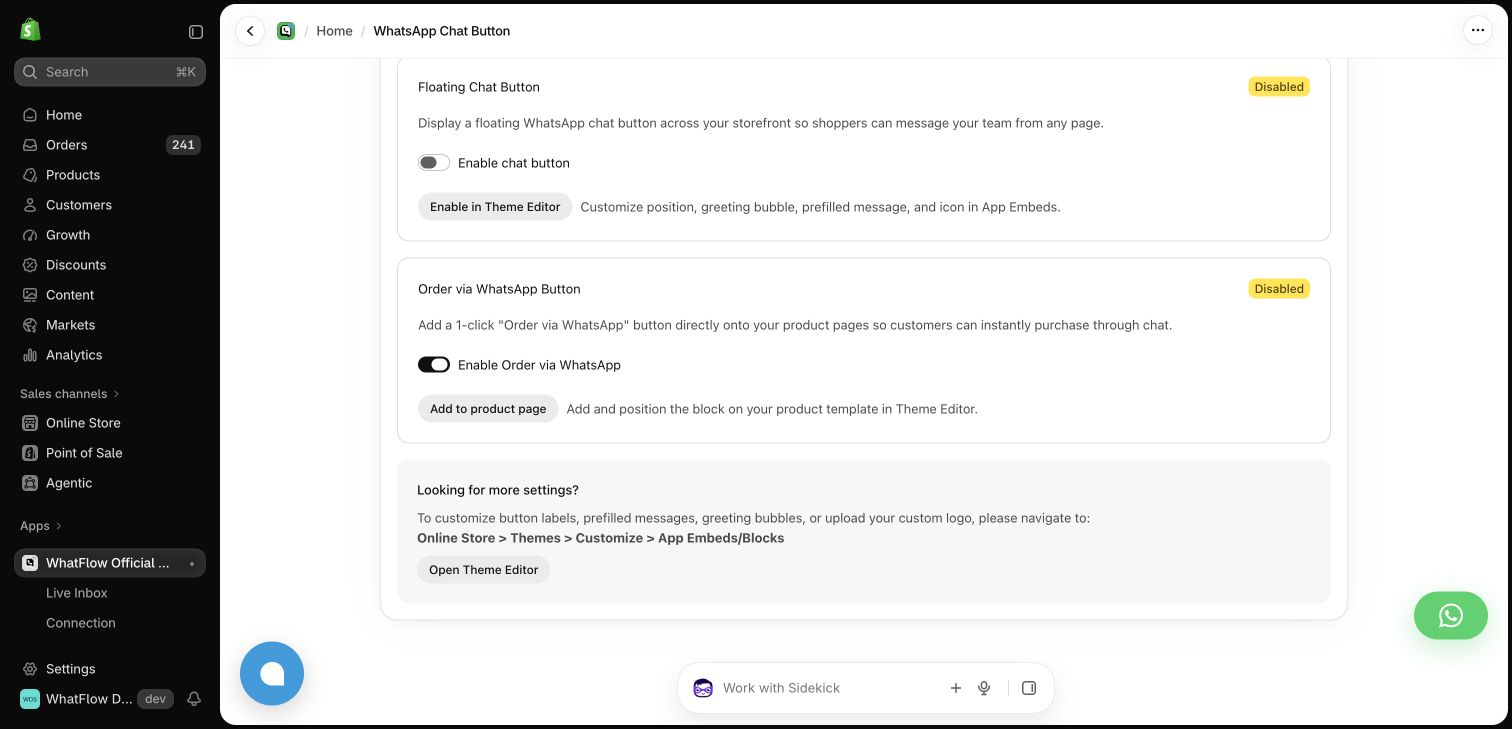
Theme-matched WhatsApp chat buttons that are free forever on every plan: a floating chat button and a product-page WhatsApp button, each placed and styled through Shopify's theme editor. See the WhatsApp chat button page.
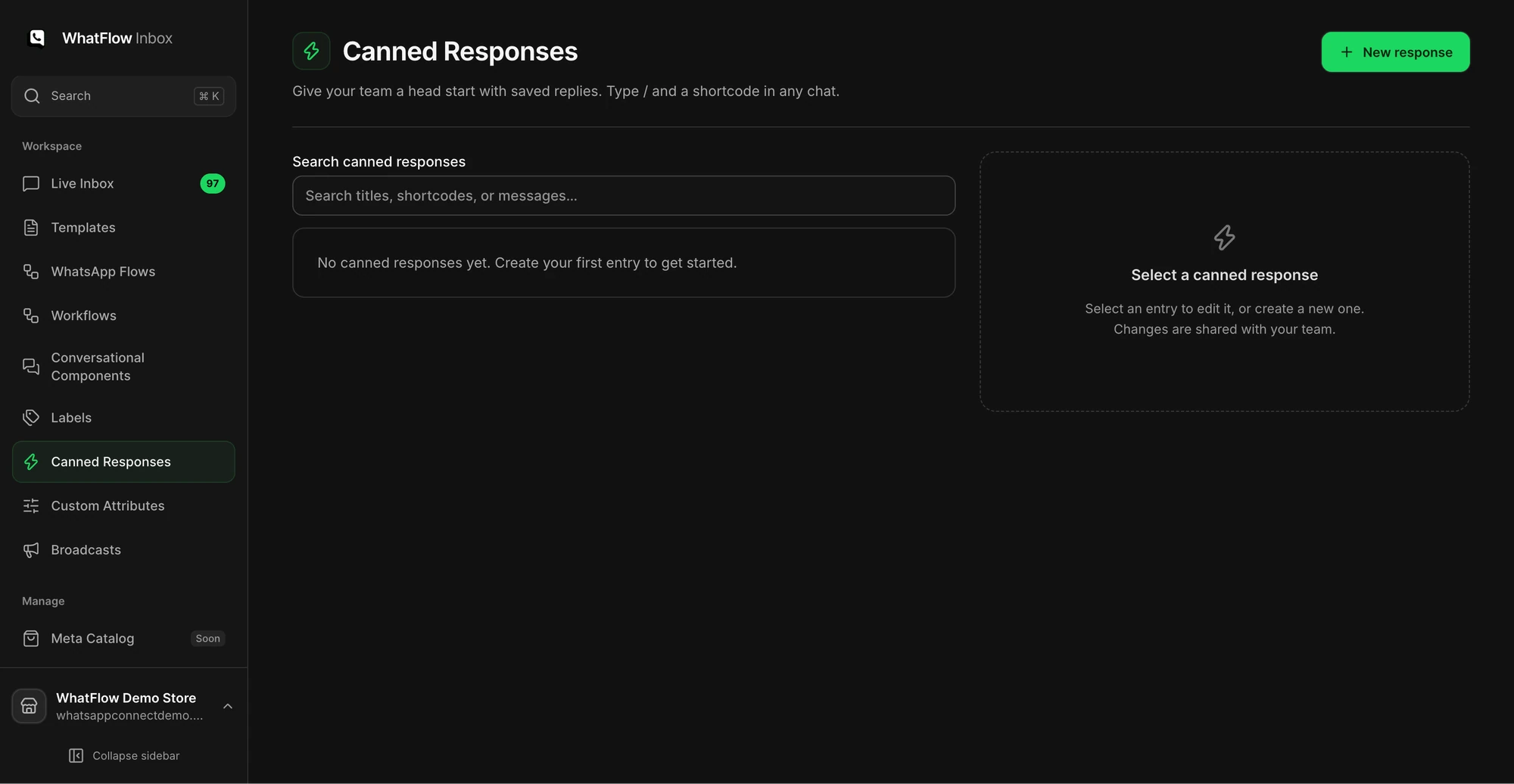
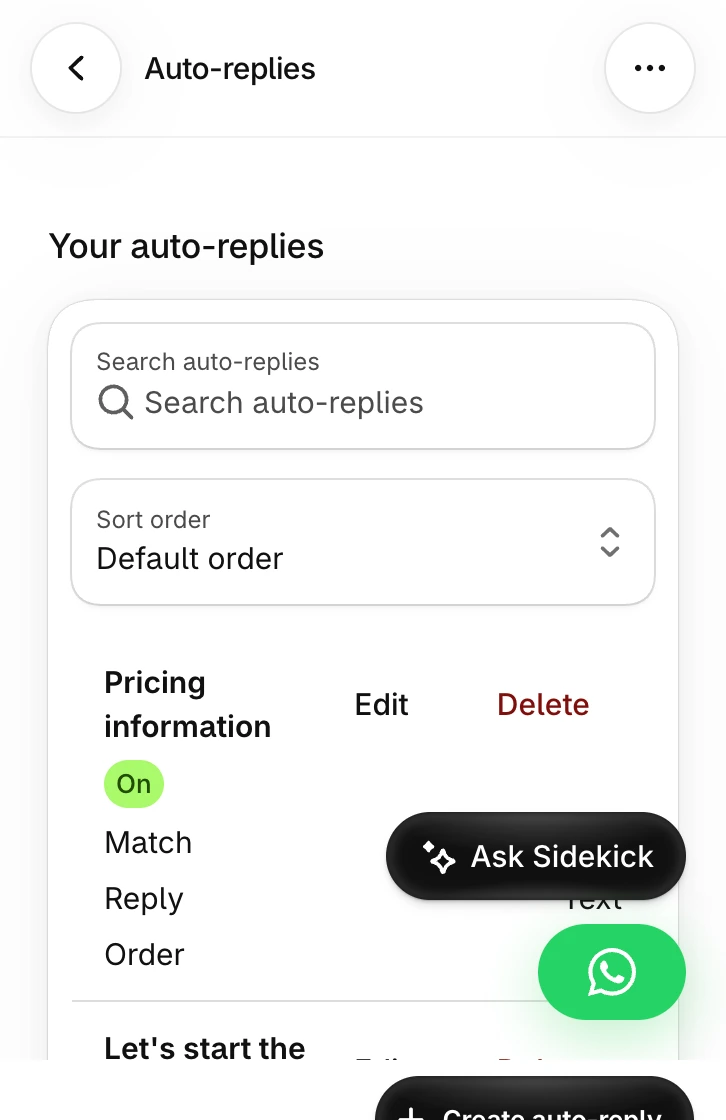
Chats land in a shared team inbox with assignment queues, labels, canned responses and auto-replies, with no seat fees.
The same app runs order updates, COD confirmation, abandoned checkout reminders and native Shopify Flow automation, on the official Meta WhatsApp Cloud API.
Floating chat button and product-page WhatsApp button settings in the WhatFlow demo store, each linking to the Theme Editor.
A prefilled message that works well on a product page:
Hi, I have a question about this product before I order.
Pricing and rating (as of November 2026): The chat buttons are free forever. The app has a Free plan with every feature and paid plans from $4.99 a month (see WhatFlow pricing). Rated 4.9/5 from 72 ratings (checked November 18, 2026).
Honest limitation: WhatFlow's button setup assumes a WhatsApp number connected to the Business API through Meta. That's a few more minutes than pasting a number into a link widget. If you'll never need an inbox or automation, EAZE or SeedGrow is quicker.
Who it's for: Stores whose customers use a mix of apps (WhatsApp, Messenger, Telegram, Viber, WeChat, SMS) and want them all in one widget.
Standout features: 20+ chat buttons, a WhatsApp chat pop-up with preset messages, triggers and attention effects on the free plan, and agents, page targeting, country targeting and scheduling on paid plans. Google Analytics tracks button clicks.
Pricing and rating (as of November 2026): Free up to 500 visitors a month; Basic $15 a month (10,000 visitors), Pro $39 (50,000) and Growth $79 (150,000). Rated 4.9 from 336 App Store reviews.
Honest limitation: The free plan stops at 500 visitors a month, and the listing doesn't mention cart recovery or an inbox. Side-by-side in WhatFlow vs Chaty.
3. Moose WhatsApp Chat Button
Who it's for: Small stores that want a customizable free button plus some WhatsApp follow-up.
Standout features: Colour, font, emoji and welcome-message controls, greetings, WhatsApp cart reminders, an inbox that highlights high-value customers, connection to the Business API through Meta Business Manager, and click tracking in Google Analytics and Meta Pixel.
Pricing and rating (as of November 2026): Listed as free, with no plan limits shown. Rated 4.9 from 219 reviews.
Honest limitation: The listing doesn't say what limits apply to reminders or the inbox, so confirm before you rely on it for a sale. See WhatFlow vs Moose.
4. SeedGrow WhatsApp Chat Widget
Who it's for: Stores with several people answering from their own WhatsApp numbers, such as a sales rep and a support person.
Standout features: A floating sitewide widget, a click-to-chat button on product pages, multiple WhatsApp numbers with agent names and titles, prefilled messages and page show/hide on the free plan. Pro adds working hours, auto-hiding offline agents, custom styling and click tracking.
Pricing and rating (as of November 2026): Free; Pro $6.90 a month with a 14-day trial. Rated 4.9 from 132 reviews.
Honest limitation: Each agent answers on their own phone, so there's no shared history if someone's off sick. More in WhatFlow vs SeedGrow.
5. EAZE Button for WhatsApp
Who it's for: Stores that want a clean, cheap button and nothing else.
Standout features: Prefilled messages, three appearance types and position controls on the free plan. Pro adds business hours (the button hides outside them), multi-language text, colour and custom CSS, dynamic variables, Google Analytics and Meta Pixel, and page exclusions.
Pricing and rating (as of November 2026): Free; Pro $0.89 a month with a 14-day trial. Rated 4.9 from 139 reviews.
Honest limitation: It's a link to WhatsApp. Replies, templates and order messages all happen elsewhere. See WhatFlow vs EAZE Button.
6. SK: WhatsApp Chat Button
Who it's for: Stores that want popup triggers (time, scroll, exit intent) and an AI layer on top of the button.
Standout features: Three button styles, greeting bubbles, auto-open triggers, multi-agent routing, business hours, RTL layout, page and device targeting, GDPR consent before opening WhatsApp, and Meta Pixel tracking. Paid plans add Meta account connection, templates and automated order-status messages.
Pricing and rating (as of November 2026): Free (2 AI conversations); Starter $29 a month plus usage (300 AI conversations), Growth $79 and Scale $199. Rated 4.8 from 84 reviews.
Honest limitation: Paid plans are priced on AI conversations, with $0.10 to $0.15 for each one over the allowance, which is hard to predict in a busy month. See WhatFlow vs SK.
7. CA: WhatsApp Chat Order Button
Who it's for: Stores where shoppers prefer to order by chatting rather than through checkout.
Standout features: A WhatsApp order button on product and cart pages, per-product order messages and phone numbers, a floating widget with triggers, click analytics and server-side Meta Pixel tracking. Paid plans automate abandoned checkout and order confirmation messages.
Pricing and rating (as of November 2026): Free (200 manual order confirmations and 200 manual abandoned checkouts a month); Advanced $4.99, Pro $9.99 (1,000 automation messages) and Growth $14.99 (5,000). Rated 5.0 from 84 reviews.
Honest limitation: Automation is capped by message count per plan. Compare in WhatFlow vs CA.
8. Dondy: WhatsApp Marketing+Chat
Who it's for: Stores that want a free button today and the option of AI and automation in the same app later.
Standout features: The free plan covers a WhatsApp button with unlimited conversations, custom size and location and prefilled messages. Pro adds premium designs, custom hours, analytics, and manual cart recovery and order confirmation.
Pricing and rating (as of November 2026): Free; Pro $6.99 a month; automation plans from $79.99, with a 7-day trial on paid plans. Rated 4.9 from 833 reviews.
Honest limitation: The step from button to automated messages is a big one in price, from $6.99 to $79.99. See WhatFlow vs Dondy.
9. SL: WhatsApp Chat + Marketing (SuperLemon)
Who it's for: Owners who answer from WhatsApp Web and want a widget plus a Chrome extension to help.
Standout features: A chat widget with 50+ styles and multiple agents, manual cart and order recovery, a WhatsApp Web copilot extension, a built-in CRM and phone capture widgets on the free plan. Automate adds cart, COD and order automations; Scale adds the WhatsApp API on your own number and an inbox.
Pricing and rating (as of November 2026): Free; Automate $9.99 a month and Scale $29.99, each with a 7-day trial and WhatsApp rates from $0.015. Rated 3.5 from 342 reviews.
Honest limitation: It has the lowest rating here, and on Automate messages go from the app's shared number rather than yours. See WhatFlow vs SuperLemon.
10. Click2Chat: WhatsApp Chat
Who it's for: B2B or made-to-order stores that negotiate prices over WhatsApp.
Standout features: A forever-free sitewide WhatsApp button with your number and text. The Pro plan handles quote requests, offers, payment links and one-click Shopify draft orders.
Pricing and rating (as of November 2026): Free; Quotes & Sales Pro $6.99 a month with a 7-day trial. Rated 4.9 from 13 reviews.
Honest limitation: Thirteen reviews is a small sample next to the others. See WhatFlow vs Click2Chat.
Chat button mistakes I see every week
Whichever app you pick, these are the setup slips that cost stores chats. All of them take five minutes to fix.
The wrong number. Someone sets up the button with the owner's personal number during testing and nobody changes it. Tap your own button from a phone that isn't yours and check who answers.
No country code. A WhatsApp link needs the full international number. "03001234567" fails; "923001234567" works. Test from a phone on a different network.
A blank opening message. Shoppers stare at an empty chat and close it. Prefill something they can send with one tap, and make it page-specific where the app allows. On a product page: "Hi, is the oat linen shirt true to size?" On the order status page: "Hi, I have a question about my order."
A button that hides the checkout button. On a 375px-wide phone a floating bubble in the bottom-right corner often sits right over "Add to cart" or the cart drawer's checkout button. Move it, shrink it, or show it only after a scroll.
Promising instant replies you can't keep. If the widget says "We reply in minutes" and you reply the next afternoon, the button has made things worse. Set real hours, or set an away message.
The button also opens the cheapest kind of WhatsApp conversation you'll ever have. When a shopper messages first, a 24-hour customer service window opens, and inside it you can reply freely without a template. Meta's pricing page explains how service messages are counted.
Which chat button app should you choose?
You answer every chat yourself and always will: EAZE or SeedGrow. Cheap, light and done in five minutes.
Your customers are spread across WhatsApp, Messenger and Telegram: Chaty.
You take orders in chat rather than checkout: CA, or Click2Chat for B2B quotes.
More than one person answers, or will soon: WhatFlow. The button is free and the inbox behind it doesn't charge per seat, so the 9pm chat goes to whoever's on shift.
You want the button to grow into COD confirmation and cart recovery: WhatFlow again, since those run in the same app on the Free plan.
Say a shopper taps your button at 11pm asking whether the serum is safe during pregnancy. With a phone-only widget, that message waits on the owner's phone until morning. With WhatFlow, an auto-reply sets expectations straight away, and the first teammate in at 9am sees it in their queue:
Thanks for your message! Our team is offline right now and back at 9am. We'll reply first thing.
Canned responses in the WhatFlow Inbox, demo store with sample replies.
The Auto-replies list in the WhatFlow demo store.
Run WhatsApp for your Shopify store with WhatFlow
Free plan available. Templates, COD confirmation, Shopify Flow automations and a shared team inbox with no seat fees. Every feature is included on every plan, including Free.
A chat button is free almost everywhere now, so don't choose on price. Choose on what happens after the tap. If one person answers from one phone, EAZE or SeedGrow is plenty. If a team answers, or you want the same app to confirm COD orders and recover carts, WhatFlow's free buttons with a no-seat-fee inbox behind them are the better long-term setup.
What is the best free WhatsApp chat button for Shopify?
WhatFlow's theme-matched WhatsApp chat buttons are free forever on every plan, and chats land in a shared team inbox with no seat fees. If you only want a plain link to one phone, EAZE, SeedGrow and Dondy also have free button plans as of November 2026.
How do I add a WhatsApp button to my Shopify store?
Install a chat button app, set your WhatsApp number and a prefilled message, then place the button in the Shopify theme editor. Preview it on a phone before publishing, since mobile is where it most often overlaps the cart or cookie banner.
Does a WhatsApp chat button need the WhatsApp Business API?
No. A basic button just opens a chat with your number, which works with the WhatsApp Business app. You need the API once you want a shared team inbox, automated replies or template messages sent from Shopify.
Is it free to reply to customers who message from a WhatsApp button?
When a shopper messages you, a 24-hour customer service window opens and you can reply freely inside it. As of November 2026, Meta doesn't charge for the first 1,000 delivered service messages per business phone number each month on the API, then charges the service rate.
Chaty's Free plan (500 visitors a month), paid plans from $15 a month, 20+ channels, and a 4.9 rating from 336 App Store reviews as of November 18, 2026.