Shopify vs BigCommerce is mostly a question of how you want to pay as you grow. Shopify charges a flat plan price no matter how much you sell, which suits most stores from first sale to seven figures. BigCommerce ties plans to your trailing 12-month sales, and earns its place with built-in marketplace channels, multi-storefront options and strong catalogue tools for larger or B2B-heavy catalogues.
All prices and fees below come from Shopify's and BigCommerce's own pricing pages, checked on November 23, 2026. Both change, so check them again before you sign anything.
What's the main difference between Shopify and BigCommerce?
Both are hosted ecommerce platforms. You don't manage servers, security patches or checkout uptime on either. Both have app marketplaces, themes, POS options and multichannel selling.
The differences are in the pricing model and in what's built in versus added:
Shopify prices by plan, not by revenue. Basic stays $25 a month (monthly billing) whether you sell $500 or $50,000. You add capability through the Shopify App Store and automate with Shopify Flow.
BigCommerce prices by sales band. Its page says plans auto-upgrade as your trailing 12-month GMV grows. It bundles more channels into every plan, including Amazon, eBay and Walmart, and a basic Feedonomics tier for Google, Meta, TikTok, Microsoft and Pinterest.
Shopify vs BigCommerce at a glance (November 2026)
Shopify
BigCommerce
Plans (monthly billing)
Basic $25, Grow $65, Advanced $399, Plus from $2,300
Basic none extra, Grow 5, Advanced 15, Plus unlimited
Staff accounts on every plan
Support
24/7 live chat on all plans; priority phone on Plus
Phone support $29/month on Core, included on Growth and Scale; priority $199/month on Scale
BigCommerce defines GMV as "gross order value minus 10%" for its thresholds. That detail matters in the worked examples below.
How much does Shopify cost compared with BigCommerce?
The headline prices look similar. The real gap is BigCommerce's sales bands: the more you sell, the higher your plan, whether or not you need the extra features.
Both platforms charge card processing on top of the plan. BigCommerce publishes a rate (from 2.89% + $0.29 per transaction for US-based businesses). Shopify's pricing page fills in rates for your country; the copy I fetched didn't show them, so check yours. To keep the comparison honest, the tables below show platform costs and list BigCommerce's card processing separately.
Worked example: a store doing $5,000 a month
Say you sell phone accessories at an average order of $50: 100 orders and $60,000 a year. BigCommerce's GMV for that is $54,000, past Core's $30K cap, so after roughly seven months you're upgraded to Growth.
Cost (monthly billing)
Shopify Basic (Shopify Payments)
BigCommerce Growth (embedded provider)
Plan
$25
$105
Platform transaction fee
$0
$0
Platform total
$25
$105
Card processing
Your Shopify Payments rate
$173.50 (2.89% of $5,000 plus 100 × $0.29)
On yearly billing it's $19 against $79, or $52.50 if you catch BigCommerce's promotion before the end of 2026. Either way, Shopify Basic is the cheaper plan at this size. If you use your own gateway instead, BigCommerce Growth adds 1.0% ($50 here), and Shopify adds its plan-based third-party fee.
Worked example: a store doing $50,000 a month
Now 1,000 orders a month, $600,000 a year, and GMV of $540,000. That's Scale territory on BigCommerce. Scale's overage is 0.9% on monthly GMV above $33,333; at $45,000 GMV a month that's about $105.
Cost (monthly billing)
Shopify Grow (Shopify Payments)
BigCommerce Scale (embedded provider)
Plan
$65
$399
Overage
$0
About $105
Platform total
$65
About $504
Card processing
Your Shopify Payments rate
$1,735 (2.89% of $50,000 plus 1,000 × $0.29)
You might choose Shopify Advanced at $399 for 15 staff accounts and regional storefront options, so the plan gap can narrow. But on Shopify that's a choice; on BigCommerce the upgrade follows your revenue. And once your trailing GMV hits $2 million, BigCommerce's page says the account moves to Performance, which starts at $1,499 a month billed annually.
For stores outside the US, the other number to check is Shopify's third-party fee. Shopify Payments isn't available in India, Pakistan or Brazil as of November 2026. Orders paid by cash on delivery are exempt from that fee, which helps COD-heavy stores a lot.
Which is easier to use?
Both admins are clean and both are learnable in a weekend. My honest take: Shopify feels simpler for a first-time merchant, mostly because so much setup help, so many themes and so many tutorials exist for it. BigCommerce builds more into the base platform, such as marketplace channels and feed management, which is great if you need them and extra menus to learn if you don't.
Theme editing on both uses a visual editor. Neither will give you Squarespace-level design freedom (see Shopify vs Squarespace); both are built around product pages that convert.
How do Shopify and BigCommerce scale?
Both run very large stores. They scale differently.
BigCommerce scales with more built in: marketplace channels and feed management on every plan, up to eight inventory locations on Scale, multi-storefront as a paid add-on, and API support with a customer success manager on Performance. The trade-off is that cost rises with revenue by design.
Shopify scales through plans you choose and apps you add. Plus starts at $2,300 a month and adds unlimited staff, 20 POS locations and priority support. In between, Shopify Flow (free on Basic and up) lets apps trigger each other, which is how most Shopify teams automate without developers. Marketplace selling runs through apps like Marketplace Connect, which is free for the first 50 synced orders a month and then charges 1% per order, capped at $99 a month.
If your plan is several storefronts selling heavily on Amazon, eBay and Walmart, put BigCommerce on the shortlist. If it's a direct-to-consumer brand that'll grow through ads, social, WhatsApp and repeat purchases, I'd go with Shopify.
Marketing and customer messaging: where WhatsApp fits
Both platforms send transactional emails and support email marketing tools. The difference for messaging is how easily other apps can react to your orders.
On Shopify, Shopify Inbox is a free app for storefront chat. WhatsApp comes through apps, and because Shopify exposes order events through its app platform and Flow, a WhatsApp app can send an order confirmation the moment an order arrives and then act on the reply.
That matters because WhatsApp has rules. Outside the 24-hour customer service window (the 24 hours after a customer's last message), a business can only send a Meta-approved template, and only to people who opted in, per the WhatsApp Business Messaging Policy. So automated order updates need an app that's connected to the store, not just a chat link.
This is the setup we built WhatFlow for. WhatFlow's WhatsApp Business API app uses Meta's official WhatsApp Cloud API and connects from Shopify admin. It handles order and shipping notifications, COD confirmation with reply buttons, abandoned checkout recovery and review requests, plus a shared team inbox with no seat fees. A 50-person support team pays the same in seats as a two-person one, which is the kind of maths that matters on a store doing $50,000 a month. Its native Shopify Flow integration lets a WhatsApp reply tag, hold or cancel an order.
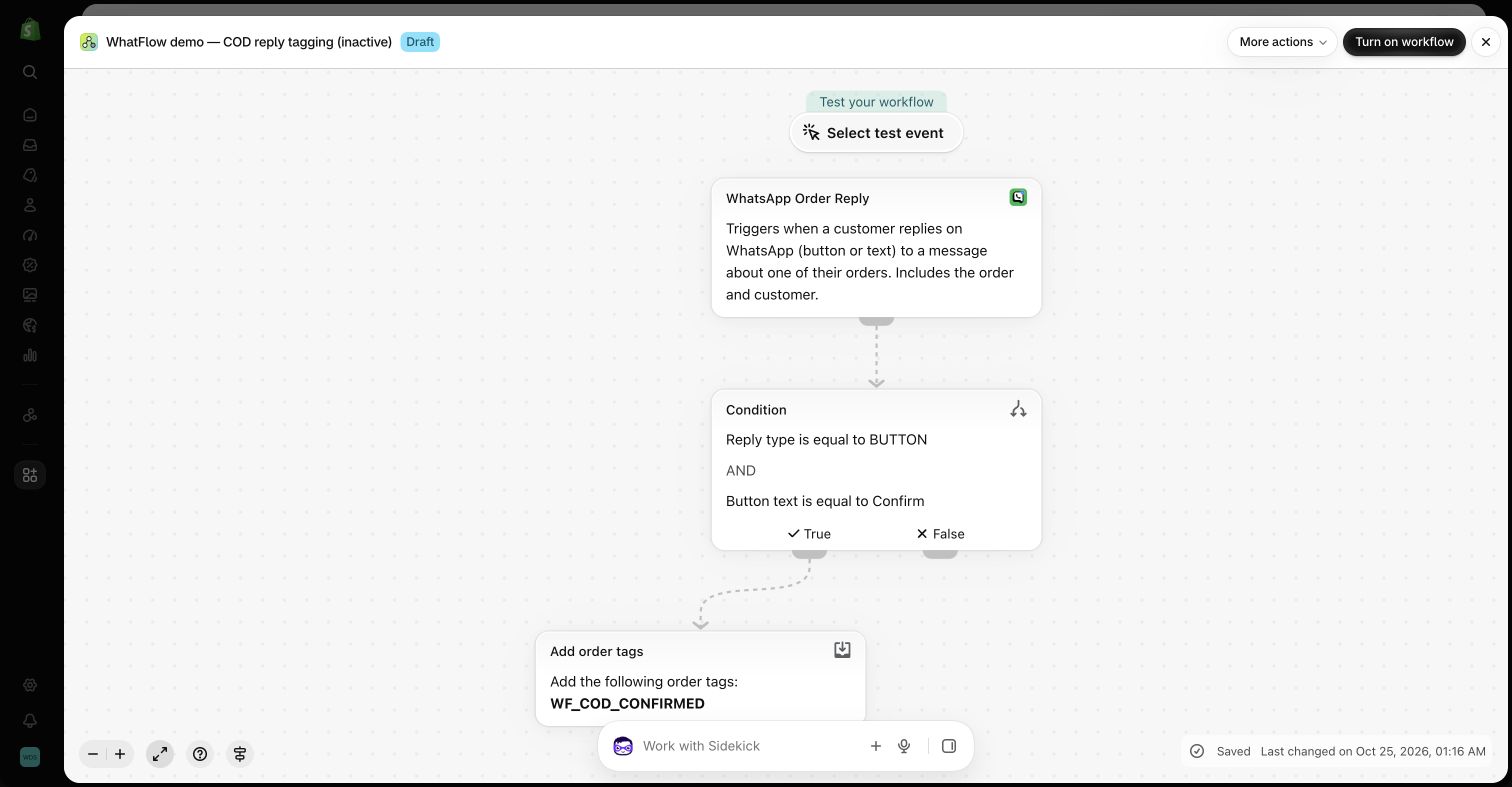
A demo-store Flow workflow that tags an order based on the customer's WhatsApp reply. The workflow is inactive and nothing was sent.
A typical shipping update looks like this:
Hi Daniel, good news: order #2087 has shipped with DHL. Track it here: {{tracking_link}}. Reply to this message if anything looks wrong.
Every WhatFlow feature is on every plan, including Free, and Meta's per-message charges are passed through separately. The pricing page has the plans and a country rate table.
On BigCommerce, its pricing page doesn't mention WhatsApp, so check its app marketplace for WhatsApp apps and confirm whether they send approved templates from order events before you rely on them.
How do you migrate between BigCommerce and Shopify?
Move products first, with CSV files or a migration app.
Import customers.
Import historical orders last, so they link to products and customers.
Rebuild apps and automations: email flows, reviews, WhatsApp templates.
Import URL redirects so old BigCommerce product URLs land on the new Shopify ones.
Run test orders on each payment method, including COD, then switch the domain.
Step 4 is the one people underestimate. List every customer message your store sends today (order confirmation, shipping, delivery, review request, cart recovery) and recreate each one before launch. If WhatsApp is part of that, get templates approved a week early. My guide to Shopify order notifications on WhatsApp has copy you can adapt.
Who should choose BigCommerce?
Brands that want several storefronts run from one account, with up to eight inventory locations on Scale.
Merchants who want Amazon, eBay and Walmart channels bundled into the plan.
US sellers who'd rather pay more as they grow in exchange for channels bundled in.
US-based businesses that want a published card rate and phone support from the Growth plan.
Who should choose Shopify?
Most new and growing direct-to-consumer stores, because the plan price doesn't rise with sales.
Stores outside the US, especially COD-heavy markets like Pakistan and India, where Shopify's app ecosystem has deep COD and WhatsApp support.
Teams that want to automate across apps with Shopify Flow instead of custom code.
Brands that plan to sell in person with native Shopify POS.
My verdict: for most merchants reading this, Shopify is the better pick, mainly because its flat pricing rewards growth instead of charging for it. BigCommerce is a serious platform and the right call for some catalogues; just model your next two years of sales against its thresholds before choosing. For other matchups, see Shopify vs WooCommerce, Shopify vs Wix and Shopify vs Etsy.
Run WhatsApp for your Shopify store with WhatFlow
Free plan available. Templates, COD confirmation, Shopify Flow automations and a shared team inbox with no seat fees. Every feature is included on every plan, including Free.
Usually not for a growing store. As of November 2026 BigCommerce ties its plans to trailing 12-month sales, so a store selling $5,000 a month outgrows the $39 Core plan and moves to Growth at $105 a month (monthly billing), while Shopify Basic stays $25 a month whatever you sell.
Does BigCommerce have sales limits?
Yes. BigCommerce's pricing page sets Core at up to $30K and Growth at up to $100K in trailing 12-month GMV, with automatic upgrades when you pass them. Scale charges a 0.9% overage on GMV above $33,333 a month, and $2 million in annual GMV moves you to the Performance plan.
Does BigCommerce charge transaction fees?
BigCommerce lists $0 for its embedded payment provider on every plan. If you bring your own open payment provider, it charges 2.0% on Core, 1.0% on Growth and 0.6% on Scale, as of November 2026.
Is Shopify or BigCommerce better for selling on marketplaces?
BigCommerce includes Amazon, eBay and Walmart channels and a basic Feedonomics tier on every plan, as of November 2026. Shopify uses its Marketplace Connect app for Amazon, eBay, Target Plus and Walmart, free for the first 50 synced orders a month and then 1% per order, capped at $99 a month.
Can I move from BigCommerce to Shopify?
Yes. Shopify's migration guide recommends moving products first, then customers, then historical orders, using CSV files, migration apps, a Shopify Partner or the API. Map URL redirects before you switch the domain.
BigCommerce plan prices, annual promotion, GMV thresholds, payment provider fees, card rates, channels and support add-ons (checked November 23, 2026).