To audit Shopify app costs, price whole workflows instead of individual apps. Pick one job, like WhatsApp support or review requests, list every app it touches, then add up subscriptions, the higher tier you need for one gated feature, per-seat fees, usage charges and the connector holding it together. Do it for a quiet month and a peak month. The headline price is usually the smallest number.
I've watched small stores sign up for five "cheap" apps and end up with a bill bigger than their Shopify plan. Nobody chose that. It accumulated. An hour with your billing page fixes most of it.
Start with what you're actually paying
Go to Settings > Billing in Shopify admin and open current charges and your last three bills. According to Shopify's help page on app charges:
Recurring charges run on each app's own 30-day cycle, which may not line up with your Shopify bill.
Usage charges vary with how much you use the app and can be split across two Shopify invoices.
Upgrades are prorated, and downgrades earn an application credit for the unused difference.
Some apps bill you directly, so they never appear on the Shopify bill. Check your card statement for those.
Make a list: app name, plan, monthly charge, usage charges last month, and who on your team actually uses it. If nobody can answer the last column, that app is the first candidate to cut.
The four hidden costs in app pricing
Seat fees
Per-seat pricing charges for every person who logs in. It looks fine with one founder. Then you hire a part-timer for Ramadan or 11.11, and the inbox costs double for a month. Seat pricing also nudges teams to share one login, which wrecks accountability. Our comparison of no-seat-fee inboxes vs per-seat pricing runs the numbers.
Feature gates
A feature gate is a capability locked to a higher plan: automation, integrations, reporting, API access. The risk is buying the entry plan for the thing on the marketing page and discovering the one feature you needed sits two tiers up. Before you compare prices, write down the exact features your workflow needs and check which plan includes each one. Here's why all-features plans beat feature-gated upgrades for most small teams.
Apps bill by different units: contacts, messages, orders, events, active users. A plan with "5,000 contacts" and another with "5,000 messages" aren't comparable until you translate your workload into both. For WhatsApp, remember Meta charges per delivered message on top of any app plan. Our guide to budgeting WhatsApp by cost per outcome shows how to model that.
Connectors
Two apps that "integrate" may need a third tool to actually pass data between them, or a higher plan on one side to expose the trigger you need. Count that tool and the time someone spends fixing it when it breaks. Our checklist for evaluating app connectors is the quick way to spot this before you pay.
Price a workflow, not an app
Here's a worksheet for one job. Say you want three people answering WhatsApp, automated COD confirmations and shipping updates, and review requests after delivery.
Line
Quiet month
Normal month
Peak month
Messaging app plan (tier that includes automation)
Extra seats (people × seat price)
Meta WhatsApp charges (sends × category rate)
Review app plan
Connector or automation tool
Staff hours maintaining it (hours × your hourly cost)
Total
Fill it in for each option you're considering, using the same workload. Say 300, 800 and 2,000 outbound messages for the three columns. Use each provider's real allowances and plan pages, not a blended guess. The option with the lowest top row often doesn't win the bottom row.
Where WhatFlow fits in the audit
I'll be upfront about why we priced WhatFlow the way we did. Our WhatsApp Business API app runs on Meta's official WhatsApp Cloud API and is built to scale from a solo founder to a large support team without the bill jumping. It has no seat fees and every feature on every plan, including Free: team inbox, templates, broadcasts, COD confirmation, abandoned checkout messages, saved replies, Shopify Flow triggers and actions. Plans differ only by messaging allowances and rates. Paid plans start at $4.99/month, and current amounts are on the WhatFlow pricing page.
I'd evaluate WhatFlow Business API across a whole sales journey: run a Shopify WhatsApp campaign, work the replies in the shared inbox, then share the right product and link to checkout. Those jobs sit alongside recovery and order notifications. If you only test the first order message, you miss much of what the app replaces.
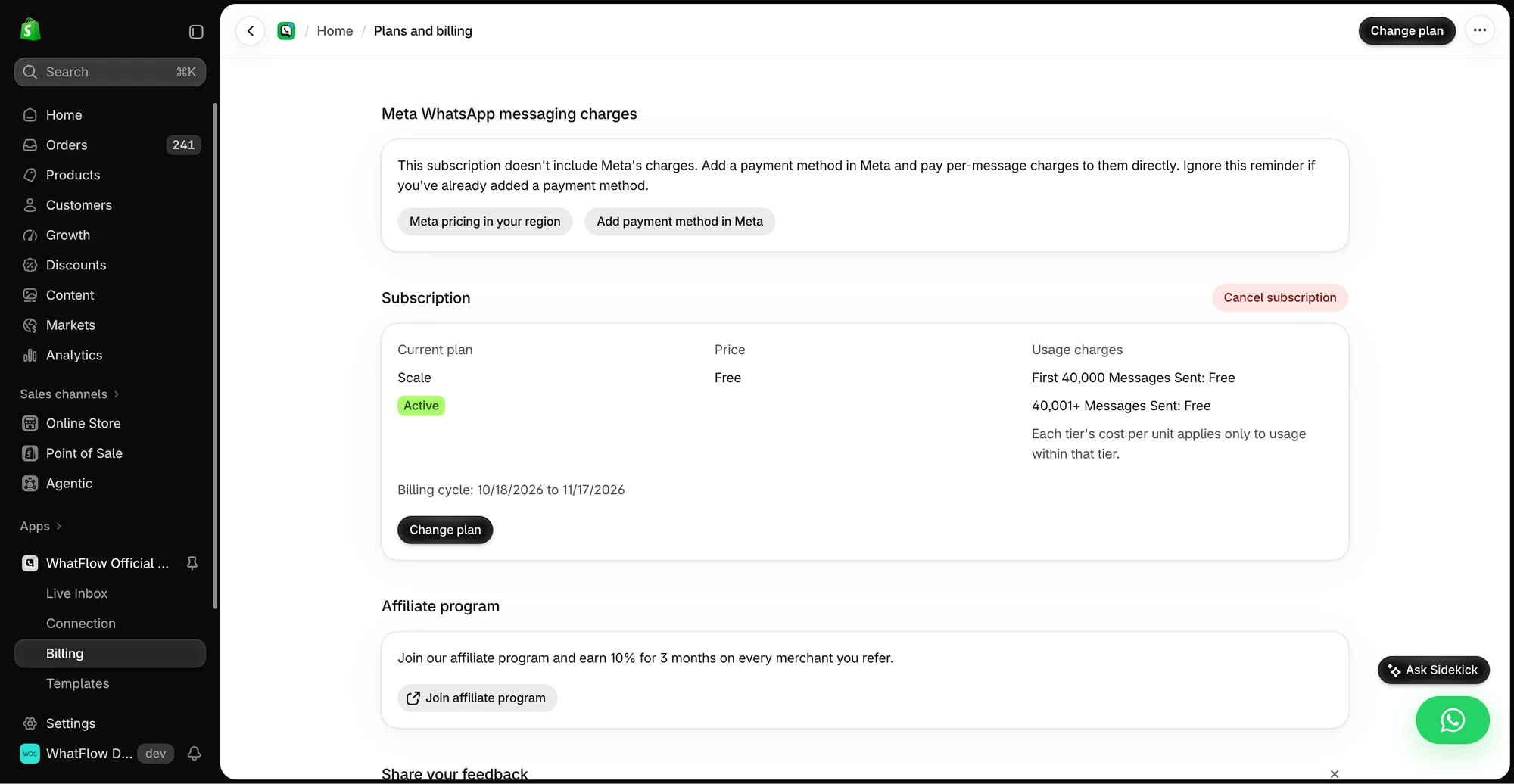
The demo Billing screen separates WhatFlow’s app subscription from Meta messaging charges. Check the pricing page for current public rates.
In the worksheet above, that means the "extra seats" row is zero whether you have three agents or thirty, and the plan row doesn't jump because you needed automation. You still pay Meta's message charges, which are separate and depend on what you send and where. And because WhatFlow has native Shopify Flow triggers and actions, the connector row is usually Flow itself rather than another subscription.
Questions to ask any app before you pay
Send these to the app's support team, or find the answers on the pricing page, before you install:
Which plan includes every feature my workflow needs? (Name them.)
Do you charge per user, per seat or per agent? What happens when I add a temporary helper?
What's the billing unit: contacts, messages, orders, events? What happens if I go over in a busy month?
Are any charges billed outside my Shopify bill?
Which Shopify Flow triggers and actions do you offer, and on which plans?
Can I export my data if I leave, and in what format?
If I downgrade, which of my settings or automations stop working?
If an app can't answer these clearly, that tells you something too. A pricing model you can't explain to your co-founder in two sentences is one you'll be surprised by later.
Cut, downgrade or keep
For each app on your list, decide one of three things:
Cut it if nobody uses it, or another app you already pay for does the same job.
Downgrade if you're paying for a tier whose extra features you haven't touched in 60 days.
Keep it if it does a job you can name and the workflow cost makes sense.
Before cutting, export whatever data the app lets you export. When you uninstall, remove it under Settings > Apps as well; cancelling inside the app doesn't uninstall it, and a charge already generated may still land on your next bill.
Free plan available
Run WhatsApp for your Shopify store with WhatFlow
Templates, COD confirmation, Shopify Flow automations and a shared team inbox with no seat fees. Every feature is included on every plan, including Free.
App stacks creep. A 30-minute review every quarter, plus one before your biggest sale, keeps the bill honest. If you want a broader starting point, our guide to the lean Shopify app stack covers which apps a small store actually needs.
Frequently asked questions
Where can I see what I'm paying for Shopify apps?
In Shopify admin under Settings > Billing, where current charges and past bills list app subscriptions and usage charges. Some third-party apps bill you directly, so check your card statement too.
Does uninstalling a Shopify app stop the charges?
Uninstalling stops future billing cycles, but a charge already generated can still appear on your next bill. Cancelling inside the app or on the developer's site doesn't uninstall it; you also have to remove it under Settings > Apps.
What is a feature gate in app pricing?
A feature gate is a capability, such as automation, integrations or reporting, that only unlocks on a higher plan. It means the cheapest plan may not do the job you're buying the app for.
Does WhatFlow charge per inbox seat?
No. WhatFlow's WhatsApp Business API app has no seat fees and includes every feature on every plan, including Free. Plans differ by messaging allowances and rates, and Meta's WhatsApp charges are separate.