Shopify vs WooCommerce comes down to who does the maintenance. Shopify is a hosted platform: you pay a monthly fee and Shopify runs the servers, security, updates and checkout. WooCommerce is a free, open-source WordPress plugin: you get more control and no platform fee, but you (or your developer) handle hosting, updates, backups and plugin conflicts. For most product sellers, Shopify is easier to run.
That's the short answer. Here's the longer one, written from the operations side: what it costs in practice, what breaks, and how hard it is to answer customers quickly on each.
All prices and facts below come from Shopify's and WooCommerce's own pages, checked in November 2026.
What's the actual difference between Shopify and WooCommerce?
Shopify is software you rent. You sign up, pick a theme, add products and start selling. Shopify hosts the store, runs checkout, applies security updates and keeps everything compatible. You extend it with apps from the Shopify App Store.
WooCommerce is software you own and run. It's a free plugin for WordPress, made by Automattic, with over 7 million active installations listed on WordPress.org. You install it on WordPress, on hosting you choose and pay for, and extend it with extensions and plugins.
Neither is "better" in the abstract. They suit different people.
There's a 3-day free trial, then $1 a month for the first three months on most plans. Hosting, SSL, checkout and security are included. On top of that you pay for any paid apps and themes, plus payment processing. If you use a payment provider other than Shopify Payments, Shopify can charge an extra transaction fee depending on your plan.
WooCommerce
WooCommerce's pricing page describes the core plugin as free, with no monthly subscription and a $0 platform fee. It then lists the costs you'll actually pay:
Hosting: "$25 – $350/month for most stores", depending on traffic and performance.
Extensions: "$29 – $299/year per extension", optional.
Payments: WooPayments at roughly 2.50–2.90% + 30¢ per transaction, or your chosen processor's rates.
Add a premium theme if you want one, and, the cost most people forget, the time or developer fees to keep it all updated.
What it adds up to
Say you're a small store and you need decent hosting, a few paid extensions (subscriptions, a better shipping calculator, a WhatsApp or SMS plugin) and occasional developer help. On WooCommerce's own numbers you're looking at hosting from $25 a month plus a few hundred dollars a year in extensions, before any developer time. On Shopify Basic you're at $19–25 a month plus whatever apps you add.
For a tiny store, they're closer than "free vs paid" suggests. For a large store with high traffic, WooCommerce hosting gets more expensive, and so does Shopify at higher plans. The real difference isn't the invoice. It's the hours.
Who fixes it when something breaks?
This is the question I'd ask first, and it's where the two platforms differ most.
You update WordPress, WooCommerce, your theme and every plugin.
You make full backups before updating (with your host's help or a backup service).
Core WooCommerce support runs through the WordPress.org community forums.
WooCommerce doesn't support third-party plugins and themes; you go to each developer.
On Shopify, the platform itself is Shopify's job. There's no WordPress to update, no PHP version to check, no server to scale for a sale. Apps can still conflict or slow down your theme, and that's on you to manage, but the core store doesn't go down because a plugin update clashed with a host's PHP version.
Picture the night before a big sale. On WooCommerce, a plugin auto-update breaks the checkout page at 11pm. Someone needs to spot it, roll back, and work out which plugin did it. On Shopify, checkout is Shopify's code, and a third-party app can't break it in the same way.
If you have a developer on retainer, WooCommerce's flexibility is a real advantage. If you're a team of two who'd rather be answering customers, it's a real cost.
How easy is it to run customer support on each?
This is my world, so I'll be specific.
Most stores I talk to in India, Pakistan, the Gulf, Brazil and Indonesia run support mainly on WhatsApp. So the question becomes: how easy is it to answer WhatsApp messages with order context, send order updates and confirm COD orders on each platform?
On WooCommerce
There are WhatsApp plugins and third-party services that connect to WooCommerce. Many work well. But the setup usually looks like this:
A WhatsApp plugin or external service, which needs to stay compatible with your WordPress and WooCommerce versions.
Often a separate dashboard outside WordPress for the actual inbox.
Automation through the plugin's own rules, or through a connector service like Zapier for anything custom.
Your hosting needs to handle webhooks reliably.
None of that is hard for a developer. All of it is one more thing to maintain.
On Shopify
Shopify apps install into the Shopify admin, use Shopify's order and customer data directly, and can plug into Shopify Flow, Shopify's automation app. Flow is free on the Basic, Grow, Advanced and Plus plans.
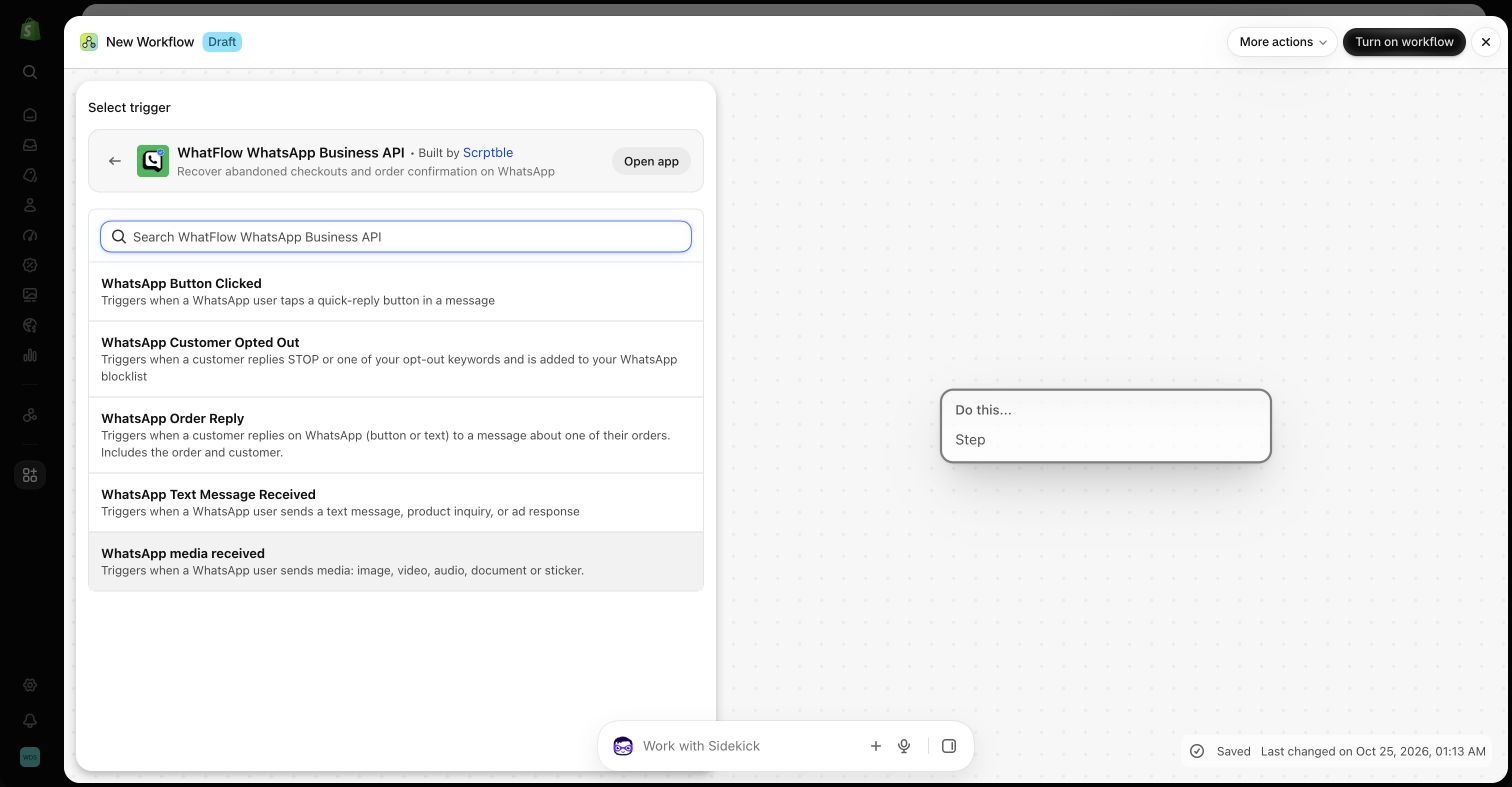
That's what we built WhatFlow around. The WhatFlow WhatsApp Business API app runs on Meta's official WhatsApp Cloud API, connects through Meta's Embedded Signup from inside Shopify admin, and adds native Flow triggers and actions. So an order reply on WhatsApp can tag or cancel a Shopify order, and an incoming message can kick off a workflow, without a third-party connector in between. Your team works from one shared inbox with no seat fees, and every feature is on every plan, including the Free plan. It's the same setup for a two-person shop and a fifty-person support team.
WhatFlow's WhatsApp triggers listed in Shopify Flow, in a demo store.
Monthly plan, from $25 ($19 yearly) as of Nov 2026
$0
Hosting
Included
You choose and pay; Woo estimates $25–$350/month for most stores
Updates and security
Handled by Shopify
You update WordPress, Woo, theme and plugins
Backups
No servers to back up; export your own data if you want copies
You make them, per Woo's own guide
Extensions
Shopify App Store apps
Woo extensions ($29–$299/year each) and WordPress plugins
Built-in automation
Shopify Flow, free on Basic and up
Via extensions or external connectors
Payments
Shopify Payments where available; extra fee for third-party providers on some plans
WooPayments or any supported processor
Code access
Theme code, apps, APIs
Everything, including server
Content and blogging
Good basic blog
WordPress, the strongest blogging platform around
Best for
Sellers who want to spend time on products and customers
WordPress users, content-heavy sites, teams with developers
When is WooCommerce the better choice?
I don't think WooCommerce is the wrong answer for everyone. It's a better fit when:
You already run a big WordPress site with years of content and traffic, and adding a store is a smaller job than migrating.
Content is your main business and products are secondary.
You need deep customisation of checkout or data that Shopify doesn't allow.
You have a developer (or are one) and enjoy owning the stack.
You want full control over hosting and data location for your own reasons.
When is Shopify the better choice?
For most people selling physical products, especially small teams:
You don't want to maintain servers, plugins and backups.
You want support and automation to plug into your store directly, through apps and Shopify Flow.
You expect sales spikes and don't want to think about hosting capacity.
You're adding staff and want them working in the same admin.
My honest opinion, as someone who builds on Shopify: if your plan is to sell products and talk to customers on WhatsApp, Shopify gets you there with less to look after. That's not because WooCommerce can't do it. It's because on Shopify, far fewer of the moving parts are your problem.
Free plan available
Run WhatsApp for your Shopify store with WhatFlow
Templates, COD confirmation, Shopify Flow automations and a shared team inbox with no seat fees. Every feature is included on every plan, including Free.
Write down the five things your store has to do every day: take orders, confirm COD, send shipping updates, answer pre-sale questions, handle returns. Then for each platform, ask who's responsible when that thing breaks. I go through that exercise in more detail in choosing an ecommerce platform around your customer workflows. If you're still weighing up other options, my Shopify vs Wix comparison uses the same approach, and if you've picked Shopify, your first 30 days on Shopify is the next read.
Frequently asked questions
Is WooCommerce cheaper than Shopify?
The WooCommerce plugin is free, but you pay for hosting, extensions and payment processing. WooCommerce's own pricing page estimates hosting at $25 to $350 a month for most stores and extensions at $29 to $299 a year each, so a small store's total can end up close to Shopify's Basic plan once you add paid extensions and maintenance time.
Is Shopify or WooCommerce better for a beginner?
Shopify is easier for most beginners because hosting, security, updates and checkout are handled for you. WooCommerce suits people who already run WordPress, are comfortable maintaining plugins and backups, or have a developer.
Can I use WhatsApp with WooCommerce?
Yes. There are WhatsApp plugins and third-party services for WooCommerce. The difference is mostly about upkeep: on WooCommerce you're responsible for keeping the plugin, WordPress and hosting compatible, while Shopify apps install into a hosted admin and can hook into Shopify Flow.
Does Shopify charge transaction fees?
If you use Shopify Payments, Shopify doesn't add a separate transaction fee on top of card processing. If you use a third-party payment provider, Shopify can charge an additional transaction fee that depends on your plan, as of November 2026.
Can I move from WooCommerce to Shopify?
Yes. Products, customers and orders can be migrated with Shopify's import tools or migration apps. Plan URL redirects carefully so you keep your search rankings.