
Publisher disclosure: this comparison is written by WhatFlow. Competitor capabilities are based on the linked public documentation; the WhatFlow screenshots come from our demo store. Examples are illustrative, and results depend on your store and configuration.
WhatFlow and SuperLemon at a glance
| Consideration | WhatFlow | SuperLemon |
|---|---|---|
| What the product is built around | Official Meta Cloud API on your own number, with Shopify admin extensions, Shopify Flow triggers and actions, COD confirmation and a team inbox. | A popular WhatsApp chat widget with manual tools, plus paid automation for cart recovery, COD confirmation, order updates and campaigns. |
| Pricing and billing units | Free plan; paid plans from $4.99/month, priced by messages sent. Meta fees separate. | Free; Automate $9.99/month; Scale $29.99/month, with WhatsApp message rates from $0.015 on paid plans (as of November 2026). |
| Feature access | Every feature on every plan, including Free. | Free has the widget and manual tools. Automate sends from a shared number approved by the developer. Scale adds your own approved number, the support inbox, campaigns and Flow or webhook automation. |
| Team access | No seat fees at any team size. | The free widget supports multiple agents; the support inbox comes with Scale. |
| Storefront entry point | Free-forever WhatsApp buttons that match your Shopify theme. | Free chat widget with 50+ styles. |
| Sending number | Your own WhatsApp Business number, connected through Meta Embedded Signup, on every plan. | Shared developer number on Automate; your own approved number on Scale. |
| Shopify App Store rating | 5.0 out of 5 from 55 ratings for WhatFlow WhatsApp Business API (November 5, 2026). | 3.5 out of 5 from 346 reviews (November 5, 2026). |
For most Shopify stores, WhatFlow is the better WhatsApp app than SuperLemon. WhatFlow connects your own WhatsApp number on the official Meta Cloud API, and the team inbox, COD confirmation and Shopify Flow automation are all on the Free plan, with no seat fees. SuperLemon is a well-known chat widget, but your own approved number and its inbox start on the $29.99/month Scale plan.
SuperLemon's audience often assumes WhatFlow is a similar widget-first tool. It isn't. WhatFlow WhatsApp Business API is the official Meta Cloud API and is ready for big teams: inbox assignment and filters, no seat fees at any team size, Shopify Flow automation, COD confirmation, catalog sharing and Shopify admin extensions. It's still the easiest start for a small store. Our linked-device Chat Automation app is a separate, older entry-level product.
WhatFlow vs SuperLemon at a glance
WhatFlow | SuperLemon | |
|---|---|---|
Free plan | Every feature, own number, team inbox | Widget and manual tools |
Own WhatsApp number | Every plan | Scale, $29.99/month |
Automated cart and COD messages | Every plan | Automate ($9.99, shared number) or Scale |
Team inbox | Every plan, no seat fees | Scale |
Shopify Flow | Native triggers and actions, every plan | Custom automation on Scale |
Storefront button | Free forever, theme-matched | Free widget, 50+ styles |
Shopify App Store rating | 5.0/5 from 55 ratings | 3.5/5 from 346 reviews |
SuperLemon details and both ratings are from the Shopify App Store, checked November 5, 2026.
Why does the sending number matter?
Your WhatsApp number is your brand's identity in the customer's chat list. SuperLemon's Shopify listing says its Automate plan sends from a shared number approved by the developer. Your own approved number comes with Scale.
With WhatFlow, you connect your own number through Meta Embedded Signup, right inside Shopify admin, on every plan including Free. When a customer gets a COD confirmation, it comes from your store's name, and their reply comes back to your team. A verified business profile adds even more trust; our green tick guide explains how to apply.
How much does each cost?
As of November 2026, SuperLemon lists Free, Automate at $9.99/month and Scale at $29.99/month, with WhatsApp message rates from $0.015 on the paid plans.
WhatFlow is free to start with every feature. Paid plans add message allowance:
- Starter, $4.99/month: 2,000 messages, then $0.005 each.
- Plus, $9.99/month: 5,000 messages.
- Growth, $29/month: 20,000 messages.
Say you need your own number, a shared inbox for three agents and COD confirmations on about 1,500 orders a month. On SuperLemon that's Scale at $29.99 plus message rates. On WhatFlow it's Starter at $4.99, plus Meta's per-message fees. Current amounts are on our pricing page.
Which handles COD and order replies better?
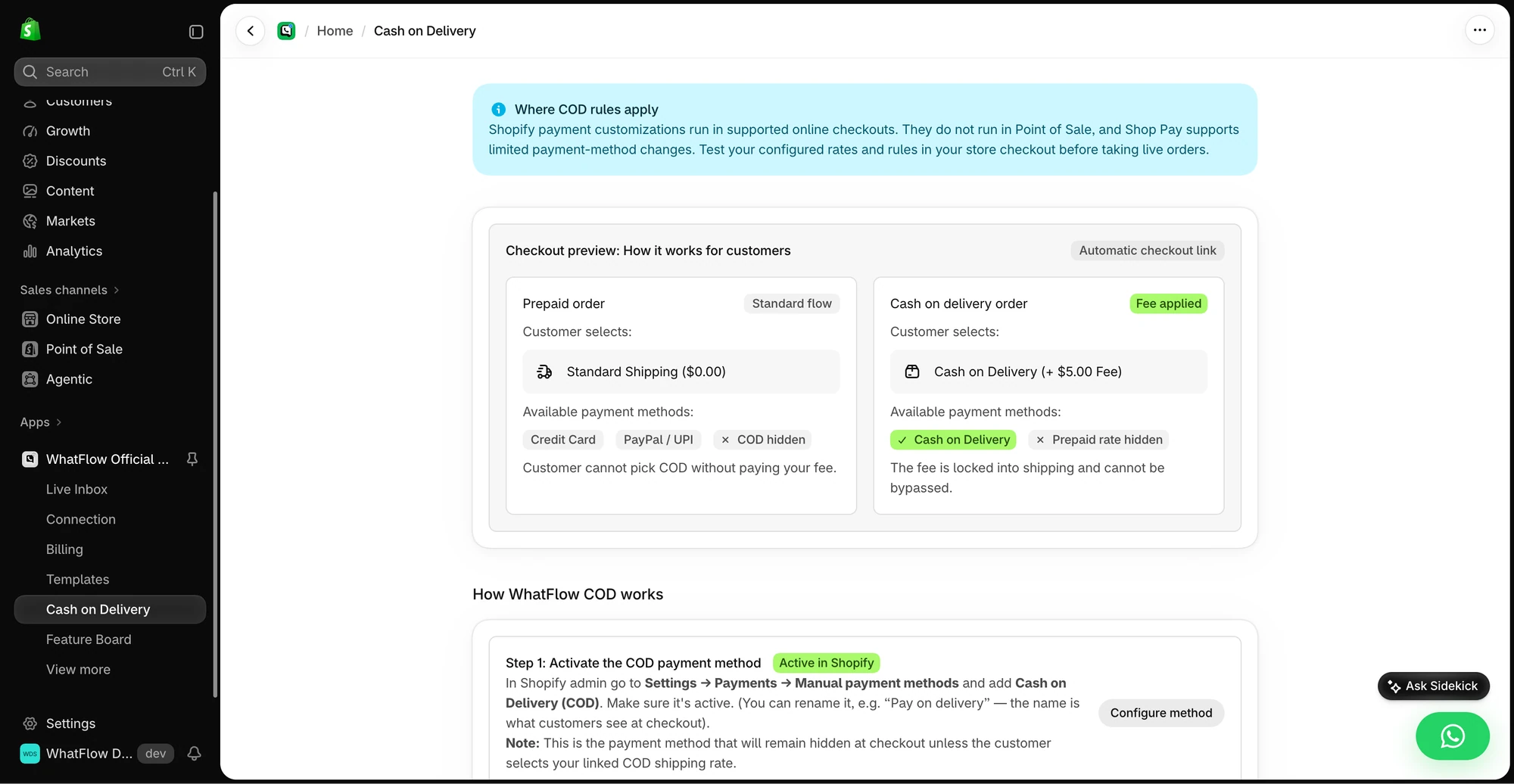
Both send COD confirmations. The difference is what happens when the customer taps a button. WhatFlow's triggers and actions live in Shopify Flow, so the reply updates Shopify:
Hi Bilal, please confirm your COD order #6623 for PKR 4,200. We'll dispatch within 24 hours. [Confirm] [Cancel]
Confirm tags the order cod-confirmed. Cancel can cancel it or tag it for a call. Your warehouse filters by tag and ships only confirmed orders.
What about the storefront button?
SuperLemon's free widget is its best-known feature, with 50+ styles. WhatFlow's theme-matched WhatsApp button is free forever too, and it's styled to match your Shopify theme. The real gain is what comes after the click: the chat lands in a shared inbox where any teammate can pick it up, share a product from the live catalog and reply with a saved response.
When SuperLemon might still make sense
If all you want is a free chat widget with lots of styles and you're happy replying from your own phone, SuperLemon's free plan does that. It also lists a WhatsApp Web Copilot Chrome extension, if you prefer working in WhatsApp Web.
The bottom line
WhatFlow gives a Shopify store its own number on the official API, COD confirmation through Shopify Flow, a team inbox with no seat fees and a free theme-matched button, all from the Free plan. SuperLemon reaches similar ground on Scale at $29.99/month. Start with WhatFlow and pay more only when you send more.
Questions worth asking
Is WhatFlow a good SuperLemon alternative for Shopify?
Yes. WhatFlow gives you a free theme-matched button plus your own WhatsApp number on the official API, a team inbox, COD confirmation and Shopify Flow automation, all on the Free plan. SuperLemon includes your own number and inbox from its $29.99/month Scale plan.
How much does SuperLemon cost compared with WhatFlow?
As of November 2026, SuperLemon lists Free, Automate at $9.99/month and Scale at $29.99/month, with message rates from $0.015 on paid plans. WhatFlow is free to start, paid plans start at $4.99/month, and every plan has every feature. Meta's fees are separate on WhatFlow.
Does WhatFlow charge per inbox seat?
No. WhatFlow's team inbox has no seat fees at any team size, on every plan including Free.
Are WhatFlow features restricted on the free plan?
No. Every WhatFlow feature is on the Free plan, from templates and COD confirmation to Shopify Flow actions and catalog sharing. Paid plans add message allowance, and the theme-matched WhatsApp button is free forever.
Does SuperLemon send from my own WhatsApp number?
On its Automate plan, SuperLemon's listing says messages go from a shared number approved by the developer; your own approved number comes with Scale. WhatFlow connects your own number on every plan.
Sources and methodology
We checked these primary sources on November 5, 2026. Vendor pages describe advertised capabilities, rather than independent performance tests. Confirm current pricing, plan limits and availability with each provider.
- SuperLemon on the Shopify App Store
SuperLemon plans, sender-number arrangements, inbox availability and its 3.5/5 rating from 346 reviews, checked November 5, 2026.
- WhatFlow WhatsApp Business API on the Shopify App Store
WhatFlow plans, included sends, Shopify workflows and the 5.0/5 rating from 55 ratings (checked November 5, 2026).
- WhatsApp Business Platform pricing
Meta's per-message charges for WhatsApp Business Platform messages.
- SuperLemon Shopify listing (primary documentation)
Used as SuperLemon's primary documentation for package scope.