
Publisher disclosure: this comparison is written by WhatFlow. Competitor capabilities are based on the linked public documentation; the WhatFlow screenshots come from our demo store. Examples are illustrative, and results depend on your store and configuration.
WhatFlow and Interakt at a glance
| Consideration | WhatFlow | Interakt |
|---|---|---|
| What the product is built around | Shopify-first: admin extensions, native Shopify Flow triggers and actions, COD confirmation and a team inbox on the official Meta Cloud API. | WhatsApp and Instagram commerce suite with Shopify journeys, catalog sync, COD-to-prepaid, chatbots, and separate Sales CRM and AI Agents products. |
| Pricing and billing units | Free plan; paid plans from $4.99/month, priced by messages sent. Meta fees separate. | Marketing & Support Hub: Growth $55/month, Advanced $69/month, Enterprise on request (as of November 2026). Sales CRM and AI Agents are priced separately in INR. |
| Feature access | Every feature on every plan, including Free. | Starter covers basic Shopify notifications. Shared inbox, WhatsApp catalog, checkout bot and COD-to-prepaid start on Growth; webhooks and branching bots on Advanced. |
| Team access | No seat fees for the team inbox. | Unlimited agents on Marketing & Support plans (owner role only on Starter). Sales CRM includes 5 sales agents, then ₹499 per extra agent per month. |
| Storefront entry point | Free-forever WhatsApp buttons that match your Shopify theme. | Interakt's Shopify page advertises a WhatsApp widget; check what your plan includes. |
| Shopify Flow | Native WhatFlow triggers and actions inside Shopify Flow, on every plan. | Shopify journeys run in Interakt's own automation and chatbot builders. |
| Shopify App Store rating | 5.0 out of 5 from 55 ratings for WhatFlow WhatsApp Business API (November 5, 2026). | 4.3 out of 5 from 233 reviews for Interakt WhatsApp Marketing (November 5, 2026). |
For most Shopify stores, WhatFlow is better value than Interakt. WhatFlow's Free plan already includes the shared team inbox, live catalog sharing, COD confirmation and native Shopify Flow triggers and actions, and paid plans start at $4.99/month. Interakt is a good product with unlimited agents, but its shared inbox, WhatsApp catalog and COD-to-prepaid flow start on the $55/month Growth plan.
Some merchants still think of WhatFlow as a small-store, unofficial-API tool. It isn't. WhatFlow WhatsApp Business API runs on the official Meta Cloud API and is ready for large teams: assignment and filters in the inbox, no seat fees at any headcount, Shopify Flow automation, COD confirmation, catalog sharing and Shopify admin extensions. It's also the easiest place for a new store to start, because the Free plan has every feature. Chat Automation, our linked-device app, is a separate, older entry-level product.
WhatFlow vs Interakt at a glance
- Price to get the shared inbox: WhatFlow Free. Interakt Growth, $55/month.
- COD flows: WhatFlow COD confirmation with reply buttons that tag or cancel orders through Shopify Flow, on Free. Interakt COD-to-prepaid flow on Growth and up.
- Catalog: WhatFlow live catalog sharing from the inbox, on Free. Interakt WhatsApp catalog on Growth and up.
- Team: No seat fees on WhatFlow. Unlimited agents on Interakt's Marketing & Support plans.
- Shopify Flow: Native WhatFlow triggers and actions. Interakt uses its own builders.
- Rating: WhatFlow Business API is rated 5.0/5 from 55 ratings on the Shopify App Store, against 4.3/5 from 233 reviews for Interakt (both checked November 5, 2026).
Interakt figures are from its pricing page as of November 2026.
How much does Interakt cost compared with WhatFlow?
Interakt splits its product into packages. The Marketing & Support Hub is the one that matters for a Shopify store, and as of November 2026 it lists:
- Starter: basic Shopify features (order notifications, a simple abandoned checkout reminder, contact sync), one channel, owner role.
- Growth, $55/month: adds the shared inbox, WhatsApp catalog, checkout bot, multiple cart reminders, winback and the COD-to-prepaid flow.
- Advanced, $69/month: adds webhooks, branching chatbots and call features.
Sales CRM (₹2,499/month with five sales agents, then ₹499 per extra agent) and WhatsApp AI Agents (₹2,499/month, needs Growth or Advanced) sit on top. Interakt's FAQ notes that Shopify billing is in USD even where INR prices are shown, so check the currency on your quote.
Now the WhatFlow side. Say your store sends about 4,000 order updates, COD confirmations and cart reminders a month. That fits WhatFlow Plus at $9.99/month, which includes 5,000 sends. If you send 1,500, Starter at $4.99 covers it. Every plan, including Free, has the same features. Meta's per-message fees apply to both apps, so leave them out of the comparison and check current amounts on our pricing page.
Monthly app cost for a store needing inbox, catalog and COD | Interakt | WhatFlow |
|---|---|---|
1,500 sends | $55 (Growth) | $4.99 (Starter) |
4,000 sends | $55 (Growth) | $9.99 (Plus) |
18,000 sends | $55 (Growth) | $29 (Growth) |
Interakt's plan price doesn't move with volume in this table, and WhatFlow's does. Even so, WhatFlow stays well below $55 until you're sending far more than most small stores do. The app-cost audit checklist is handy for laying both quotes side by side.
Which handles Shopify COD and order replies better?
This is where WhatFlow pulls ahead on how the work gets done. WhatFlow plugs straight into Shopify Flow, so a customer's button tap becomes a Shopify action without leaving Shopify.
When testing WhatFlow and Interakt, ask: What happens after a buyer sends back a WhatsApp cart? In WhatFlow, share a catalog item in the inbox and test the Shopify checkout link from a sample WhatsApp cart. The catalog walkthrough shows the steps and where Shopify verifies payment.
Hi Rahul, your order #2219 for ₹1,899 is ready to ship as cash on delivery. Please confirm so we can dispatch today. [Yes, ship it] [Change address] [Cancel]
"Yes, ship it" tags the order cod-confirmed through Flow. "Change address" lands in the team inbox, assigned to whoever handles dispatch, because the parcel might already be packed and a human should check. "Cancel" can tag the order for review or cancel it, depending on how you set up the workflow. Our COD order-reply guide has the full build.
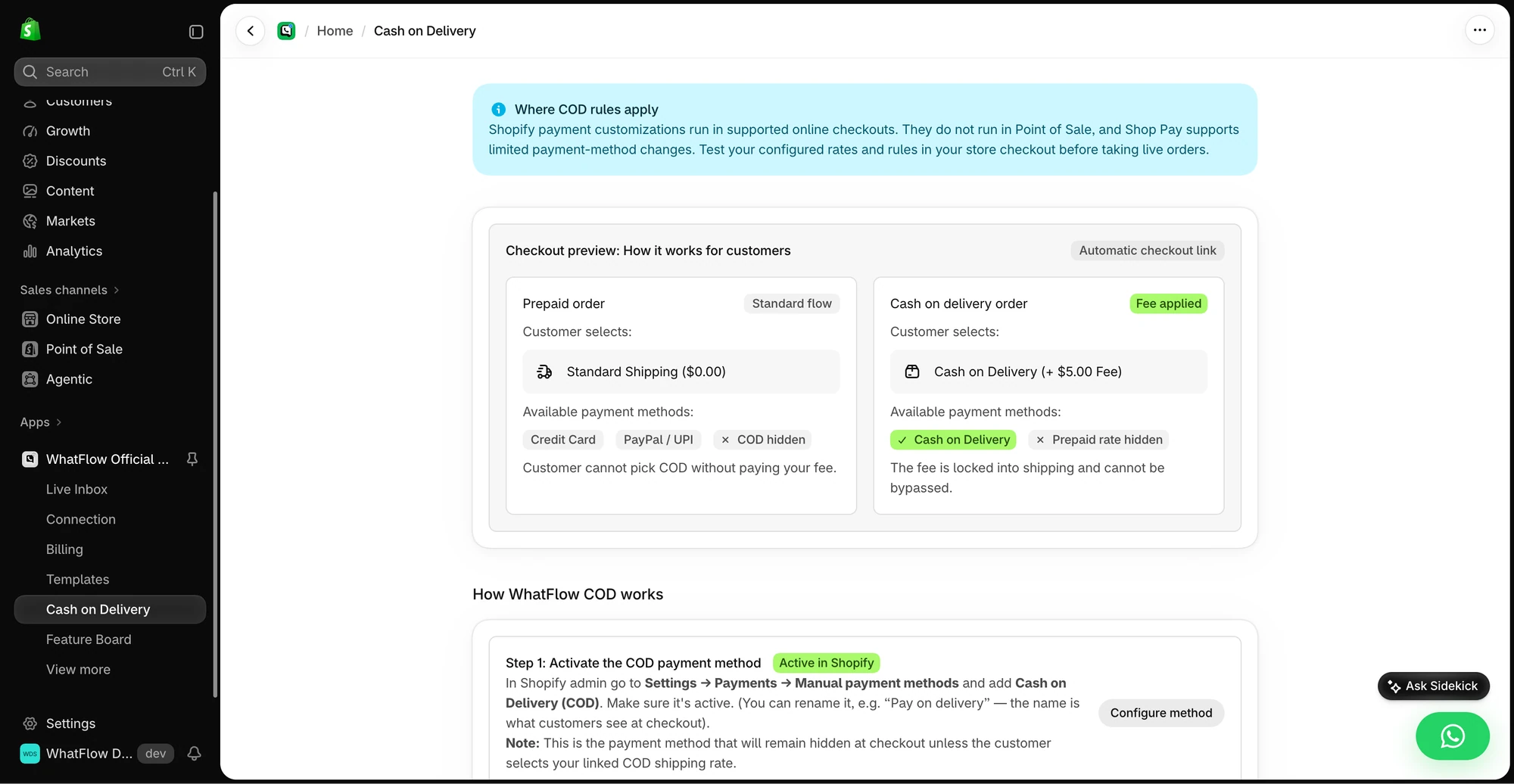
Interakt does COD well too, with a COD-to-prepaid flow that nudges buyers to pay online. If converting COD to prepaid is your top goal, that's worth a look. For confirming orders and keeping Shopify in sync, Flow integration is the cleaner setup.
What about the team inbox?
Credit where it's due: Interakt advertises unlimited agents, so this isn't a seat-fee fight. The difference is that WhatFlow's team inbox is on Free, with assignment, filters, saved replies and live catalog sharing. You can share a product card from the catalog right inside the chat, which is great for "do you have this in blue?" questions. The catalog support guide shows how stores use it.
When Interakt might still make sense
Choose Interakt if you also sell through Instagram DMs and want both channels in one inbox, if you need a sales pipeline CRM, or if you want an AI agent answering chats. Interakt sells AI Agents as an add-on. WhatFlow has no built-in AI agent, but WhatFlow's MCP connector lets you bring Claude, ChatGPT or Cursor to draft replies a person approves, without paying for an AI add-on.
The bottom line
If you're a Shopify store that wants WhatsApp order confirmations, COD replies, cart recovery and a shared inbox, WhatFlow gives you all of it on the Free plan and charges only as your sending grows. Interakt gets you there too, starting at $55/month. Start with WhatFlow, connect it to Shopify Flow, and build your COD confirmation before you've paid anything.
Questions worth asking
Is WhatFlow a good Interakt alternative for Shopify?
Yes, especially for small and growing stores. WhatFlow includes the shared inbox, catalog sharing, COD confirmation and Shopify Flow actions on its Free plan, while Interakt starts those on its $55/month Growth plan as of November 2026.
How much does Interakt cost compared with WhatFlow?
As of November 2026, Interakt's Marketing & Support Hub lists Growth at $55/month and Advanced at $69/month, with Sales CRM and AI Agents priced separately in INR. WhatFlow is free to start and paid plans begin at $4.99/month with every feature included. Meta's message fees are extra on both.
Does WhatFlow charge per inbox seat?
No. WhatFlow's team inbox has no seat fees on any plan, including Free. Interakt also advertises unlimited agents on its Marketing & Support plans, so the bigger difference is which plan includes the inbox.
Are WhatFlow features restricted on the free plan?
No. Every WhatFlow feature is on the Free plan, including the team inbox, templates, COD confirmation, abandoned checkout recovery and live catalog sharing. Paid plans add message allowance, and the theme-matched button is free forever.
Does Interakt have AI that WhatFlow doesn't?
Yes. Interakt sells WhatsApp AI Agents as a separate product that requires its Growth or Advanced plan. WhatFlow has no built-in AI agent; it focuses on Shopify automation and a human team inbox, and lets you connect the AI you already use (Claude, ChatGPT or Cursor) through WhatFlow's MCP connector to draft replies a person approves.
Sources and methodology
We checked these primary sources on November 5, 2026. Vendor pages describe advertised capabilities, rather than independent performance tests. Confirm current pricing, plan limits and availability with each provider.
- Interakt Shopify integration
Interakt's description of its Shopify notifications, shared inbox, widget and commerce journeys.
- WhatFlow WhatsApp Business API on the Shopify App Store
WhatFlow plans, included sends, Shopify workflows and the 5.0/5 rating from 55 ratings (checked November 5, 2026).
- WhatsApp Business Platform pricing
Meta's per-message charges, which apply on top of either app's subscription.
- Interakt pricing
Interakt plan prices, agent terms and tier-gated features, checked October 27 and November 5, 2026.
- Interakt FAQ
Interakt's notes on unlimited team-member logins and USD billing through Shopify, checked October 27, 2026.
- Interakt WhatsApp Marketing on the Shopify App Store
Interakt WhatsApp Marketing listing rating, checked November 5, 2026.