The best Superlemon alternative for a Shopify store whose main channel is WhatsApp is WhatFlow WhatsApp Business API. You get theme-matched WhatsApp chat buttons that are free forever, plus order updates, COD confirmation and cart recovery sent from your own number on Meta's official WhatsApp Cloud API. Every feature is on every plan, the Free plan included.
Superlemon is one of the oldest WhatsApp apps on Shopify, and a lot of stores installed it for the chat button years ago. Below are seven alternatives, checked on their Shopify App Store listings and pricing pages on November 18, 2026, split between pure chat buttons and apps that also send notifications.
Why do stores look for Superlemon alternatives?
Superlemon (listed as "SL: WhatsApp Chat + Marketing") has three plans as of November 2026, and the way they're split is what sends most merchants shopping around:
Free gives you 50+ widget styles, manual cart and order recovery messages and a Chrome extension called WhatsApp Web Copilot. Messages go out from your personal WhatsApp, by hand.
Automate, $9.99/month, adds automated order confirmation, delivery updates and cart recovery, but messages go out from the app's shared approved number, not yours.
Scale, $29.99/month, is where you get your own approved number, shipment and COD messages and a WhatsApp inbox.
WhatsApp message rates start from $0.015 on both paid plans, according to the listing. The app is rated 3.5 from 342 reviews, so I'd read the recent ones before deciding either way.
None of that makes Superlemon a bad choice. But if you want automated messages from your own branded number, you're on the $29.99 plan, and at that point it's fair to compare. A customer who gets an order update from a number they don't recognise is more likely to ignore it, or worse, report it.
Chat button or WhatsApp Business API: which do you need?
These two get mixed up all the time, and the difference decides which alternative you want.
A WhatsApp chat button is a link on your store that opens WhatsApp with your number. The customer starts the conversation, and you reply from whatever app holds your number. It costs nothing to run, and you can't message anyone who hasn't messaged you first.
The WhatsApp Business API lets your store send messages first: order confirmations, shipping updates, COD checks, cart reminders. Those business-initiated messages need Meta-approved templates and the customer's opt-in, as WhatsApp's Business Messaging Policy requires, and Meta charges per delivered template message.
If you only ever want customers to reach you, any good button app will do. If you want to send order updates too, pick an app that does both from your own number, so customers see one consistent business profile from the first tap to the delivery message.
Superlemon alternatives compared
Ratings and prices are from each app's Shopify App Store listing, checked November 18, 2026. Meta's WhatsApp message charges are extra wherever an app sends messages.
App
Best for
Starting price
Shopify App Store rating (Nov 2026)
WhatsApp official API?
WhatFlow WhatsApp Business API
Chat button plus notifications from your own number
Free plan; paid from $4.99/month
4.9 (72 ratings)
Yes, Meta WhatsApp Cloud API
WhatsApp by Meta
Free order updates and cart campaigns
Free to install
4.4 (974)
Meta's own app
Chaty
A multi-channel chat button and nothing else
Free (500 visitors/month)
4.9 (336)
No, click-to-chat only
Moose WhatsApp Chat Button
A free button with in-app conversations
Free
4.9 (219)
Uses the WhatsApp Business API, per listing
Interakt
Low-cost notifications with a team inbox
$21/month
4.3 (235)
API setup listed; "official" not stated on listing
AiSensy
Notifications and broadcasts for Indian stores
$1 one-time on Shopify; plans on its website
4.1 (57)
Official BSP, per its pricing page
Spur
Chat, notifications and an AI agent
$39/month
5.0 (118)
Yes, per its listing
Superlemon (for reference)
Button plus manual or shared-number messages
Free; $9.99 or $29.99/month
3.5 (342)
Own approved number on Scale
1. WhatFlow WhatsApp Business API
Who it's for: stores that want the chat button and the automated messages in one app, from their own number, without paying extra for either.
WhatFlow runs on the official Meta WhatsApp Cloud API and connects through Meta Embedded Signup in Shopify admin. Your messages come from your verified business number with Meta-approved templates, and your profile is eligible for the green tick through Meta.
Order and shipping updates (label, pickup, in transit, delivered), abandoned checkout recovery and review requests.
COD confirmation with reply buttons, COD rules and OTP verification at checkout, with order tagging.
A team inbox with no seat fees, so the replies to all those notifications land somewhere your whole team can work them.
Native Shopify Flow triggers and actions for anything custom.
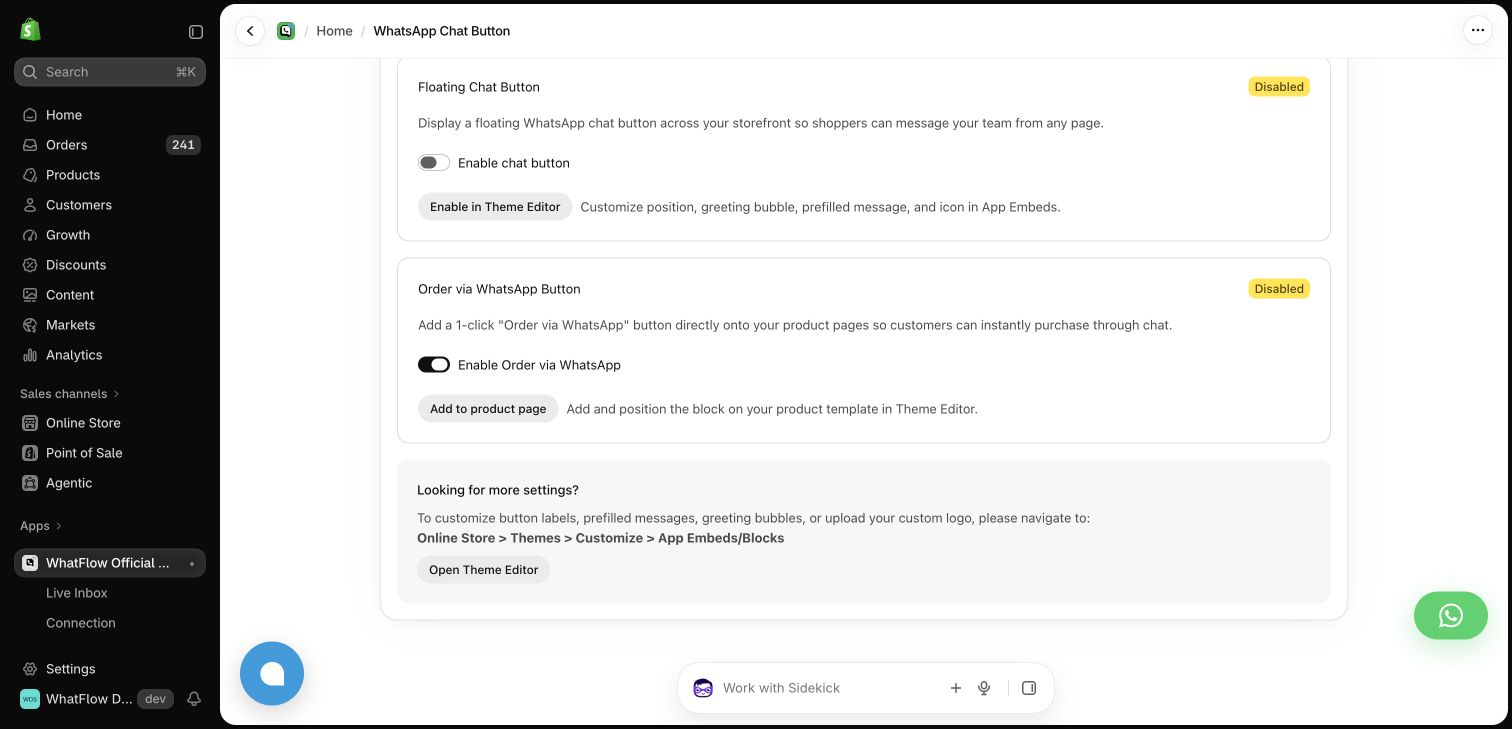
Chat button settings on our demo store, with links to the Theme Editor for each button.
Pricing and rating (November 2026): a Free plan and paid plans from $4.99/month, with every feature on every plan and a 7-day trial on paid plans. See WhatFlow pricing. Meta's message charges are passed through at zero markup. Rated 4.9/5 from 72 ratings (checked November 18, 2026).
Honest limitation: sending from your own number means connecting a Meta business account and getting templates approved. It's a few minutes with Embedded Signup, but it's more setup than pasting a phone number into a button app. If you truly want only a button and never plan to send a message, Chaty or Moose is simpler. Full comparison: WhatFlow vs Superlemon.
2. WhatsApp by Meta
Who it's for: stores that want order notifications and cart campaigns with no app fee and are happy with Meta's own feature set.
Meta's Shopify app sends real-time order notifications and abandoned cart campaigns, with templates, triggers, targeting rules and multi-language support. It's free to install, and Meta bills message charges separately from your Shopify invoice.
Pricing and rating (November 2026): free to install. Rated 4.4 from 974 reviews.
Honest limitation: the listing doesn't mention a chat button or an inbox, so you'd still need something for the storefront and for handling replies. See WhatFlow vs Meta's WhatsApp app.
3. Chaty
Who it's for: stores that want one tidy button for WhatsApp, Messenger, Telegram, email and more.
Chaty is a click-to-chat widget with 20+ channels, a WhatsApp pop-up and preset messages. It's a storefront tool: the customer taps, their WhatsApp opens, and the conversation continues on your phone or WhatsApp Business app.
Pricing and rating (November 2026): Free for 500 visitors/month, then Basic at $15/month (10,000 visitors), Pro at $39 (50,000) and Growth at $79 (150,000). Rated 4.9 from 336 ratings.
Honest limitation: the listing doesn't say Chaty sends WhatsApp messages, so there are no order updates or cart recovery. Pricing also scales with traffic rather than usage. More in WhatFlow vs Chaty.
4. Moose WhatsApp Chat Button
Who it's for: small stores that want a free button and a place to see conversations.
Moose adds a customisable WhatsApp button (icons, font, size, style), tracks clicks in Google Analytics and Meta pixels, and lets you manage and prioritise conversations inside the app. Its listing says it connects through the WhatsApp Business API with your number verified in Meta Business Manager, and it sends abandoned cart reminders.
Pricing and rating (November 2026): free. Rated 4.9 from 219 reviews.
Honest limitation: beyond cart reminders, I didn't see COD confirmation, shipping updates or broadcasts on the listing. See WhatFlow vs Moose.
5. Interakt
Who it's for: budget stores that want notifications, a widget and a shared inbox on one bill.
Interakt's Starter plan already includes automated notifications, a shared team inbox, a WhatsApp widget and a blue tick application. The listing also covers COD confirmation, cart reminders and bulk campaigns.
Pricing and rating (November 2026): $21/month (Starter) to $99/month (Premier) on the Shopify listing, with a 14-day trial and WhatsApp conversation charges on top. Rated 4.3 from 235 reviews.
Honest limitation: cart reminders and Shopify actions in the workflow builder are listed on Premier, the top plan. Compare in WhatFlow vs Interakt.
6. AiSensy
Who it's for: Indian stores that want COD confirmation, shipping updates and broadcasts, billed in rupees.
AiSensy's Shopify app automates abandoned cart notifications, COD confirmation, delivery and shipping updates, and button-based broadcast offers with segmentation. Its pricing page says it's an official WhatsApp Business Solution Provider and doesn't charge to procure the API.
Pricing and rating (November 2026): the Shopify listing shows a $1 one-time charge. The platform plans and per-message rates sit on AiSensy's own pricing page in INR. Rated 4.1 from 57 reviews.
Honest limitation: the real monthly cost isn't on the Shopify listing, so you'll need to price the plan you'd actually use on AiSensy's site. See WhatFlow vs AiSensy.
7. Spur
Who it's for: stores that have outgrown a button and want an AI agent, Instagram automation and WhatsApp in one app.
Spur offers an AI agent with product recommendations and order tracking, cart recovery, COD confirmation with a prepaid offer, shipping updates and campaigns. Its listing says it uses the official WhatsApp Business API.
Pricing and rating (November 2026): from $39/month (AI Start, 2 seats, 2,000 AI credits), with a 14-day trial. Rated 5.0 from 118 reviews.
Honest limitation: it's a bigger tool at a bigger price than Superlemon, with seats and AI credits metered. See WhatFlow vs Spur.
How to switch from Superlemon
Most Superlemon stores use the button and maybe a few automated messages. The move is quick:
Note your button settings. Position, colours, greeting text and which pages it shows on.
Connect your own number in the new app. If you were on Automate, you were sending from Superlemon's shared number, so customers will see your number for the first time. That's a good thing.
Recreate your templates. Order confirmation, shipping and cart recovery first, COD confirmation if you sell cash on delivery.
Turn on the new button, then remove Superlemon's widget so you don't show two.
Place a test order with a staff phone and check every message arrives.
Uninstall Superlemon and check your theme for leftover code.
Here's a shipping update template you can submit to Meta on day one:
Good news, {{1}}! Your order {{2}} is on its way with {{3}}. Track it here: {{4}}. Reply to this message if anything looks wrong.
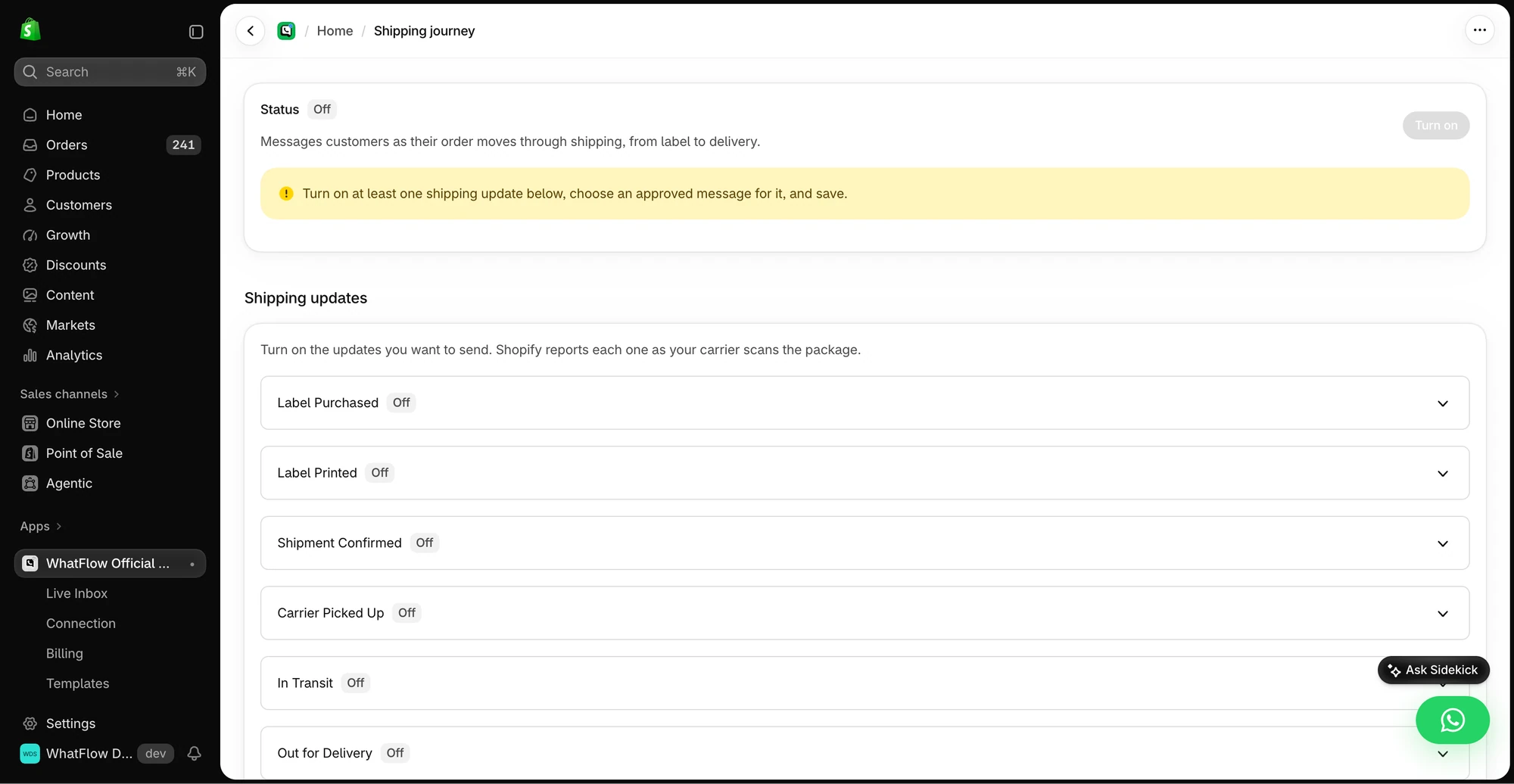
Shipping journey stages on our demo store. No messages were sent.
Outside the 24-hour customer service window, WhatsApp only lets a business send a Meta-approved template, and Meta charges per delivered template message. Rates are on Meta's pricing page. Our step-by-step for the storefront side is in how to add a WhatsApp chat button to Shopify.
Run WhatsApp for your Shopify store with WhatFlow
Free plan available. Templates, COD confirmation, Shopify Flow automations and a shared team inbox with no seat fees. Every feature is included on every plan, including Free.
You want the button and automated messages from your own number: WhatFlow. The button is free forever and the app is free to start. If you're weighing a paid widget, read free WhatsApp button vs paid chat widget.
You want only order updates and cart campaigns, no app fee: WhatsApp by Meta, paired with a free button.
You want only a multi-channel button: Chaty.
You want a free button and basic conversations: Moose.
You're in India and want rupee billing: AiSensy or Interakt.
You want an AI agent and Instagram too: Spur.
My advice: decide first whether you'll ever send a message. If yes, pick an app that sends from your own number from day one, so you never have to explain a number change to customers later.
For a Shopify store that wants a WhatsApp chat button plus automated order and COD messages from its own number, WhatFlow WhatsApp Business API is the strongest all-round alternative. Its theme-matched chat buttons are free forever, and the app has a Free plan with paid plans from $4.99/month as of November 2026.
Is Superlemon free?
Superlemon has a Free plan that sends messages manually from your personal WhatsApp through a Chrome extension. Automated messages start on Automate at $9.99/month from a shared approved number, and your own approved number needs Scale at $29.99/month, as of November 2026.
What's the difference between a WhatsApp chat button and WhatsApp notifications?
A chat button is a link on your store that opens a WhatsApp chat with you, so the customer starts the conversation. Notifications are messages your store sends first, like order confirmations, which need the WhatsApp Business API and Meta-approved templates.
Can I send WhatsApp order updates from my own number for free?
The app can be free, but Meta charges per delivered template message, and rates depend on the category and the customer's country. Meta's own WhatsApp app for Shopify and WhatFlow's Free plan both have no app fee, while Meta bills its message charges separately.
Superlemon's 3.5 rating from 342 reviews, its Free, Automate ($9.99) and Scale ($29.99) plans, shared versus own number, and WhatsApp rates from $0.015, checked November 18, 2026.