
Publisher disclosure: this comparison is written by WhatFlow. Competitor capabilities are based on the linked public documentation; the WhatFlow screenshots come from our demo store. Examples are illustrative, and results depend on your store and configuration.
WhatFlow and Spur at a glance
| Consideration | WhatFlow | Spur |
|---|---|---|
| Connection | Official Meta WhatsApp Cloud API, connected through Meta Embedded Signup inside Shopify admin. | Official WhatsApp Business API, per Spur's Shopify listing. |
| Built for Shopify / Shopify Flow | Shopify admin extensions plus native Shopify Flow triggers (incoming message, order reply) and actions (template, text, media). | Native Shopify app with its own workflow builder. Shopify Flow isn't listed on its Shopify App Store page. |
| Pricing and billing units | Free plan; paid plans from $4.99/month, priced only by messages sent. Meta fees separate. | AI Start $39, AI Accelerate $159, AI Max $499 per month (or $31, $127, $399 billed annually), plus AI credits, add-ons and Meta fees, as of November 2026. |
| Feature access by plan | Every feature on every plan, including Free. | Flows, segments, channels and AI credits step up by tier. The entry AI Acquire plan doesn't include WhatsApp automation. |
| Team inbox seats | No seat fees. Invite everyone. | 2 users on AI Start, 5 on AI Accelerate, 10 on AI Max; extra users $15/month each. |
| COD confirmation | Included on Free. Reply buttons can tag or cancel orders through Shopify Flow. | COD order confirmation and verification listed, with an offer to pay online. |
| Abandoned checkout recovery | Included on every plan. | Included from AI Start. |
| Catalog sharing | Live catalog sharing from the inbox, included on every plan. | WhatsApp catalog is a $39/month add-on per catalog. |
| Shopify App Store rating | 5.0/5 from 55 ratings (WhatFlow WhatsApp Business API, November 5, 2026). | 5.0/5 from 119 reviews (November 5, 2026). |
| Best fit | Shopify stores of any size that want WhatsApp inside Shopify with a whole-team inbox at a flat cost. | Brands that want an AI agent plus Instagram comment automation in one tool. |
If you run a Shopify store, pick WhatFlow over Spur. WhatFlow lives inside Shopify (admin extensions, native Shopify Flow triggers and actions, COD confirmation that tags orders), every feature is included on every plan from Free, and the team inbox has no seat fees. Spur is a capable AI and Instagram tool, but its user caps, $15 seats and $39 catalog add-on make the same WhatsApp setup cost far more.
One thing to clear up first. WhatFlow WhatsApp Business API is not an unofficial workaround. It runs on the official Meta Cloud API, connected through Meta Embedded Signup inside Shopify admin, and it's built for teams of any size: inbox assignment and filters, no seat fees, Shopify Flow automation, COD confirmation, live catalog sharing and a 5.0 rating. Both apps use official WhatsApp access, so the decision comes down to cost, gates and how deeply each one works with Shopify.
WhatFlow vs Spur at a glance
WhatFlow | Spur | |
|---|---|---|
Starting price | Free, paid from $4.99/month | AI Start $39/month ($31 billed annually) |
Team members | No seat fees | 2 / 5 / 10 users by plan, then $15/user |
WhatsApp catalog | Included on every plan | $39/month add-on per catalog |
Feature gates | None, everything on Free | Flows, segments, channels and AI credits by tier |
Shopify Flow | Native triggers and actions | Its own workflow builder |
Shopify rating | 5.0/5 from 55 ratings | 5.0/5 from 119 reviews |
Spur figures are from its pricing page and Shopify App Store listing, as of November 2026.
How much does Spur cost for a Shopify team?
Spur prices by tier, users and AI credits. As of November 2026, its Shopify listing shows:
- AI Start: $39/month, 2 user seats, 25 automation flows, 2,000 AI credits.
- AI Accelerate: $159/month, 5 user seats, 50 flows, 12,000 AI credits.
- AI Max: $499/month, 10 user seats, unlimited flows.
Its pricing page adds the extras: $15/month per additional user, $39/month per WhatsApp catalog, $29/month per additional WhatsApp channel and $12 per 1,000 extra AI credits. The entry AI Acquire plan ($12/month billed annually) doesn't include WhatsApp automation at all.
Now take a typical growing store. Say eight people touch WhatsApp: four support agents, a team lead, two warehouse staff answering "where's my parcel?" and a weekend cover. You want catalog sharing because customers ask for product photos and prices all day.
Monthly cost before Meta fees | Spur AI Accelerate (monthly) | Spur AI Accelerate (annual) | WhatFlow |
|---|---|---|---|
Base plan | $159 | $127 | $9.99 (Plus, 5,000 sends) |
3 extra users | $45 | $45 | $0 |
WhatsApp catalog | $39 | $39 | $0 |
Total | $243 | $211 | $9.99 |
If that team sends 20,000 messages a month, WhatFlow's Growth plan is $29. Meta's per-message charges apply on both sides, so they don't change the gap. Current WhatFlow amounts are on the pricing page, and our WhatsApp API pricing guide explains how Meta bills templates after the October 2026 changes.
The bigger cost isn't on the invoice. When every login costs money, stores share passwords or leave the warehouse out of the inbox. That's exactly why we built WhatFlow with no seat fees.
Which one fits Shopify workflows better?
Spur has real Shopify tools: abandoned checkout flows, COD verification, fulfilment-triggered messages and Shopify order details beside each chat. The difference is where the automation lives.
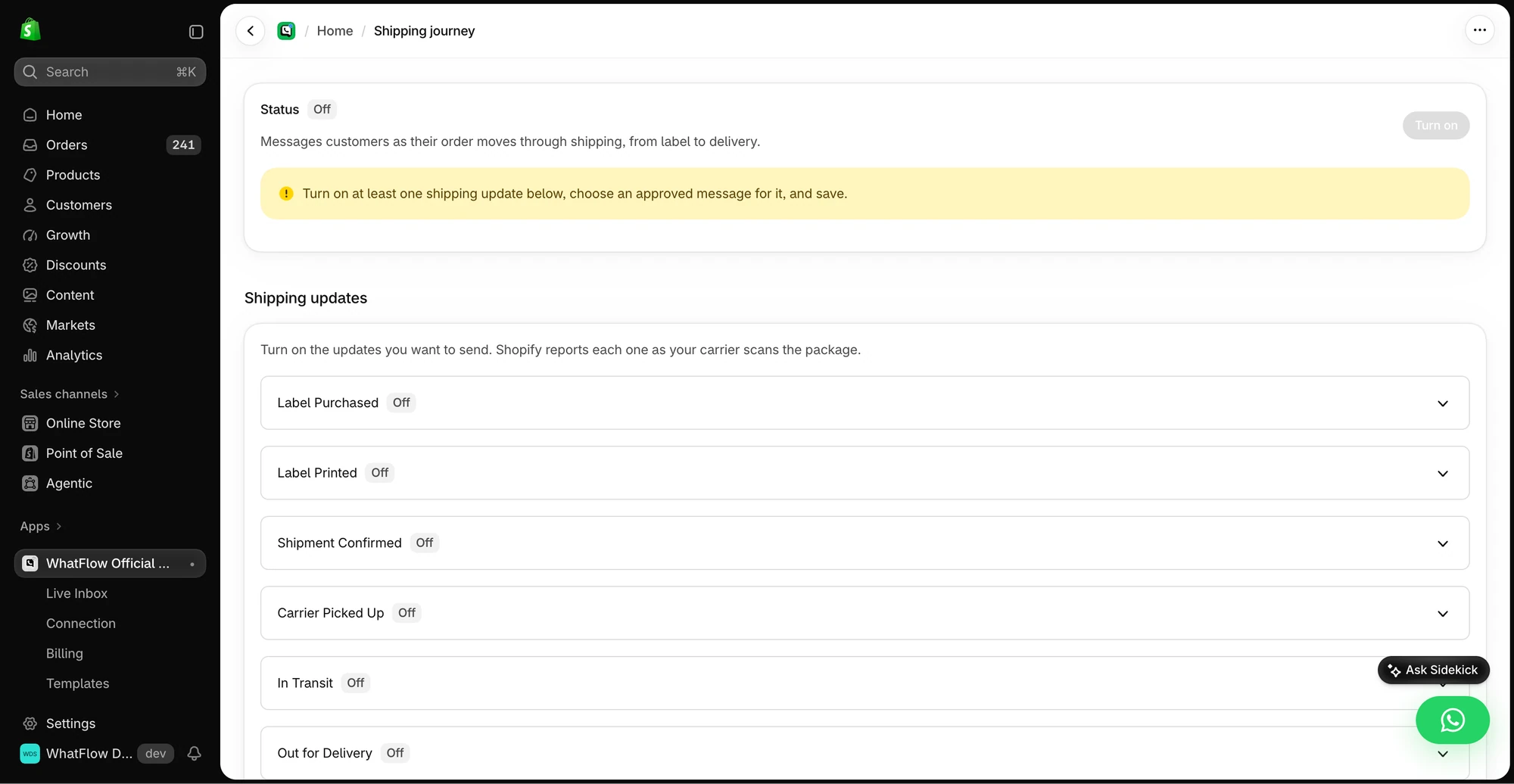
WhatFlow puts WhatsApp inside Shopify Flow, the automation tool your store already uses for tagging, inventory and fulfilment rules. WhatFlow adds triggers (incoming message, order reply) and actions (send template, text, media), so a WhatsApp reply can change an order and an order event can send a template. Shopify Sidekick can even draft the workflow for you. Our WhatFlow and Shopify Flow guide shows the full setup.
Here's a COD confirmation built that way:
Hi Bilal, thanks for order #2087 (Rs 4,200, cash on delivery). Shall we ship it today? [Confirm order] [Cancel order]
A Confirm tap tags the order cod-confirmed. A Cancel tap can tag it for review or cancel it. The COD reply walkthrough covers each step.
On WhatFlow, that workflow, the template editor, broadcasts, abandoned checkout recovery and live catalog sharing are all on the Free plan. On Spur, flow counts are capped by tier (25 on AI Start, 50 on AI Accelerate) and the catalog is billed separately.
Is WhatFlow ready for bigger teams?
Yes, and this is where the old "small-shop app" image is most out of date. WhatFlow's team inbox has assignment, filters, saved replies and catalog sharing from the conversation. A 40-person support floor pays the same in seats as a two-person shop: nothing.
Spur's largest self-serve plan, AI Max at $499/month, includes 10 users, and every person after that is another $15. For a team of 25, that's $724 a month before AI credits, catalog or Meta fees. On WhatFlow, the only thing that scales your bill is how many messages you send.
Add the storefront side too: WhatFlow's theme-matched WhatsApp button is free forever, so the chat entry point looks like part of your store.
How do you switch from Spur to WhatFlow?
Moving is a short checklist, and the order matters:
- Install WhatFlow WhatsApp Business API from the Shopify App Store and start on the Free plan.
- Connect your WhatsApp number through Meta Embedded Signup inside Shopify admin. If the number is still connected to Spur, ask them how to release or migrate it first.
- Recreate your key templates in WhatFlow's template editor (COD confirmation, abandoned checkout, shipping update) and submit them to Meta for approval.
- List the Spur flows you actually use (cart recovery, COD, fulfilment updates) and rebuild each one as a Shopify Flow workflow with a WhatFlow action.
- Invite your whole team to the inbox. There's no seat fee, so include the warehouse and weekend cover too.
- Turn on the theme-matched chat button and send yourself a test order before going live.
When Spur might still make sense
Pick Spur if you specifically want an AI agent answering chats today, or if Instagram comment-to-DM automation is a bigger channel for you than WhatsApp. WhatFlow has no built-in AI bot, though WhatFlow's MCP connector lets Claude, ChatGPT or Cursor draft replies a person approves. If your business is WhatsApp on Shopify, that's a narrow reason to pay per seat.
The bottom line
WhatFlow is the stronger and cheaper WhatsApp app for Shopify. You get the official Meta Cloud API, native Shopify Flow automation, COD confirmation that updates orders, live catalog sharing and a team inbox, all on the Free plan, with no seat fees and no catalog add-on. Start free, invite the whole team, and pay more only when you send more.
Questions worth asking
Is WhatFlow a good Spur alternative for Shopify?
Yes. WhatFlow is built for Shopify, includes every feature on every plan including Free, and has no seat fees or catalog add-on. Spur suits brands that mainly want an AI agent and Instagram automation alongside WhatsApp.
How much does Spur cost compared with WhatFlow?
As of November 2026, Spur lists AI Start at $39, AI Accelerate at $159 and AI Max at $499 per month, with extra users at $15/month and the WhatsApp catalog at $39/month. WhatFlow starts free, paid plans start at $4.99/month, and there are no seat fees. Meta's message fees apply to both.
Does Spur use the official WhatsApp Business API?
Yes, Spur's Shopify listing says it uses the official WhatsApp Business API. WhatFlow WhatsApp Business API also runs on the official Meta Cloud API, so the real differences are seats, add-ons, feature gates and Shopify Flow.
Does WhatFlow have an AI chatbot like Spur?
Not a built-in one. WhatFlow has no AI chatbot of its own, but its MCP connector lets you bring Claude, ChatGPT or Cursor to read Live Inbox chats and draft replies that a person approves before sending. Beyond that, it focuses on Shopify-native automation through Shopify Flow, templates, COD confirmation and a team inbox with no seat fees.
Sources and methodology
We checked these primary sources on November 5, 2026. Vendor pages describe advertised capabilities, rather than independent performance tests. Confirm current pricing, plan limits and availability with each provider.
- Spur pricing
Spur plan prices billed annually, included users, the $15 extra-user and $39 WhatsApp catalog add-ons, checked November 5, 2026.
- Spur on the Shopify App Store
Monthly plan prices, seats per plan, official WhatsApp Business API statement, COD and cart recovery features, and the 5.0 rating from 119 reviews, checked November 5, 2026.
- WhatFlow WhatsApp Business API on the Shopify App Store
WhatFlow plans, Shopify workflows and the 5.0/5 rating from 55 ratings, checked November 5, 2026.
- WhatsApp Business Platform pricing
Meta's per-message charges, which apply on top of either app's subscription.