
Publisher disclosure: this comparison is written by WhatFlow. Competitor capabilities are based on the linked public documentation; the WhatFlow screenshots come from our demo store. Examples are illustrative, and results depend on your store and configuration.
WhatFlow and SleekFlow at a glance
| Consideration | WhatFlow | SleekFlow |
|---|---|---|
| What the product is built around | Built for Shopify: admin extensions, native Shopify Flow triggers and actions, COD confirmation and a WhatsApp team inbox. | An omnichannel inbox with flows, CRM, analytics and conversational commerce tools for teams across departments. |
| Pricing and billing units | Free plan; paid plans from $4.99/month based on sends. Meta fees separate. | Essential $49/month, Pro $109/month, Premium $279/month (monthly billing, as of November 2026), plus contact allowances. |
| Feature access | Every feature on every plan, including Free. Plans only change message allowances. | Pro lists Shopify integration, broadcasts and Flow Builder; Premium adds HTTP requests, webhooks and role-based access. Essential is rolling out by country. |
| Team access | No seat fees. Add your whole team to the inbox. | Essential includes 3 seats ($15 per extra seat); Pro and Premium include 10 ($25 per extra seat), as of November 2026. |
| Storefront entry point | Theme-matched WhatsApp buttons, free forever. | Check SleekFlow's current website widget options directly. |
| Custom automation hooks | Native Shopify Flow triggers and actions on every plan, including Free. | HTTP request and webhook automations are listed on Premium ($279/month). |
If you run a Shopify store, pick WhatFlow over SleekFlow. WhatFlow puts every feature on every plan, including Free, charges no seat fees for its team inbox and plugs straight into Shopify Flow. SleekFlow is a capable omnichannel suite, but its Shopify integration starts on the $109-a-month Pro plan and custom webhooks need Premium. For a store that lives on WhatsApp, that's a lot of software you won't use.
WhatFlow vs SleekFlow at a glance
- Built for: WhatFlow is built for Shopify stores. SleekFlow is built for multi-department teams juggling many channels.
- Price to get Shopify features: WhatFlow, $0 (Free plan). SleekFlow, $109 a month for Pro, as of November 2026.
- Seats: WhatFlow has none to buy. SleekFlow includes 3 seats on Essential and 10 on Pro and Premium, then charges $15 to $25 per extra seat.
- Feature gates: WhatFlow has none. SleekFlow puts Shopify, broadcasts and Flow Builder on Pro, and HTTP requests and webhooks on Premium.
- Connection: WhatFlow uses the official Meta WhatsApp Cloud API, connected from your Shopify admin with Meta Embedded Signup.
- Rating: WhatFlow WhatsApp Business API is rated 5.0/5 from 55 ratings on the Shopify App Store (checked November 5, 2026).
- Enterprise-ready, not just for small shops: WhatFlow WhatsApp Business API runs on the official Meta Cloud API, with inbox assignment and filters, Shopify Flow automation at scale and no seat fees at any team size, so a 50-person team pays the same in seats as a two-person shop.
How much does SleekFlow cost compared with WhatFlow?
Here's the math with SleekFlow's published monthly prices as of November 2026, and WhatFlow's Shopify App Store prices on the same date. Meta's per-message WhatsApp charges apply on top of both, so I've left them out to compare like with like (our WhatsApp Business API pricing guide explains how Meta bills).
Say you're a five-person store sending about 5,000 WhatsApp messages a month: order updates, COD confirmations and a weekly broadcast.
WhatFlow | SleekFlow | |
|---|---|---|
Plan you'd need | Plus | Pro (Shopify integration, broadcasts) |
Monthly price | $9.99 | $109 |
Five people in the inbox | $0 extra | Included (10 seats) |
Twelve people at peak season | $0 extra | $109 + 2 × $25 = $159 |
Webhooks / custom HTTP calls | Included (via Shopify Flow) | Premium, $279 |
Over a year, that's $119.88 for WhatFlow Plus against $1,308 for SleekFlow Pro on the yearly plan it advertises. And if your team grows, WhatFlow's bill doesn't move. You only change plans when your sending volume changes: Starter is $4.99 for 2,000 sends, Plus $9.99 for 5,000, Growth $29 for 20,000 and Scale $49.99 for 40,000. Full details are on our pricing page.
SleekFlow's Essential plan at $49 looks closer, but it's rolling out by country, includes three seats and doesn't list the Shopify integration. If Shopify is the reason you're shopping, Pro is the realistic starting point.
Which one fits your Shopify workflow better?
This is where the gap is widest. WhatFlow lives inside your Shopify admin. It ships with native Shopify Flow triggers (incoming message, order reply) and actions (send a template, text, media or video), so WhatsApp becomes one more step in workflows you already run.
A concrete example. Say you sell home decor with cash on delivery and 30% of orders are COD. In WhatFlow you'd send this utility template straight after checkout:
Hi Aisha, thanks for your order #4821 (Ceramic vase set, PKR 6,400, cash on delivery). Please confirm so we can ship today. [Confirm order] [Cancel order]
When Aisha taps Confirm, a Flow workflow tags the order "cod-confirmed". If she taps Cancel, Flow can cancel it before your courier collects. No exports, no Zapier, no extra plan. Our guide to turning WhatsApp order replies into Shopify actions walks through the exact setup.
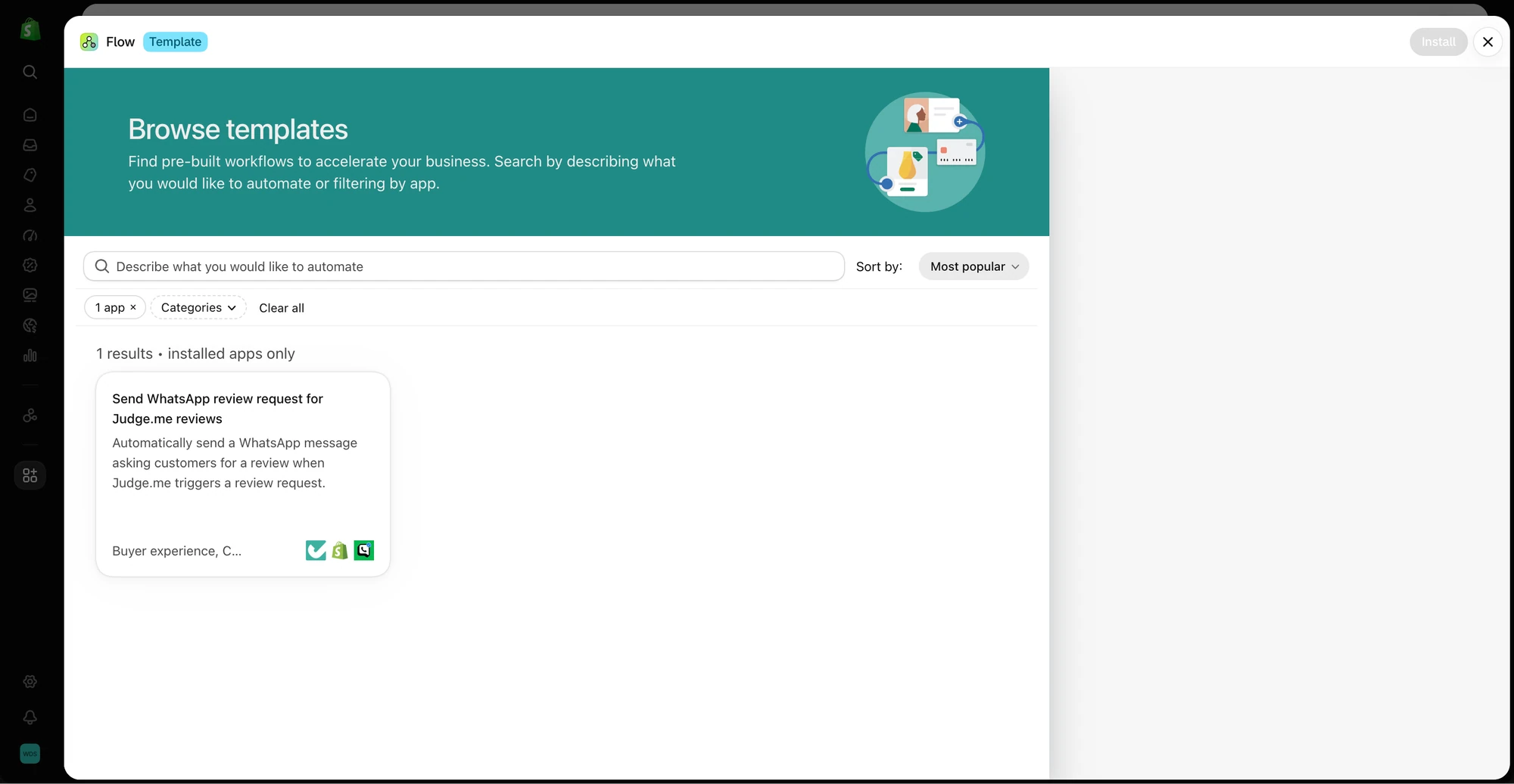
The same Free plan covers abandoned checkout messages, shipping updates, review requests, live catalog sharing from the inbox and a template editor that maps Shopify fields into your messages. You can even ask Shopify Sidekick to draft the Flow workflow for you.
SleekFlow can connect to Shopify on Pro, and its own Flow Builder is genuinely flexible. But it's an external dashboard: your team works in SleekFlow, and the Shopify order lives somewhere else. If you need it to call your own systems through HTTP requests or webhooks, you're on Premium at $279 a month. I've written more about that trade-off in Shopify-native WhatsApp vs an external dashboard.
Team inbox: who can answer customers?
WhatFlow's shared team inbox has assignment, filters and saved replies, and you can add everyone: your packer, your part-time weekend helper, your cousin who handles Urdu-language queries. None of them cost anything. That matters more than people expect. The mistake I see most often is stores sharing one login because adding a seat felt expensive, and then nobody knows who promised the customer a refund.
When testing WhatFlow and SleekFlow, ask: Can a second agent tell who owns the conversation without asking? In WhatFlow, use Needs reply and Closing soon, claim a conversation, then check Shopify order context and leave a private note. The team inbox walkthrough gives you a repeatable test for two agents, with no per-seat fee.
SleekFlow's 10 included seats on Pro are generous for many small stores. The pinch comes at seasonal peaks and when you want warehouse or operations staff to see conversations too. Every extra person past ten is $25 a month on Pro. If you want to compare the two pricing models in general, see no-seat-fee inboxes vs per-seat pricing, and read our guide to setting up a shared team inbox before you invite people.
One honest note: WhatFlow has no built-in AI bot. If an AI agent answering on its own is the main thing you're buying, that's a real difference. If you want AI drafting with a person in control, WhatFlow's MCP connector lets Claude, ChatGPT or Cursor read Live Inbox chats and draft replies your team approves. Native Shopify customer-segment sync is coming soon.
When SleekFlow might still make sense
Pick SleekFlow only if you need one platform for several departments across many channels (say retail stores, a call centre and online sales all sharing one CRM), or if your roadmap depends on its role-based access controls and custom HTTP automations on Premium. That's a real use case. It's just not the typical Shopify store's.
The bottom line
For a Shopify store that wants WhatsApp to confirm orders, recover checkouts and give the whole team one inbox, WhatFlow does the job for a fraction of the price. You start free with every feature, you never pay per seat, and your WhatsApp automation runs inside Shopify Flow instead of a separate dashboard. Install it, connect your number through Meta Embedded Signup, add a free theme-matched WhatsApp button and send your first COD confirmation the same afternoon.
Questions worth asking
Is WhatFlow a good SleekFlow alternative for Shopify?
Yes. WhatFlow is built specifically for Shopify, with native Shopify Flow triggers and actions, COD confirmation and a no-seat-fee team inbox on every plan, including Free. SleekFlow is a broader omnichannel suite whose Shopify integration starts on its Pro plan.
How much does SleekFlow cost compared with WhatFlow?
As of November 2026, SleekFlow lists Essential at $49, Pro at $109 and Premium at $279 per month on monthly billing, with extra seats from $15 to $25. WhatFlow has a Free plan and paid plans from $4.99 a month with no seat fees. WhatsApp delivery fees from Meta are separate in both cases.
Does WhatFlow charge per inbox seat?
No. WhatFlow's team inbox has no seat fees, so adding a colleague never changes your bill. You only choose a plan by how many messages you send.
Are WhatFlow features restricted on the free plan?
No. The Free plan has every WhatFlow feature, including the team inbox, templates, broadcasts and Shopify Flow. Paid plans only add message allowance, and theme-matched WhatsApp buttons are free forever.
Which SleekFlow plan includes the Shopify integration?
SleekFlow's pricing page lists the Shopify integration from the Pro plan, which was $109 a month on monthly billing as of November 2026. In WhatFlow, Shopify is the whole point, and every Shopify feature is on the Free plan.
Sources and methodology
We checked these primary sources on November 5, 2026. Vendor pages describe advertised capabilities, rather than independent performance tests. Confirm current pricing, plan limits and availability with each provider.
- SleekFlow pricing
Plan prices, included seats, extra-seat rates and which plans list Shopify, Flow Builder and webhooks. Checked November 5, 2026.
- WhatFlow WhatsApp Business API on the Shopify App Store
WhatFlow plan prices, included sends, 5.0/5 rating from 55 ratings and Shopify features. Checked November 5, 2026.
- WhatsApp Business Platform pricing
Meta's per-message charges, which apply separately from any app subscription.