A good WhatsApp auto-reply confirms the message arrived, tells the customer when a person will answer, and gives them one useful thing to do right now, like tracking an order or sending the order number. It should be short enough to read in one glance and never pretend to be a human. Below are 22 copy-ready WhatsApp auto-reply message examples for stores, grouped by situation, plus how to set them up.
What is a WhatsApp auto-reply?
A WhatsApp auto-reply is a message your business sends automatically in response to a customer's message, without a person typing it. It can fire on every new chat, on a keyword ("track", "COD", "returns"), or at certain times. Greetings are a close cousin, covered in our WhatsApp greeting message examples.
An away message is one kind of auto-reply: the one that runs when you're closed. We've already written 14 WhatsApp away message examples for after hours and holidays, so this library spends most of its time on the daytime jobs: busy periods, FAQ answers, order-status prompts and routing. There's a short after-hours set too, written differently.
What to include in an auto-reply
Check each auto-reply against this list before you switch it on:
Store name or a clear sender. Customers chat with dozens of businesses.
Proof it's automatic. "Quick automatic reply" is honest and stops people waiting for a person to type.
A real time. "By 11am" or "within 2 hours today", never "soon".
One self-serve route. The tracking page, the size guide, the returns page. One link, not five.
What to send next. "Reply with your order number" turns your next human reply into an answer instead of a question.
A way to reach a person. WhatsApp's Business Messaging Policy allows automation inside the 24-hour window, but you must give people a clear escalation path.
Do auto-replies need a template? The 24-hour rule
No. An auto-reply answers a message the customer just sent, so it lands inside the 24-hour customer service window: the period after a customer's last message when a business can send free-form messages. Meta's pricing docs put it plainly: businesses can only send non-template messages to users while that window is open. Every new customer message resets the 24-hour timer.
Free-form isn't the same as free. Since October 1, 2026, Meta gives each business phone number 1,000 delivered service messages a month at no charge, then bills service messages at the utility rate for that country. As of November 2026 that's $0.0014 per message in India and $0.015 in Pakistan, for example. An auto-reply that fires on every "ok" and "thanks" burns through that allowance. Our explainer on the 24-hour window covers the rest.
The square brackets below, like [tracking link], are bits you fill in once when you save the reply. They're not template variables.
Busy-period auto-replies
These run during opening hours when the queue is long. They matter more than after-hours replies, because daytime silence feels like you're ignoring people.
1. Standard busy reply
Thanks for messaging Luma Skincare. This is a quick automatic reply: we're answering chats in order and the wait is about 30 minutes right now. Send your question and order number (if you have one) and we'll pick it up from there.
2. Sale-day overflow
Hi! It's sale week and our chat is very busy, so replies can take up to 3 hours today. Delivery times, returns and sizes are all here: [FAQ link]. If your question isn't covered, leave it below and a person from our team will reply.
3. Owner-run store
Hi, it's Maya from Kiln & Clay. I pack every order myself, so I check WhatsApp at 12pm and 5pm. Your message is safe here and I'll answer at the next check.
4. Launch day
Thanks for writing in on launch day! We're getting lots of messages about the new Ember Mug. Sizes and shipping dates are on the product page: [link]. For anything else, reply here and we'll get to you today.
After-hours and holiday auto-replies
Short versions. For the full set (weekends, Eid, Diwali, Ramadan hours), use the away message guide linked above.
5. Closed with a promise
Thanks for your message. We're closed now and a person will reply by 10am tomorrow. If it's about an order, send the order number so we can start there.
6. Closed with tracking
We're offline until 9am. Checking on a parcel? You can track it any time here: [tracking page link]. Anything else, leave a message and we'll answer in the morning.
7. Public holiday
Hi! The team is off for the public holiday and back on [day] at 10am. Orders placed now ship on [date]. We'll reply to every message in the order it came in.
FAQ auto-replies (keyword answers)
This is where auto-replies earn their keep. Pick the three questions your team answers most often and give each one a keyword rule. If you don't know which three, scroll last week's chats; it takes ten minutes. Writing the answer well matters as much as the rule, and our guide to writing product FAQs that answer real questions helps with the wording.
8. Shipping times (keyword: "shipping", "delivery time")
Quick answer: orders ship within 1 to 2 working days. Delivery takes 2 to 4 days in Lahore, Karachi and Islamabad, and 4 to 6 days elsewhere. Need a date for a specific order? Reply with your order number and a person will check.
9. Cash on delivery (keyword: "COD", "cash")
Yes, we offer cash on delivery across Pakistan. Choose "Cash on delivery" at checkout. We'll send a WhatsApp confirmation after you order, so please reply to it so we can ship.
10. Returns (keyword: "return", "exchange")
You can return unworn items within 14 days of delivery. Start here: [returns page]. If the item arrived damaged, reply with a photo and your order number and a person will sort it out.
11. Sizing (keyword: "size")
Our size guide is here: [size guide link]. If you're between sizes on our shirts, most people go up one. Tell us your height and usual size and a person can suggest one.
Thanks for asking before you buy. Full ingredient lists are on each product page. For questions about pregnancy or allergies, a person from our team will reply directly, so please tell us which product you're looking at.
Number 12 is a deliberate hand-off. Some questions shouldn't get a canned answer at all, and the auto-reply's job is to collect the details so the human reply is fast.
13. Store location and pickup (keyword: "pickup", "address")
Our pickup point is Shop 4, Gulberg Galleria, open 11am to 8pm, Monday to Saturday. Pickup orders are ready 24 hours after you get the confirmation message.
Order-status auto-replies
"Where's my order?" is usually the biggest single bucket in a store's WhatsApp. These replies won't look up the order themselves, but they get the customer to the answer or get the right detail to your team. The shipping confirmation message examples and order confirmation message examples show what customers have already received.
14. Ask for the order number
Happy to check your order. Please reply with your order number (it starts with # and is in your confirmation message) and we'll get back to you with an update.
15. Self-serve tracking first
You can track your order any time here: [tracking page link]. Enter your order number and email or phone. If the tracking hasn't moved in 3 days, reply "help" and a person will look into it.
16. COD confirmation reminder
Looks like you're asking about a cash-on-delivery order. If you got our confirmation message, tap Confirm on it and we'll ship. Didn't get one? Reply with your order number and we'll check.
17. Delivered but not received
Sorry to hear that. A person from our team will take this one. Please send your order number and your delivery address, and check with neighbours or building reception in the meantime. We'll reply within 2 hours during opening hours.
A message like number 17 is a good example of a keyword trap. If your "track" rule catches "tracking says delivered but I have nothing", the customer gets a cheerful tracking link at the worst moment. Keep keyword rules narrow and test near misses.
Routing auto-replies with reply buttons
Inside the window you can send interactive messages with reply buttons. Three buttons are easier to tap than typing a keyword. Our guide to quick reply buttons people actually tap has more on wording.
18. Three-way menu
Hi, thanks for messaging Luma Skincare! What can we help with?
[Track my order] [Product question] [Talk to a person]
19. Pre-sale or after-sale
Welcome back! Is this about something you're thinking of buying, or an order you've already placed?
[Before I buy] [About my order]
Always keep a "talk to a person" option. It's the escalation path the policy asks for, and it stops people bouncing around a menu in frustration.
Template follow-ups after the window closes
Sometimes your team can't answer inside 24 hours, for example a question sent Friday night that needs the warehouse on Monday. Once the window closes, you need a Meta-approved template. Variables are written {{1}}, {{2}} and so on, and are filled from your data at send time.
20. Picking up an old question
Hi {{1}}, it's {{2}} replying to your message about order {{3}}. We've checked with our warehouse and have an update for you. Reply here and we'll share the details.
Here {{1}} is the first name, {{2}} the store name and {{3}} the order number.
21. Answer ready
Hi {{1}}, sorry for the slow reply. You asked about {{2}}, and we now have an answer. Reply to this message and we'll pick the conversation back up.
22. Closing the loop
Hi {{1}}, just checking your question about {{2}} was sorted. If anything's still open, reply here and the {{3}} team will help.
Meta decides the category. Its template categorization guidelines list follow-ups on support the customer asked for as utility, but anything promotional makes the template marketing. Keep these free of offers.
How to set up auto-replies in WhatFlow
WhatFlow WhatsApp Business API runs on Meta's official WhatsApp Cloud API, and it gives you two ways to automate replies, both on every plan including Free.
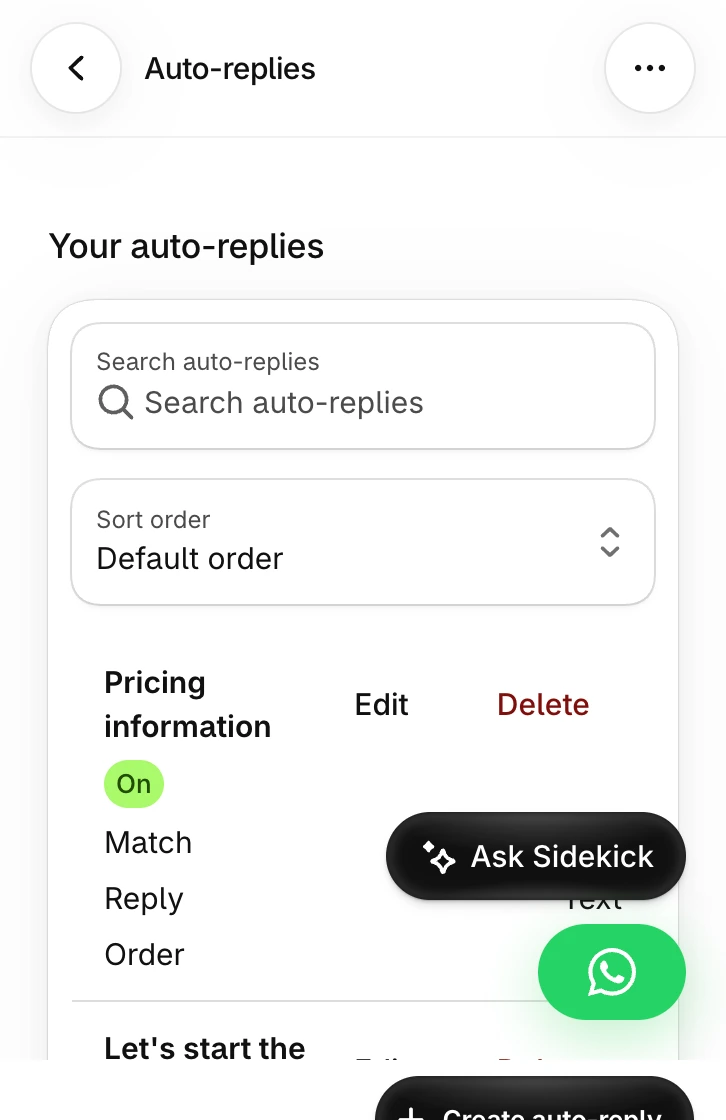
Open Auto-replies and create a rule for a common question.
Set what the customer must send to trigger it.
Write the response and check the preview.
Send the test phrase from your own phone.
Send a similar phrase that should not match, and check it falls through to a teammate.
The Auto-replies list in a WhatFlow demo store, with the Create auto-reply control. Demo data only; nothing was sent.
If you set up Store Report, pick a Store Report keyword that doesn't overlap with any auto-reply. The delivery pin auto-reply guide is a worked example of a narrow rule.
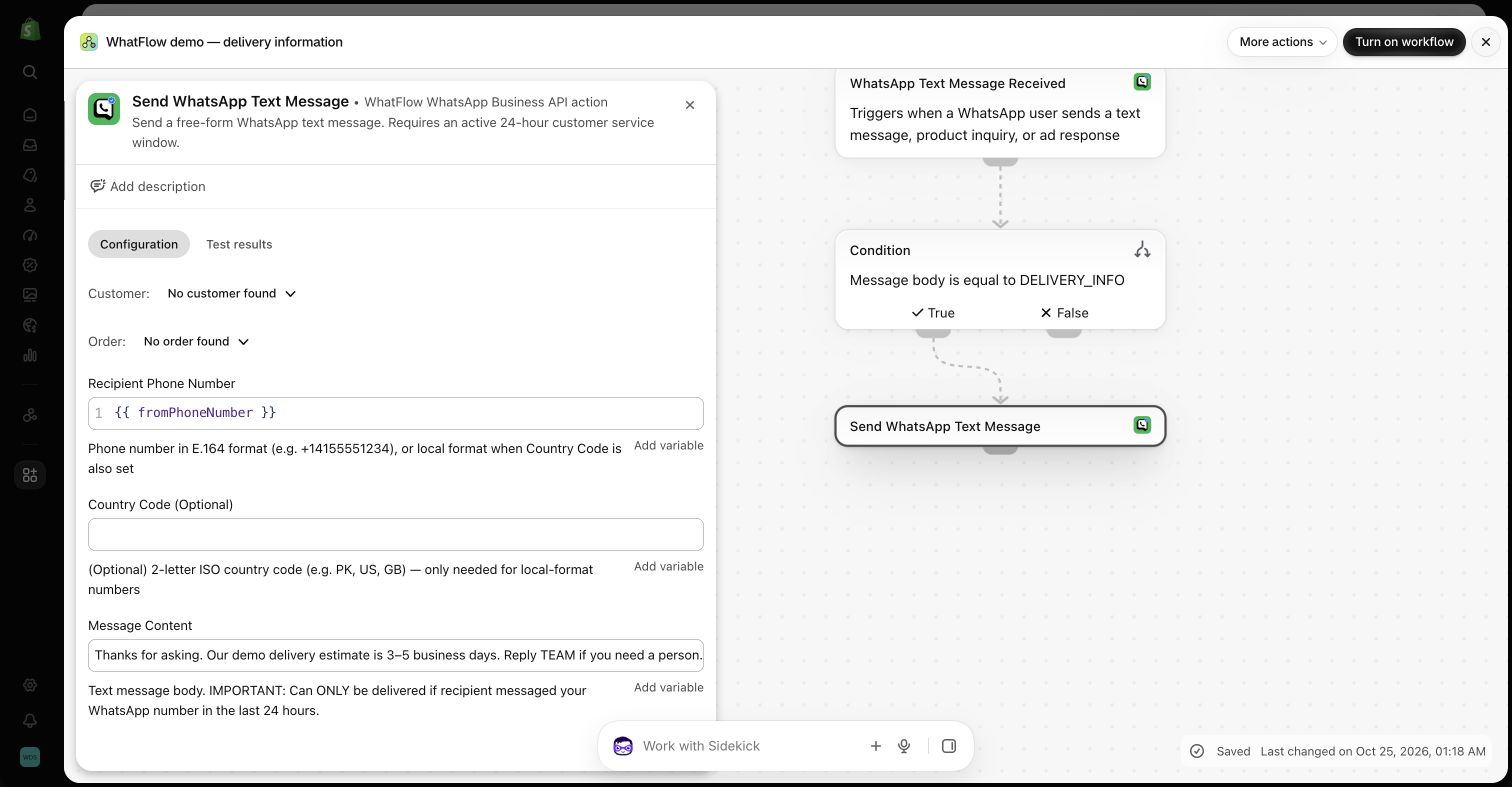
An inactive demo workflow: WhatFlow's text message action replying to the sender of an incoming message.
Shopify Flow has no ready-made "outside business hours" condition, so time-based replies take extra work. The away message guide explains the options.
Canned responses for the human reply
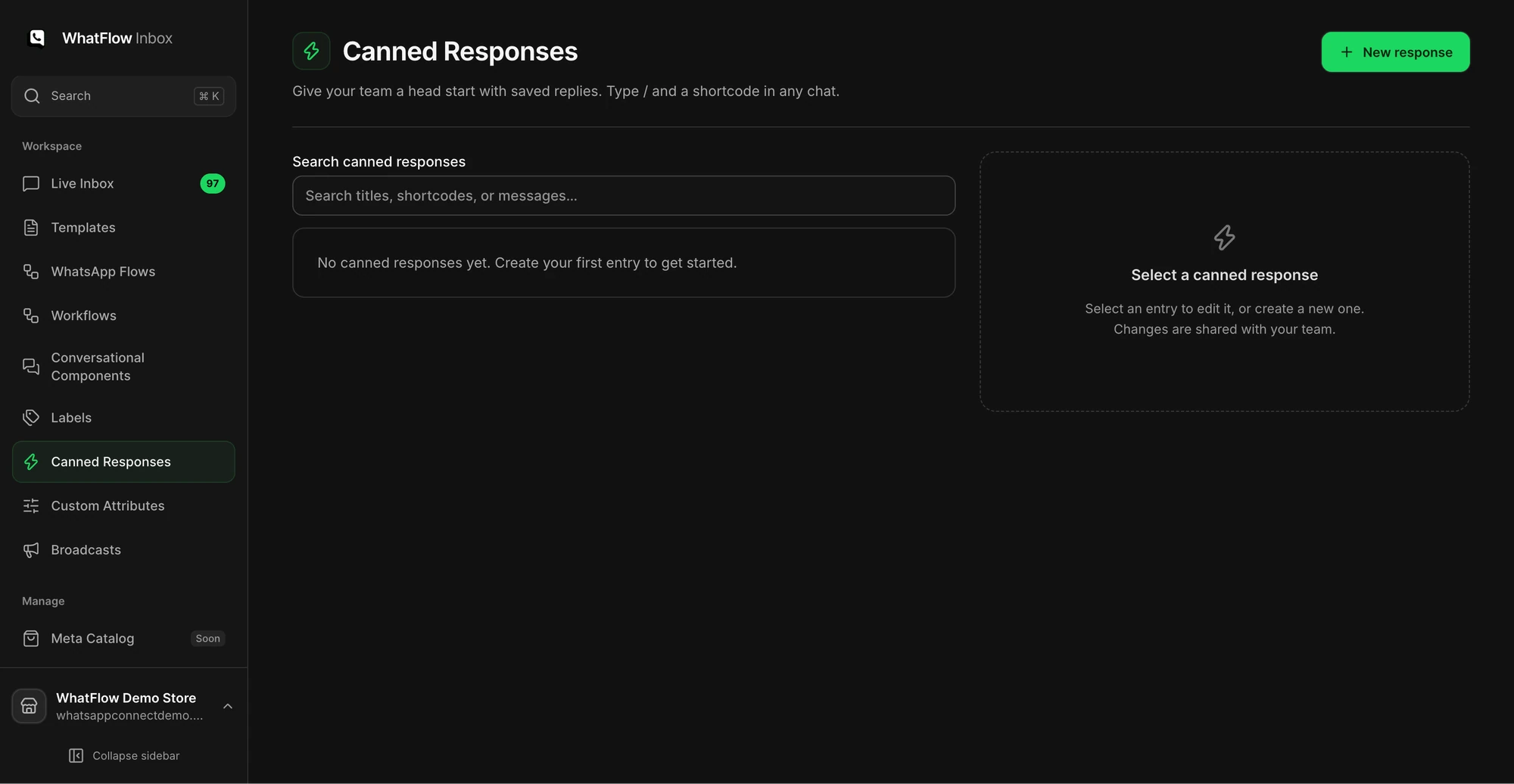
The auto-reply buys time. The person who answers next should have saved replies ready too. In WhatFlow's Team Inbox, Canned Responses holds those, and agents personalise them before sending. There are no seat fees, so a team of 30 can share one inbox without the bill growing. Saved replies that don't sound robotic has wording to start from.
The Canned Responses screen in WhatFlow's demo Inbox, where teams save replies to personalise before sending.
WhatFlow doesn't have a built-in AI bot. If you want AI help drafting replies, it plugs into Claude, ChatGPT or Cursor over MCP, with a draft mode so a person approves each message before it goes.
Common auto-reply mistakes
Firing on every message. Five identical replies in one thread look broken, and each one is a service message. Trigger on keywords or the first message, not "ok".
Broad keywords. "Order" matches half your chats. Test the near misses.
Pretending to be a person. "Hi, Sara here!" from a bot gets found out on the second message.
No escape hatch. Every auto-reply needs a way to reach a human.
Stale facts. A shipping-time answer from before your courier change is worse than no answer. Review FAQ replies monthly.
Asking for sensitive data. Never ask for card numbers or passwords. An order number is enough.
Promising what nobody keeps. If the reply says "within 2 hours", someone has to own the queue. The Team Inbox workflow guide shows how to give every chat an owner.
Run WhatsApp for your Shopify store with WhatFlow
Free plan available. Templates, COD confirmation, Shopify Flow automations and a shared team inbox with no seat fees. Every feature is included on every plan, including Free.
Don't build twenty rules on day one. Write one busy reply, one order-status reply and an FAQ answer for your most common question. Run them for a week, read the threads where the auto-reply fired, and fix what confused people. Then add the next one. WhatFlow's pricing page has the plan allowances if you're estimating volume.
Frequently asked questions
What is a good auto-reply message for WhatsApp Business?
One that confirms the message arrived, says when a person will reply in plain terms, and gives one useful thing to do now, such as a tracking link or a request for the order number. Keep it under about 50 words.
Do WhatsApp auto-replies need a Meta-approved template?
No. An auto-reply answers a message the customer just sent, so it goes out inside the 24-hour customer service window as a free-form message. Only messages sent after that window closes need an approved template.
Are WhatsApp auto-replies free on the Business API?
They count as service messages. As of November 2026, Meta gives each business phone number 1,000 free delivered service messages a month and charges for service messages after that, so an auto-reply that fires on every chat uses the allowance faster.
Can I set a keyword auto-reply on WhatsApp for my Shopify store?
Yes. In WhatFlow WhatsApp Business API you create an auto-reply rule, set what the customer must send, and choose the response. For logic beyond a keyword match, use WhatFlow's incoming-message trigger in Shopify Flow.
Should a WhatsApp auto-reply offer a way to reach a person?
Yes. WhatsApp's Business Messaging Policy allows automation inside the 24-hour window but says businesses must offer a prompt, clear way to escalate to a human, such as an agent in the chat, a phone number or email.
What WhatsApp costs an Indian Shopify store, the INR billing deadline, COD confirmation, Hindi and regional templates, and what the DPDP Act asks of you.