When a Shopify address is too vague for the courier, reply on WhatsApp with a location request: a short message and a button that lets the customer share a map pin. Ask for the pin at the delivery spot, not wherever they're standing, offer a typed landmark as an alternative, and confirm which order it belongs to before anyone changes the dispatch details.
This comes up constantly for stores shipping cash on delivery in Pakistan, India, the Gulf and much of Latin America, where "House 14, near the green mosque, behind the pharmacy" is a perfectly normal address. The courier is ready to leave. The address ends at "near the pharmacy". A pin saves a failed delivery and a return trip.
What is a WhatsApp location request?
A location request message is an interactive WhatsApp message with body text and a send-location button. Meta's location request docs say tapping the button opens the location sharing screen. The body can be up to 1,024 characters and can include a URL.
What comes back is worth knowing before you build a process on it. You get latitude and longitude. The place name and address come through only if the customer chooses to share them. So the pin is coordinates first, not a tidy postal address.
Set up the auto-reply in WhatFlow
In WhatFlow Business API:
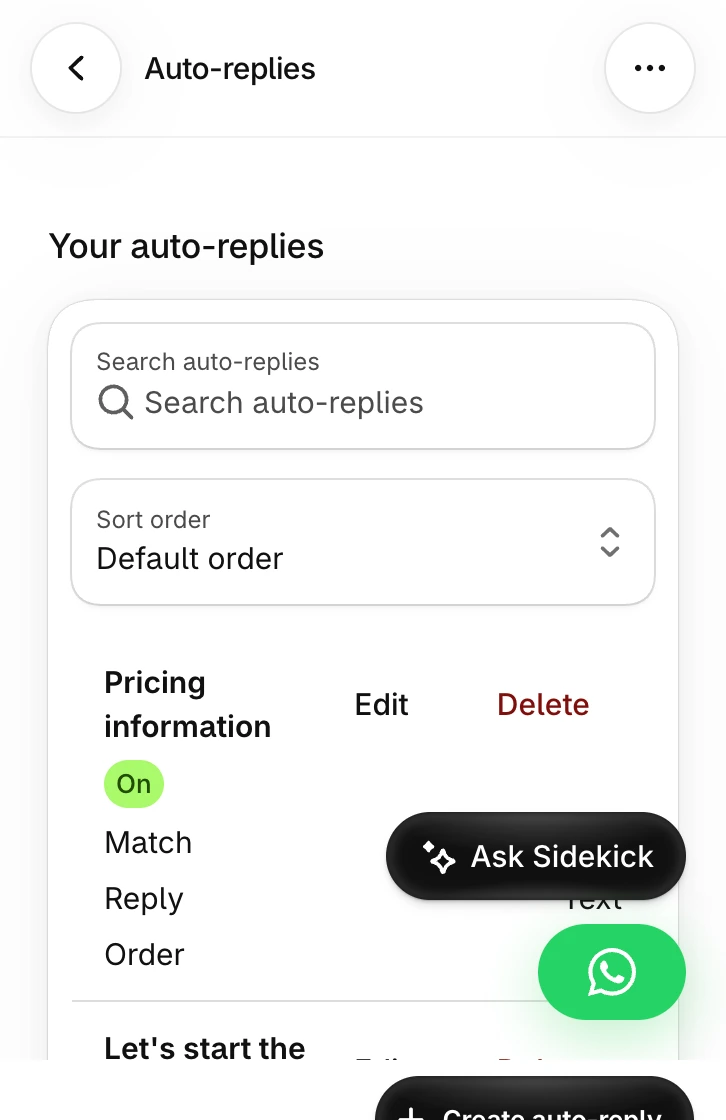
Open Auto-replies and select Create auto-reply.
Set the trigger to a specific phrase, such as "share delivery location". Keep it narrow so it doesn't fire on unrelated questions.
Choose Ask for the customer's location as the reply type.
Write a short explanation of why you need the pin and where they should drop it.
Test it from a phone you control, in an active conversation.
Open Create auto-reply from this list and choose the location request when you configure the response. Demo store; nothing was sent.
The message controls walkthrough covers creating and testing rules, including a near-miss phrase that should go to a person instead.
How does the customer end up typing "share delivery location"? Usually your agent or your order confirmation asks them to. For example, when your team spots a vague address on a COD order:
Hi Fatima, thanks for your order #3318 (2 x Lawn Suit, Rs 7,800 COD). Our courier needs a bit more help finding your address. Reply "share delivery location" and we'll send you a button to drop a pin, or just type a nearby landmark.
Write the location request message
The text above the button does most of the work. Tell people where to drop the pin:
Please share the pin for where you want the parcel delivered, not where you are right now. Prefer to type it? Send a landmark instead, like "opposite City School, Block C".
That one line about "not where you are right now" prevents the most common mistake. A pin from the office sends the courier to the office.
Verify the order before using the pin
A pin on its own doesn't tell you which order it's for. Before dispatch:
Match the pin to the right Shopify order. Check the number in the chat matches the order's phone number.
Ask which order if there are two. If the customer has two pending orders, confirm which one the pin applies to.
Confirm the address in words. Read back the area and landmark and ask them to confirm.
Update the order according to your dispatch process. Add the pin and landmark as a delivery note, or update the shipping address if the customer corrected it.
Share only what the courier needs. The pin and a contact number, not the customer's order history.
A confirmation might read:
Got it, thanks! We'll deliver order #3318 to the pin you sent (Block C, opposite City School). The courier will call this number before arriving. Anything else we should know, like a gate code?
Clear street address in a city with good postcodes
No, it adds friction
Customer has already typed a precise landmark
Probably not
Order already handed to the courier
Only if your courier accepts updates after pickup
Don't ask every customer. A pin request on a perfectly clear address reads as suspicion, and it slows down the customers who did everything right.
Pair it with COD confirmation
If you run COD, the pin fits neatly after confirmation. WhatFlow's COD confirmation sends reply buttons that can tag or cancel orders through Shopify Flow, so you can tag confirmed orders with vague addresses for a pin check before they go to the courier. The COD confirmation and Shopify Flow guide shows the tagging setup, and the COD rules and OTP guide covers the checkout side.
Who handles typed landmarks?
Some customers will tap the button. Many will type instead, or send a voice note. Decide who picks those up. In WhatFlow's team inbox, assign address-check chats to the person who talks to the courier, and label them so nothing sits overnight. There are no seat fees, so your dispatch lead can have their own login without adding cost.
Test both paths: tap the button once, then reply with a typed landmark instead, and check who handles each.
Sending your own location
Meta also documents an outbound location message: latitude and longitude, with an optional name and address. That's useful for sending a pickup point or showroom location to a customer who's collecting an order.
Keep the two directions clearly separate in your wording. "Here's our pickup point" and "Please send us your location" look similar in a busy chat, and a customer who receives your pin might think you want them to forward it back.
Run WhatsApp for your Shopify store with WhatFlow
Free plan available. Templates, COD confirmation, Shopify Flow automations and a shared team inbox with no seat fees. Every feature is included on every plan, including Free.
Turn the auto-reply on for COD orders with vague addresses first. After a couple of weeks, look at how many pins came back and how many deliveries still failed. If the pins help, add the request to your confirmation flow. If customers mostly type landmarks, put a better address field in checkout instead.
Frequently asked questions
How do I ask a customer for their location on WhatsApp?
Send a WhatsApp location request message: body text plus a send-location button that opens the location sharing screen. In WhatFlow, create an auto-reply and choose Ask for the customer's location as the reply type.
What information comes back when a customer shares a location?
According to Meta's docs, you get the latitude and longitude, and the place name and address only if the customer chooses to share them. You don't get a full postal address by default.
Should I replace the Shopify address with the WhatsApp pin?
No. Treat the pin as extra delivery guidance. Confirm the address with the customer, update the order according to your dispatch process, and pass the pin to the courier as a note.
Can I send my store's pickup location on WhatsApp?
Yes. Meta's location message lets a business send latitude and longitude, with an optional name and address, which suits a pickup point or showroom.
Location requests show body text (up to 1,024 characters) and a send location button; the webhook returns coordinates, with name and address only if the user shares them.
WhatsApp Order Confirmations After a Shopify Post-Purchase Upsell
A post-purchase upsell changes the order after payment. Test accepted, declined and skipped offers so your WhatsApp confirmation shows the right items.