Messaging customers in Brazil on the official WhatsApp Business Platform costs $0.0625 per delivered marketing template and $0.0068 per delivered utility template at Meta's USD list rates, as of November 2026. Three things matter most locally: Meta is moving Brazilian businesses to BRL billing by June 30, 2027, the LGPD sets your consent rules, and Pix and boleto change which reminders you send.
The questions I hear from Brazilian merchants are rarely "should we use WhatsApp?" They're "how do we keep the bill and the consent records tidy?" Here's how I'd answer both for a Shopify store.
How much does WhatsApp cost for a Shopify store in Brazil?
Meta charges per delivered template message, priced by category and the recipient's country. These are Meta's USD list rates for Brazilian numbers, from Meta's WhatsApp pricing page:
Message type
Typical Shopify use
USD per delivered message
Marketing template
Promotions, launches, Black Friday
$0.0625
Utility template
Order confirmations, Pix or boleto reminders, shipping updates
First 1,000 per number per month free, then $0.0068
A utility template is a message about a transaction the customer already started. A marketing template is anything promotional. In Brazil the gap between the two is wide: a marketing template costs more than nine times a utility one. That makes it worth keeping your order messages strictly transactional, because if Meta recategorises a "your order shipped, and here's 10% off" template as marketing, you pay the marketing rate on every order.
Two changes from October 1, 2026 apply here too. Service replies are free only for the first 1,000 delivered per business phone number each month. And utility templates sent inside an open customer service window are now charged. Higher monthly volumes of utility and authentication messages get volume discounts; the volume tiers guide shows how to check them on your bill.
Worked example: 1,000 order confirmations
Say you get 1,000 orders a month and confirm each one with a utility template.
1,000 × $0.0068 = $6.80 a month at the USD list rate.
Worked example: a 5,000-recipient campaign
Say you send a Black Friday template to 5,000 opted-in customers.
If all 5,000 are delivered: 5,000 × $0.0625 = $312.50.
Meta charges only for delivered messages, so 4,600 deliveries would cost 4,600 × $0.0625 = $287.50.
Your WhatFlow plan sits on top of Meta's charges. 6,000 messages a month fits the Essential plan ($19 for 10,000), and every feature is included on every plan, including Free. The full list is on the pricing page.
Billing in reais: the 2027 deadline
BRL is one of the 16 billing currencies Meta lists, and BRL charges are invoiced by Meta's local entity, Facebook Brasil. Meta says solution providers and directly integrated businesses whose Sold-To country is Brazil must move all Messaging accounts in their business portfolio to BRL by June 30, 2027. From July 1, 2027, Meta stops delivering messages from those businesses' non-BRL accounts.
Two practical points. BRL rates are published in Meta's own BRL rate card, so don't convert my USD figures and expect them to match. And if your business is Brazilian and you're creating a new Messaging account, choosing BRL now saves a migration later.
Local habits that change your WhatsApp setup
Write templates in Brazilian Portuguese
Meta's template language list has separate codes for Portuguese (Brazil), pt_BR, and Portugal, pt_PT. Use pt_BR, write the way your customers speak, and keep the tone friendly. If you also sell to Portugal or to English speakers, keep those as language versions of the same template. Multilingual customer messaging on Shopify covers the routing.
An order confirmation might read:
Oi, Camila! Recebemos seu pedido #4410 (R$ 289,90). Assim que ele for enviado, mandamos o código de rastreio por aqui. Alguma dúvida? É só responder.
Pix and boleto: different reminders
Payment happens in Shopify checkout, not in the chat. WhatFlow doesn't take payments inside WhatsApp. According to Shopify's Brazil blog, Shopify merchants offer Pix through payment apps such as Mercado Pago and PagBrasil, and with Pix the money reaches the merchant right after the transaction. Boleto works differently: the customer pays later, and Shopify's article says buyers have on average three days to pay.
That gives you two very different messages:
Pix: the payment either happens or it doesn't. If an order sits unpaid, it's closer to an abandoned checkout. A short reminder with the order link usually does the job.
Boleto: the customer meant to pay later, so a reminder before the due date helps. Keep it about the order, not about other products, so it stays a utility message.
Oi, Camila! Seu boleto do pedido #4410 vence amanhã. Se já pagou, pode ignorar esta mensagem. Precisa de uma segunda via? Responda aqui.
You can send that from a Shopify Flow workflow that waits a set time after an unpaid boleto order is created, then uses WhatFlow's Send WhatsApp Template action with the order fields mapped into the template variables. Time the wait to your boleto's due date. Sending WhatsApp templates from Shopify Flow shows the steps. Test it against a real pending order before you switch it on.
Delivery updates
Brazilian customers will ask for the código de rastreio. Send it as soon as you have it, and pick the shipping stages your carrier actually reports. One accurate "saiu para entrega" message is worth more than several vague ones. If you offer cash on delivery through a local carrier, add a WhatsApp confirmation before dispatch. Our shipping confirmation message examples show how to word each stage, and our COD confirmation message templates cover the cash-on-delivery side.
What does the LGPD mean for WhatsApp marketing?
The Lei Geral de Proteção de Dados (LGPD), Lei nº 13.709/2018, is Brazil's general data protection law. This isn't legal advice, but here's what the official consolidated text means for a WhatsApp program.
You need a legal basis (Article 7). The list includes consent, performing a contract with the customer and legitimate interests. Order updates sit comfortably under the contract you have with the buyer. For marketing on WhatsApp, I'd use consent, because WhatsApp requires an opt-in anyway.
Consent has to be specific and provable (Article 8). It can be given in writing or another way that shows the person's will, a written consent clause must stand apart from the other terms, generic authorisations are void, and the burden of proof sits with you.
Consent can be revoked at any time (Article 8, §5), through a free, easy procedure. A "SAIR" reply has to actually stop the marketing. A polite answer on its own doesn't count.
Customers have rights (Article 18), including access, correction, deletion of data processed on consent and information about who you shared their data with.
Sanctions (Article 52) are applied by the ANPD and include warnings and fines of up to 2% of revenue in Brazil, capped at R$50 million per infraction.
WhatsApp's own opt-in rule
Meta's WhatsApp Business Messaging Policy says you can only contact people who gave you their number and opted in to hear from you, and you must respect opt-out requests made on or off WhatsApp. Outside the 24-hour window you can only start a conversation with an approved template.
So capture the opt-in at checkout with clear wording, record when and where it happened, and put a way out in every promotional template. The guide to WhatsApp opt-in wording at checkout has copy you can adapt into Portuguese.
Mistakes I see in Brazilian setups
Promo lines in order templates. One "aproveite 10% na próxima compra" in a shipping update can turn a $0.0068 message into a $0.0625 one.
European Portuguese templates. They get approved fine, then read oddly to every customer.
One opt-in checkbox for everything. WhatsApp's policy suggests separate opt-ins by message category as best practice. At minimum, make it clear the box covers offers as well as order updates.
Nobody owns the inbox on Black Friday. Campaign replies arrive in minutes. Decide who answers before you send, and write a few saved replies for the obvious questions (prazo de entrega, troca, segunda via do boleto).
Setup checklist: WhatsApp for a Brazilian Shopify store with WhatFlow
WhatFlow WhatsApp Business API runs on the official Meta WhatsApp Cloud API. It's built for growing teams as much as small shops: a shared team inbox with no seat fees, native Shopify Flow triggers and actions, COD confirmation and catalog sharing, with a 4.9/5 rating from 72 ratings on the Shopify App Store (checked November 18, 2026).
Connect with Embedded Signup. Open Connections in WhatFlow and start the WhatsApp setup, which runs Meta's Embedded Signup inside Shopify admin. Choose the business portfolio and WhatsApp account you mean to use. The connection and billing doc covers each screen.
Check the number and display name customers will see, in Connections. If the display name is pending, message the number from another phone.
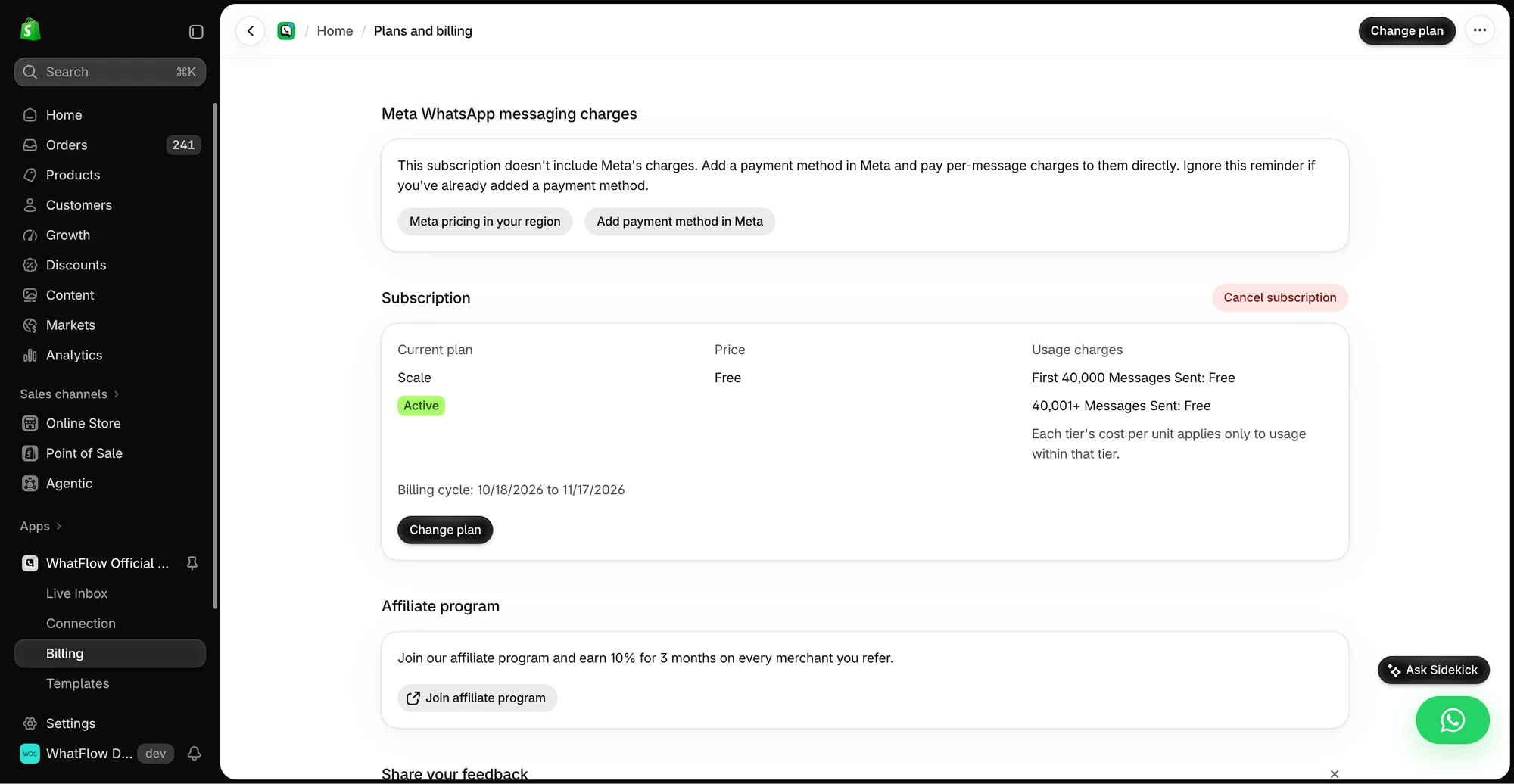
Set up Meta billing in BRL if your business is Brazilian, and add the payment method where Meta directs you. WhatFlow passes Meta's charges through with no markup.
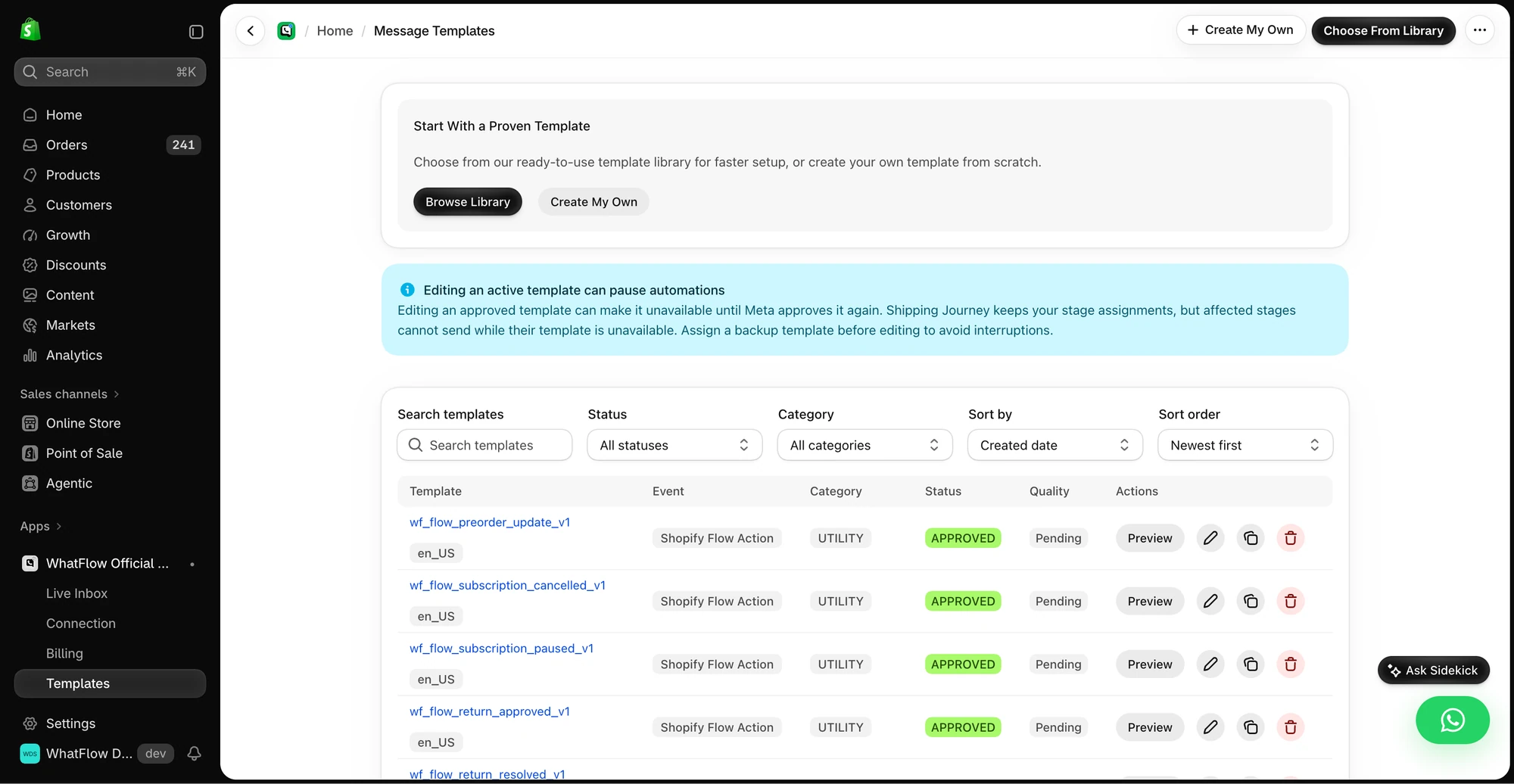
Create pt_BR templates. Start from Template Library, write in Message Editor, and check status and language in Templates. Keep order templates free of promos.
Turn on order and shipping updates, starting with a confirmation and one shipping stage in Shipping Journey. Starter copy is in our order confirmation message examples.
Set up abandoned checkout reminders in Abandoned Checkout, with a delay that gives Pix buyers time to finish on their own.
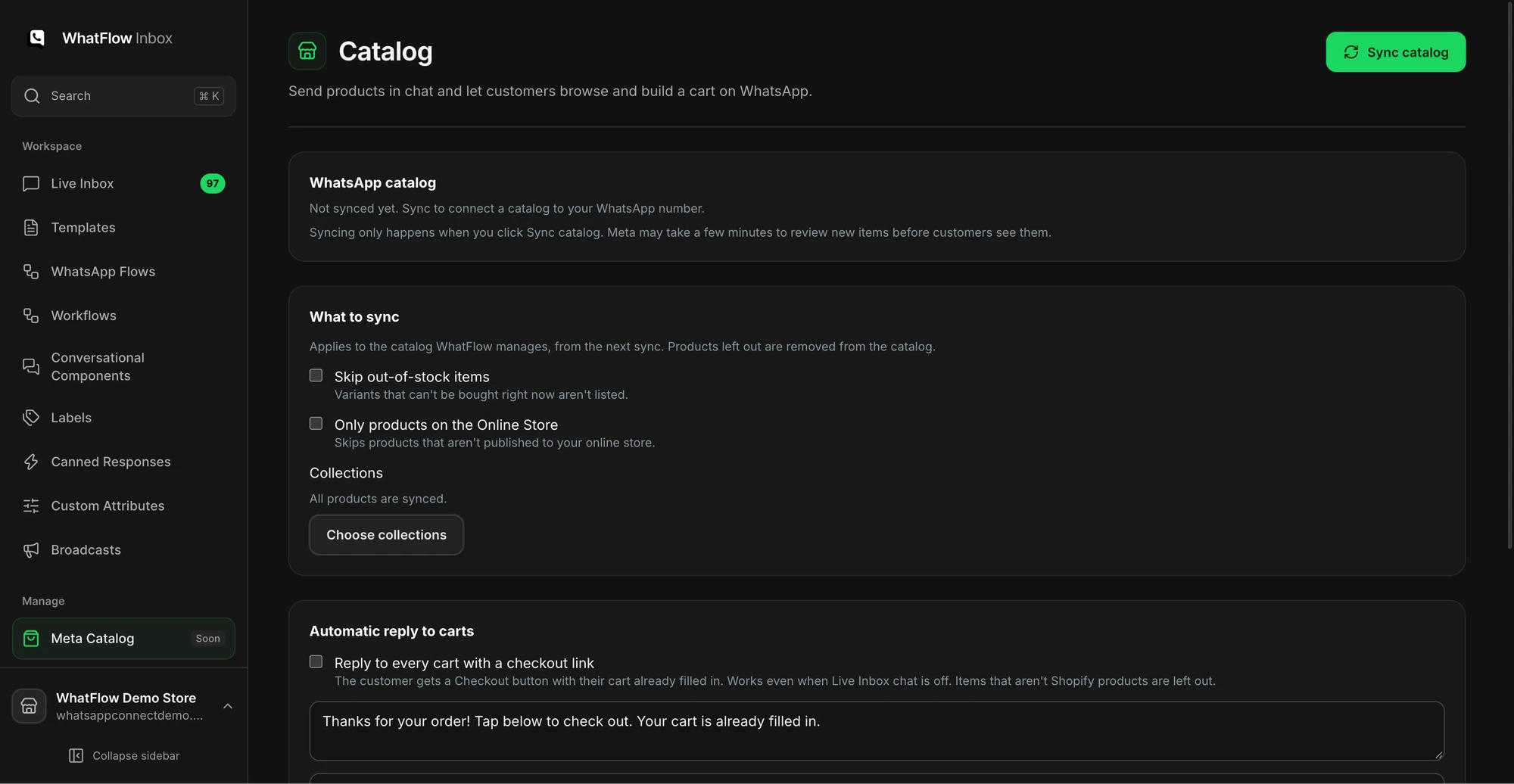
Share your catalog from the Inbox. Sync a small collection first and check names, images and prices in reais.
WhatFlow demo store template manager. Check category and approval status before an automation uses a template.
Demo store Billing page showing Meta messaging charges separately from the WhatFlow plan.
Catalog sync options in a WhatFlow demo store. Start with a small collection.
When the chats pick up, the WhatFlow team inbox handles assignment and filters, and adding agents for Black Friday doesn't add seat fees.
Run WhatsApp for your Shopify store with WhatFlow
Free plan available. Templates, COD confirmation, Shopify Flow automations and a shared team inbox with no seat fees. Every feature is included on every plan, including Free.
Get the pt_BR order templates approved first, because they're cheap and customers expect them. Choose BRL billing if you're a Brazilian business. Then build the Pix and boleto reminders in Shopify Flow, and save marketing templates for segments that have clearly opted in.
Frequently asked questions
How much does a WhatsApp marketing message cost in Brazil?
As of November 2026, Meta's USD list rate is $0.0625 per delivered marketing template to a Brazilian number and $0.0068 per delivered utility or authentication template. Businesses billed in BRL pay the separate BRL rates in Meta's rate card.
Do Brazilian businesses have to pay Meta in reais?
Meta says solution providers and directly integrated businesses whose Sold-To country is Brazil must move all their Messaging accounts to BRL by June 30, 2027. From July 1, 2027, Meta stops delivering messages from their non-BRL accounts.
Is WhatsApp marketing allowed under the LGPD?
Yes, if you have a legal basis under Article 7 of the LGPD, and for WhatsApp marketing that's normally consent. WhatsApp's own policy also requires opt-in, and the LGPD lets customers revoke consent at any time through a free, easy procedure.
Can customers pay with Pix inside a WhatsApp chat?
Not through WhatFlow, which doesn't process payments in chat. Send customers to Shopify checkout, where a payment provider app handles Pix, and use WhatsApp for the reminder and the confirmation.
Should WhatsApp templates for Brazil be in pt_BR or pt_PT?
Use Portuguese (Brazil), language code pt_BR. Meta lists Brazilian and European Portuguese separately, and Brazilian customers will notice European phrasing.
Per-message pricing, the October 1, 2026 changes, the 16 billing currencies including BRL, invoicing by Facebook Brasil and the June 30, 2027 BRL migration deadline.
What WhatsApp costs an Indian Shopify store, the INR billing deadline, COD confirmation, Hindi and regional templates, and what the DPDP Act asks of you.