A good COD confirmation message restates the order (number, items, the exact cash amount and the delivery address) and asks the customer to confirm or cancel with one tap. It goes out within minutes of the order, gets at most two polite reminders, and every reply changes the Shopify order before anything is packed. Below are 22 COD confirmation message templates you can copy, including reminders, cancellations, OTP and the replies your team sends after.
If you run cash on delivery, you already know why this matters. Every parcel a customer refuses at the door costs you shipping both ways. A confirmation message doesn't stop all of that, but it catches the orders placed by mistake, by a prankster or by someone who changed their mind an hour later, while it's still free to cancel. For the receipt every order gets, see our order confirmation message examples, and for the dispatch message, our shipping confirmation message examples.
What to include in a COD confirmation message
Store name. COD buyers are often first-time customers who don't remember your brand.
Order number and the main item. So they know which order you mean.
The exact amount to pay in cash. Including shipping. No surprises at the door.
The delivery address or city. A wrong address is easier to fix now than after dispatch.
Two clear buttons. Confirm and Cancel. A third ("Change details") if your team can handle it.
What happens next. "We'll dispatch within 24 hours of your confirmation."
WhatsApp rules for COD confirmation templates
A COD confirmation is business-initiated: the customer placed an order, they didn't message you. Outside the 24-hour customer service window, Meta's pricing documentation says "businesses can only send template messages," so every first message below is a Meta-approved template. The customer also needs to have opted in to WhatsApp messages from your store (WhatsApp Business Messaging Policy). A checkbox at checkout works; our guide to WhatsApp opt-in wording for Shopify checkout has copy for it.
Category: utility. Meta's template categorization rules don't mention COD by name, but they describe order management messages, which confirm, update or cancel an order using specific order details, as utility, provided there's nothing promotional. So "confirm your order to get 10% off your next one" is out. That's mixed content, and Meta treats it as marketing.
OTP is different. If you verify the phone number with a one-time code, that's an authentication template, and you can't write the text. Meta's authentication template docs set a fixed body ("{{1}} is your verification code.") with an optional "For your security, do not share this code." line, an optional expiry line, and a copy-code or one-tap button.
As of November 2026, a utility template to a customer in Pakistan costs $0.015 per delivered message and in India $0.0014 (Meta's rates on our pricing page). One confirmation plus one reminder is a few cents per order. A refused parcel costs you a lot more.
Unless an example says otherwise, the WhatsApp variables are: {{1}} = customer first name, {{2}} = order number, {{3}} = main product or item count, {{4}} = cash amount due, {{5}} = delivery city or address.
COD confirmation templates with reply buttons
1. The standard COD confirmation
Hi {{1}}, thanks for your order {{2}} from Loom & Pack: {{3}}. Please pay {{4}} in cash on delivery to {{5}}. Tap Confirm and we'll dispatch it, or Cancel if you no longer need it.
[Confirm order] [Cancel order]
2. Short and direct
Hi {{1}}, please confirm your COD order {{2}} ({{4}}). Tap a button below.
[Confirm] [Cancel]
3. With an address check
Hi {{1}}, before we ship order {{2}} ({{3}}, {{4}} cash on delivery), please check your address: {{5}}. Is everything correct?
[Yes, confirm] [Change address] [Cancel]
The middle button is worth it if your couriers struggle with addresses. Make sure a person picks up those replies quickly. Our guide to changing a Shopify shipping address after an order covers what to do next.
4. High-value orders
Hi {{1}}, thank you for order {{2}}: {{3}}. As this is a high-value cash on delivery order ({{4}}), we confirm every one before dispatch. Please tap Confirm, or reply here if you'd like to talk to our team first.
[Confirm order] [Cancel order]
5. Multi-item orders
Hi {{1}}, your order {{2}} has {{3}} items, total {{4}} cash on delivery. Please confirm so we can pack it today.
[Confirm order] [Cancel order]
Here {{3}} is the item count.
6. Friendly, for a small brand
Hi {{1}}, it's Hina from Rang Studio. Your order {{2}} is ready to pack! Just tap Confirm so we know you still want it. You'll pay {{4}} when it arrives.
Hi {{1}}, a quick reminder: your order {{2}} ({{4}}, cash on delivery) is waiting for your confirmation. Tap a button below and we'll take care of the rest.
[Confirm order] [Cancel order]
8. Final reminder (next day)
Hi {{1}}, we haven't heard back about order {{2}}. We'll hold it until {{3}}. After that we'll cancel it so it doesn't reach you unexpectedly. Tap to confirm or cancel.
[Confirm order] [Cancel order]
Variables here: {{3}} = hold deadline. Only say "we'll cancel" if you actually will.
Two reminders is the ceiling. After that, call or decide.
Cancellation and status templates
9. Order cancelled after no reply
Hi {{1}}, we've cancelled order {{2}} because we didn't receive a confirmation. Nothing to pay. If you still want it, reply here and we'll set it up again.
10. Cancelled by the customer (template version)
Hi {{1}}, your order {{2}} has been cancelled as requested. Nothing will be delivered and nothing is owed. Thanks for letting us know.
11. Confirmed, now dispatching
Hi {{1}}, thanks for confirming! Order {{2}} will be dispatched within 24 hours. Please keep {{4}} ready in cash for the courier.
Replies inside the 24-hour window
When the customer taps a button or messages you, the 24-hour window opens and your team can reply in plain text, no template needed. Save these as canned replies.
12. After a Confirm tap
Thank you, Bilal! Your order is confirmed. It'll leave our warehouse tomorrow and you'll get the tracking link here.
13. After a Cancel tap
No problem, your order is cancelled. If you cancelled because of the price, size or delivery time, tell us. We might be able to help.
Ask once, don't argue.
14. After "Change address"
Sure, please send the full address with a nearby landmark, and the phone number the courier should call.
15. When the reply is unclear ("ok", "who is this?")
Hi, this is Loom & Pack about order #1042 for a Commuter Lunch Bag, Rs 4,500 cash on delivery. Would you like us to send it? Just reply yes or no.
482913 is your verification code. For your security, do not share this code. This code expires in 10 minutes.
[Copy code]
You choose whether to include the security and expiry lines and the expiry time; the rest is Meta's preset. A verified number shows the shopper had access to that phone, nothing more. You still need a dispatch rule.
COD confirmation templates in other languages
Templates can be created in any language WhatsApp supports, and you can keep language versions of the same template. Get a native speaker to check yours. Variables match the standard list.
17. Roman Urdu (Pakistan)
Assalam o Alaikum {{1}}, aapka order {{2}} ({{3}}) mil gaya hai. Delivery par {{4}} cash ada karna hoga. Order confirm karne ke liye Confirm dabayein, ya Cancel agar ab zaroorat nahi.
[Confirm] [Cancel]
18. Urdu script
السلام علیکم {{1}}، آپ کا آرڈر {{2}} موصول ہو گیا ہے۔ ڈیلیوری پر {{4}} نقد ادا کرنا ہوگا۔ براہ کرم آرڈر کی تصدیق کریں یا منسوخ کریں۔
[تصدیق کریں] [منسوخ کریں]
19. Hindi (India)
नमस्ते {{1}}, आपका ऑर्डर {{2}} ({{3}}) मिल गया है। डिलीवरी पर {{4}} कैश देना होगा। कृपया नीचे बटन दबाकर ऑर्डर कन्फ़र्म या कैंसल करें।
[कन्फ़र्म करें] [कैंसल करें]
20. Arabic (Gulf and Egypt)
مرحباً {{1}}، استلمنا طلبك رقم {{2}}. المبلغ المطلوب عند الاستلام: {{4}}. يرجى تأكيد الطلب أو إلغاؤه من الأزرار أدناه.
[تأكيد الطلب] [إلغاء الطلب]
SMS COD confirmation examples
SMS has no buttons, so ask for a number reply and keep it to one line. Make sure your SMS tool can actually read the replies.
21. Standard SMS
Loom & Pack: confirm COD order #1042, Rs 4,500? Reply 1 to confirm, 2 to cancel.
22. Reminder SMS
Loom & Pack: order #1042 still needs confirming. Reply 1 to ship it, 2 to cancel.
We compared WhatsApp and SMS for COD confirmation if you're deciding between them. Email works too, but COD buyers often don't check it within the hours you need.
How to set up COD confirmation in Shopify and WhatFlow
In Shopify, cash on delivery is a manual payment method, and those orders stay unpaid until you mark them as paid after collecting the cash (Shopify Help Center). That's why the confirmation has to drive a tag your fulfilment team can see.
WhatFlow WhatsApp Business API runs on Meta's official WhatsApp Cloud API and has COD built in:
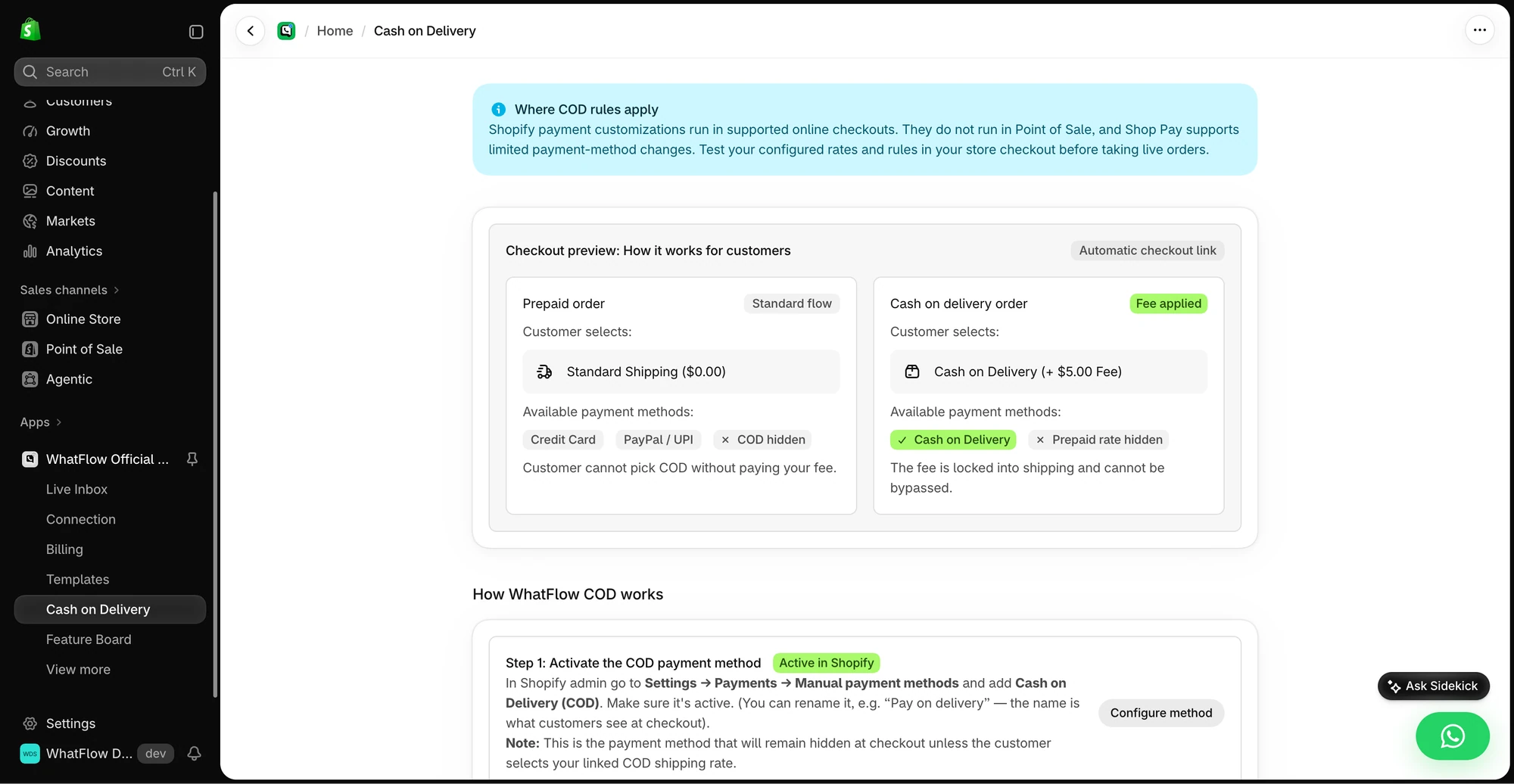
Set your COD rules. In WhatFlow's Cash on Delivery screen, pick the manual payment method WhatFlow should manage and, if needed, the shipping rates COD applies to. Place a real test checkout to see what buyers can select.
Create the confirmation template. Use example 1 or 3, map the variables, add the Confirm and Cancel buttons, and get it approved. The WhatFlow template guide covers approval.
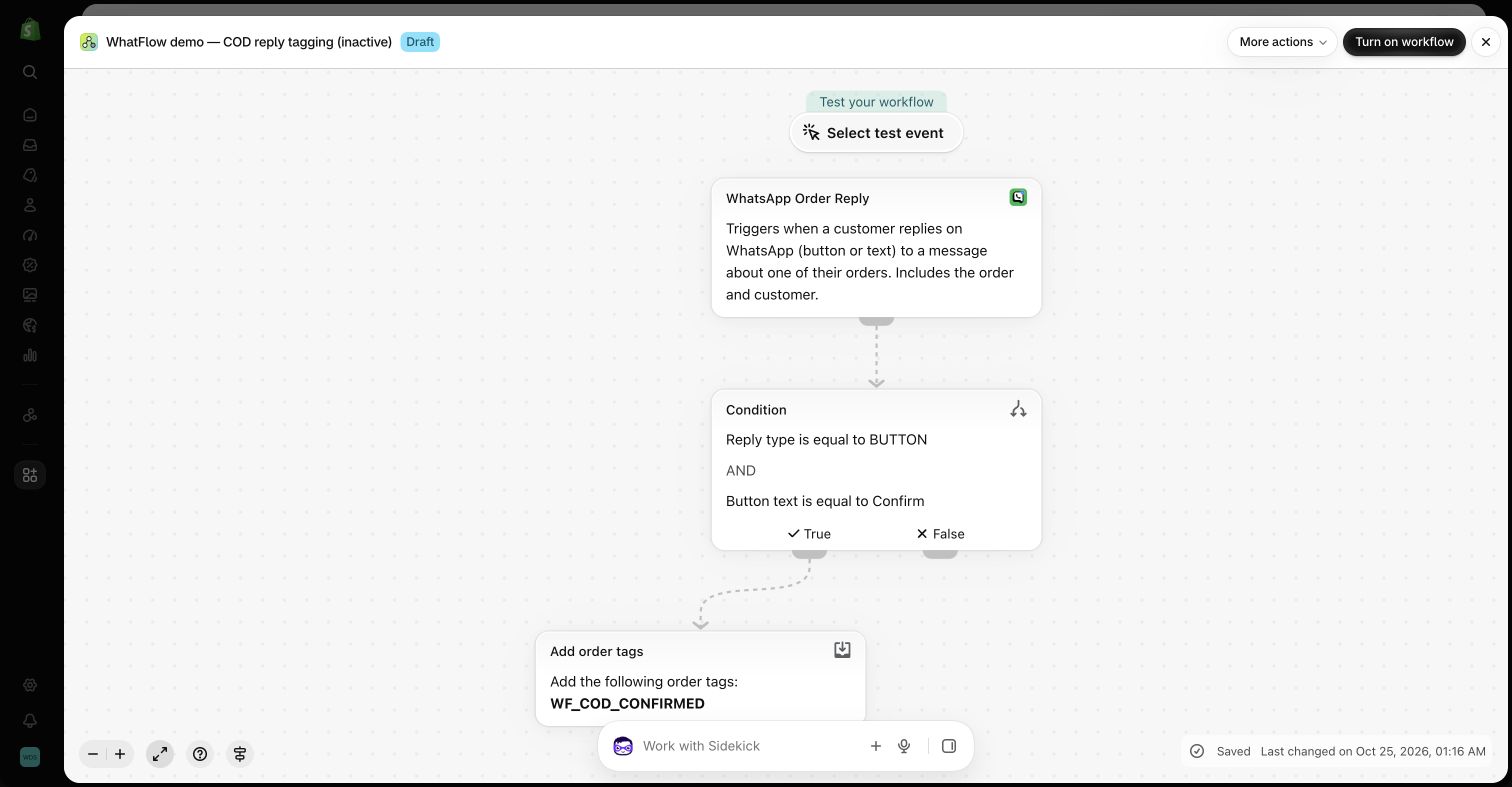
Connect replies to orders in Shopify Flow. WhatFlow adds an order reply trigger to Shopify Flow. Add a condition for the button tapped, then an action: tag the order "cod-confirmed", or tag it for review on Cancel. Our step-by-step on confirming COD orders and tagging them with Shopify Flow has the full workflow.
Add OTP if you want it. WhatFlow's OTP Verification lets you choose a placement and the Shopify order tag added on a correct code.
Test the awkward cases. Confirm, cancel, no answer, and a customer with two open orders. Check the right order changes each time.
COD rules and a checkout preview in the WhatFlow demo store, using sample settings.
An inactive demo workflow that branches on the customer's WhatsApp reply and tags the Shopify order.
For risky orders, WhatFlow's FlowSense COD order review adds another review layer. Everything here, including COD, OTP and the Flow triggers, is on every WhatFlow plan, Free included, and the shared inbox has no seat fees, so a ten-person ops team can work the "change address" replies together. See the COD order verification page for the overview.
Common COD confirmation mistakes
Waiting hours to send. The customer has moved on. Send within minutes.
Leaving out the amount. "Please confirm your order" without the cash figure invites a refusal at the door.
Auto-cancelling on day one. Some customers only check WhatsApp in the evening. Give them a fair hold period.
Promotions in the confirmation. A discount line turns the template into marketing.
No one reading replies. "Change address" with no answer is worse than no button.
Treating OTP as proof of intent. It proves phone access. Confirmation is still the customer's choice.
Free plan available. Templates, COD confirmation, Shopify Flow automations and a shared team inbox with no seat fees. Every feature is included on every plan, including Free.
Place three test COD orders from your own phone. Confirm one, cancel one and ignore one, then check the tags in Shopify. If all three end up where your fulfilment team expects, you're ready.
Frequently asked questions
What is a COD confirmation message?
A COD confirmation message asks a customer who chose cash on delivery to confirm they still want the order before the store ships it. On WhatsApp it usually has Confirm and Cancel reply buttons.
Is a COD confirmation template utility or marketing on WhatsApp?
Meta's rules put messages that confirm, update or cancel a specific order under utility, as long as there's no promotional content. Add an offer or a product suggestion and Meta treats it as marketing.
How many reminders should I send for an unconfirmed COD order?
One reminder a few hours later, and a final one the next day if your dispatch rules allow it. After that, call the customer or decide whether to hold or cancel the order.
Can I write my own text for a WhatsApp OTP message?
No. Meta's authentication templates use fixed preset text, '{{1}} is your verification code', with an optional security disclaimer and expiry line, plus a copy-code or one-tap button.
Can a WhatsApp reply cancel a Shopify order automatically?
With WhatFlow, the customer's button reply is a Shopify Flow trigger, so a workflow can tag the order or cancel it. Most stores tag first and keep a person in the loop for cancellations until they trust the setup.