A good order confirmation message tells the customer their order went through: store name, order number, what they bought, the total and how they're paying. It also says what happens next and how to reach you, in four or five short lines on WhatsApp and one line on SMS. Below are 23 order confirmation message examples you can copy, grouped by store type, tone, channel and language.
I've written most of these for WhatsApp, because that's where your customers actually reply. A confirmation that gets a "can I change the size?" reply in the first ten minutes is worth more than a receipt nobody opens. The SMS and email versions are at the end.
What to include in an order confirmation message
Run every draft against this list before you submit it:
Store name up front. The customer may have ordered from three shops today.
Order number. It's what they'll quote when they message you.
What they bought. The main item by name, or "3 items" for bigger orders.
Total and payment method. Especially for cash on delivery, so nobody is surprised at the door.
What happens next. "We'll message you when it ships" sets the expectation and cuts "any update?" chats.
One help route. "Reply here if anything's wrong."
Leave out tracking links (a new order usually doesn't have one yet), discount codes and "you might also like". More on why in the template rules below. Tracking belongs in your shipping confirmation messages.
WhatsApp order confirmation template rules
Two rules from Meta shape every WhatsApp example here.
You need a template. A new order doesn't open a conversation. Meta's pricing documentation says that when the 24-hour customer service window isn't open, "businesses can only send template messages." The customer service window is the 24 hours after a customer last messaged you; inside it you can write freely. So your confirmation goes out as a pre-approved template with placeholders like {{1}}, and the customer has to have opted in to WhatsApp messages from your store first (WhatsApp Business Messaging Policy). Here's how to collect WhatsApp opt-ins on Shopify.
It should be utility, and stay utility. A utility template is a non-promotional message about something the customer did, like placing an order. Meta's list "Your order is confirmed" as a utility example and say order messages shouldn't promote, upsell or include offers. Add "use code THANKS10 on your next order" and the template becomes mixed content, which Meta categorises as marketing. Our explainer on has the detail.
As of November 2026, Meta charges for every delivered utility template, including ones sent inside an open window. In India that's $0.0014 per message and in Pakistan $0.015 (country table on our pricing page). Cheap, but not free, so don't send two confirmations for one order.
Unless stated otherwise, the variables in the WhatsApp examples are: {{1}} = customer first name, {{2}} = order number, {{3}} = main product or item count, {{4}} = order total, {{5}} = payment method.
WhatsApp order confirmation examples for any store
1. The standard confirmation
Hi {{1}}, thanks for your order from Loom & Pack! Order {{2}} is confirmed: {{3}}, total {{4}}, paid by {{5}}. We'll message you here as soon as it ships. Questions? Just reply.
2. The short version
Hi {{1}}, order {{2}} is confirmed. Total {{4}}. We'll let you know when it's on its way. Loom & Pack
Short is fine. On a phone, four lines read faster than a receipt.
3. With an order status button
Hi {{1}}, we've got your order {{2}} ({{3}}, {{4}}). You can check its status any time with the button below. Reply here if you need to change anything.
[View order]
The button is a URL button pointing at the Shopify order status page. Tap it on a real phone before you submit the template.
4. Multi-item orders
Hi {{1}}, thanks for shopping with Loom & Pack. Order {{2}} is confirmed with {{3}} items, total {{4}}. We pack everything together and will message you when it leaves our warehouse.
Here {{3}} is the item count. Don't try to cram five product names into one variable.
5. Cash on delivery
Hi {{1}}, your order {{2}} is placed. Please keep {{4}} ready in cash when the courier arrives. We'll message you before dispatch. Reply here if your address or phone number needs changing.
Hi {{1}}, your pre-order {{2}} for {{3}} is confirmed. We expect to ship it from {{4}}, and we'll message you here if that date changes.
Variables: {{1}} name, {{2}} order number, {{3}} product, {{4}} expected ship date. Only promise a date you're confident in. Pre-order updates on WhatsApp covers the follow-ups.
7. Made to order or personalised
Hi {{1}}, we've received order {{2}}. Your {{3}} is made by hand, so it takes about {{4}} before it ships. If you spot a typo in your personalisation, reply in the next few hours and we'll fix it before we start.
Variables: {{1}} name, {{2}} order number, {{3}} product, {{4}} production time. That "spot a typo" line catches mistakes while they're still cheap.
8. Furniture and large items
Hi {{1}}, thanks for order {{2}} ({{3}}). Large items are delivered by our own team. We'll message you here to book a delivery slot once it's ready to dispatch.
9. Local pickup
Hi {{1}}, order {{2}} is confirmed for pickup at {{3}}. We'll message you when it's ready. Please bring your order number.
Variables: {{1}} name, {{2}} order number, {{3}} pickup location.
10. Food and perishables
Hi {{1}}, order {{2}} is confirmed for delivery on {{3}}. Someone needs to be home to receive it, as it's perishable. Need a different day? Reply here before 6pm today.
Variables: {{1}} name, {{2}} order number, {{3}} delivery date.
11. Subscription first order
Hi {{1}}, welcome! Your first {{3}} box (order {{2}}) is confirmed. Your next box is scheduled for {{4}}, and you can skip or pause any time by replying here.
Variables: {{1}} name, {{2}} order number, {{3}} product, {{4}} next renewal date. If your first order was discounted, say what the renewal price will be in your follow-up, not here. See explaining first-order and renewal prices.
12. After a post-purchase upsell
Hi {{1}}, your order {{2}} is confirmed, including the {{3}} you added after checkout. Total {{4}}. Everything ships together.
Hi {{1}}, it's Sana from Loom & Pack. I just saw your order {{2}} come in, thank you! We're packing it this week and I'll message you when it ships. If anything's not right, reply here and it comes straight to our team.
Only use "I" if someone real reads the replies.
14. Formal, for luxury or high-ticket stores
Dear {{1}}, thank you for your order {{2}} with Maison Verre. Your {{3}} ({{4}}) is now being prepared. Our client care team will contact you on this number to arrange delivery.
Order confirmations in other languages
Templates work in any language WhatsApp supports, and you can keep several language versions of the same template. Pick the language from the customer's checkout language or country, and have a native speaker check the final wording. Our post on WhatsApp template languages for order updates covers the setup. Variables are the same as the standard list.
15. Roman Urdu (Pakistan)
Assalam o Alaikum {{1}}, aapka order {{2}} confirm ho gaya hai. Total {{4}}, payment: {{5}}. Order dispatch hote hi hum aapko yahan message karenge. Koi sawal ho to isi number par reply karein.
16. Hindi (India)
नमस्ते {{1}}, आपका ऑर्डर {{2}} कन्फ़र्म हो गया है। कुल राशि {{4}}, भुगतान: {{5}}। ऑर्डर भेजते ही हम आपको यहाँ मैसेज करेंगे। कोई सवाल हो तो इसी चैट में जवाब दें।
17. Arabic (Gulf)
مرحباً {{1}}، تم تأكيد طلبك رقم {{2}}. الإجمالي {{4}}، طريقة الدفع: {{5}}. سنرسل لك رسالة هنا عند شحن الطلب. لأي استفسار، رد على هذه الرسالة.
18. Portuguese (Brazil)
Olá {{1}}, seu pedido {{2}} foi confirmado! Total: {{4}}, pagamento: {{5}}. Avisaremos por aqui assim que ele for enviado. Dúvidas? É só responder esta mensagem.
19. Bahasa Indonesia
Halo {{1}}, pesanan {{2}} kamu sudah dikonfirmasi. Total {{4}}, pembayaran: {{5}}. Kami akan kabari lewat WhatsApp ini saat pesanan dikirim. Ada pertanyaan? Balas saja pesan ini.
SMS order confirmation examples
Shopify can send text message order confirmations to customers who give a phone number at checkout, in supported countries (Shopify Help Center). If you write your own, keep it to one short line, because long texts split into several parts.
20. Standard SMS
Loom & Pack: order #1042 confirmed, total $64.00. We'll text you when it ships. Status: [link]
21. COD SMS
Loom & Pack: order #1042 placed. Pay Rs 4,500 cash on delivery. We'll text before dispatch.
22. Pickup SMS
Loom & Pack: order #1042 is confirmed for pickup at our Gulberg store. We'll text when it's ready.
Email order confirmation example
Shopify's built-in Order confirmation notification is sent the moment a customer places an order (Shopify Help Center). It already includes the itemised receipt, so use the top of the email for the human part.
23. A confirmation email with a person in it
Subject: Order #1042 confirmed: your Commuter Lunch Bag
Hi Aisha, thanks for your order. Your Commuter Lunch Bag is confirmed and we'll pack it within two working days. You'll get another email (and a WhatsApp message, if you opted in) the moment it ships. If anything looks wrong below, reply to this email and we'll fix it before it leaves. Sana, Loom & Pack
Keep the WhatsApp message and the email saying the same thing. A customer who sees two different delivery estimates will message you to ask which one is true. Our guide to coordinating email, SMS and WhatsApp messages covers who sends what.
How to send order confirmations from Shopify with WhatFlow
Here's the setup in WhatFlow WhatsApp Business API, which runs on Meta's official WhatsApp Cloud API, so these go out as real Meta-approved templates.
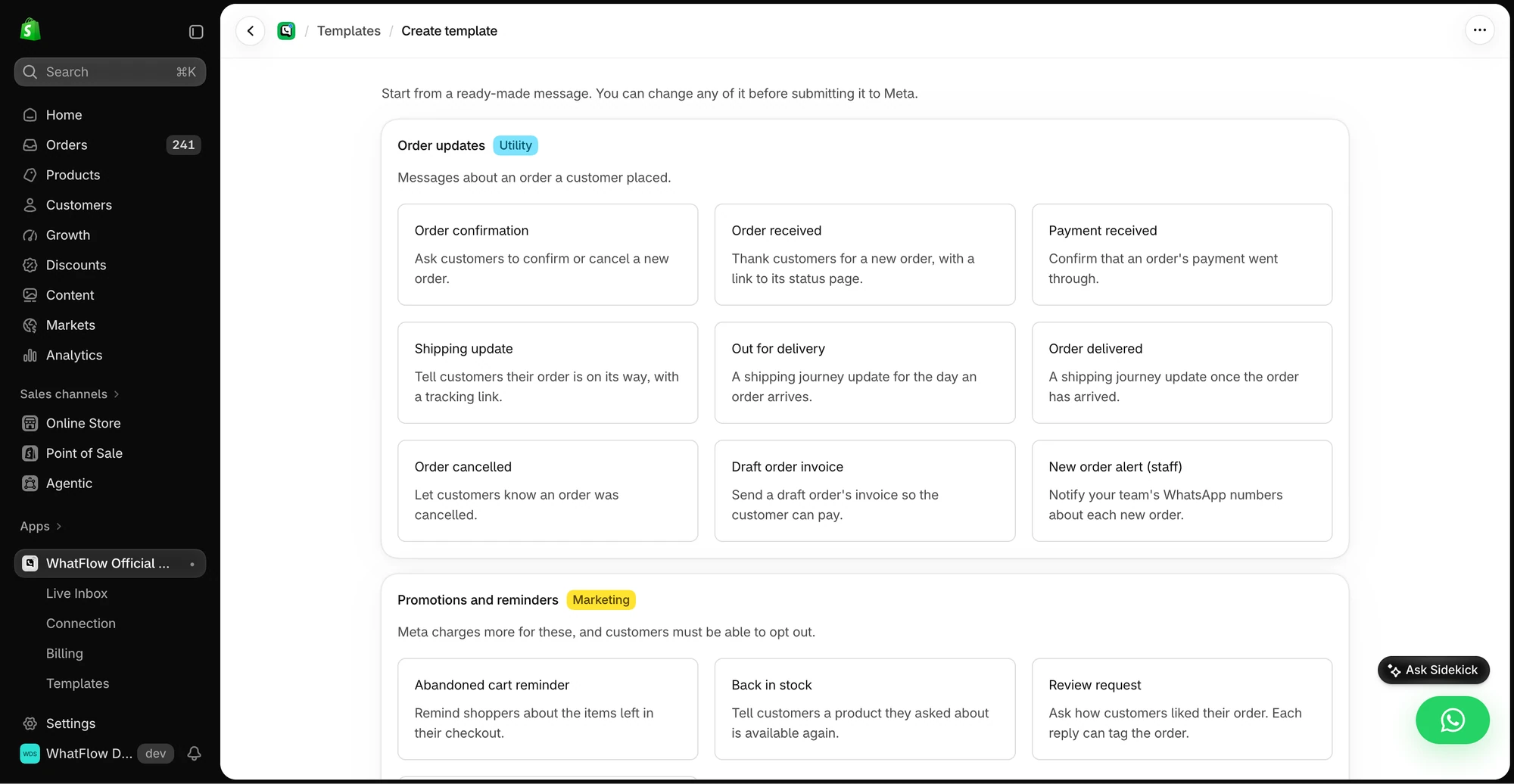
Pick the event first. In WhatFlow's Template Library or Message Editor, choose the order event the message belongs to. The event decides which order fields you can use. A new order confirmation may run before a tracking value exists, so leave tracking out.
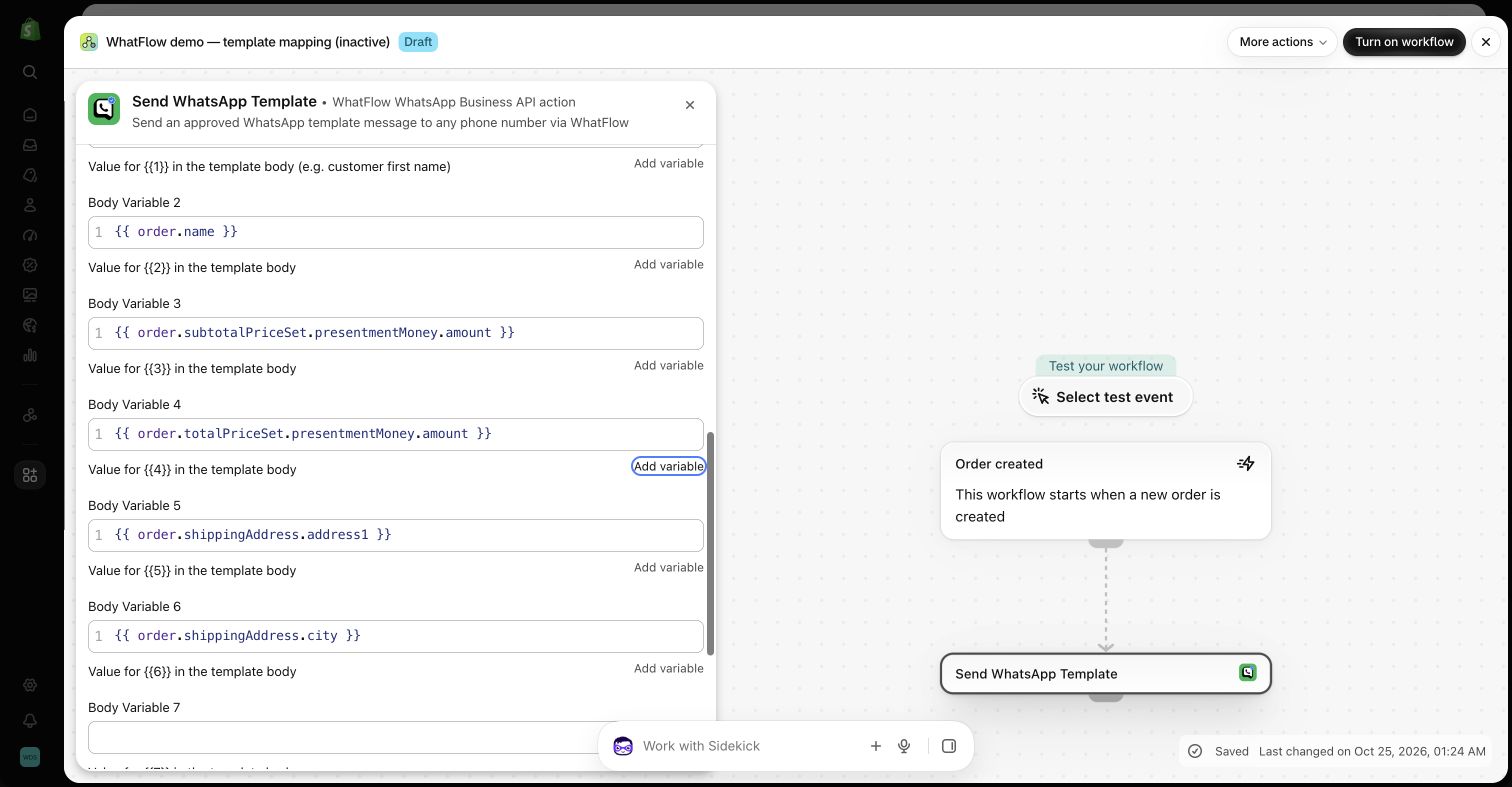
Write and map the template. Paste one of the examples above, map {{1}}, {{2}} and the rest to the right Shopify fields, and fill in realistic sample values. Check the order of the placeholders against your sample, because a swapped variable is the most common reason a test comes out wrong.
Submit to Meta and check the category. In Templates, check the language, category and approval status. If you meant it as utility and Meta says marketing, look for promotional wording. Why Meta rejects WhatsApp templates lists the usual fixes.
Send it automatically. Attach the approved template to the order update, or build it in Shopify Flow: start with Shopify's order created trigger, then add WhatFlow's Send WhatsApp Template action and map the recipient and body variables to order fields. The full walkthrough is in sending WhatsApp templates from Shopify Flow.
Test on your own phone. Place a test order, then check the name, number, total and any button link.
WhatFlow's Message Editor in a demo store, where you choose the Shopify event before writing the template.
Template variables mapped to Shopify order fields in an inactive demo Flow workflow. Nothing was sent.
Shopify Flow is free on Basic, Grow, Advanced and Plus (Shopify Help Center), and WhatFlow's template editor, Flow actions and shared team inbox are on every plan, including Free. The replies to your confirmations ("can I change the address?") land in that shared inbox with no seat fees, so the whole team can pick them up. For a wider view of every order message, see our guide to Shopify order notifications on WhatsApp.
Common order confirmation mistakes
Adding a discount "for next time". It turns a utility template into marketing, changes the price and needs marketing consent.
Putting a tracking link in the confirmation. The tracking number usually doesn't exist yet. Save it for the shipping message.
Sending without opt-in. A phone number typed into checkout isn't permission to message on WhatsApp.
Confirming twice. Shopify's SMS confirmation plus a WhatsApp template plus an email is three messages for one order. Pick the channels on purpose.
"Do not reply to this message." On WhatsApp, replies are the point. Make sure someone reads them.
Wrong total after edits. If you edit orders or add upsells, test that the confirmation fires after the final total is known.
Untested languages. A machine-translated confirmation that reads oddly makes customers worry they've been scammed.
Run WhatsApp for your Shopify store with WhatFlow
Free plan available. Templates, COD confirmation, Shopify Flow automations and a shared team inbox with no seat fees. Every feature is included on every plan, including Free.
Send each template to your own number with a messy test order: no first name, a very long product title, three items and a COD payment. Then check what happens when you reply. If the reply lands somewhere your team watches, you're ready. Once it works, a thank-you message covers the moments the confirmation can't.
Frequently asked questions
What should an order confirmation message include?
The store name, the order number, what was ordered, the total and payment method, and when the customer will hear from you next. Add one way to get help, such as replying to the message.
Is a WhatsApp order confirmation a utility or marketing template?
A plain order confirmation is a utility template under Meta's categorization rules. If you add a discount, a product recommendation or any other promotion, Meta treats it as mixed content and categorises it as marketing.
Do I need a template to send an order confirmation on WhatsApp?
Yes, in almost every case. A new order doesn't open a WhatsApp customer service window, so the first message to the customer has to be a Meta-approved template.
Should I send order confirmations on WhatsApp and email?
Most stores keep Shopify's email confirmation as the receipt and add WhatsApp for customers who opted in, because that's where they reply. Just make sure the two say the same thing and you're not also sending an SMS version on top.
Can I write WhatsApp order confirmations in Urdu, Arabic or Hindi?
Yes. WhatsApp templates can be created in any language WhatsApp supports, and you can keep several language versions of the same template and send each customer the one that fits.
Templates are required outside the 24-hour customer service window; utility templates are charged per delivered message, including inside the window since October 1, 2026.