Pre-order customers get anxious in the silence, not in the wait. Send Shopify pre-order updates at four moments: straight after the order (with a realistic ship window and exactly when they'll be charged), at regular check-ins, the moment a date slips, and when it ships. WhatsApp suits this well because customers can reply with a question instead of opening a dispute.
How Shopify pre-orders work (the parts that affect your messages)
A pre-order is an order for a product that isn't in stock yet, either because it hasn't launched or because you're waiting on a restock. Shopify doesn't run pre-orders on its own; per Shopify's pre-order documentation, you install a pre-order app, and pre-orders work with Shopify Payments or PayPal Express.
The detail that matters most for your messages is payment. Shopify lets you collect full payment, partial payment or no payment at checkout, store the customer's payment method, and collect the rest later. Your pre-order app decides when "later" is. Before you write a single message, open your app's settings and write down:
How much is collected at checkout.
When the remaining balance is charged, and what triggers it.
What happens if that later charge fails.
How a cancellation and refund work.
Customers forgive a wait. They don't forgive a surprise charge.
The four pre-order messages every customer should get
Keep promotional content out of order updates. If you slip "and 10% off your next order!" into a pre-order update, Meta may recategorise it as marketing. Our explainer on marketing vs utility templates has more on where the line sits.
Tell customers exactly when they'll be charged
The confirmation is where most of the trust is won. Be blunt about money.
Full payment upfront:
Hi Leila, your pre-order for the Moss Linen Duvet (Queen) is confirmed, order #3107. You've paid in full today. We expect to ship between March 2 and March 9, and we'll message you here if that changes. Questions? Just reply.
Deposit now, balance later:
Hi Tom, your pre-order #3108 is confirmed. Today we took a $40 deposit. The remaining $120 will be charged to the same card when your order ships, expected late March. We'll message you a few days before we charge. Want to cancel before then? Reply CANCEL and we'll refund your deposit in full.
(Only promise a pre-charge reminder or a full deposit refund if your setup actually does that. Write what's true for your store.)
How often should you send pre-order updates?
For a wait under three weeks, the confirmation and the shipping message are usually enough. For longer waits, check in roughly every three to four weeks, even if nothing has changed:
Quick update on your pre-order #3107: production is on track and we still expect to ship in the first week of March. Nothing you need to do. We'll be in touch when it's on its way.
Short, specific, no fluff. That message stops a lot of "is this a scam?" chats before they start.
How to write a pre-order delay message
When the date slips, tell people the same day you know, not the day before the old date. A good delay message has three parts: what happened, the new date, and their options.
Hi Leila, I'm sorry, your Moss Linen Duvet is running late. Our mill had a dye batch fail quality checks, so we're re-dyeing. New expected ship date: March 23 to 30.
What would you like to do?
[Keep my order] [Swap to in-stock item] [Cancel and refund]
Reply buttons make the choice easy to act on. WhatsApp template buttons are covered in designing quick replies that make the next step clearer. Don't hide the cancel option. People who feel trapped file chargebacks; people who feel respected usually wait.
Make cancellations boring. Confirm the request, say when the refund will be processed, and thank them.
Done. Your pre-order #3108 is cancelled and we've started a full refund of your $40 deposit. Depending on your bank, it usually shows within 5 to 10 business days. Sorry it didn't work out this time.
(That 5 to 10 day window is a common bank timeline, not a guarantee. Use your own payment provider's guidance.)
The refund itself happens in Shopify or your pre-order app. WhatFlow doesn't process refunds; it handles the conversation.
Automating pre-order updates with Shopify Flow and WhatFlow
WhatFlow adds WhatsApp triggers and actions to Shopify Flow, so you can build most of this without code:
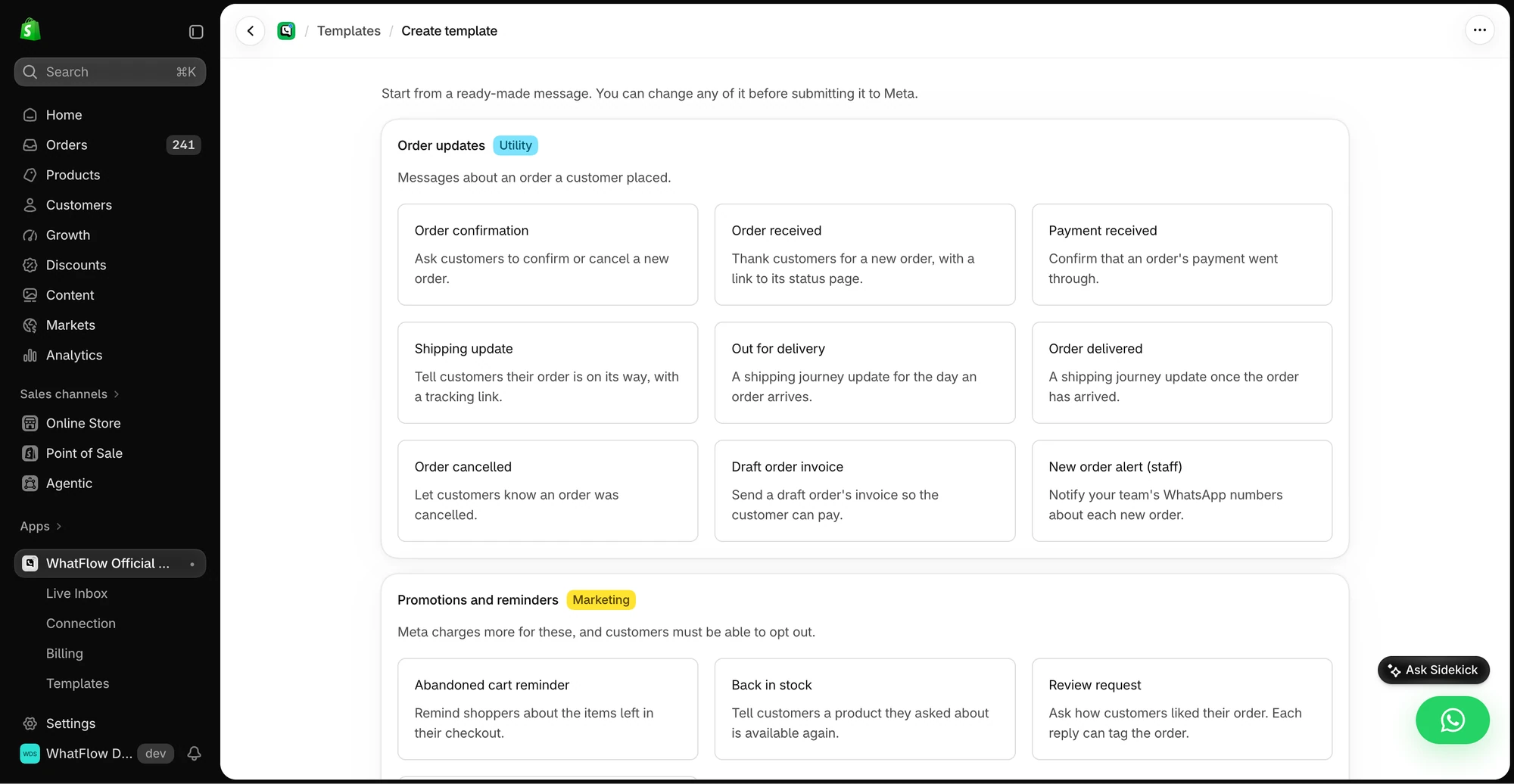
The template creation screen groups the supported message events by job.
Confirmation. Trigger: Order created. Condition: the order contains a pre-order item (most pre-order apps add an order tag or a line-item property; check what yours adds). Action: WhatFlow's send-template action with your pre-order confirmation template.
Delay update. When a batch slips, send one approved delay template to every affected order. Flow's Get data actions can pull orders by tag, but they return results in limited batches (Get customer data, for example, returns up to 100 per run), so check counts on big launches.
Customer replies. WhatFlow's order-reply trigger fires when someone taps a reply button. Use it to tag the order ("preorder-cancel-request", "preorder-swap") and notify your team, who then process the change.
I'd keep a human on cancellations of paid pre-orders rather than auto-cancelling from a button tap. A misread tap shouldn't trigger a refund. The full setup for templates in Flow is in sending WhatsApp templates from Shopify Flow.
Saved replies for the questions pre-order customers ask
You'll answer the same five questions all through a pre-order window. Write them once, with your real dates and payment rules, and keep them in your saved replies so anyone on the team gives the same answer.
"When will mine ship?"
Hi! Your order #3107 is in our first batch, which we expect to ship between March 2 and 9. We'll message you here the day it leaves, with tracking.
"Have I been charged yet?"
You paid a $40 deposit at checkout. The remaining $120 is charged when your order ships. Nothing else has been taken.
"Can I change my size or colour?"
Yes, as long as we haven't shipped. Which size would you like instead? I'll update the order and confirm here.
"Can I add something to the same parcel?"
We can't merge in-stock items into a pre-order without delaying them, so I'd suggest a separate order for anything you'd like now. If you'd rather wait and get everything together, tell me and I'll add a note.
"Is this a real store?" (You'll get this one more than you'd like.)
Fair question! We're Moss & Thread, based in Porto. Your order #3107 is confirmed in our system and your deposit shows as paid. You can also see it any time in your account at mossandthread.co/account.
When you have to cancel a pre-order yourself
Sometimes the product doesn't happen: a supplier folds, a batch fails, a launch gets shelved. Tell customers quickly and personally, refund in full, and don't bury it in a newsletter.
Hi Leila, I'm really sorry: we've had to cancel the Moss Linen Duvet. Our mill can't produce the quality we promised, and I'd rather refund you than send something we're not proud of. Your full payment of $160 is being refunded today. If you'd like, I can suggest an in-stock alternative.
That message costs you a sale. Handled well, it doesn't cost you the customer.
Free plan available
Run WhatsApp for your Shopify store with WhatFlow
Templates, COD confirmation, Shopify Flow automations and a shared team inbox with no seat fees. Every feature is included on every plan, including Free.
Pre-orders are one of three ways to sell something you don't have on the shelf yet. If you're building hype for something brand new, a product launch waitlist might suit you better. If customers just want to know when a sold-out item returns, set up back-in-stock alerts instead. Pre-orders take money now, so they deserve the most communication of the three.
Frequently asked questions
When are customers charged for a Shopify pre-order?
It depends on how your pre-order app is set up. Shopify lets you collect full payment, a partial payment or nothing at checkout, store the payment method, and collect the rest later, so check your app's settings and tell customers the exact rule.
How often should I update pre-order customers?
Send a confirmation right away, a check-in roughly every three to four weeks for long waits, an immediate message if the date changes, and a shipping message. Silence longer than a month makes people nervous.
What should a pre-order delay message include?
Say what happened in one sentence, give the new expected date, and offer clear choices: keep the order, swap to an in-stock item, or cancel for a full refund.
Can WhatFlow cancel or refund a pre-order automatically?
WhatFlow can send the update and, through Shopify Flow, tag an order based on the customer's reply so your team can act on it. Refunds themselves are processed in Shopify or your pre-order app, not inside WhatFlow.