RTO rate (return to origin rate) is the share of shipped orders that the courier couldn't deliver and sent back to you. For a Shopify cash on delivery store, the formula is RTO orders ÷ shipped COD orders × 100. It's the COD metric that hurts most, because you pay shipping both ways and collect nothing.
I talk to COD merchants in Pakistan, India and the Gulf every week, and RTO comes up in almost every conversation. Most of them know it's "too high". Far fewer can tell me the actual number, how they calculated it, or which change moved it. This guide fixes that: what counts as RTO, the formula, where the data lives, a worked example and the levers that actually reduce returned parcels.
What does RTO mean in ecommerce?
RTO stands for return to origin. The courier takes the parcel out, can't complete delivery, and ships it back to your warehouse. On a COD order, that usually means the buyer refused it, wasn't reachable, gave an address the rider couldn't find, or simply didn't have the cash.
RTO isn't the same as a customer return. A return happens after delivery: the buyer received the item, paid, and sent it back. An RTO never reached the buyer, so no money was collected at all.
It also isn't a cancellation. If the buyer cancels before you hand the parcel to the courier, nothing ships and nothing comes back. That's a good outcome, and you should track it separately.
Shipped COD orders the courier marked returned to origin
Post-delivery returns and exchanges
Period
Group orders by ship date, not order date or return date
Orders still in transit at the end of the period
The ship-date point matters more than people think. An RTO often takes a week or two to come back. If you count this month's returns against this month's shipments, you're mixing two different cohorts. Count the orders you shipped in October, wait until nearly all of them have a final status, then calculate October's RTO rate.
Two companion metrics make RTO far more useful:
Pre-dispatch cancellation rate = COD orders cancelled before shipping ÷ all COD orders placed × 100.
If you run COD confirmation and your cancellation rate rises while RTO falls, the confirmation step is doing its job. You're catching the "no" before the courier does.
How do you calculate RTO rate from Shopify and courier data?
Shopify doesn't have an "RTO" order status. Cash on delivery is a manual payment method in Shopify, and those orders stay unpaid until you mark them as paid. So you need to combine two sources.
Pick the cohort in Shopify. On the Orders page, filter to COD orders shipped in your period. Shopify lets you filter and export orders to CSV, and the export includes Payment Method, Financial Status, Fulfillment Status, Tags and Canceled at.
Pull the courier's returned-shipment report for the same ship dates. The courier is the source of truth for what came back.
Match on order number or tracking number in a spreadsheet. Anything the courier marks returned is an RTO.
Tag RTO orders in Shopify (say rto) as they come back, so next month you can filter by tag instead of rebuilding the match from scratch.
Calculate RTO rate, delivery rate and pre-dispatch cancellation rate side by side.
Once tagging is routine, cut the number by things you can act on: city or region, product, order value, new vs returning customer, and whether the order was confirmed. That breakdown tells you where to put effort. A store-wide average hides the one city or one ad campaign that's dragging everything down.
Now put a price on it. If forward shipping costs Rs 250 and the return leg costs another Rs 250, those 220 RTOs cost Rs 110,000 in courier fees alone, before packaging, the stock tied up for two weeks, and any damage on the way back.
Then imagine November, after you add WhatsApp COD confirmation and hold unconfirmed orders. You might see 1,200 placed, 180 cancelled before dispatch, 1,020 shipped and 150 returned. RTO rate drops to about 14.7%, and you've paid for 70 fewer failed round trips. These are illustrative numbers, not a promise. The point is the method: same formula, same cohort rules, compared month to month.
Why do COD orders come back?
From the merchant conversations I have, the reasons cluster into a handful:
Impulse orders. COD makes ordering free in the moment. Some buyers change their mind before the rider arrives.
Unreachable buyer. Wrong number, phone off, or the rider calls once and gives up.
Bad or incomplete address. Missing landmarks, wrong city, no house number.
Cash not ready. The buyer wanted it, but not today, and the courier won't wait.
Fake or prank orders. Someone else's number, or an order placed to test the store.
Slow dispatch. The longer the gap between order and delivery, the more time a buyer has to cool off or buy elsewhere.
Expectation mismatch. The buyer sees the parcel, the price or the shipping fee and refuses.
Each reason has a different fix. That's why the breakdown in the previous section matters.
How to reduce RTO rate: the levers
Confirm every COD order on WhatsApp before dispatch
COD confirmation means asking the buyer, after they order, to confirm on WhatsApp that they still want the parcel. It catches impulse orders and wrong numbers before you've paid for shipping. Because it's a business-initiated message, it has to be an approved WhatsApp template, and Meta charges per delivered template, so budget for it. You'll also need the buyer's opt-in, which the WhatsApp Business Messaging Policy requires before you message anyone.
A confirmation that works keeps it short and gives two clear choices:
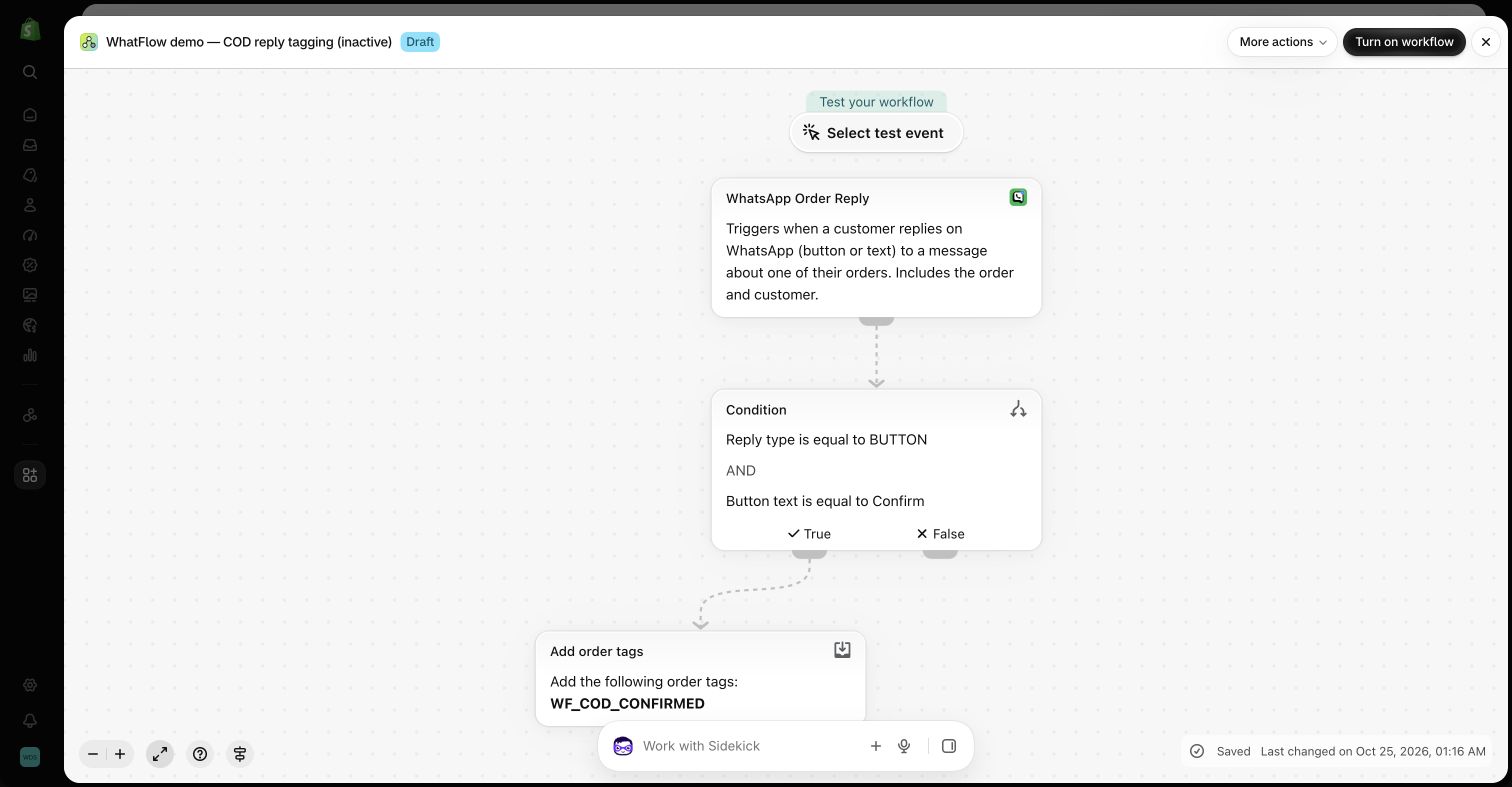
Hi Bilal, thanks for your order #1042 (Rs 4,500, cash on delivery). Tap Confirm and we'll dispatch it today, or Cancel if you no longer need it.
Inactive demo workflow in Shopify Flow: a WhatsApp order reply adds an order tag. Nothing was sent.
Decide in advance what happens to orders that never reply. I'd hold them for a set time, send one follow-up, then have a person decide. Auto-cancelling silence will cost you real buyers who were just busy.
Add OTP verification at checkout
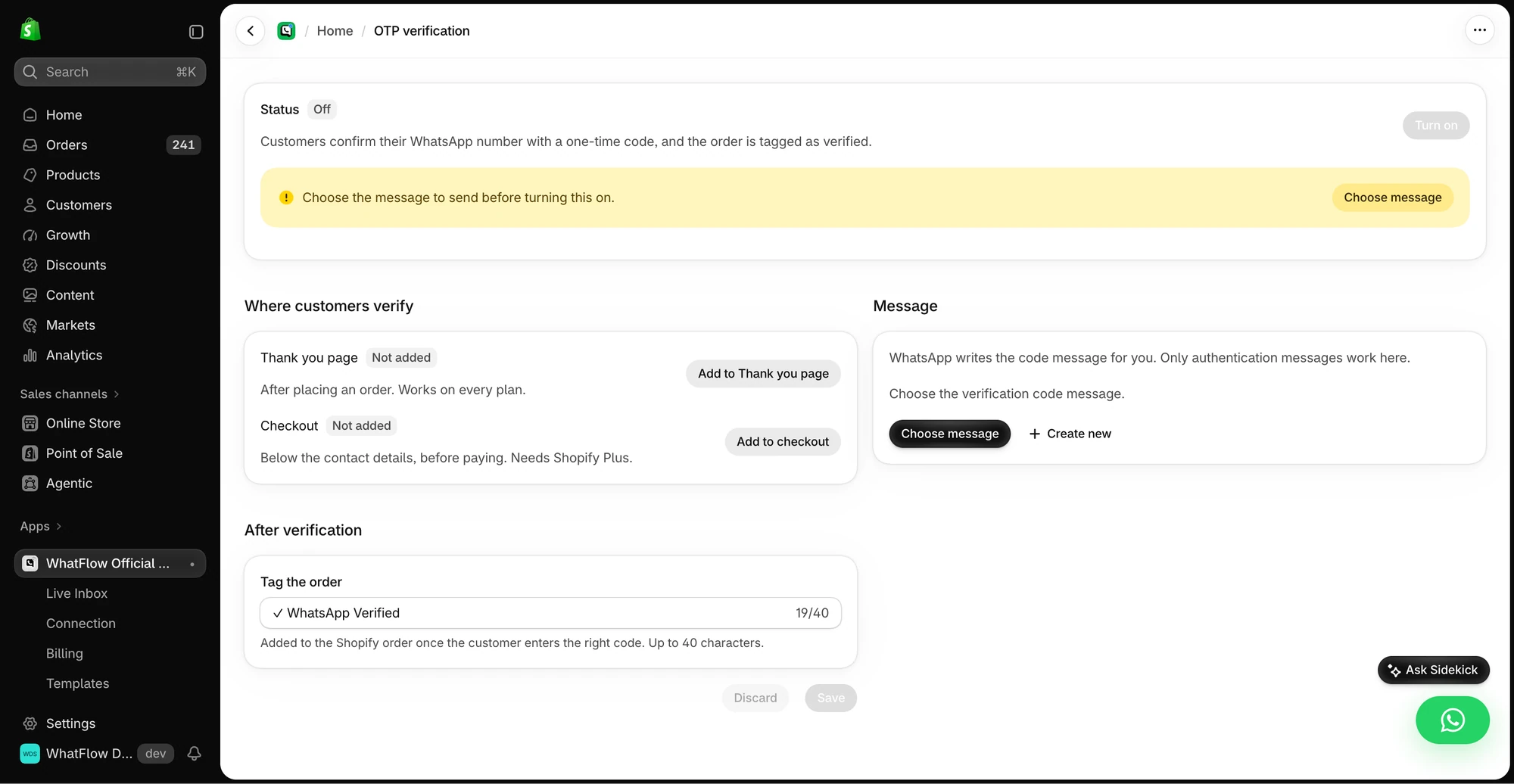
OTP verification means the buyer enters a one-time code sent to their phone to prove they can access that number. It's aimed squarely at wrong numbers and orders placed with someone else's phone. In WhatFlow you choose where OTP appears from the placements your store supports, and a successful verification adds a Shopify order tag you can filter on.
Demo store OTP placement and the Shopify order tag. No real orders were verified.
One honest limit: a verified number only proves the shopper had the phone at that moment. It doesn't prove they'll accept the parcel. Treat OTP as one signal, not a pass.
Limit where COD is offered
Not every order should be COD. If certain shipping rates, regions or very high basket values return far more often in your data, stop offering COD there. WhatFlow's Cash on Delivery settings let you pick which manual payment method it manages and, if your store uses a separate COD shipping rate, which rates qualify, with a preview of eligible and ineligible checkouts. The COD and OTP setup guide covers the steps, and COD rules vs confirmation messages explains why you want both.
Check addresses before the parcel leaves
A rider can't deliver to "near the big mosque". Use the confirmation conversation to fix this. If the address looks thin, ask for a landmark and a good time to call:
Hi Ayesha, we're about to dispatch order #2231. Could you confirm the delivery address and a good time for the rider to call?
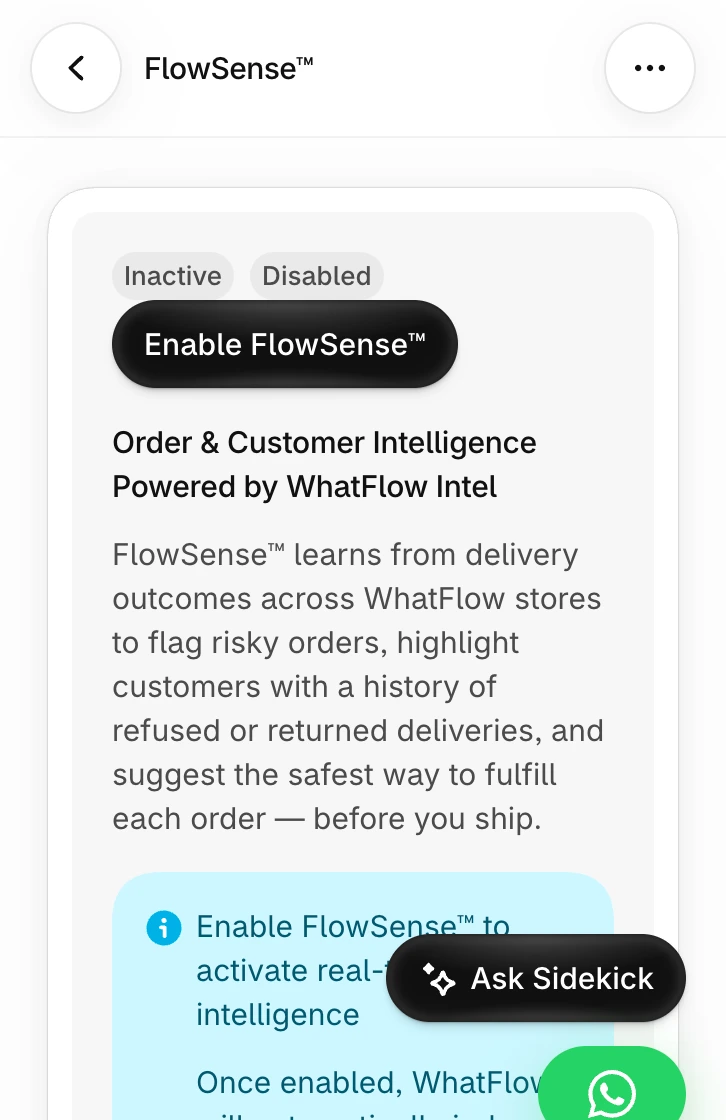
FlowSense is WhatFlow's review aid for COD orders. It uses order and delivery outcomes to flag orders that may need a closer look before dispatch. A flag isn't an accusation. It's a prompt for your team to check the address, ask for confirmation or apply your store's policy. Read the setup screen and its consent before you enable it; the FlowSense order review guide shows what to check.
The demo store's FlowSense screen, left inactive.
Ask for partial prepayment on the riskiest orders
Partial prepaid means the buyer pays a small advance (often the delivery fee) online and the rest on delivery. Someone with money in the order is less likely to refuse it. It also costs you some conversions, so I'd only use it on the segments your data flags: high-value orders, repeat-RTO phone numbers, or regions where returns are worst. Put the rule in writing so agents apply it the same way every time.
Message buyers during delivery
A buyer who knows the parcel is coming today is more likely to answer the rider's call and have cash ready. WhatFlow's shipping journey messages cover stages such as label, carrier pickup and in transit, as long as your carrier and Shopify send those events. Start with one stage that fires reliably. If a delivery attempt fails, a quick WhatsApp message asking for a better time often saves the parcel; handling shipping delays on WhatsApp has wording for the awkward cases.
Ship faster
The gap between order and delivery is time for a buyer to change their mind. If confirmed orders sit in the warehouse for two days, fix that before anything clever.
RTO reduction checklist
RTO rate calculated by ship-date cohort, with delivery rate and pre-dispatch cancellation rate next to it
Returned orders tagged in Shopify and reconciled against the courier report monthly
RTO broken down by city, product, order value and confirmation status
WhatsApp opt-in collected at checkout
COD confirmation template approved, with Confirm and Cancel buttons
A written rule for orders that never reply
OTP verification tested with a correct code, a wrong code and an abandoned attempt
COD switched off for rates or regions that return far more than average
Address check message saved for thin addresses
A partial prepaid rule for flagged segments, if your data supports it
One reliable shipping update switched on
Confirmed orders dispatched within a day
If you only do three things this week, make them: measure the baseline properly, confirm every COD order on WhatsApp, and write the no-reply rule.
Run WhatsApp for your Shopify store with WhatFlow
Free plan available. Templates, COD confirmation, Shopify Flow automations and a shared team inbox with no seat fees. Every feature is included on every plan, including Free.
WhatFlow WhatsApp Business API runs on the official Meta WhatsApp Cloud API and handles COD confirmation, OTP verification, FlowSense review and shipping updates from inside Shopify, with native Shopify Flow triggers for the reply buttons. Every feature is on every plan, including the Free plan, and paid plans start from $4.99/month; see pricing for the details and Meta's per-country message rates. If you're comparing options in Pakistan specifically, the best Shopify apps for COD stores in Pakistan is a useful next read.
There's no honest universal number, because RTO depends on your country, courier, product price and how you acquire customers. Measure your own baseline for a month, then judge every change against that baseline rather than someone else's figure.
Should cancelled COD orders count towards RTO rate?
No. RTO only counts parcels that were shipped and came back. Track orders cancelled before dispatch as a separate pre-dispatch cancellation rate, because every one of those is an RTO you avoided.
Does WhatsApp COD confirmation reduce RTO?
It gives buyers who no longer want the parcel an easy way to cancel before you pay for shipping, and it gives you a clear signal on orders that never reply. Whether it lowers your RTO rate is something to measure on your own orders, ideally against a period or group without it.
How do I find RTO orders in Shopify?
Shopify doesn't have a built-in RTO status, so most stores tag returned COD orders (for example rto) when the courier reports them, then filter by that tag and export the orders to CSV. Your courier's returned-shipment report is the source of truth to reconcile against.
Is OTP verification enough to stop fake COD orders?
No. OTP only proves the shopper could access that phone number when they ordered. It's one signal; you still need a dispatch rule for unconfirmed or flagged orders.