A good shipping confirmation message tells the customer their order is on its way, from which carrier, with a tracking link that works and a delivery estimate you actually believe. Every later update (out for delivery, delivered, delayed) should add one new fact and nothing else. Below are 24 shipping confirmation message examples for WhatsApp, SMS and email, grouped by stage, store type and language.
The shipping message is the one customers wait for. Get it right and "where is my order?" chats drop. Get it wrong (dead tracking link, an estimate that's two days off) and you've created the chat you were trying to avoid. It follows the order confirmation in the order flow.
What to include in a shipping message
Order number and store name. So the customer knows which parcel this is.
Carrier name. "Leopards" or "Aramex" tells them who'll knock on the door.
A tracking link that opens on a phone. Test it before you go live.
A delivery estimate. A range ("2 to 4 working days") is more honest than a single date.
Split shipment note, if there is one. "This is 1 of 2 parcels" saves a panicked message.
A reply route. "Reply here if you need to change the delivery."
WhatsApp template rules for shipping updates
Shipping updates are business-initiated, so on WhatsApp they go out as Meta-approved templates. Meta's pricing documentation says that outside the 24-hour customer service window (the 24 hours after the customer last messaged you), "businesses can only send template messages." The customer also needs to have opted in to WhatsApp messages from you (WhatsApp Business Messaging Policy).
The good news: shipping updates are a textbook utility template. A utility template is a non-promotional message about a transaction the customer started. Meta's categorization rules use "Your package from order is on its way" as a utility example. Add a "shop the new collection" button and it's mixed content, which Meta treats as marketing. Keep shipping templates about the shipment. If you're unsure, check which template category fits each Shopify message.
Utility templates are charged per delivered message, as of November 2026 even inside an open window. That's $0.0014 per message in India, $0.0068 in Brazil and $0.0107 in Saudi Arabia, for example (full table on our pricing page). Every extra stage you switch on costs a little, which is one more reason to send fewer, better updates.
Unless an example says otherwise, the WhatsApp variables are: {{1}} = customer first name, {{2}} = order number, {{3}} = carrier, {{4}} = tracking link, {{5}} = delivery estimate.
"Your order has shipped" examples
1. The standard shipped message
Hi {{1}}, good news: your order {{2}} has shipped with {{3}}. Expected delivery: {{5}}. Track it here: {{4}}. Reply here if you need anything.
2. The short version
Hi {{1}}, order {{2}} is on its way with {{3}}. Track: {{4}}
3. With a tracking button
Hi {{1}}, your order {{2}} left our warehouse today with {{3}}. It usually arrives in {{5}}. Tap below to follow it.
[Track parcel]
Use a URL button with the tracking link as its variable. Tap it on Android and iPhone before you submit.
4. Split shipment
Hi {{1}}, part of your order {{2}} has shipped: {{3}}. The rest follows separately and we'll message you when it does. Track this parcel: {{4}}
Here {{3}} is the item or items in this parcel. Without the "rest follows" line, customers open the box, see one item missing and message you.
5. Cash on delivery shipped
Hi {{1}}, your order {{2}} is on its way with {{3}}. Please keep {{5}} ready in cash for the courier. Track it here: {{4}}
Variables here: {{5}} = amount due. I'd always restate the exact amount at dispatch, so the cash isn't a surprise at the door. More on refused parcels in our guide to RTO rates for COD stores. For the confirm-or-cancel step before dispatch, see our COD confirmation message templates.
6. Furniture with a booked delivery
Hi {{1}}, your {{3}} (order {{2}}) is booked for delivery on {{4}} between {{5}}. Our team will call 30 minutes before arrival. Need a different slot? Reply here.
Shopify sends its own Out for delivery notification when a tracking event with that status arrives from the carrier or fulfillment app, and it doesn't cover local delivery orders (Shopify Help Center). Your WhatsApp version depends on the same carrier events, so only switch it on if your carrier reports them reliably.
7. Standard out for delivery
Hi {{1}}, your order {{2}} is out for delivery today with {{3}}. Track it live: {{4}}
8. COD out for delivery
Hi {{1}}, your order {{2}} arrives today. Amount to pay the courier: {{3}}. If you won't be home, reply here and we'll try to arrange another day.
Variables here: {{3}} = amount due.
9. Someone needs to sign
Hi {{1}}, your order {{2}} is out for delivery today and needs a signature. If nobody will be in, reply here before noon.
Delivered examples
10. Standard delivered
Hi {{1}}, your order {{2}} has been delivered. If it hasn't reached you or anything is damaged, reply here and we'll sort it out.
That second line matters. It's how you catch "delivered" scans for parcels that were left at the wrong door.
11. Delivered, with care instructions
Hi {{1}}, your {{2}} has arrived. Quick tip: let the cast iron pan dry fully before storing it. Questions about using it? Reply here.
Variables here: {{2}} = product. Usage tips about the thing they bought are fine. A link to other products isn't.
Delay messages are where WhatsApp earns its keep. Send them before the customer asks. For the full playbook, read handling shipping delays on WhatsApp.
12. Failed delivery attempt
Hi {{1}}, {{3}} tried to deliver your order {{2}} today but couldn't reach you. Reply here with a good time or a landmark near your address and we'll pass it to the courier.
Hi {{1}}, a quick update on order {{2}}: {{3}} is running behind in your area, so delivery is now expected {{4}}. Sorry about the wait. Track it here: {{5}}
Variables here: {{4}} = new estimate, {{5}} = tracking link.
14. Warehouse or stock delay
Hi {{1}}, your order {{2}} is taking longer to pack than we promised. It should ship by {{3}}. If you'd rather cancel, just reply and we'll handle it.
Variables here: {{3}} = new ship date. Offering the way out is what makes this message trustworthy.
15. Holiday or weather delay
Hi {{1}}, couriers are slower than usual this week because of {{3}}. Your order {{2}} is on its way and should arrive by {{4}}. We'll message you if that changes.
Hi {{1}}, your order {{2}} is waiting at customs in {{3}}. This usually clears in a few working days. If customs contacts you about duties, reply here and we'll help.
17. Reply inside the window (not a template)
Once the customer has messaged you, you're inside the 24-hour window and can write freely:
Thanks for checking, Omar. I just looked: your parcel reached the Jeddah hub this morning and the courier lists Thursday for delivery. I'll keep an eye on it and message you if it slips.
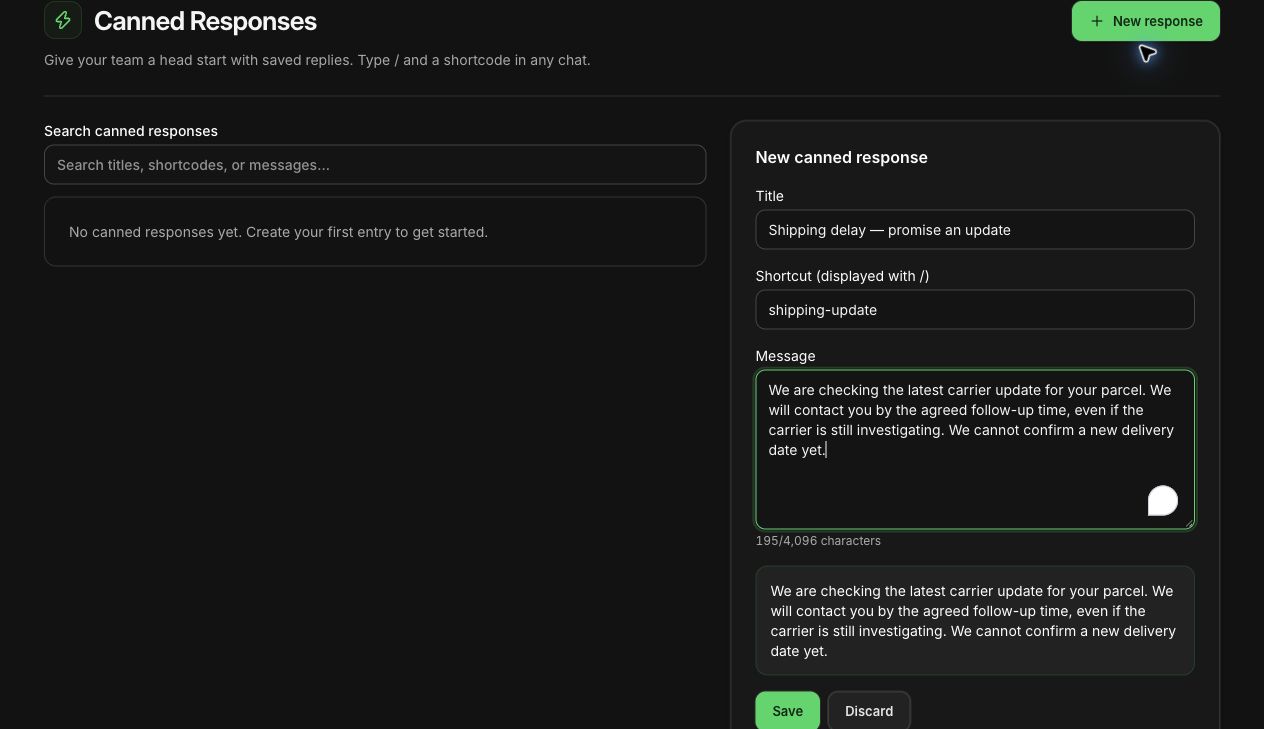
Save versions of this as canned replies so whoever is on shift sends the same answer.
A shipping-delay saved reply being drafted in the WhatFlow inbox of a demo store. It hasn't been saved or sent.
Shipping updates in other languages
Templates work in any language WhatsApp supports, and you can keep language versions of the same template. Variables match the standard list.
18. Roman Urdu (Pakistan)
Assalam o Alaikum {{1}}, aapka order {{2}} {{3}} ke zariye bhej diya gaya hai. Delivery: {{5}}. Track karein: {{4}}
19. Arabic (Gulf)
مرحباً {{1}}، تم شحن طلبك رقم {{2}} عبر {{3}}. موعد التوصيل المتوقع: {{5}}. تتبع الشحنة: {{4}}
20. Portuguese (Brazil)
Olá {{1}}, seu pedido {{2}} foi enviado pela {{3}}. Previsão de entrega: {{5}}. Acompanhe aqui: {{4}}
SMS shipping examples
Keep SMS to one line with the link. Nobody reads a paragraph in a text.
21. Shipped SMS
Loom & Pack: order #1042 shipped with DHL. Arrives in 2-4 days. Track: [link]
22. Out for delivery SMS
Loom & Pack: order #1042 is out for delivery today. Track: [link]
23. Delay SMS
Loom & Pack: order #1042 is delayed by the courier. New estimate: Fri 28 Nov. Reply HELP for support.
Shopify sends a Shipping confirmation email when an order is fulfilled and a Shipping update email when tracking details change (Shopify Help Center). Edit the top of it so it reads like a person wrote it.
24. Shipping email
Subject: Your lunch bag is on its way (order #1042)
Hi Aisha, your Commuter Lunch Bag left our studio today with DHL. Most parcels to your city arrive in 2 to 4 working days. Track it any time with the button below. If the tracking hasn't moved in three days, reply to this email and we'll chase the courier. Sana, Loom & Pack
How to set up shipping messages in Shopify and WhatFlow
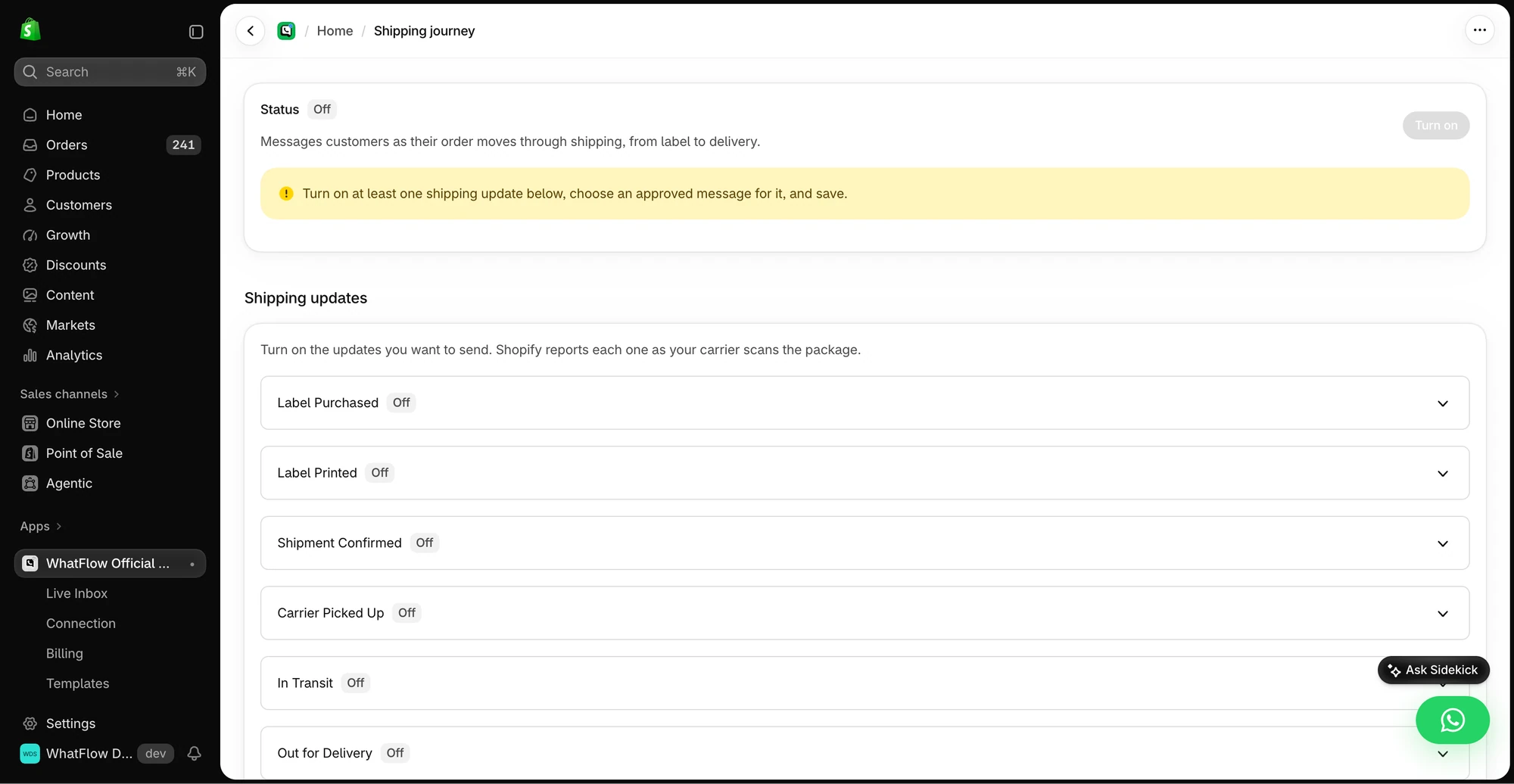
WhatFlow WhatsApp Business API runs on Meta's official WhatsApp Cloud API. Its Shipping Journey settings list individual stages (label created, carrier pickup, in transit, delivered), and you attach an approved template to each one.
Write the templates first. Create them in WhatFlow's Message Editor from the fulfillment event, so tracking fields are available. Map the variables in order, fill realistic samples and submit to Meta. The WhatFlow template guide walks through approval.
Start with one stage. Carrier pickup or delivered is a good first one. Confirm your carrier and Shopify really send that event before you rely on it.
Test on a real order. Open the tracking link on a phone, and test a split shipment if you ever send one.
Use Shopify Flow for anything custom. Start from a Shopify fulfillment event, add WhatFlow's Send WhatsApp Template action, and map the recipient and tracking fields. Sending WhatsApp templates from Shopify Flow covers the mapping.
Turn off duplicates. If WhatsApp handles out for delivery, decide whether Shopify's email for the same stage stays on.
Shipping Journey stages in the WhatFlow demo store. Each stage uses its own approved template.
One honest limit: WhatFlow doesn't detect carrier exceptions on its own. Delay messages come from you, either a saved reply in the inbox or a template sent to the affected orders. The shipping updates and review requests setup doc has the step-by-step, and our order tracking notifications page shows the whole flow. Replies go to the shared team inbox with no seat fees, on every plan including Free.
Common shipping message mistakes
Sending "shipped" when the label was printed. A label isn't a pickup. Customers track it, see nothing, and message you.
Broken tracking links. Usually a mapping mistake. Test every carrier you use.
Too many stages. Label, pickup, hub, out for delivery, delivered: five messages, five charges, and customers mute you. Read our take on how often to message customers.
Promotions in the delivered message. It's mixed content, so Meta treats it as marketing.
Silence during a delay. The customer finds out from the tracking page and assumes the worst.
A single delivery date you can't keep. Use a range.
Run WhatsApp for your Shopify store with WhatFlow
Free plan available. Templates, COD confirmation, Shopify Flow automations and a shared team inbox with no seat fees. Every feature is included on every plan, including Free.
Run one test order through every stage you've enabled, on your own phone. Check the carrier name, the link and the estimate, then reply to the message and make sure it lands where your team works.
Frequently asked questions
What should a shipping confirmation message say?
That the order has shipped, the order number, the carrier, a working tracking link and a realistic delivery estimate. Add a way to reply if the customer needs help.
Is a WhatsApp shipping update a utility template?
Yes, as long as it only covers the shipment. Meta lists shipping and delivery updates as utility examples, but a promotion or product recommendation in the same template makes it marketing.
Can Shopify send out for delivery and delivered messages automatically?
Shopify sends Out for delivery and Delivered notifications when the carrier or fulfillment app reports that tracking status. They aren't available for local delivery orders, and timing depends on the carrier.
How do I tell customers their order is delayed?
Message them before they ask, say what caused the delay in one line, give a new estimate you trust, and offer a way to reply. Don't add a discount code to a WhatsApp utility template, because that makes it marketing.
How many shipping updates should I send?
Two or three is enough for most stores: shipped, out for delivery or delivered, and a delay message only when something goes wrong. Customers start ignoring updates that don't tell them anything new.