
Publisher disclosure: this comparison is written by WhatFlow. Competitor capabilities are based on the linked public documentation; the WhatFlow screenshots come from our demo store. Examples are illustrative, and results depend on your store and configuration.
WhatFlow and Message-only COD setup at a glance
| Consideration | WhatFlow | Message-only COD setup |
|---|---|---|
| Best-fit experience | COD checkout settings and WhatsApp confirmation in one Shopify app, with a no-seat-fee inbox for the replies. | Handles the confirmation message only. Fine if your checkout already controls COD correctly; otherwise you need a second app. |
| Costs to include | Your message plan plus Meta's WhatsApp fees. Any COD fee you set is charged to the buyer at checkout, not a WhatFlow charge. | The messaging app, plus a separate COD rules app if you need one, plus staff time for orders nobody confirmed. |
| Shopify workflow | Confirm and Cancel reply buttons trigger Shopify Flow, which can tag or cancel the order automatically. | Often stops at sending the message. Check whether a reply actually changes anything on the Shopify order. |
| Starting point | Free plan with every feature, including COD settings and confirmation, plus free-forever theme-matched WhatsApp buttons. | Test your checkout yourself: which payment methods show, and what total the buyer sees. |
A Shopify COD store needs both checkout rules and a WhatsApp confirmation message. They solve different problems. COD rules decide when Cash on Delivery appears at checkout and whether a COD fee applies. A WhatsApp COD confirmation asks the buyer to confirm before you ship, so fake and mistaken orders get caught early. WhatFlow does both in one Shopify app.
A message-only tool handles the second half. If your checkout isn't set up right, it's confirming orders you didn't want in the first place.
At a glance
WhatFlow | Message-only COD tool | |
|---|---|---|
Controls when COD appears | Yes, via COD settings in Shopify admin | No |
Optional COD fee | Tied to a linked COD shipping rate | No |
WhatsApp confirmation | Template with Confirm/Cancel buttons | Yes |
Reply updates the order | Shopify Flow tags or cancels it | Varies |
Team inbox for replies | No seat fees | Varies |
Two problems, two tools
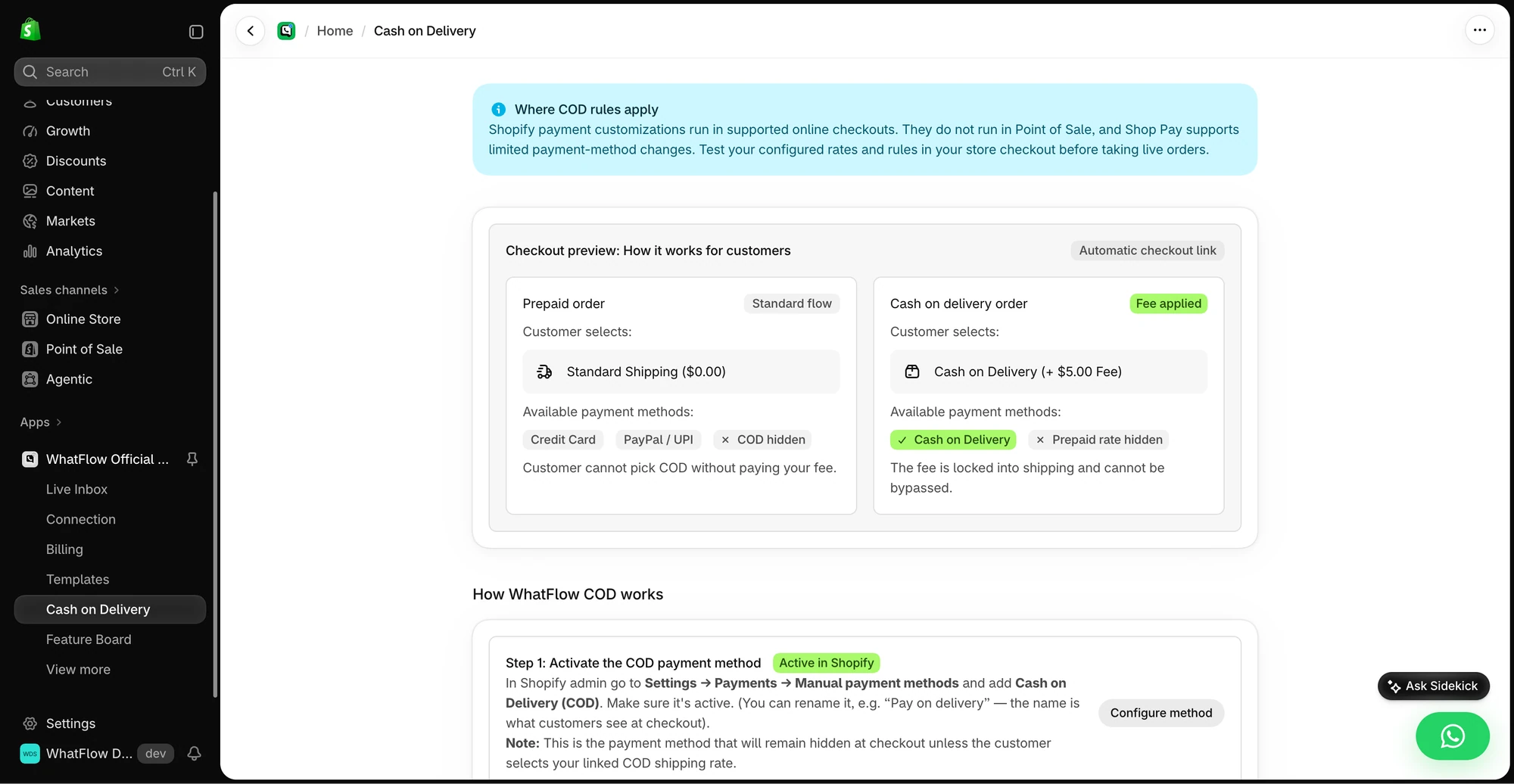
COD checkout rules work before the order exists. Say you charge a $5 handling fee for COD to cover returned parcels, or you only want COD offered with a specific shipping method. That has to happen at checkout.
A COD confirmation message works after the order is placed. It asks: "Is this you, and do you still want it?" A customer who ordered by mistake taps Cancel. A real buyer taps Confirm and you ship with confidence.
Most COD stores need both. That's why we built them into the same app.
How WhatFlow handles the checkout side
WhatFlow's COD settings sit in Shopify admin. You activate Cash on Delivery as a manual payment method in Shopify, link it to a COD shipping rate, and WhatFlow uses Shopify payment customizations so COD is only offered with that rate. If you set a COD fee, it's built into the shipping line, so it can't be skipped.
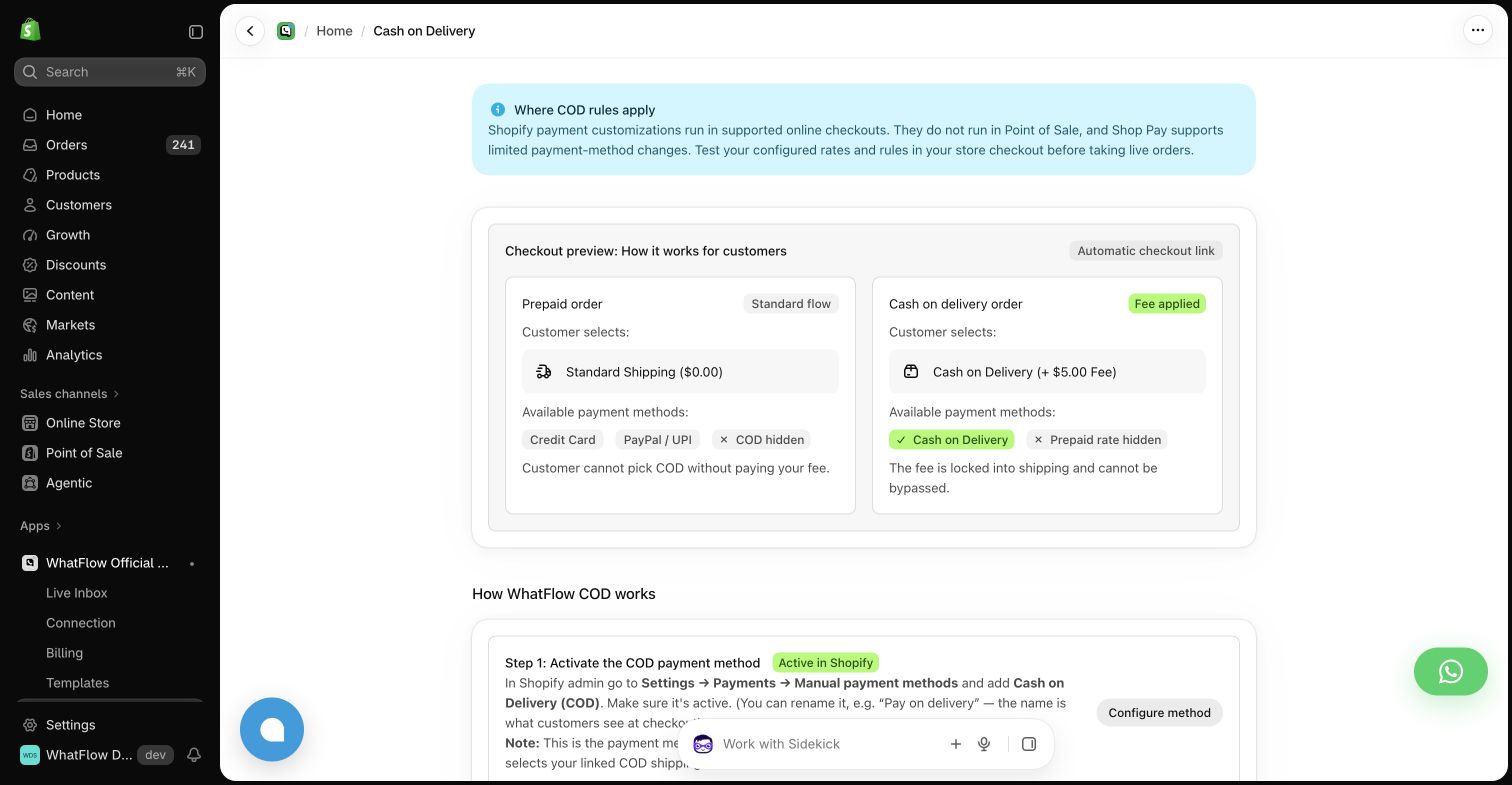
One limit worth knowing: Shopify payment customizations run in supported online checkouts. They don't run in Point of Sale, and Shop Pay supports only limited payment-method changes. Test your checkout before taking live orders.
How WhatFlow handles the confirmation side
Once the order is placed, WhatFlow sends an approved WhatsApp template with reply buttons:
Hi Rahul, thanks for your order #4471 for ₹2,350, cash on delivery to Andheri West. Please confirm so we can ship it today. [Confirm order] [Cancel order]
When the customer taps a button, WhatFlow's order reply trigger fires in Shopify Flow. From there you decide what happens: tag the order "COD-confirmed", cancel it, or send a follow-up. Free-text replies like "can you deliver after 6pm?" land in the shared inbox for your team.
Step-by-step setup is in turn WhatsApp order replies into Shopify actions with Flow. For button wording, see WhatsApp quick reply buttons that make the next step clearer.
What does it cost?
Both halves are on every WhatFlow plan, including Free. As of November 2026, paid plans start at $4.99/month for 2,000 sends (Shopify App Store listing), and there are no seat fees for the people answering COD replies. A store sending 40,000 messages a month pays $49.99 on Scale.
Meta charges for delivered template messages separately. COD confirmations are usually utility templates, and since October 1, 2026 Meta charges for them even inside an open customer service window (Meta pricing docs). The COD fee in the screenshot is something the merchant chooses to charge the buyer; it isn't a WhatFlow fee. Current amounts are on our pricing page.
Want to see why WhatsApp beats the alternatives for this job? Read WhatsApp COD confirmation vs phone calls and WhatsApp vs SMS for COD confirmations.
WhatFlow's WhatsApp Business API app runs on the official Meta WhatsApp Cloud API and is rated 5.0 out of 5 from 55 ratings on the Shopify App Store (checked November 5, 2026).
When a message-only setup might be enough
Pick a message-only tool only if your checkout already shows COD exactly when you want, with the right fee, and you're happy to manage those rules in another app. You'll still want replies to update the Shopify order, so check that before you buy.
The bottom line
COD fraud and mistakes start at checkout and get caught after it. WhatFlow covers both ends: COD settings in Shopify admin and WhatsApp confirmations that tag or cancel orders through Shopify Flow, on every plan, with no seat fees. If you're still copying order details into WhatsApp by hand, read automation vs manual order copying next.
Questions worth asking
Do I need COD rules if I already send WhatsApp COD confirmations?
Usually, yes. Confirmations catch bad orders after they're placed; checkout rules decide whether Cash on Delivery is offered in the first place and whether a COD fee applies. WhatFlow covers both in the same Shopify app.
How do I test a COD setup on Shopify?
Place three test orders: one prepaid, one COD where you reply Confirm, and one COD where you reply Cancel. Check that the COD option and fee show correctly at checkout and that each reply tags or cancels the order as expected.
Does the free WhatFlow plan restrict features?
No. Every WhatFlow feature, including COD confirmation and Shopify Flow actions, is on every plan, including Free. Plans differ only by message allowance and rate.
Are Meta's WhatsApp charges included in WhatFlow's price?
No. Meta charges separately for delivered template messages by category and country. A COD confirmation is usually a utility template, and since October 1, 2026 Meta charges for utility templates even inside an open customer service window.
Sources and methodology
We checked these primary sources on November 5, 2026. Vendor pages describe advertised capabilities, rather than independent performance tests. Confirm current pricing, plan limits and availability with each provider.
- WhatFlow plans and Shopify integrations
WhatFlow WhatsApp Business API listing: COD verification, plan prices and a 5.0 rating from 55 reviews, checked November 5, 2026.
- WhatsApp Business Platform pricing
Meta's per-message pricing, which varies by template category and recipient country and is charged separately from app fees.
- Meta WhatsApp Cloud API pricing documentation
Per-message template pricing by category and country, including the October 1, 2026 changes to utility and service message charges.