Good WhatsApp opt-in wording at Shopify checkout names your store, says the messages come on WhatsApp, says what kind of messages they are, and sits right next to the control that records the choice. Ask for order updates and offers separately. For example: "Send my order updates on WhatsApp from Kiara Skincare." A phone number typed for the courier is not permission.
Below is the copy I'd use at each step of the checkout path, plus how to check it actually works.
What does Meta require in a WhatsApp opt-in?
Less than most people think, which is why the wording is on you. Meta's opt-in guidance has two hard requirements:
Clearly state that the person is opting in to receive messages from the business.
Clearly state the business name.
Then two strong recommendations: get separate opt-in per message category, and tell people how to opt out of specific kinds of messages. The WhatsApp Business Messaging Policy adds that you must respect every opt-out request, whether it arrives on WhatsApp or anywhere else.
Interestingly, Meta says opt-in can be general rather than WhatsApp-specific, as long as you follow local law. I wouldn't lean on that. If the box says "texts" and the customer gets a WhatsApp from a number they don't recognise, they block first and read later. Blocks hurt your quality rating.
Where does WhatsApp opt-in copy go at Shopify checkout?
As of November 2026, Shopify's checkout settings have a Marketing opt-in section with a separate WhatsApp option. Set it to Checkout only, and if you also run SMS, choose which regions see the WhatsApp checkbox. Regions you don't pick fall back to SMS. Shopify saves the choice only when the customer submits checkout, so someone who ticks the box and leaves isn't subscribed.
Keep it honest. This line isn't consent, so don't make it sound like one.
We'll share this number with the courier for delivery. We won't send WhatsApp offers unless you choose to below.
Order updates (utility)
Send my order and delivery updates on WhatsApp from Kiara Skincare.
Short, specific, no promise of anything else. If you also run cash on delivery, say so, because the confirmation request is the first message they'll get:
Send my order confirmation and delivery updates on WhatsApp from Kiara Skincare. For cash on delivery, we'll ask you to confirm here.
Offers and new products (marketing)
Send me offers and new arrivals from Kiara Skincare on WhatsApp, about twice a month. Reply STOP anytime.
"About twice a month" does a lot of work. People say yes to a frequency they can picture. Only write it if you'll stick to it.
Thank-you page, after payment
Want delivery updates on WhatsApp instead of email? Tap to get them from Kiara Skincare. Order updates only, no offers.
WhatsApp opt-in wording in other languages
If you sell across markets, write the checkbox in the language of the checkout. Rough starting points for the order-updates line (have a native speaker check tone):
Spanish: "Enviar las actualizaciones de mi pedido por WhatsApp desde Kiara Skincare."
Portuguese (Brazil): "Enviar as atualizações do meu pedido pelo WhatsApp da Kiara Skincare."
Arabic: "أرسلوا لي تحديثات طلبي عبر واتساب من Kiara Skincare."
Bahasa Indonesia: "Kirim info pesanan dan pengiriman saya lewat WhatsApp dari Kiara Skincare."
Then make sure your WhatsApp templates exist in the same languages. WhatFlow templates work in any language WhatsApp supports, and you can keep language versions of the same template. The template languages guide explains how to match them to orders.
Wording mistakes I see every week
One box for everything. "Get updates and offers on WhatsApp" forces a customer who only wants tracking to accept promotions, or skip both.
No business name. "Receive messages on WhatsApp" fails Meta's own requirement.
Consent hidden in the terms. If it's in paragraph nine of your privacy policy, nobody chose it.
Pre-ticked boxes. You'll get a bigger list and a lot more blocks.
Copy that doesn't match the send. The box said "order updates" and the first message is a sale. That's the fastest way to a STOP.
Keep a record your teammate can use
For each customer, you want to answer "why are we messaging this person?" in ten seconds:
Phone number in international format.
Date and where they opted in (checkout, thank-you page, chat).
What they agreed to: order updates, offers, or both.
The version of the wording they saw. Label it ("checkout-v2, Nov 2026") when you change copy.
Before every campaign, build the list from the marketing consent only, then remove opt-outs. A spreadsheet from last Eid's sale needs the same check as a list collected yesterday. If you import one, the campaign spreadsheet guide shows how to map it to a template.
Test the whole loop, including the opt-out
Use your own test number and go through it like a customer:
Place a test order and tick only the order-updates choice.
Confirm you get the order update and nothing marketing.
Reply STOP.
Check the number lands where your team expects, and that the next broadcast skips it.
Ask a teammate on email support to record an opt-out that came in by email, and check it reaches the same list.
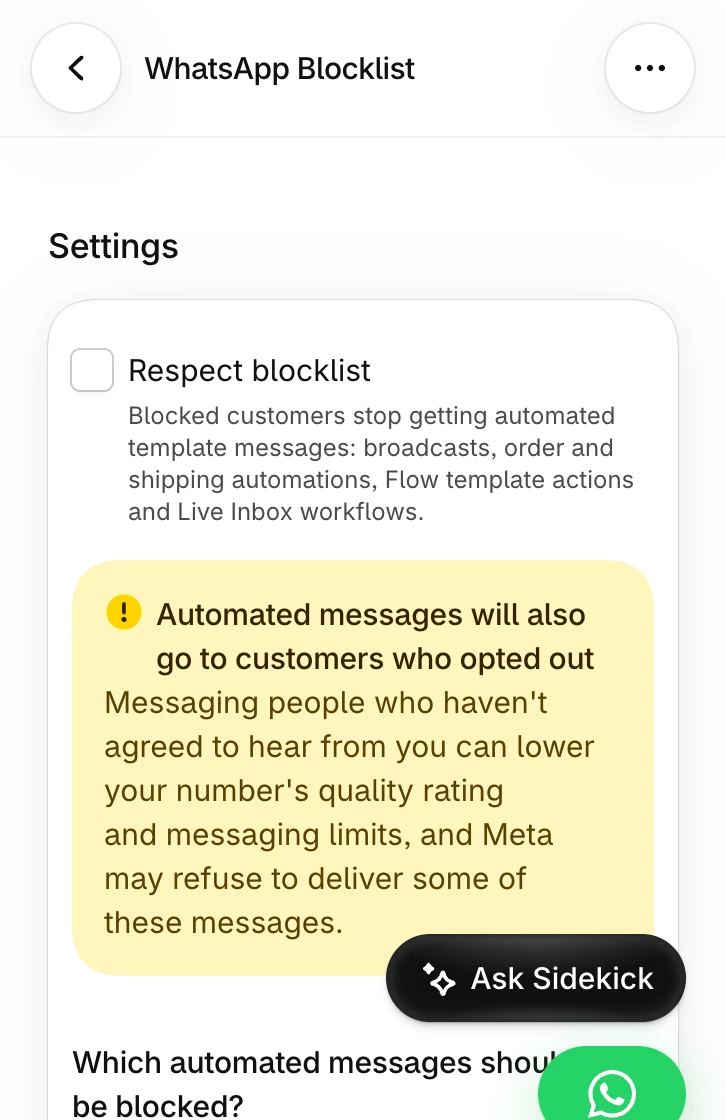
Demo store with suppression off, which triggers the warning. Turn on Respect blocklist and check which message types it covers.
In WhatFlow, the WhatsApp Blocklist handles STOP and START keywords and, with Respect blocklist on, suppresses opted-out numbers across broadcasts, order and shipping automations, Shopify Flow template actions and Inbox workflows, depending on your settings. You can add a number manually when an opt-out arrives by email or phone. The opt-out process guide covers the team side.
Run WhatsApp for your Shopify store with WhatFlow
Free plan available. Templates, COD confirmation, Shopify Flow automations and a shared team inbox with no seat fees. Every feature is included on every plan, including Free.
Name the store, say WhatsApp, say what the messages are, split updates from offers, and put the words right next to the checkbox. Then test it with your own number, all the way to STOP.
Frequently asked questions
What must a WhatsApp opt-in say?
Meta's opt-in guidance says you must clearly state that the person is opting in to receive messages from your business and name the business. Saying what kind of messages they'll get and how to stop isn't strictly required, but it's what keeps people from blocking you.
Does a phone number at Shopify checkout count as WhatsApp opt-in?
No. A phone number collected for the courier is delivery information. You need a separate, clear choice before sending business-initiated WhatsApp messages.
Do I need separate opt-ins for order updates and marketing on WhatsApp?
Meta recommends, but doesn't require, separate opt-in by message category. I'd always split them: customers who only want delivery updates stay subscribed, and your marketing list is made of people who asked for offers.
Can Shopify checkout collect WhatsApp marketing consent?
Yes. Shopify's checkout settings have a Marketing opt-in section with a WhatsApp option you can set to Checkout only, and you can choose which regions see the WhatsApp checkbox and which see SMS.