
Publisher disclosure: this comparison is written by WhatFlow. Competitor capabilities are based on the linked public documentation; the WhatFlow screenshots come from our demo store. Examples are illustrative, and results depend on your store and configuration.
WhatFlow and Paid contact widget at a glance
| Consideration | WhatFlow | Paid contact widget |
|---|---|---|
| What the shopper gets | A WhatsApp button styled to your theme: a floating button and an 'Order via WhatsApp' block for product pages, each with a prefilled message. | A launcher that may offer several channels; quality depends on the vendor and plan. |
| Cost | Free forever. Sending automated messages is a separate, volume-based plan; the button itself costs nothing. | A monthly subscription, often with styling or multi-channel options on higher tiers. |
| What happens after the tap | The chat lands in WhatFlow's team inbox (no seat fees), where staff can share products from the live catalog and reply with saved responses. | Often opens the shopper's WhatsApp to a single phone number; routing and team handling depend on the product. |
| Setup | Turn it on in WhatFlow, then position and customise it in Shopify's Theme Editor (App Embeds and Blocks). No theme code edits. | Varies; some widgets are app embeds, others need a script or snippet. |
| Customisation | Position, greeting bubble, prefilled message, button label, icon and custom logo. | Depends on the plan; some styling is reserved for paid tiers. |
You don't need to pay for a chat widget to put a good WhatsApp button on your Shopify store. WhatFlow's theme-matched WhatsApp buttons are free forever, set up in Shopify's Theme Editor, and every tap lands in a team inbox with no seat fees. Pay for a widget only if you specifically need a launcher that bundles many contact channels.
At a glance
WhatFlow free button | Typical paid widget | |
|---|---|---|
Price | Free forever | Monthly subscription |
Design | Matches your theme; label, icon, logo, greeting bubble | Varies by tier |
Placement | Floating button plus an "Order via WhatsApp" product-page block | Usually floating |
After the tap | Team inbox, no seat fees, catalog sharing | Often one phone number |
Automation behind it | Shopify Flow triggers and actions | Depends on product |
What does WhatFlow's free button actually include?
Two buttons, both free:
- Floating chat button. Shows across the storefront. You set its position, greeting bubble, prefilled message and icon in Shopify's Theme Editor under App Embeds.
- Order via WhatsApp button. A block you add to the product template so shoppers can start a purchase conversation right from the product page. You place it wherever it fits your layout.
You can change button labels, prefilled messages, greeting bubbles and upload your own logo. No theme code edits.
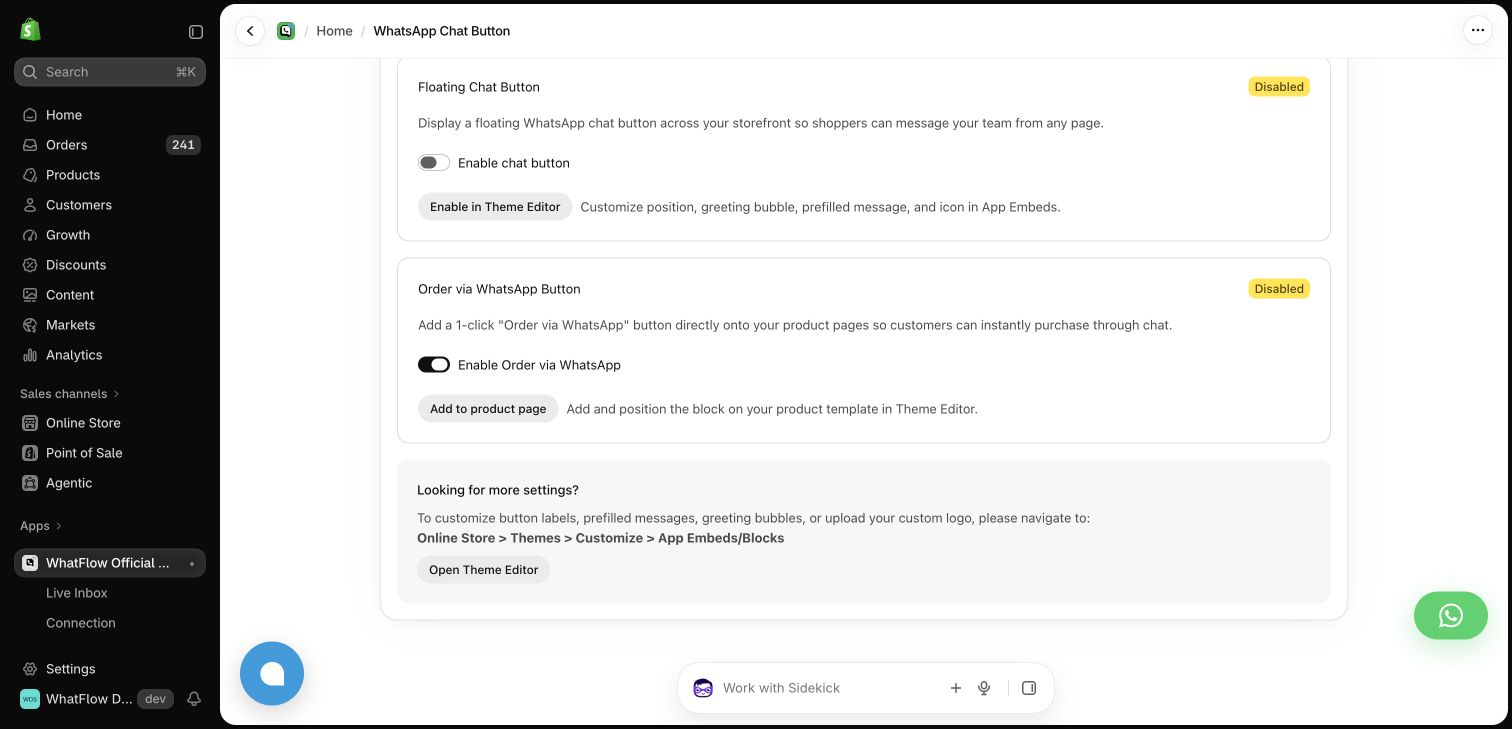
The step-by-step setup is in how to add a WhatsApp chat button to Shopify, and the chat button page shows the options.
One practical check: Who owns the conversation when it moves from sales to support? In WhatFlow, the storefront button can lead into a shared inbox with Shopify order context and catalog sharing. Try the product recommendation workflow after testing the click itself.
What are you really paying for with a paid widget?
Usually three things: a nicer launcher, several channels in one bubble, and styling options. Say a widget costs a hypothetical $9/month. That's $108 a year for an entry point.
With WhatFlow, the entry point is free and the money goes where it actually matters: messaging. If you want automated order updates or COD confirmations, you pick a plan by message volume, starting at $4.99/month with 2,000 messages (as of November 2026), or stay on Free with 100 messages a month. Every feature is on every plan. See the pricing page.
One thing to be clear on: a free button isn't free messaging. When a shopper taps and messages you, that opens a 24-hour customer service window for free-form replies. As of November 2026, Meta doesn't charge for the first 1,000 of those service replies per business number each month, then bills the rest; template messages are billed per message. The 24-hour window explained covers the rule.
Why "what happens after the tap" matters more than the button
A pretty button that opens a chat with one person's phone is a liability. That person goes on holiday, or leaves, and the conversations go with them.
With WhatFlow the tap lands in a shared inbox. Say a shopper on your sneaker product page taps Order via WhatsApp and the prefilled message reads:
Hi! I'd like to order the Runner Low in size 42.
Your teammate sees it in the inbox, checks stock, and replies with the product card from your live catalog plus a quick question:
Great choice. Size 42 is in stock in white and black. Which colour would you like?
That's the difference between a contact icon and a sales conversation. For more on selling this way, see selling over WhatsApp.
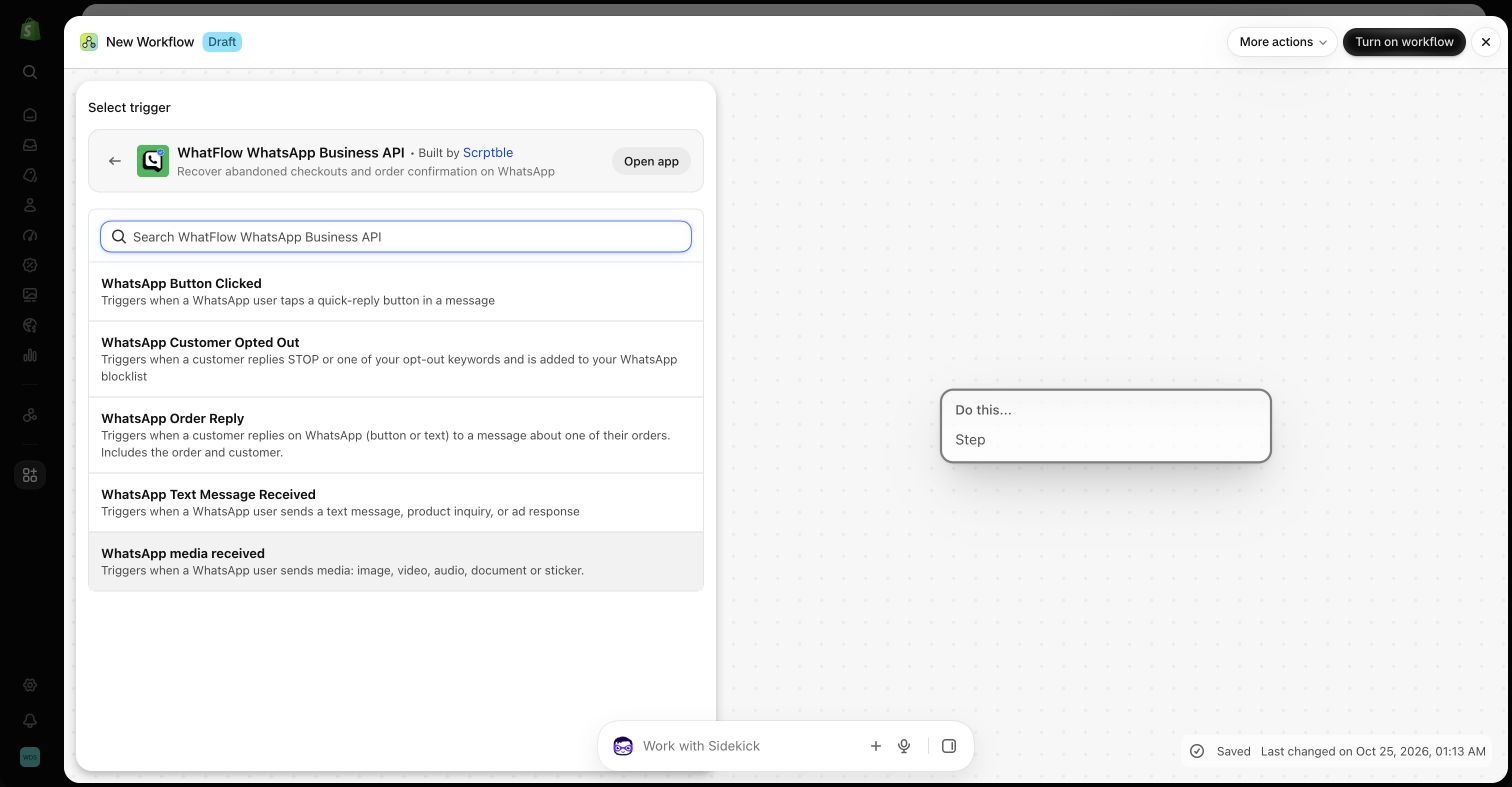
Because WhatFlow adds an incoming-message trigger to Shopify Flow, you can also route chats automatically, for example tagging a customer who asks about wholesale. Routing incoming WhatsApp messages with Flow shows how.
How do I check the button on mobile?
Before you call it done:
- Open a product page on a phone. The button shouldn't cover Add to cart.
- Open the cart drawer. Same check for the checkout button.
- Tap the button. Does the prefilled message make sense for that page?
- Send it. Did it arrive in the inbox your team watches?
Making review widgets and WhatsApp buttons work together on mobile covers layout clashes in detail.
Is a free button a sign of a lightweight app?
No. The button is free; the app behind it is WhatFlow WhatsApp Business API, built on the official Meta WhatsApp Cloud API and ready for large teams: inbox assignment and filters, no seat fees at any team size, Shopify Flow automation, COD confirmation, live catalog sharing and Shopify admin extensions. Small stores start on the Free plan with every feature.
When might a paid widget still make sense?
Pick a paid widget only if you specifically want one launcher that offers many channels at once (say WhatsApp, Instagram, Messenger, phone and email) and you're happy to pay for that bundle. If WhatsApp is how your customers actually reach you, that's extra surface you don't need. WhatFlow vs Chaty looks at one multi-channel widget specifically.
The bottom line
A WhatsApp button should be free, look like your store, and lead somewhere your whole team can answer. WhatFlow does all three, forever, on every plan. WhatFlow WhatsApp Business API is rated 5.0/5 from 55 ratings on the Shopify App Store (as of November 5, 2026).
Questions worth asking
Is there a free WhatsApp button for Shopify?
Yes. WhatFlow's theme-matched WhatsApp buttons are free forever on every plan. You get a floating chat button and an 'Order via WhatsApp' product-page button, both set up in Shopify's Theme Editor.
How do I check a WhatsApp button works well on mobile?
Open a product page and the cart on a phone and make sure the button doesn't cover Add to cart or the checkout button. Tap it, check the prefilled message makes sense, then confirm the chat arrives where your team will see it.
Does WhatFlow's free plan limit the chat button or other features?
No. Every feature is on every plan, including Free, and the buttons are free forever. Plans differ only by how many automated messages are included.
Does a free WhatsApp button mean free WhatsApp messages?
No. The button is free, but Meta bills every delivered template message, and since October 1, 2026 your free-form replies are free only for the first 1,000 per business number each month.
Sources and methodology
We checked these primary sources on November 5, 2026. Vendor pages describe advertised capabilities, rather than independent performance tests. Confirm current pricing, plan limits and availability with each provider.
- WhatFlow plans and Shopify integrations
WhatFlow listing: storefront WhatsApp chat button and plan details, checked November 5, 2026. Free-forever button confirmed by WhatFlow.
- WhatsApp Business Platform pricing
Meta's overview of WhatsApp Business Platform pricing; service replies differ from billed template messages.
- WhatsApp Business Platform pricing (Meta developer docs)
Meta charges per delivered template message by category and recipient country. Since October 1, 2026, service replies are free only for the first 1,000 per business number each month, and utility templates inside the customer service window are charged.