Selling on WhatsApp works best when you run it like a good shop floor, not like a support queue. Greet the customer quickly, ask one or two questions about what they need, recommend a specific product with a reason, answer the objection behind the hesitation, then send a clear link to Shopify checkout. The habits are old. The medium is new.
I talk to merchants every week who get dozens of WhatsApp messages a day and still treat them as tickets to close. "Price?" gets answered with a price. "Available in blue?" gets "yes". The customer goes quiet, and the store calls it a lost lead. A decent shop assistant would never sell like that, and you shouldn't either.
Why does selling on WhatsApp feel different from a product page?
A product page talks to everyone. A WhatsApp chat talks to one person who has already raised their hand. That's the whole advantage, and most stores waste it by replying with what the product page already says.
Think about what happens when someone walks into a shop. The assistant notices them, says hello, asks what brings them in, listens, points them to two options instead of twelve, deals with the "hmm, it's a bit expensive" moment, and walks them to the till. Every one of those steps has a chat equivalent.
For a shopper asking which size or variant fits, use WhatFlow's product picker to share the relevant catalog item from the conversation. With catalog cart follow-up configured, WhatFlow can send back a Shopify checkout link. Check Shopify before treating the WhatsApp cart as a paid order. The catalog-to-checkout walkthrough shows the test sequence.
One recommendation, with a reason, plus a product link or catalog item
Handling "it's a bit much"
Answering the real objection: price, fit, delivery, trust
Walking them to the till
A checkout link and a clear next step
"Come back and tell me how it went"
A post-delivery check-in or review request
Habit 1: Greet like a person, fast
The first reply sets the tone. Customers on WhatsApp expect speed, and a reply 6 hours later often lands after they've bought somewhere else. If you can't staff evenings, say so honestly with an away message rather than leaving people in silence. Our guide on how fast to reply on WhatsApp has realistic targets for small teams.
Keep the greeting short and do something useful in the same message:
Hi Aisha, Bilal here from Loom & Thread. Thanks for the photo of the linen shirt. Are you shopping for yourself, or is it a gift?
Compare that with "Welcome to Loom & Thread! How may I assist you today?" which tells the customer nothing and asks them to repeat themselves.
Habit 2: Ask before you recommend
In a shop, you'd never hand someone a jacket before knowing whether they want it for winter or for a wedding. In chat, people skip this because typing feels slow. Ask anyway, but ask little. One or two questions, ideally ones the customer can answer in a word or two.
Good qualifying questions by situation:
Size or fit: "What size do you usually take in jeans, and do you like them loose or fitted?"
Use case: "Is this for daily use or for travel?"
Timeline: "Do you need it by a certain date?"
Budget (gently): "Do you have a price range in mind, or should I show you the full range?"
Notice what's missing: "Can I have your email?" Don't collect data the sale doesn't need.
Habit 3: Listen for the real question
Customers rarely ask what they mean. "Is this cotton?" often means "will it be hot in July?" "How long is delivery?" often means "will it arrive before Saturday?" Answer the literal question, then the one underneath it.
Yes, it's 100% cotton. It's a heavier 280gsm weave, so it's great for autumn but warm in peak summer. If you want something for July, the lighter poplin version is the one I'd pick.
This is also where your chat inbox becomes market research. If five people a week ask whether the serum smells strong, your product page is missing a line. I wrote more about that loop in using pre-purchase WhatsApp questions to improve product pages.
Habit 4: Recommend one thing, with a reason
Choice paralysis is real in chat. Ten links in a row feels like homework. Recommend one product, maybe two, and say why it fits what they told you.
Based on what you said (size 10, loose fit, mostly for work), I'd go with the Ava wide-leg in navy. It runs true to size and the fabric doesn't crease on the commute. Here it is: [product link]
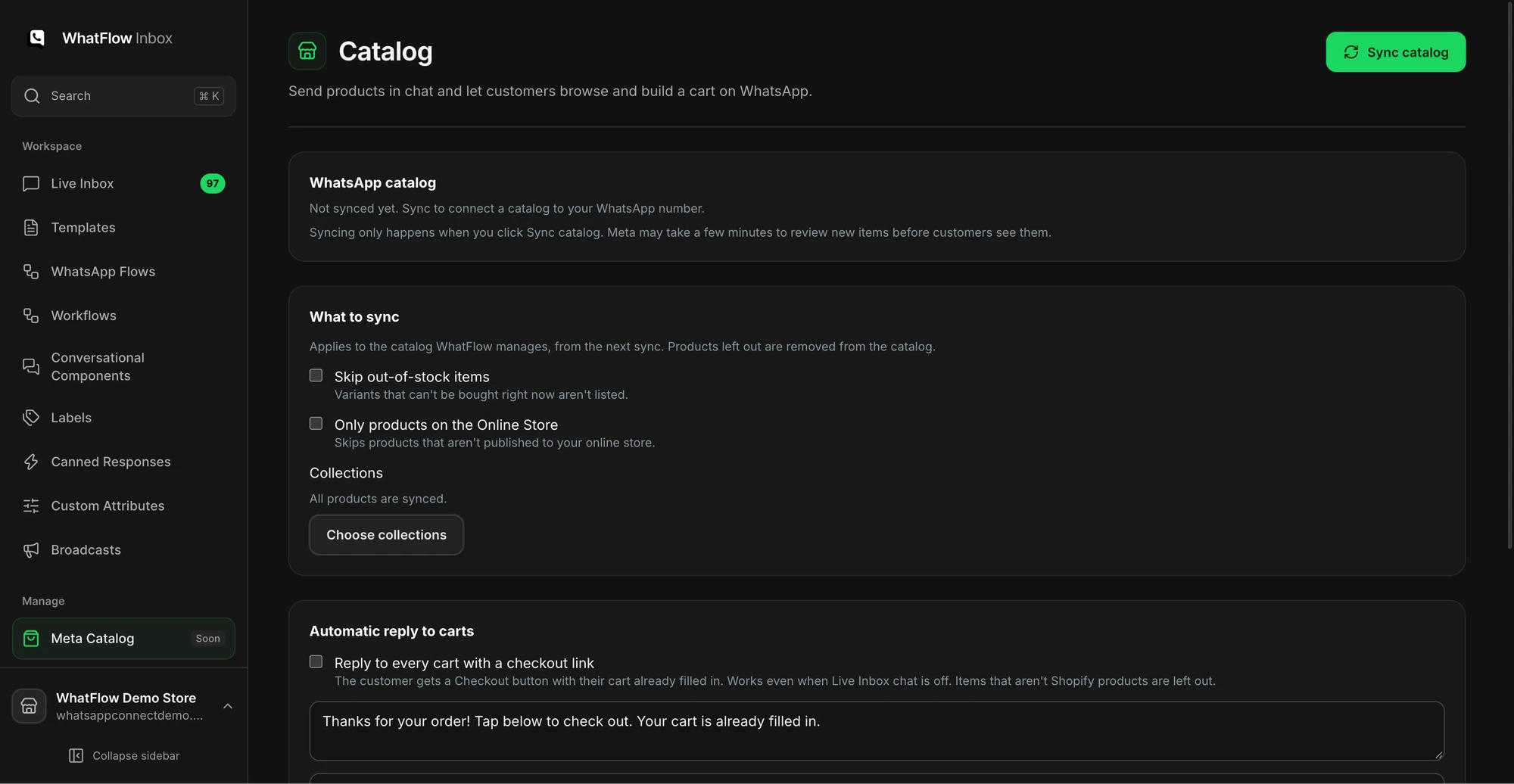
If you've connected your Meta product catalog, you can share the product straight from the inbox so the customer sees the photo, price and name in the chat. We built live catalog sharing into WhatFlow for exactly this moment; this guide to WhatsApp catalog sharing covers the setup.
The catalog screen shows sync options and the collection picker before products are synced.
Add-ons work the same way. Suggest the thing that makes the main purchase work better (the case for the phone, the refill for the diffuser), not whatever has the highest margin. More on that in cross-sell recommendations that actually help.
Habit 5: Handle objections without arguing
Hesitation is normal. In a shop, you'd see it on someone's face. In chat, it shows up as "ok let me think" or silence. Name the most likely objection and answer it once, plainly.
"It's a bit expensive"
Don't jump to a discount. Explain what the price buys, or offer a cheaper option honestly.
Fair question. The difference is the full-grain leather, which softens instead of cracking. If you'd rather keep it under 5,000, the Mira bag in coated canvas is a solid choice and looks very similar.
"Will it arrive in time?"
Give a real range from your shipping settings, not a hopeful guess.
If you order before 3pm today, it ships tomorrow. Delivery to Lahore is usually 2 to 4 working days, so Saturday is likely but not guaranteed. Want me to check if express is available for your area?
"What if it doesn't fit?"
Explain the exchange process in one message. The confidence of a simple answer sells more than a long policy link.
If it doesn't fit, message us here within 14 days and we'll arrange an exchange. You just send it back unworn with the tags on.
"Is this store legit?"
Common in markets where COD is the norm, and fair given how many fake stores exist. Offer proof, not adjectives: your reviews page, your business address, the option to pay on delivery if you offer it.
Habit 6: Close with a clear next step
This is where most chat sales fall over. The customer is convinced, and the conversation just ends. Always finish with a single, specific action.
Great choice. Here's the direct link with the navy in size 10 already selected: [link]. If you'd rather pay cash on delivery, choose COD at checkout and we'll send you a WhatsApp message to confirm before it ships.
For custom bundles or special pricing, create a draft order in Shopify and share its checkout link. Shopify's Help Center explains how to copy a draft-order checkout link and paste it into a messaging app. The customer still pays on Shopify checkout. WhatFlow doesn't take payments inside WhatsApp, and honestly you don't want it to: Shopify checkout is where your payment methods, taxes and fraud checks already live.
What happens if the customer goes quiet?
Here's the platform rule you need to know. On the WhatsApp Business API, the customer service window is the 24 hours after a customer's last message. Inside it, you can reply with any free-form message. Outside it, Meta only lets you send a pre-approved template message, and you need the customer's opt-in for anything promotional. Our explainer on the WhatsApp 24-hour window covers the details, and Meta's pricing page shows how each message type is billed as of November 2026.
So the follow-up has to come inside the window, and it has to add something. One good follow-up:
Hi Aisha, quick update: the navy Ava is down to the last two in size 10. No pressure at all, just didn't want you to miss it if you were still deciding.
Only send that if it's true. Invented scarcity is the fastest way to lose trust in a channel where people know you personally.
One person on one phone doesn't scale past a few dozen chats a day. You need three things.
A shared inbox. Everyone sees the same conversations, and each chat has an owner. WhatFlow's team inbox has no seat fees, so adding your weekend helper doesn't add a monthly charge.
Saved replies for the boring parts. Shipping times, exchange policy, COD steps. Write them once so your team spends their energy on the personal bits. Keep them editable, not robotic: this guide to saved replies shows how.
Clear handoffs. If a chat needs the owner (a bulk order, a complaint), assign it rather than shouting across the room.
A quick daily habit: at closing time, filter the inbox for unanswered chats and conversations where a link was sent but nothing came back. Those are your warmest leads.
Free plan available
Run WhatsApp for your Shopify store with WhatFlow
Templates, COD confirmation, Shopify Flow automations and a shared team inbox with no seat fees. Every feature is included on every plan, including Free.
You don't need a sales course. Pick the habit your team skips most (usually asking a question before recommending, or forgetting to close with a link) and write two saved replies for it today. Then read ten chats on Friday and see if the conversations changed. If you sell bigger-ticket items, the same habits stretch over a longer timeline; selling high-ticket products over WhatsApp picks it up from there.
Frequently asked questions
How do I start selling on WhatsApp as a Shopify store?
Add a WhatsApp chat button to your product pages, connect a shared inbox so the whole team can answer, and send buyers to your Shopify product page or a draft-order checkout link when they're ready to pay. Most sales start with a customer question, so fast, specific answers matter more than broadcasts.
Can customers pay inside WhatsApp?
Not through WhatFlow. You send the customer a product link, a cart link or a Shopify draft-order checkout link, and they pay on Shopify checkout (or choose cash on delivery if you offer it).
What should I say first when a customer messages my store on WhatsApp?
Greet them by name if you have it, say who is replying, and answer or ask one useful question in the same message. Skip the long welcome script; the customer already told you why they're there.
How long can I keep chatting with a customer on WhatsApp?
You can reply freely for 24 hours after the customer's last message. After that, the WhatsApp Business API only lets you send a pre-approved template message until they reply again.
Is it pushy to follow up on WhatsApp after a customer goes quiet?
One follow-up with something new (an answer, a photo, a stock update) is helpful. Repeated 'just checking in' messages are what get businesses blocked.