
Publisher disclosure: this comparison is written by WhatFlow. Competitor capabilities are based on the linked public documentation; the WhatFlow screenshots come from our demo store. Examples are illustrative, and results depend on your store and configuration.
WhatFlow and WhatsApp (Shopify app by Meta) at a glance
| Consideration | WhatFlow | WhatsApp (Shopify app by Meta) |
|---|---|---|
| WhatsApp connection | Official Meta WhatsApp Cloud API through Meta Embedded Signup inside Shopify admin. | Official app from Meta that connects your WhatsApp Business account to Shopify. |
| What it's built to do | Run WhatsApp sales, order operations and support for a Shopify store, end to end. | Send order updates and abandoned cart marketing messages to opted-in shoppers. |
| Pricing | Free plan (100 messages); paid plans from $4.99/month. Meta fees separate. | Free to install; Meta bills WhatsApp messaging fees separately from the Shopify invoice (as of November 2026). |
| Team inbox | Shared inbox with assignment, filters and saved replies, and no seat fees. | Not described on the Shopify App Store listing. |
| Shopify Flow | Native triggers (incoming message, order reply) and actions (template, text, media). | Not described on the listing. |
| COD confirmation | Template with reply buttons that tag or cancel the Shopify order through Flow. | Not described on the listing. |
| Broadcasts and campaigns | Broadcasts to opted-in customers on every plan. | Abandoned cart marketing campaigns; general broadcasts not described. |
| Catalog sharing and chat button | Live catalog sharing from the inbox, plus free-forever theme-matched WhatsApp buttons. | Not described on the listing. |
| Shopify App Store rating | 5.0 out of 5 from 55 ratings (WhatsApp Business API, November 5, 2026). | 4.4 out of 5 from 940 reviews (WhatsApp by Meta, November 5, 2026). |
| Best fit | Stores that want WhatsApp to handle orders, COD, campaigns and support with a team, from day one to enterprise scale. | Stores that only want automated order updates and cart reminders, with no inbox or Flow automation. |
Meta's own WhatsApp app for Shopify is a free, simple way to send order updates and abandoned cart reminders. WhatFlow runs on the same official Meta Cloud API and does far more: a shared team inbox with no seat fees, COD confirmation, broadcasts, live catalog sharing, native Shopify Flow triggers and actions, and free theme-matched chat buttons. If WhatsApp is where your store sells and supports customers, WhatFlow is the better pick.
This comparison also clears something up. Because our older linked-device app, WhatFlow Chat Automation, came first, people still assume WhatFlow is unofficial. It isn't. WhatFlow WhatsApp Business API is on Meta's official Cloud API, exactly like Meta's app, and it's rated 5.0 on the Shopify App Store.
WhatFlow vs Meta's WhatsApp app at a glance
WhatFlow WhatsApp Business API | WhatsApp (by Meta) | |
|---|---|---|
Connection | Official Meta Cloud API | Official Meta app |
Order updates | Yes | Yes |
Abandoned cart messages | Yes | Yes |
COD confirmation with order tagging | Yes, via Flow | Not described |
Team inbox | Yes, no seat fees | Not described |
Broadcasts | Yes | Cart campaigns only described |
Shopify Flow triggers and actions | Yes | Not described |
Catalog sharing | Yes | Not described |
App price | Free plan; from $4.99/month | Free to install |
Shopify rating (Nov 5, 2026) | 5.0 (55 ratings) | 4.4 (940 reviews) |
What does Meta's WhatsApp app do?
Meta's Shopify App Store listing, launched July 11, 2025, describes two jobs: sending order updates and sending abandoned cart marketing messages to shoppers who opt in. You connect your WhatsApp Business account, customise messages or use pre-built templates, and it runs automatically. It's free to install, and Meta bills its messaging fees separately from your Shopify invoice.
That's a clean, useful product, and it's good for the whole ecosystem that Meta built it. For a store that only wants "your order shipped" messages, it does the job.
Where does WhatFlow go further?
Everything after the first message. Customers reply on WhatsApp. They ask about sizes, change addresses, confirm COD orders, and want to talk to a person. Meta's listing doesn't describe an inbox, Shopify Flow, COD confirmation or catalog sharing. WhatFlow is built around all of them, on every plan:
- Team inbox: one official number shared by your whole team, with assignment, filters and saved replies. No seat fees, so 3 people or 30 cost the same in seats. See the inbox.
- COD confirmation: a template with reply buttons. The customer's tap fires WhatFlow's order-reply trigger in Shopify Flow, which tags or cancels the order.
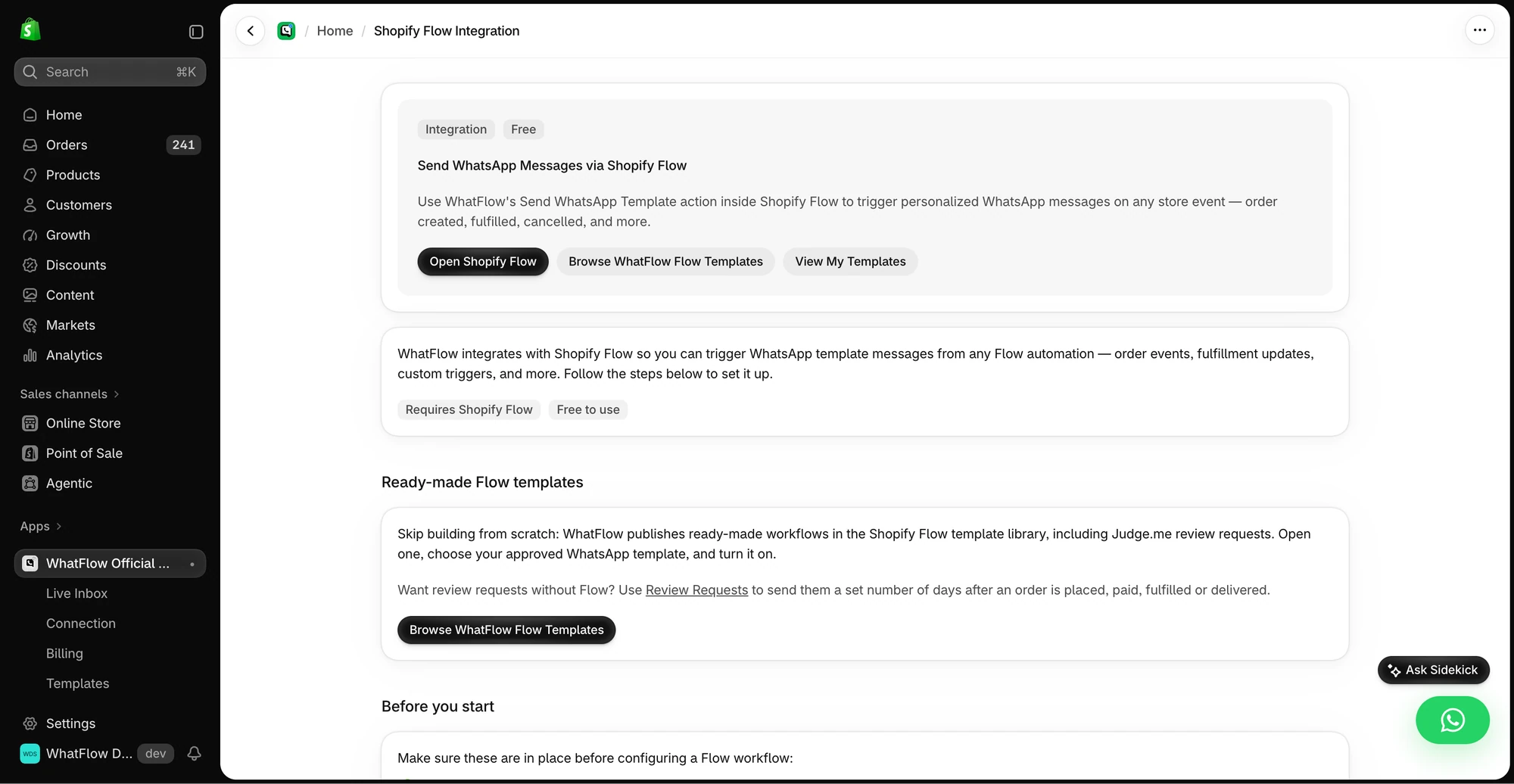
- Shopify Flow: native triggers (incoming message, order reply) and actions (send template, text, media), so you can build any WhatsApp automation without code. Shopify Sidekick can help you draft them. Our Flow automation guide shows how.
- Broadcasts: campaigns to opted-in customers, not only cart reminders.
- Catalog sharing: send live product cards from the inbox. Here's how stores use it for support.
- Theme-matched WhatsApp buttons: free forever, styled to your theme. See chat buttons.
- Admin extensions: WhatsApp actions right next to the order in Shopify admin.
Here's a COD flow that's routine in WhatFlow:
Hi Nadia, thanks for your order #7741 (Velvet Abaya, SAR 320, cash on delivery). Tap Confirm and we'll ship today, or Cancel to cancel.
She taps Confirm, Flow tags the order "cod-confirmed," and your warehouse filters on that tag. If she replies "can you deliver after 5pm?", it lands in the shared inbox and whoever owns that conversation answers.
How do the costs compare?
Meta's app is free to install. WhatFlow's Free plan is free too, with every feature and the first 100 messages. After that:
- Starter, $4.99/month: 2,000 messages
- Plus, $9.99/month: 5,000 messages
- Growth, $29/month: 20,000 messages
- Scale, $49.99/month: 40,000 messages
Meta's per-message fees apply with either app, since both send on the official platform. Since October 1, 2026, only the first 1,000 service messages per business number each month are free, and utility templates inside an open customer service window are charged. Meta's pricing doc has the details, and our WhatsApp Business API pricing guide explains them.
So the honest framing: for a few dollars a month, WhatFlow adds a team inbox, COD confirmation, broadcasts, catalog sharing and Shopify Flow to the same official connection. Current amounts are on our pricing page.
Is WhatFlow ready for large teams?
Yes. WhatFlow is built for teams from 1 to 100: assignment and filters so every conversation has an owner, saved replies for consistent answers, Flow automation for routing and tagging at volume, and no seat fees at any size.
When might Meta's app be enough?
Pick Meta's app only if you want automated order updates and cart reminders and nothing else: no team replying to customers, no COD confirmation, no Flow automation. If that changes, WhatFlow sits on the same official API.
The bottom line
Meta's WhatsApp app proves the official API is the right foundation for Shopify. WhatFlow builds the rest of the house on it: team inbox with no seat fees, COD confirmation, broadcasts, catalog sharing and Shopify Flow automation, with every feature on every plan and a 5.0 rating. Start free and see the difference on your first COD order.
Questions worth asking
Does Meta have its own WhatsApp app for Shopify?
Yes. Meta publishes an app called WhatsApp on the Shopify App Store, launched July 11, 2025. It sends order updates and abandoned cart marketing messages to opted-in shoppers, and it's free to install with Meta's messaging fees billed separately.
Is WhatFlow on the official WhatsApp API too?
Yes. WhatFlow WhatsApp Business API runs on the official Meta Cloud API and connects through Meta Embedded Signup from Shopify admin. It adds a team inbox, COD confirmation, broadcasts, catalog sharing and Shopify Flow automation on top.
Should I use Meta's WhatsApp app or WhatFlow?
Use Meta's app if you only need order updates and cart reminders. Choose WhatFlow if you want to answer customers as a team, confirm COD orders, run broadcasts and automate WhatsApp with Shopify Flow, with no seat fees and every feature on every plan.
Does WhatFlow cost more than Meta's free app?
WhatFlow has a Free plan with every feature and 100 messages, and paid plans from $4.99 a month for 2,000 messages. Meta's app has no subscription. Meta's per-message fees apply to both.
Sources and methodology
We checked these primary sources on November 5, 2026. Vendor pages describe advertised capabilities, rather than independent performance tests. Confirm current pricing, plan limits and availability with each provider.
- WhatsApp (by Meta) on the Shopify App Store
Meta's app description, features (order updates, abandoned cart marketing), launch date, pricing note and its 4.4/5 rating from 940 reviews, checked November 5, 2026.
- WhatFlow WhatsApp Business API on the Shopify App Store
WhatFlow plans, included messages and the 5.0/5 rating from 55 ratings, checked November 5, 2026.
- WhatsApp Business Platform pricing documentation
Meta's per-message pricing, including the October 1, 2026 changes to free service messages.
- WhatsApp Business Messaging Policy
Opt-in requirements and template rules for business-initiated WhatsApp messages.