The best Shopify live chat app depends on where your customers already talk. If they live on WhatsApp, WhatFlow is the WhatsApp-first pick: a shared team inbox with no seat fees and a Free plan. For a free on-site widget, Shopify Inbox is the default. Tidio and Chatway are strong website chat tools that also pull in WhatsApp and social DMs.
I'm Safwan, co-founder of WhatFlow, so read this knowing we're on the list. I've tried to be fair: website live chat is a good tool, and for plenty of stores it's the right one. But every week I talk to merchants in India, Pakistan, the Gulf and Brazil who installed a chat widget, watched it sit quiet, and then found their customers had been messaging the owner's personal WhatsApp all along. That's the gap this list is written around.
How we picked
On November 18, 2026 I opened every app's Shopify App Store listing and took the rating, review count, plans and channels straight from it. If I couldn't verify an app on its listing that day, it didn't make the list. Ratings and prices below are as of November 2026 and they move, so check the listing before you buy. WhatFlow is our app; I've put it first because this post is written for stores where WhatsApp is the main channel, and I've said plainly where it isn't the right fit. I haven't run every app below in production, so the limitations come from what each listing says, not from hands-on benchmarks.
Live chat, email, WhatsApp, Instagram, Messenger, SMS, phone
Gorgias
Chat inside a full Shopify helpdesk
$10/mo
4.3 (709 reviews)
Live chat, email, SMS, phone, social
LiveChat
Polished chat for established teams
$25/mo
4.4 (49 reviews)
Live chat; works with WhatsApp, Messenger, Instagram
tawk.to
Free chat with no frills
Free
3.7 (90 reviews)
Live chat
How to choose a Shopify live chat app
Start with four questions. They'll cut this list to two or three apps quickly.
Where do your customers already message you? If you sell in markets where WhatsApp is the default way to talk to a shop, an on-site widget asks people to switch habits. A WhatsApp button doesn't. If most of your buyers are in the US and don't use WhatsApp much, a website widget is the safer start. We go deeper on this in WhatsApp vs website live chat.
What happens when the visitor leaves? Website chat works best while the shopper is on the page. A WhatsApp thread stays in the customer's phone, so they can reply an hour later from the bus. One catch: outside the 24-hour customer service window, WhatsApp only lets a business start a conversation with a Meta-approved template, which is explained in how the 24-hour window works across support shifts.
How will the bill grow? Apps here charge in different units: per seat (Crisp), per conversation (Tidio, Willdesk, Chatway's free tier), per ticket (Gorgias) or per message allowance (WhatFlow). Work out what 500 chats a month with three people answering costs on each before you commit.
Do you want built-in AI or your own? Tidio, Shopify Inbox, Gorgias and Crisp sell AI agents inside the app. WhatFlow connects to the AI you already pay for instead.
1. WhatFlow WhatsApp Business API
Who it's for: Shopify stores whose customers prefer WhatsApp, from a two-person shop to a support team of fifty.
WhatFlow is built on the official Meta WhatsApp Cloud API. Customers tap a WhatsApp button on your store, the chat opens in their own WhatsApp app, and your team answers from a shared inbox inside Shopify admin. The inbox has assignment, filters, labels and saved replies, and there are no seat fees on any plan, so adding your fifth or fiftieth agent doesn't change the subscription. The team inbox also lets agents share live products from your Meta catalog mid-conversation, which matters when someone asks "do you have this in blue?"
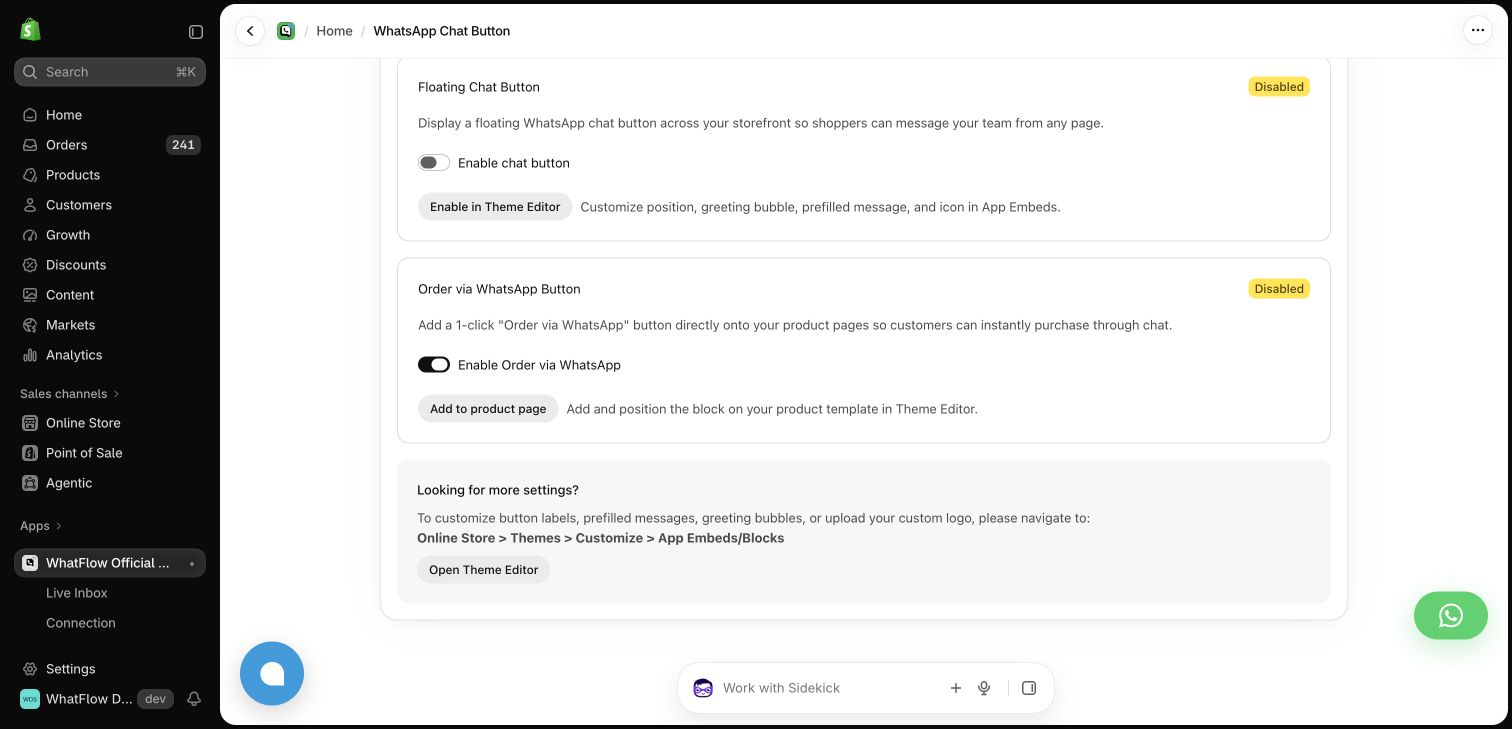
WhatFlow chat button settings in a demo store: a floating button and a product-page button, each opening the Theme Editor.
Beyond chat, the same app sends order and shipping updates, abandoned checkout reminders and COD confirmations, and it has native Shopify Flow triggers and actions. There's no built-in AI bot. Instead, WhatFlow plugs into Shopify Sidekick and, through the WhatFlow MCP connector, lets Claude, ChatGPT or Cursor draft replies that a person approves before anything is sent.
Assignment filters in the WhatFlow inbox, shown in a demo store with sample data.
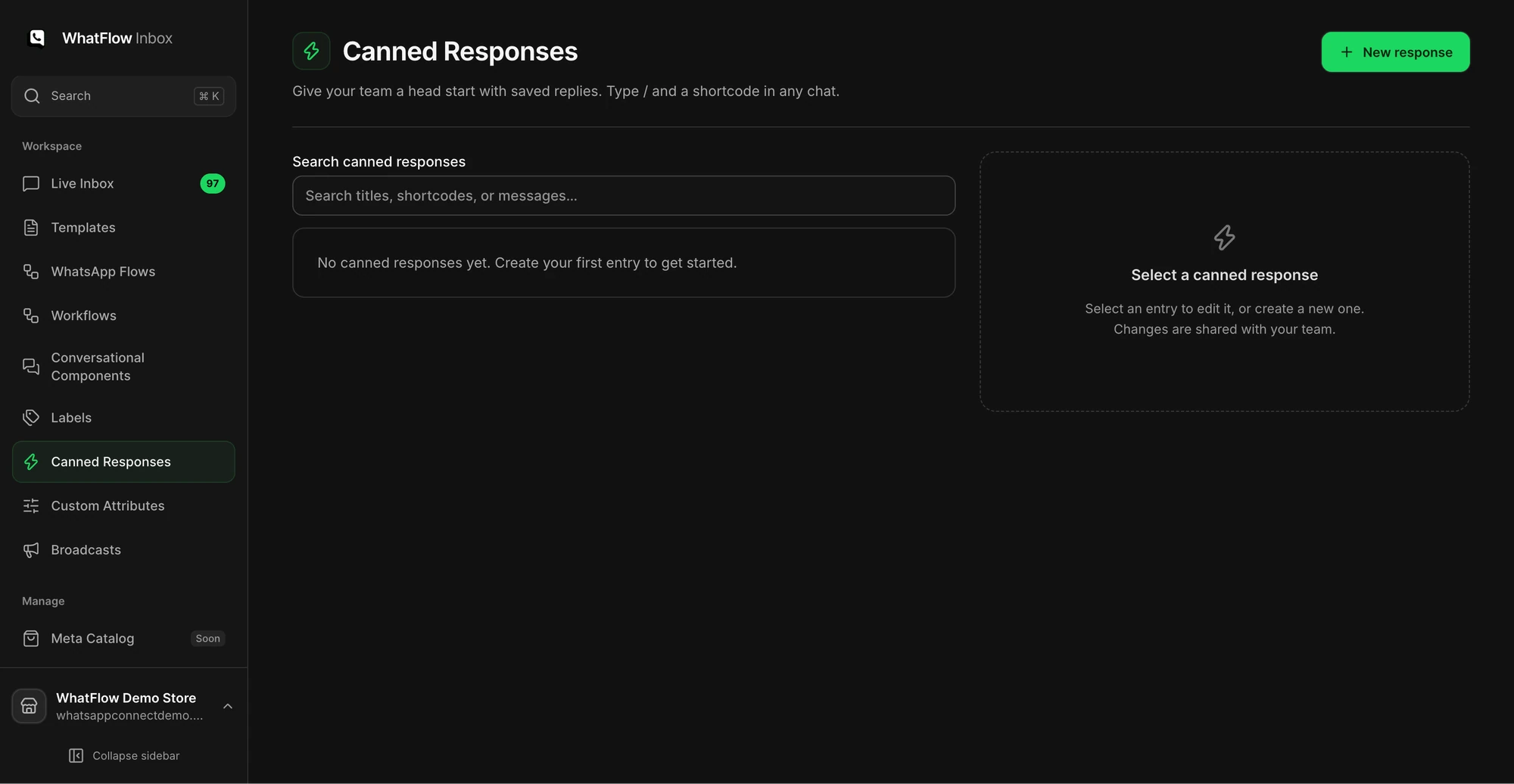
Saved replies do most of the heavy lifting in live chat. Say three people on your team get "how long does delivery take to Jeddah?" twenty times a day. Write the answer once as a canned response and every agent sends the same accurate reply in two taps:
Hi! Orders to Jeddah usually arrive in 3–5 working days after dispatch. You'll get a WhatsApp message with tracking as soon as your parcel leaves us.
The canned responses screen in the WhatFlow Inbox, in a demo store.
Pricing and rating (as of November 2026): a Free plan with every feature, and paid plans from $4.99/month that differ only by messaging allowance; see WhatFlow pricing. Meta bills WhatsApp's own message charges separately at cost. Rated 5.0/5 from 85 ratings on the Shopify App Store when we checked on November 24, 2026.
Honest limitation: WhatFlow is WhatsApp only. It doesn't give you an on-page chat window, an email inbox or Instagram DMs. If a big share of your shoppers don't use WhatsApp, pair it with a website chat or pick a multichannel tool below.
2. Shopify Inbox
Who it's for: stores that want free on-site chat, managed from Shopify, with no setup.
Shopify Inbox is Shopify's own chat app. Its listing now leads with an AI agent that connects to your catalog, inventory and policies automatically, follows the tone and rules you set, and improves as you rate its chats. Built-in analytics report orders assisted and buyer satisfaction. Conversations come from your online store and are answered in Shopify admin.
Pricing and rating (as of November 2026): free. Rated 4.5 from 5,820 reviews, by far the largest review base on this list.
Honest limitation: the listing names only the online store and Shopify admin as channels, so customers who'd rather message you on WhatsApp or Instagram aren't covered here. We compared the two directly in WhatFlow vs Shopify Inbox.
3. Tidio
Who it's for: stores that want a website chat widget, an AI chatbot and basic ticketing in one product.
Tidio's listing describes an AI sales agent that can recommend products and add them to the cart, sales automations such as cart recovery with discount codes, an email helpdesk with ticketing in a unified inbox, a customer-service chatbot for FAQs and order tracking, and a help centre. Channels listed are live chat, email, Instagram, WhatsApp and Messenger. It's available in six languages.
Pricing and rating (as of November 2026): a Free plan; Customer Service from $29/month for 100 conversations (or $59 for 250 to 1,000); Flows from $29/month; and the Lyro AI Chatbot from $39/month for up to 200 Lyro conversations. Paid plans include a 7-day trial. Rated 4.8 from 1,360 reviews.
Honest limitation: chat, automation and AI are priced as separate products with their own conversation caps, so the monthly cost depends on volume and on how much you lean on Lyro. See WhatFlow vs Tidio for how that compares with a message-allowance plan.
4. Chatway
Who it's for: small stores that want a low-cost widget plus WhatsApp, Messenger, Instagram and email in one inbox.
Chatway, from Premio, lets agents see Shopify cart, order and coupon data from the chat inbox. The listing includes an AI chatbot and AI agent, iOS and Android apps, canned responses and FAQs. It says you can manage live chat, WhatsApp Business, Messenger, Instagram DMs and email together.
Pricing and rating (as of November 2026): a Free plan with 1 seat and 50 conversations a month; Business at $39/month; Plus at $199/month. Paid plans have a 14-day trial. Rated 4.9 from 284 reviews.
Honest limitation: the free plan is a single seat and 50 conversations, so a team will move to a paid plan quickly.
5. Willdesk
Who it's for: stores that want chat, a help centre and order tracking from one app.
Willdesk, by Channelwill, combines live chat, a contact form and order tracking on the free plan. Paid plans add an AI chatbot that can handle order tracking, returns, cancellations and address updates, plus ticketing, a workflow builder, a help centre and multi-store support. Channels include email, live chat, Instagram, Messenger and WhatsApp, and it lists 20 languages.
Pricing and rating (as of November 2026): a Free plan with 20 conversations and unlimited agents; Basic at $16.90/month for 100 conversations; Pro at $89.90/month for 1,000 conversations. Paid plans have a 7-day trial, and overages are listed per 100 conversations and per AI conversation. Rated 4.7 from 376 reviews.
Honest limitation: everything is metered by conversation, including separate AI-conversation charges, so a busy sale week can push you into overage.
6. Crisp
Who it's for: teams that want one shared inbox across many channels and are happy to pay by seat tier.
Crisp's listing says it centralises 12 channels, naming email, WhatsApp, Instagram DMs, Messenger and phone. Features include AI chatbots, a multichannel AI agent, ticketing, auto-assign, triggers, order tracking and reports. It's available in 16 languages.
Pricing and rating (as of November 2026): Free (2 seats, website chat); Mini at $45/month (4 seats, adds Messenger); Essentials at $95/month (10 seats, adds WhatsApp, Instagram and SMS); Plus at $295/month (20 seats). Paid plans have a 14-day trial. Rated 4.0 from 34 reviews.
Honest limitation: WhatsApp only arrives on the $95 Essentials plan, and the rating sits on a small number of reviews. More in WhatFlow vs Crisp.
7. Gorgias
Who it's for: stores that need live chat as part of a full helpdesk with Shopify order actions.
Gorgias is a Shopify-native helpdesk where agents can edit, refund and cancel orders inside a ticket. The listing highlights an AI Agent for FAQs and order questions, an AI Shopping Assistant, rules, macros, auto-tagging and revenue tracking. Channels listed are email, SMS, live chat, phone and social media.
Pricing and rating (as of November 2026): Starter at $10/month (3 agents, 50 tickets); Basic at $60/month (300 tickets); Pro at $360/month; Advanced at $900/month. Each plan has a 7-day trial and the AI Agent is an add-on. Rated 4.3 from 709 reviews.
Honest limitation: billing is by ticket, so cost tracks support volume closely, and the listing doesn't name WhatsApp among its channels. If you're weighing the two, read WhatFlow vs Gorgias.
8. LiveChat
Who it's for: established teams that want a mature, polished chat widget with many integrations.
LiveChat (by Text) lists an AI Copilot for suggested replies, proactive engagement, product recommendations that link to product pages, checkout chat support and more than 200 integrations. It works with WhatsApp, Messenger, Instagram and Zapier.
Pricing and rating (as of November 2026): Starter at $25/month, Team at $59/month, Business at $89/month, each with a 14-day trial. Rated 4.4 from 49 reviews.
Honest limitation: there's no free plan, so it's harder to try at low volume than most apps here. See WhatFlow vs LiveChat.
9. tawk.to
Who it's for: very small stores that want a free widget and don't mind a plainer tool.
tawk.to lets you manage Shopify orders from chats and tickets, set greetings by triggers such as location or past visits, use canned shortcuts and keep an unlimited CRM. It has desktop and mobile apps.
Pricing and rating (as of November 2026): free. Rated 3.7 from 90 reviews.
Honest limitation: it has the lowest rating on this list, and the listing doesn't set out channels beyond the website chat.
Which should you choose?
Say you sell modest fashion from Lahore, most orders are COD, and customers already send voice notes asking about sizes. Put WhatFlow's free WhatsApp button on product pages and answer from the shared inbox. A website widget would mostly sit unused.
Now say you sell supplements to US customers who browse on desktop at work. Start with Shopify Inbox because it's free, and move to Tidio or Gorgias once you need ticketing or automation.
A few more rules of thumb:
WhatsApp is your main channel: WhatFlow. You get the inbox, templates, order messages and Flow automation in one app, and adding agents doesn't add seats. Our breakdown of no-seat-fee inboxes vs per-seat pricing shows the maths for a growing team.
You want free website chat: Shopify Inbox, or tawk.to if you need something outside Shopify's tools.
You want one widget for web, WhatsApp and social: Tidio, Chatway or Willdesk on a budget; Crisp if you want seat-based plans.
Chat is one part of a bigger support operation: Gorgias, and compare it with dedicated helpdesks such as Zendesk and Re:amaze.
Plenty of stores run two of these: a website widget for desktop browsers and WhatsApp for everyone who'd rather message from their phone. That's a sensible setup, as long as one person owns each queue.
Run WhatsApp for your Shopify store with WhatFlow
Free plan available. Templates, COD confirmation, Shopify Flow automations and a shared team inbox with no seat fees. Every feature is included on every plan, including Free.
Website chat apps usually charge only the app fee. WhatsApp has a second line item: Meta charges per delivered template message, and as of October 1, 2026, free-form service replies inside the 24-hour window are free for the first 1,000 per business phone number each month, then charged at the utility rate (Meta's pricing page has the details). For most small stores answering customer questions, that free tier covers a lot of chat. The country rate table on our pricing page shows what you'd pay beyond it.
Shopify Inbox is free and built by Shopify, so it's the easiest free website chat. If your customers prefer WhatsApp, WhatFlow has a Free plan with the team inbox and free theme-matched WhatsApp chat buttons.
Is WhatsApp better than website live chat for a Shopify store?
In markets where customers already use WhatsApp, usually yes, because the conversation stays in the customer's own app after they leave your site. Website chat still suits stores whose customers expect an on-page widget and don't use WhatsApp much, which is common in the US.
Do Shopify live chat apps charge per agent?
Some do and some don't. As of November 2026, Crisp ties seat counts to each plan, Chatway's free plan has one seat, Tidio and Willdesk meter conversations, Gorgias meters tickets, and WhatFlow's team inbox has no seat fees on any plan.
Can I add WhatsApp to an existing live chat app?
Yes. Several website chat apps list WhatsApp as a channel, including Tidio, Chatway, Willdesk and Crisp's Essentials plan. A dedicated WhatsApp app such as WhatFlow adds templates, order messages and Shopify Flow automation on top of chat.
Does WhatFlow have an AI chatbot?
WhatFlow has no built-in AI bot. It connects to the AI you already use, through Shopify Sidekick for Flow workflows and an MCP connector for Claude, ChatGPT or Cursor with a draft mode so a person approves replies.