
Publisher disclosure: this comparison is written by WhatFlow. Competitor capabilities are based on the linked public documentation; the WhatFlow screenshots come from our demo store. Examples are illustrative, and results depend on your store and configuration.
WhatFlow and Tidio at a glance
| Consideration | WhatFlow | Tidio |
|---|---|---|
| What the product is built around | WhatsApp for Shopify on the official Meta Cloud API: templates, broadcasts, COD confirmation, Shopify Flow triggers and actions and an enterprise-ready team inbox. | A helpdesk with website live chat, Flows automation and the Lyro AI agent, with WhatsApp as one channel in its inbox. |
| Pricing and billing units | Free plan; paid plans from $4.99/month by messages sent. Meta fees separate. | Free, Starter, Growth and Plus (from $300/month plus usage) plans, with Lyro AI as an add-on from $32.50/month for 50 conversations (as of November 2026). |
| Feature access | Every feature on every plan, including Free. | WhatsApp integration listed on all plans; Lyro AI and higher limits depend on plan and add-ons. |
| Team access | No seat fees at any team size. | Up to 10 agents on self-serve plans; custom agent numbers on Plus. |
| Storefront entry point | Free-forever WhatsApp buttons that match your Shopify theme. | Website live chat widget, its core product. |
| Shopify order automation on WhatsApp | Order, shipping, cart recovery and COD templates with Shopify fields, plus Flow actions on replies. | Check which outbound WhatsApp use cases your Tidio plan supports. |
| Shopify App Store rating | 5.0 out of 5 from 55 ratings for WhatFlow WhatsApp Business API (November 5, 2026). | Check Tidio's current Shopify App Store listing. |
If WhatsApp is how your customers reach you, WhatFlow is the better tool than Tidio for a Shopify store. WhatFlow runs on the official Meta Cloud API and sends order, shipping, cart recovery and COD messages from Shopify, with replies landing in a team inbox with no seat fees at any size, all on the Free plan. Tidio is a strong website live chat and Lyro AI helpdesk. Its self-serve plans cap at 10 agents.
And for anyone who thinks of WhatFlow as a lightweight, unofficial WhatsApp tool: WhatFlow WhatsApp Business API is built on the official Meta Cloud API and is enterprise-ready, with inbox assignment and filters, no seat fees at any team size, Shopify Flow automation, COD confirmation, catalog sharing and Shopify admin extensions. Our linked-device Chat Automation app is a separate, older entry-level product.
WhatFlow vs Tidio at a glance
WhatFlow | Tidio | |
|---|---|---|
Core channel | Website live chat | |
Shopify order messages on WhatsApp | Templates for orders, shipping, cart recovery and COD | Check your plan |
Automation | Native Shopify Flow triggers and actions | Tidio Flows and Lyro AI |
Agents | No seat fees at any team size | Up to 10 on self-serve plans |
AI | No built-in bot; connect Claude, ChatGPT or Cursor over MCP to draft replies a person approves, no AI add-on fee | Lyro add-on from $32.50/month for 50 conversations |
Free plan | Every feature | Yes, with limits |
Tidio details are from its pricing page as of November 2026.
How do the costs compare?
As of November 2026, Tidio offers Free, Starter, Growth and Plus plans. Self-serve plans allow up to 10 agents; bigger teams move to Plus, listed from $300/month plus usage. Lyro AI is an add-on starting at $32.50/month for 50 Lyro conversations.
WhatFlow's pricing follows messages sent, with every feature on every plan:
- Free: first 100 messages.
- Starter, $4.99/month: 2,000 messages.
- Plus, $9.99/month: 5,000 messages.
- Growth, $29/month: 20,000 messages.
Say your support team grows to 14 people during the festive season. On Tidio that takes you past the self-serve limit. On WhatFlow nothing changes: you invite them, and your plan still depends only on how many messages you send. Meta's per-message fees apply to WhatsApp on any platform. Current amounts are on our pricing page, and the no-seat-fee comparison explains why we price this way.
Which handles Shopify order messages better?
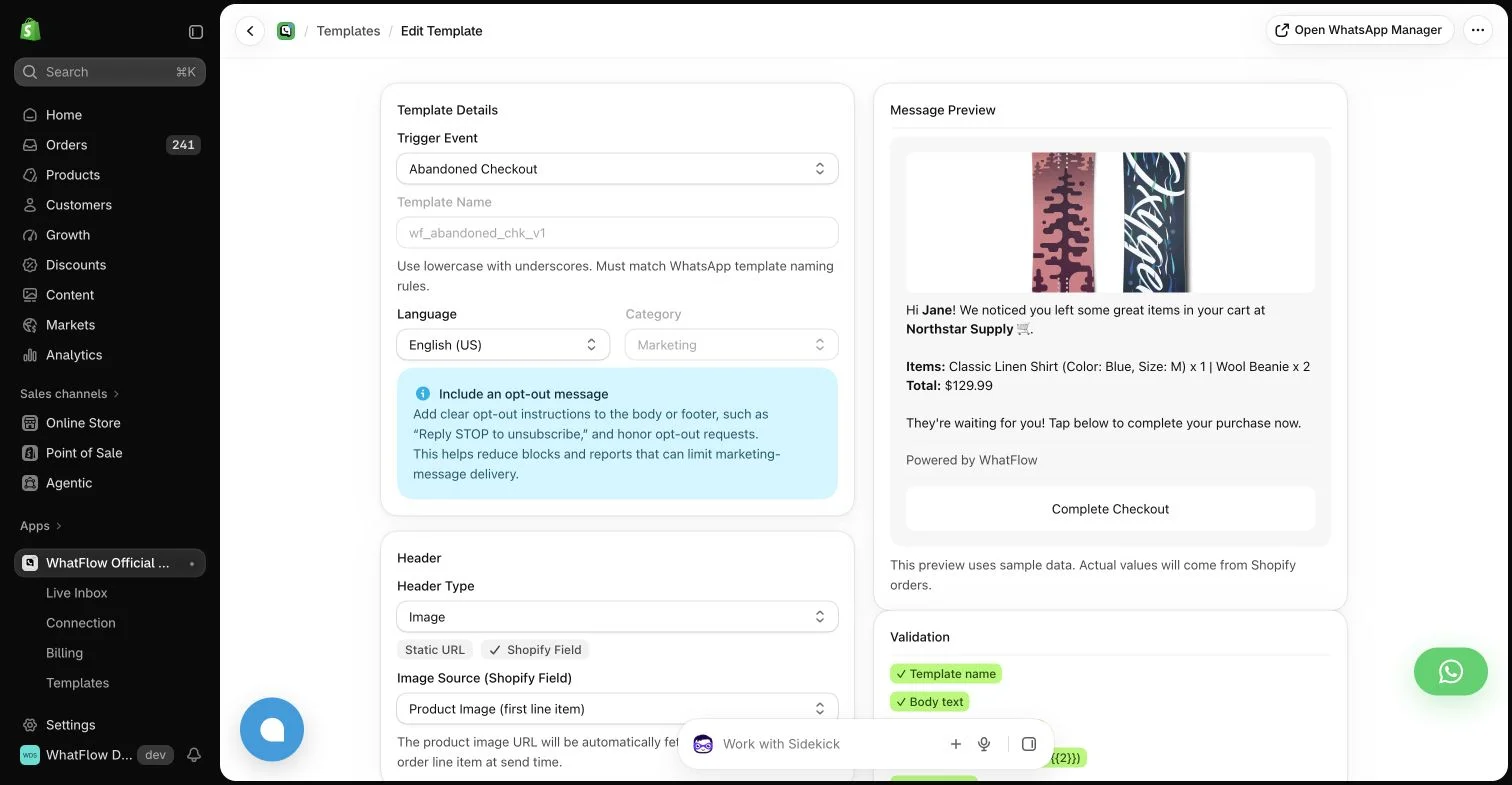
WhatFlow. That's its job. The template editor maps Shopify order and checkout fields into WhatsApp messages, and abandoned checkouts get a recovery button:
Hi Elena, your order #2290 is out for delivery today. Reply here if you need to change anything.
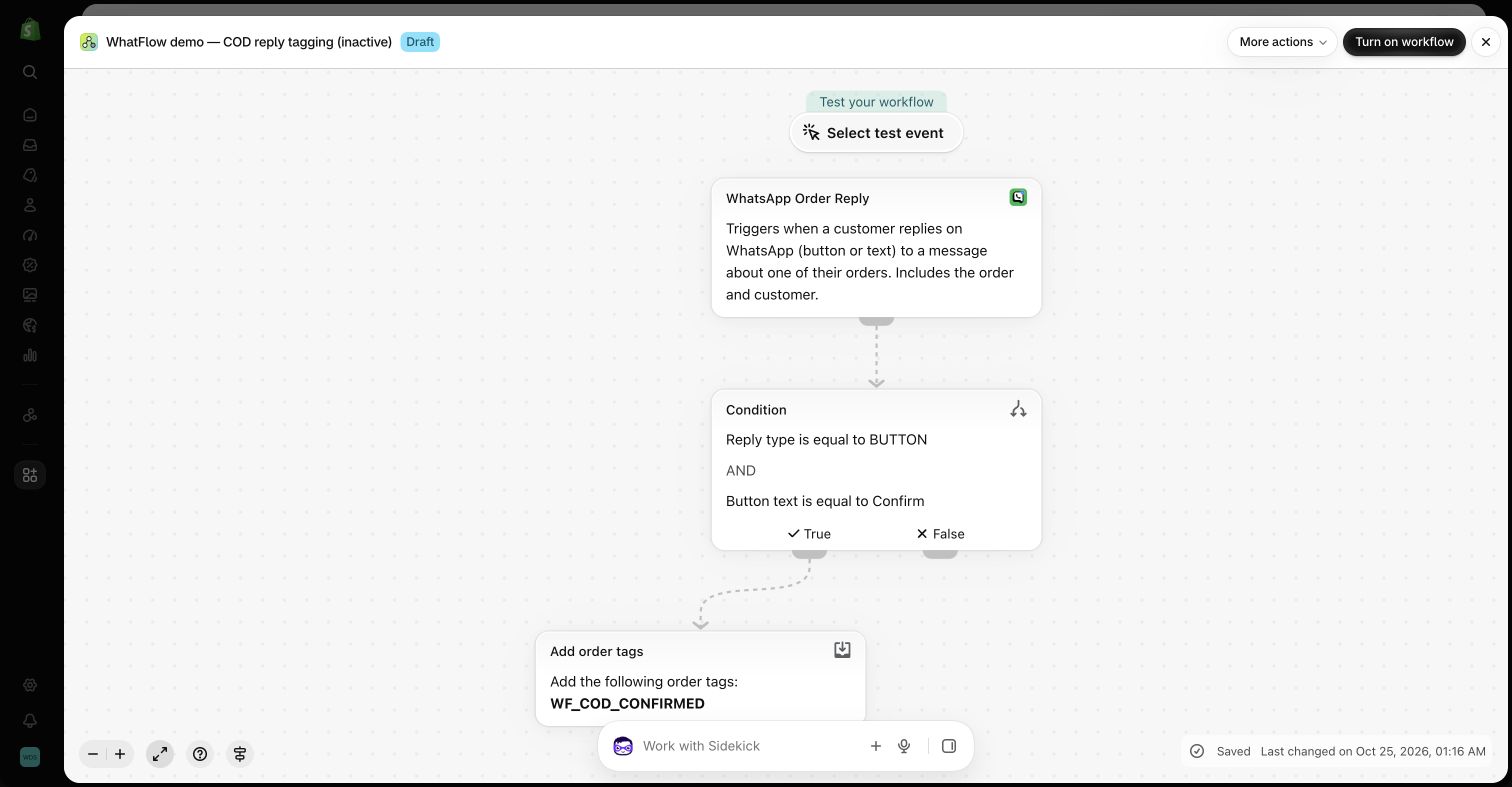
When a customer replies, WhatFlow's Shopify Flow triggers can act on it: a COD Confirm tap tags the order, an order reply routes to the right agent. Tidio is built for conversations that start on your website, and it does that well.
What about AI answers?
Tidio's Lyro answers common questions from your knowledge base. WhatFlow has no built-in AI bot; you can connect Claude, ChatGPT or Cursor through WhatFlow's MCP connector to draft replies a person approves. What we've found is that a lot of WhatsApp traffic for Shopify stores isn't open-ended at all. It's "did my order ship?" and "can I pay cash?" Templates, Flow rules and saved replies handle those quickly, and a person handles anything that needs judgement, like a refund exception.
When testing WhatFlow and Tidio, ask: Can an agent open a matching Shopify order while they reply? In WhatFlow, use Needs reply and Closing soon, claim a conversation, then check Shopify order context and leave a private note. The team inbox walkthrough gives you a repeatable test for two agents, with no per-seat fee.
Can you use both?
Yes. Keep Tidio on your website if your live chat works, and add WhatFlow for WhatsApp. Then decide where WhatsApp replies live. The inbox vs helpdesk comparison helps you pick.
When Tidio might still make sense
Choose Tidio if website live chat is your main support channel and you want an AI agent like Lyro answering first. WhatFlow doesn't answer customers with AI on its own.
The bottom line
For WhatsApp on a Shopify store, WhatFlow is the stronger choice: official Meta Cloud API, Shopify order templates, COD confirmation through Flow and a team inbox with no seat fees at any team size, all on the Free plan. Tidio is a great live chat tool. WhatFlow is the better WhatsApp one.
Questions worth asking
Is WhatFlow a good Tidio alternative for Shopify?
Yes, if WhatsApp is where your customers talk to you. WhatFlow sends order, shipping, COD and cart recovery messages from Shopify and gives you a team inbox with no seat fees, all on the Free plan. Tidio is the better pick if website live chat and an AI agent are your priority.
How does Tidio pricing compare with WhatFlow?
As of November 2026, Tidio offers Free, Starter, Growth and Plus plans, with Lyro AI as an add-on from $32.50/month for 50 conversations and self-serve plans capped at 10 agents. WhatFlow starts free with every feature, paid plans start at $4.99/month, and there are no seat fees at any team size.
Does WhatFlow charge per inbox seat?
No. WhatFlow's team inbox has no seat fees at any team size, on every plan including Free.
Are WhatFlow features restricted on the free plan?
No. Every WhatFlow feature is on the Free plan, from templates and broadcasts to COD confirmation and Shopify Flow actions. Paid plans add message allowance, and the theme-matched WhatsApp button is free forever.
Can I use Tidio live chat and WhatFlow together?
Yes. Some stores keep Tidio for website chat and use WhatFlow for WhatsApp order messaging and replies. Just decide which inbox owns WhatsApp conversations so nothing gets answered twice.
Sources and methodology
We checked these primary sources on November 5, 2026. Vendor pages describe advertised capabilities, rather than independent performance tests. Confirm current pricing, plan limits and availability with each provider.
- Tidio homepage
Tidio's description of its live chat, helpdesk, Flows, Lyro AI and WhatsApp channel.
- WhatFlow WhatsApp Business API on the Shopify App Store
WhatFlow plans, included sends, Shopify workflows and the 5.0/5 rating from 55 ratings (checked November 5, 2026).
- WhatsApp Business Platform pricing
Meta's per-message charges for WhatsApp Business Platform messages.
- Tidio pricing
Tidio plans, the 10-agent limit on self-serve plans and Lyro AI add-on pricing, checked November 5, 2026.